Best AI Photo Editing Tools in 2026: 8 Apps Compared


Professional retouching · Starting price: See website
How we put this together: we compare official feature and pricing pages, app store listings, privacy policies and public user reviews. Prices change, so check the provider's site before you pay.
Key takeaways
- Adobe Photoshop leads for professional retouching and generative fill, while Lightroom suits photographers who manage large photo libraries.
- Luminar Neo gives the fastest AI-assisted edits for people who want strong results with less manual work.
- DxO PhotoLab leads on noise reduction and lens corrections for raw photos.
- Affinity by Canva is now free for many users and is the strongest no-cost alternative to Photoshop.
- The best AI photo editing app depends on whether you edit raw photos, portraits, social images or full composites.
Quick comparison
| Name | Who it suits | Starting price | Free option | |
|---|---|---|---|---|
| Adobe Photoshop | Professional retouching | See website | Free trial | Visit |
 Adobe Lightroom Adobe Lightroom | Raw workflow and libraries | See website | Free trial | Visit |
 Luminar Neo Luminar Neo | Fast AI-assisted edits | See website | Free trial | Visit |
 DxO PhotoLab DxO PhotoLab | Noise reduction and raw quality | See website | Free trial | Visit |
 Capture One Capture One | Studio colour and tethering | See website | Free trial | Visit |
 Affinity by Canva Affinity by Canva | Free professional editing | Free | Yes | Visit |
 ON1 Photo RAW ON1 Photo RAW | All-in-one editing | See website | Free trial | Visit |
 Pixlr Pixlr | Quick browser edits | Free | Yes | Visit |
The best ai photo editing tools
AI photo editing covers many jobs, from removing an object to cleaning noise, replacing a sky or sorting a large shoot. We compared tools on AI masking, generative fill, noise reduction, raw quality, cataloguing, price and ease of use. We focused on tools that are still maintained and that offer a clear AI feature set, not only basic filters.

Adobe Photoshop remains the standard for pixel-level work. Generative Fill lets you remove objects or extend a scene by describing what should appear, and AI selection tools speed up masking for hair, subjects and skies. Layers, masks and adjustment tools give full control when the AI result needs refining, which is why professionals still rely on it for client work. The subscription and learning curve are the main barriers. Beginners who only need quick fixes may find Photoshop more than they need, and the cost adds up over years. If you retouch portraits, build composites or deliver print-ready files, Photoshop is still the tool to beat.
- Generative Fill and Expand
- Deep layers and masking
- Huge plugin range
- Subscription only
- Steep learning curve for beginners
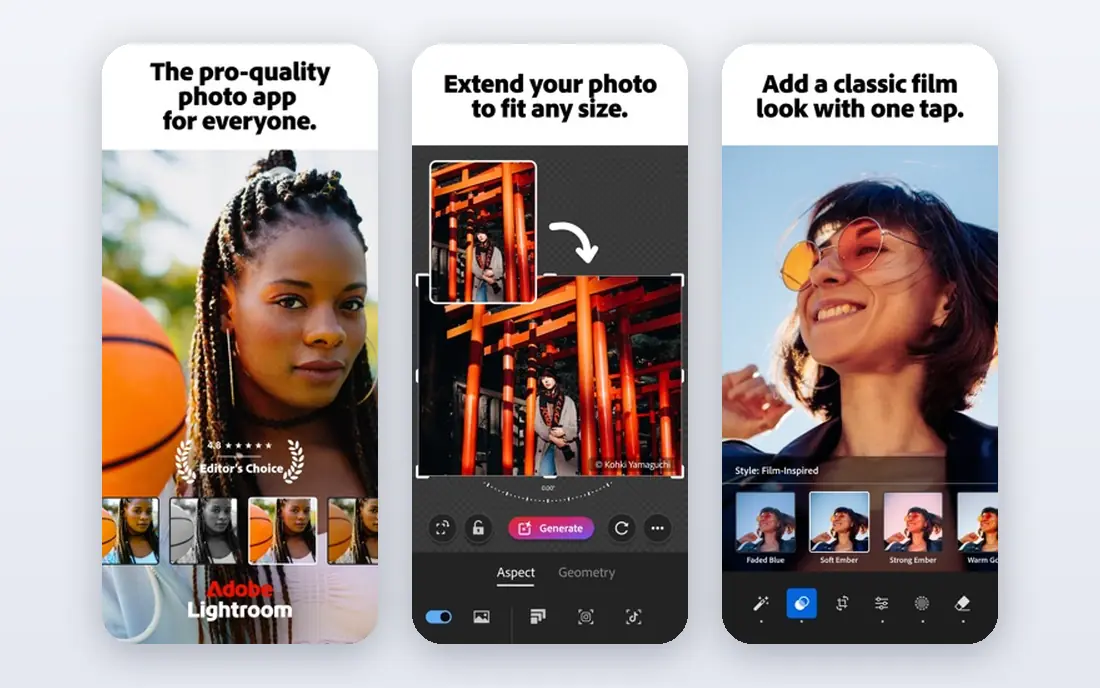
Adobe Lightroom suits photographers who shoot many raw files and need to organise, develop and export them efficiently. AI masking can select subjects, skies and backgrounds in one click, and AI denoise cleans high-ISO images without losing detail. Cataloguing, ratings and presets help you handle a wedding or travel shoot without drowning in files. Lightroom is not a compositing tool, so heavy retouching still needs Photoshop. The subscription also means you pay ongoing costs to keep full access. If your main work is developing raw photos and managing a library, Lightroom is the better Adobe choice.
- Strong raw development
- AI masking and denoise
- Cloud sync across devices
- Subscription only
- Weaker than Photoshop for compositing

Luminar Neo is built for speed. Sky AI can replace a dull sky, Relight AI adjusts foreground and background light separately, and generative erase removes distractions with little manual masking. That makes it ideal for hobbyists and content creators who want a polished photo in minutes, not an hour of layer work. Organisation tools are less mature than Lightroom, so large libraries need more manual care. Some AI features also sit in higher tiers, so check what is included in the licence you buy. If you want AI to do most of the work and you value a simple interface, Luminar Neo is a strong pick.
- Sky replacement and relight tools
- Generative erase
- Simple interface
- Cataloguing is weaker than Lightroom
- Some AI tools need a paid plan
DxO PhotoLab focuses on image quality above all else. Its DeepPRIME noise reduction cleans high-ISO raw files while keeping fine detail, and automatic optical corrections fix lens distortion, vignetting and sharpness based on lab profiles. For scenery, wildlife and low-light photographers, that quality edge is noticeable. The interface is more technical than Luminar, and cataloguing is basic compared with Lightroom. Pricing is a one-time licence for many users, which some prefer to a subscription. If raw quality and noise control matter most, DxO PhotoLab is hard to beat.
- DeepPRIME noise reduction
- Automatic lens corrections
- Excellent raw detail
- No subscription option for some users who prefer it
- Interface is technical
Capture One is the studio favourite for tethered shooting, where photos appear on a computer screen as you shoot. Colour tools are precise, with skin tone controls and layer-based adjustments that suit fashion and product work. Sessions keep a shoot organised, which helps commercial photographers deliver consistent results. Price and complexity are the drawbacks for casual users. The interface assumes photographic knowledge, and the cost sits above many rivals. If you shoot in a studio or need exact colour control, Capture One justifies its price. For casual editing, simpler tools will feel faster.
- Excellent colour control
- Tethered shooting
- Strong session workflow
- Higher price
- Learning curve for new users
Affinity by Canva, formerly Affinity Photo, is now free for many users and offers professional-grade editing without a subscription. Layers, masks, retouching tools and raw development cover most Photoshop jobs for social, print and web work. The interface is familiar to Photoshop users, so switching takes less time than learning a new system from scratch. AI features are fewer than Adobe's generative tools, so you will do more manual work for complex fills or expansions. The plugin range is also smaller. If you want a capable editor for free and you do not need the latest generative features, Affinity is the best value in this list.
- Free for many users
- Full layers and masking
- No subscription required for core use
- AI features are fewer than Adobe
- Smaller plugin range
ON1 Photo RAW combines browsing, organising and editing in a single app, which appeals to photographers who do not want separate tools. AI masking, portrait retouching and resize tools cover common jobs, and effects and presets speed up creative edits. A one-time licence option also suits users who dislike subscriptions. The interface packs in many panels, so beginners may need time to find their way around. Performance on older machines can also lag with large raw files. If you want one app for organising and editing with a perpetual licence, ON1 Photo RAW is a practical choice.
- Editing plus organising in one app
- AI masking and portrait tools
- One-time licence option
- Interface can feel crowded
- Performance varies on older computers
Pixlr is the quickest way to edit a photo without installing software. It runs in a browser, offers AI background removal, object removal and auto-enhance tools, and covers basic retouching for social posts and web images. That makes it ideal for a fast fix on a shared computer or a phone. The free tier has limits and ads, and it is not built for large raw libraries or print colour work. For serious photography, a desktop editor will give better quality and control. If you need the best AI photo editing app for quick online edits, Pixlr is the easiest place to start.
- Works in a browser
- AI background removal
- Free tier for quick edits
- Free tier has limits and ads
- Less suited to large raw workflows
How we picked these
We reviewed official feature pages, pricing pages, app listings and public reviews for each tool. We checked AI features such as masking, generative fill, denoise, sky replacement and portrait tools, plus raw support, platform coverage and price model. We kept only tools with a current version and a clear AI feature set, and we marked prices as See website where plans vary by region or licence type. We did not claim hands-on testing that we did not do.
How to choose an AI photo editor
Start with the type of photos you edit most. Raw scenery and low-light work favours DxO PhotoLab or Lightroom, while portraits and social content favour Luminar Neo or Pixlr. Studio and commercial work favours Capture One or Photoshop. A tool that excels at one job may feel awkward for another, so match the strength to your main use.
Check the price model and AI limits
Some AI tools use credits or require a higher tier, while others include AI features in the base licence. Check whether generative fill, denoise and sky tools are included, and whether exports are limited on a free tier. A free app is good value only if its AI tools cover your needs without forcing an upgrade for every edit.
Test with your own photos
Use a free trial with your own raw files, not only sample images. Test noise reduction on a high-ISO shot, masking on a portrait with complex hair, and generative fill on a scene you actually need to fix. That test reveals more than a feature list, and it shows whether the interface feels natural for your workflow.
Frequently asked questions
What is the best AI tool for photo editing overall?
Adobe Photoshop is best for professional retouching and generative work, while Luminar Neo is best for fast AI-assisted edits. Lightroom wins for raw workflow and libraries. The overall winner depends on whether you need compositing, raw quality or speed.
What is the best AI photo editing app for beginners?
Luminar Neo and Pixlr suit beginners best, because AI tools handle skies, backgrounds and objects with few clicks. Affinity by Canva is also beginner-friendly once you learn basic layers. Start with a free trial and pick the interface that feels clearest to you.
Is there a free AI photo editor?
Yes, Affinity by Canva is free for many users and covers professional editing, while Pixlr offers a free browser tier with AI background removal. Free tiers have limits, so check export, resolution and AI feature limits before relying on them for client work.
Does AI photo editing replace manual editing?
No, AI speeds up masking, cleanup and enhancement, but manual checks still matter for colour, detail and realistic results. Generative tools can invent details that look wrong on close inspection. Review every AI edit at full size before you publish or print.
Which AI editor is best for raw photos?
DxO PhotoLab leads on noise reduction and lens corrections for raw files, while Lightroom offers the best raw workflow and library tools. Capture One suits studio raw work with precise colour control. Test denoise on your own high-ISO files to judge the difference.
Do AI photo editors work on phones?
Yes, Lightroom mobile, Pixlr, Luminar mobile tools and Affinity on iPad cover many phone and tablet edits. Desktop apps give more control for large files and printing, while mobile apps suit quick social edits. Check whether your chosen tool syncs edits across phone and desktop.
Sources we checked (7)

Online Jobs is an independent blog about careers, online work, learning new skills and the tools that help people earn. More about us.
Keep reading
All posts
Best Writing Software
Looking for the best writing software in 2026? We compared 9 writing apps for books, articles and screenplays on price, features and fit. All verified.

Best Weather Apps
Searching for the best weather app? We compared eight top weather apps for accurate forecasts, radar, severe alerts, and daily planning near you today.

Best Video Editing Software
We compared the best video editing software for beginners and pros, checking official pricing, free plans and honest limits before ranking all nine editors.