GitHub Alternatives in 2026: 8 Platforms Compared

How we put this together: we compare official feature and pricing pages, app store listings, privacy policies and public user reviews. Prices change, so check the provider's site before you pay.
Key takeaways
- GitLab suits teams that want code, CI/CD, security and planning in one platform, while Bitbucket suits teams already using Jira and Confluence.
- Codeberg suits open source projects that want a nonprofit, community-run forge, while SourceHut suits developers who prefer email-based workflows.
- Gitea and Forgejo suit teams that want a lightweight, self-hosted forge they control, with low server requirements.
- Azure DevOps suits Microsoft-centered teams, while SourceForge suits older open source projects that want a long-running distribution site.
Quick comparison
| Name | Who it suits | Starting price | Free option | |
|---|---|---|---|---|
 GitLab | All-in-one DevOps platform | Free | Yes | Visit |
 Bitbucket | Jira-centered teams | Free | Yes | Visit |
 Codeberg | Open source community hosting | Free | Yes | Visit |
 SourceHut | Email-based development | See website | Yes | Visit |
 Gitea | Lightweight self-hosting | Free | Yes | Visit |
 Forgejo | Self-hosted community forge | Free | Yes | Visit |
 Azure DevOps | Microsoft-centered teams | Free | Yes | Visit |
 SourceForge | Open source distribution | Free | Yes | Visit |
The best GitHub alternatives
GitHub is the largest code hosting platform, but it is not the only sensible choice. Some teams want an all-in-one DevOps platform. Others want open source hosting, a lightweight self-hosted forge, or deep integration with tools they already use. We compared official pricing pages, hosting models and workflow styles for the platforms below.

GitLab is the closest full replacement for GitHub as a platform, rather than just a code host. It combines repositories, issues, merge requests, CI/CD pipelines, container registry, security scanning and planning in one application. Teams can use GitLab.com hosted service, with a free tier covering a small number of users per namespace and limited CI minutes, or self-host the Community Edition, which is free and open source.
Paid tiers add more users, pipeline minutes and advanced features. Premium is listed at $29 per user per month billed annually in many comparisons, while Ultimate is quote-based and adds security dashboards, vulnerability management and compliance features. GitLab suits teams that want one platform for the whole DevOps lifecycle, but self-hosting needs at least 8GB of RAM for comfortable use, so a tiny VPS is not enough.
- Code, CI/CD, security scanning and planning in one app
- Free Community Edition for self-hosting
- Free tier on GitLab.com
- Self-hosting needs substantial server resources
- Advanced security and compliance features sit on paid tiers
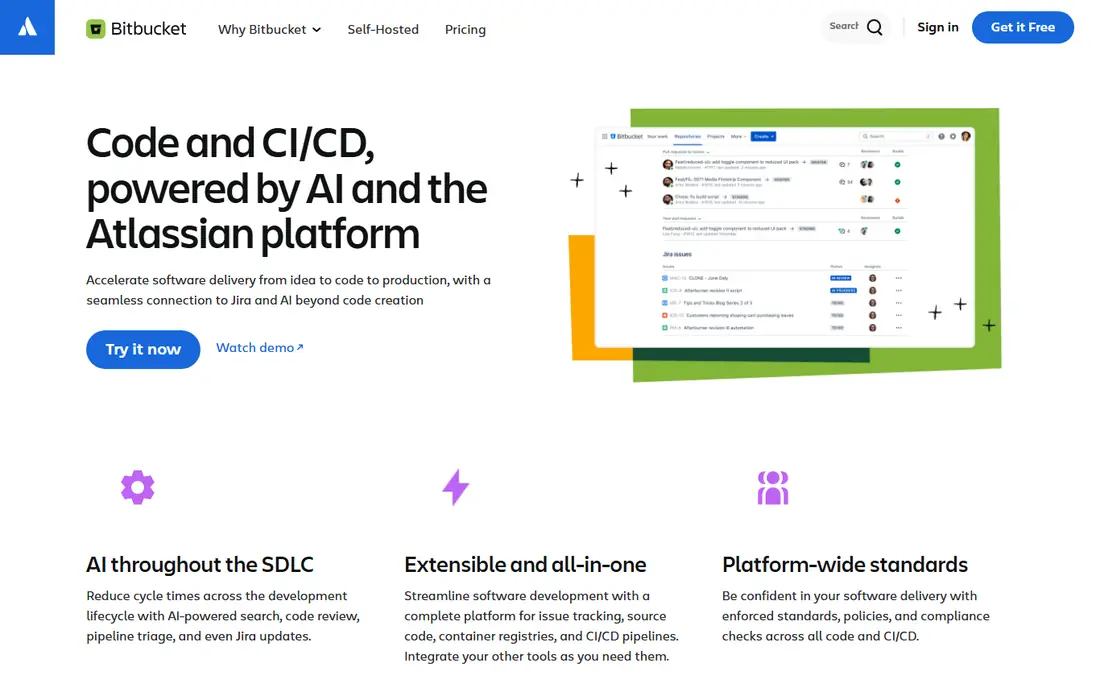
Bitbucket is Atlassian's Git hosting platform, built to connect code to Jira and Confluence rather than to compete as a standalone developer community. Teams can create branches from Jira issues, link commits and pull requests to tickets, and track work from code to release without extra integration work. Bitbucket Pipelines provides built-in CI/CD with configuration as code.
Bitbucket is free for small teams of up to five users, with Standard listed at $3.65 per user per month and Premium at $7.25 per user per month in recent comparisons. Premium adds IP allowlisting, enforced merge checks, required two-step verification and deployment permissions. For a team already running Jira, Bitbucket is often the simplest choice. For public open source discovery, GitHub or Codeberg will reach more contributors.
- Native Jira and Confluence integration
- Free for small teams
- Built-in CI/CD with Pipelines
- Smaller open source community than GitHub
- Less suited to public discovery and social coding
Codeberg is run by Codeberg e.V., a nonprofit association in Berlin, and funded by donations rather than advertising. It offers Git hosting, issues, pull requests, code review, a wiki, releases and static sites through Codeberg Pages, using Forgejo software. Its documentation also covers CI with Woodpecker or self-hosted Forgejo Actions runners and a Weblate service for translations.
Codeberg is meant for free and open source software, so closed-source company projects do not belong there. Its community is far smaller than GitHub's, which means fewer contributors who already have an account and less discoverability for new projects. For an open source project that values nonprofit governance, European hosting and independence from a large commercial platform, Codeberg is a strong, principled choice.
- Nonprofit, donation-funded hosting in Europe
- Git hosting, issues, pull requests and Pages
- Based on Forgejo
- Meant for free and open source software only
- Smaller community than GitHub
- Fewer third-party integrations
SourceHut takes a different approach from GitHub-style forges. It offers Git and Mercurial hosting, mailing lists, ticket tracking, build automation and wiki tools, with code review handled by email patches rather than web pull requests. That model appeals to experienced developers, especially in systems and open source communities that already work by email, because it keeps discussion in a durable, searchable format.
SourceHut is less familiar for teams used to pull requests, inline web review and rich marketplace integrations. Hosted use is paid in many cases, with free use for open source projects and reduced fees where needed in community descriptions, so check the current SourceHut pricing page before planning a move. SourceHut suits developers who prefer simplicity, email workflows and control over a polished web interface.
- Lightweight, hacker-friendly tools
- Email-based code review
- Open source and self-hostable
- Workflow feels unfamiliar to GitHub users
- Smaller ecosystem
- Paid plans for hosted use in many cases
Gitea is a lightweight, self-hosted Git service that runs well on modest hardware, making it popular for small teams, home labs and companies that want private repositories without a large platform. It covers repositories, issues, pull requests, code review, releases, wikis and packages, with a familiar GitHub-style interface. The core software is MIT-licensed and free to self-host, while Gitea Cloud offers managed hosting for teams that do not want to run a server.
Gitea's lightness is its strength and its limit. A small VPS can run it, but the team still owns updates, security patches, backups and uptime. For a small team that wants control and low cost, that trade-off is attractive. For a large enterprise that needs advanced security, compliance and support at scale, GitLab or Azure DevOps may fit better.
- Very lightweight self-hosted forge
- MIT-licensed software
- Repositories, issues, pull requests and CI options
- Self-hosting means you own updates and backups
- Smaller hosted ecosystem than GitLab or GitHub
Forgejo is a lightweight software forge for self-hosting, developed under the umbrella of Codeberg e.V. as a community-driven fork of Gitea. It covers repositories, issues, pull requests, code review, releases and CI through Forgejo Actions, with a focus on security, scaling and federation. Codeberg itself recommends Forgejo for commercial projects that need private repositories, since Codeberg hosting is reserved for open source.
Forgejo suits teams that want Gitea-style lightness with community governance and a clear path to federation between forges. The price is administration, as with Gitea. Someone must run the server, apply updates and take backups, and a small VPS is usually enough for a team. For a company that wants a self-hosted forge without a commercial vendor lock-in, Forgejo is a credible, modern choice.
- Community-driven fork of Gitea
- Lightweight self-hosting
- CI through Forgejo Actions
- Federation focus
- Self-hosting requires administration
- Hosted use is mainly through Codeberg or your own server
Azure DevOps is Microsoft's suite for software delivery, covering Azure Repos for Git hosting, Azure Boards for planning, Azure Pipelines for CI/CD, Azure Artifacts for packages and Azure Test Plans for testing. It integrates deeply with Visual Studio, VS Code, Azure and Microsoft Entra ID, which makes it a natural fit for teams already building on Microsoft technology.
Azure DevOps offers a free tier for small teams, with paid users added beyond that tier, so check the current Azure DevOps pricing page for your team size and pipeline needs. It is less suited to public open source community building than GitHub, and its enterprise interface can feel heavy for a tiny team. For a Microsoft-centered company that wants planning, code and delivery in one governed system, it is a strong alternative.
- Git repos, boards, pipelines and artifacts in one suite
- Strong Microsoft and Azure integration
- Free tier for small teams
- Interface can feel enterprise-heavy
- Less suited to public open source discovery
SourceForge is one of the oldest open source hosting sites, and it still hosts many projects with Git, Mercurial and Subversion repositories, download mirrors, project web pages and mailing lists. For an established open source project that values stable distribution and a long history, SourceForge remains a working option, and basic hosting is free.
SourceForge is not the best choice for a new team that wants modern pull request workflows, integrated CI/CD and a large social coding community. Its interface and tooling feel dated next to GitLab, Codeberg or Gitea. Use SourceForge when distribution and project history matter most, and use a modern forge when collaborative development workflow matters most.
- Long-running open source hosting and distribution
- Download mirrors
- Project web hosting and mailing lists
- Interface and workflow feel dated compared with modern forges
- Less suited to modern CI/CD-first teams
How we picked these
We compared official product and pricing pages, hosting models and workflow styles, and we favored platforms that are actively maintained in 2026 and fit a distinct need, from all-in-one DevOps to lightweight self-hosting. Where pricing was quote-based or varied by tier, we wrote See website rather than repeating a single figure as a universal price. We did not claim hands-on testing, and we treated third-party comparisons as background for vendor pages.
How to migrate from GitHub without losing work
Start by listing what you actually use on GitHub. Repositories are easy to move with Git itself, but issues, pull requests, actions, packages, wikis and project boards need separate migration or manual recreation. Export issues and pull request history where the new platform supports import, and keep the GitHub repository read-only for a transition period rather than deleting it at once.
Next, test CI and permissions on a small repository first. Rebuild one pipeline on the new platform, check secrets, runners and branch protection, and confirm that contributors can push, review and merge. Update documentation, badges and links, and tell contributors where the new canonical repository lives. A staged migration with one pilot project avoids a rushed move that breaks releases.
Finally, decide on hosting. Hosted platforms remove server work but tie you to a vendor's terms and pricing. Self-hosted forges give control but need updates, backups and monitoring. Choose the model your team can maintain for a year, not just the model that looks cheapest on day one.
Frequently asked questions
What is the best GitHub alternative?
GitLab is the best all-in-one replacement for most teams, Bitbucket suits Jira-centered teams, and Codeberg suits open source projects that want nonprofit hosting. Gitea and Forgejo suit self-hosting, SourceHut suits email-based workflows, and Azure DevOps suits Microsoft-centered teams. The best choice depends on workflow, hosting preference and team size.
Can I self-host a GitHub alternative?
Yes. GitLab Community Edition, Gitea and Forgejo are all free to self-host, and SourceHut can also be self-hosted. Self-hosting removes vendor hosting fees but adds server, update and backup work. A lightweight forge such as Gitea or Forgejo needs far less hardware than GitLab.
Is Codeberg free?
Yes, Codeberg hosting is free for open source projects, funded by donations to a nonprofit association. It is not intended for closed-source company projects, so commercial teams should self-host Forgejo or use a commercial platform instead.
Does Bitbucket integrate with Jira?
Yes. Bitbucket is built by Atlassian to integrate natively with Jira and Confluence, linking branches, commits and pull requests to Jira issues. That integration is the main reason Jira-centered teams choose Bitbucket over a standalone Git host.
How do I migrate repositories from GitHub?
Git repositories themselves migrate by adding a new remote and pushing branches and tags. Issues, pull requests, actions and wikis need platform-specific import tools or manual migration, so test migration on a small repository first and keep the GitHub copy read-only during transition.
Sources we checked (8)

Online Jobs is an independent blog about careers, online work, learning new skills and the tools that help people earn. More about us.
Keep reading
All posts
Zoom Alternatives
Zoom alternatives compared for 2026: Google Meet, Microsoft Teams, Webex, Jitsi and more for free calls, large meetings and webinars for teams and classrooms.

Which Software Is Best for Data Entry
Compare the best data entry software for forms, OCR scanning, and spreadsheets, with free plans, pricing, and honest limits for each tool before you commit.

What's the Best App to Read PDFs
Find what's the best app to read PDFs in 2026, from Adobe Acrobat Reader and Foxit to PDF Expert and Xodo, with free options and honest limits for every device.