Doodle Poll Alternatives in 2026: 8 Tools Compared

How we put this together: we compare official feature and pricing pages, app store listings, privacy policies and public user reviews. Prices change, so check the provider's site before you pay.
Key takeaways
- Rallly is the closest free replacement for classic Doodle polls, with no ads and no account needed for voters.
- When2meet and LettuceMeet suit groups that prefer to paint availability on a grid rather than vote on fixed times.
- Calendly and Cal.com are better when you also need booking pages, calendar sync, and reminders.
- Xoyondo adds polls for places and dates, which helps when the question is not only about time.
- SavvyCal and YouCanBookMe suit people who want a polished booking page with calendar overlays.
Quick comparison
| Name | Who it suits | Starting price | Free option | |
|---|---|---|---|---|
 Rallly | Classic scheduling polls without ads | Free | Yes | Visit |
 When2meet | Fast availability grids for large groups | Free | Yes | Visit |
 LettuceMeet | Modern availability grids on mobile | Free | Yes | Visit |
 Calendly | Booking pages with group polls | Free | Yes | Visit |
 Cal.com | Open booking pages you can self-host | Free | Yes | Visit |
 Xoyondo | Polls for dates, places, and opinions | Free | Yes | Visit |
 SavvyCal | Polished booking links with calendar overlays | See website | Free trial | Visit |
 YouCanBookMe | Branded booking pages with polls | See website | Yes | Visit |
The best doodle poll alternatives
Doodle polls work well when a group must pick one time from a short list. The trouble starts when the free tier feels crowded with ads or when you need more than a simple vote. The tools below split into two groups: poll tools for group decisions, and booking tools for one-to-one or team scheduling.
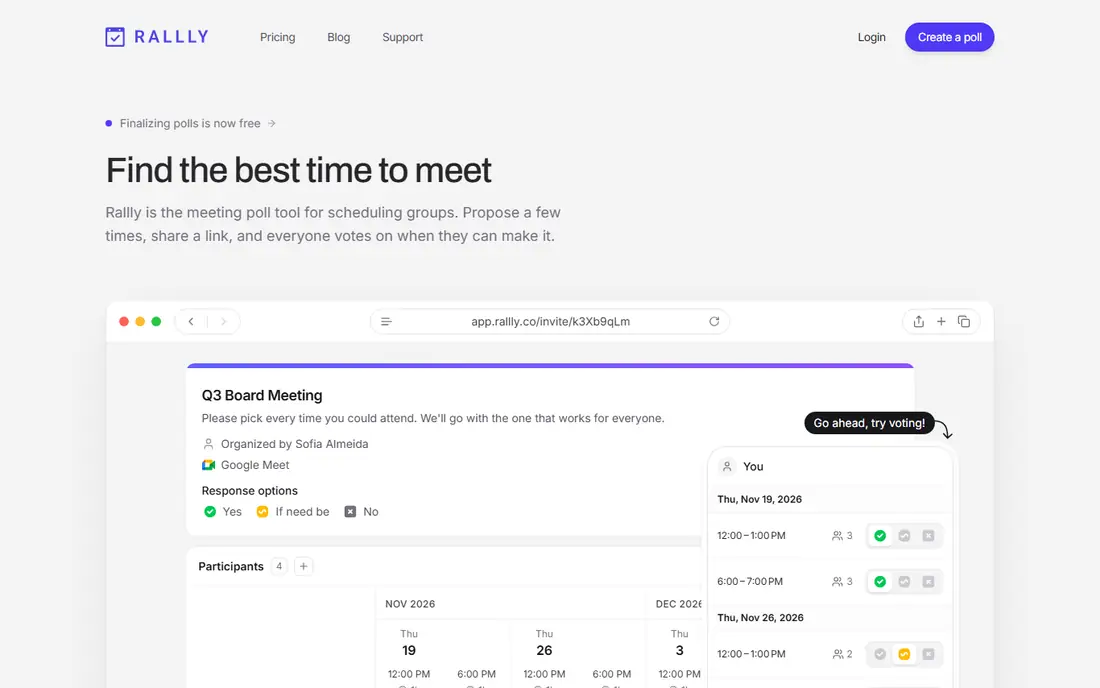
Rallly is our first pick for most people leaving Doodle. You propose dates and times, share a link, and participants vote on what works. The interface is plain in a good way, with no ads getting in the way of the vote itself.
The open-source side matters for teams that care about data control. You can use the hosted version for speed, or self-host Rallly if your group prefers to run its own tools. For a family gathering, a club meeting, or a small team, the hosted version is enough, and voters do not need to create an account.
The limit is scope. Rallly finds a time, but it does not replace a booking page, payment flow, or deep calendar system. If you need those, pair it with a booking tool or pick Calendly or Cal.com instead.
- Clean poll layout close to classic Doodle
- No account needed for participants
- Open-source option for self-hosting
- No full booking-page system
- Calendar sync is limited compared with Calendly
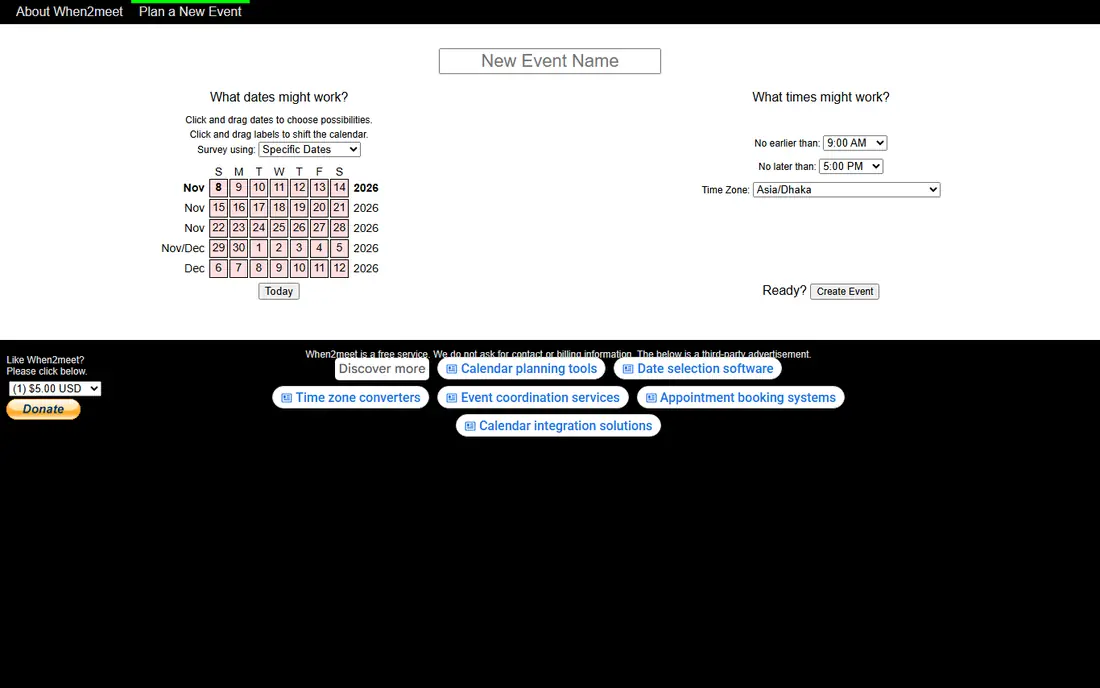
When2meet is the original drag-to-paint availability grid, and it is still the fastest way to ask a large group when they are free. Each person paints the times they can meet, and the combined grid shows where everyone overlaps. There is no account, no install, and no setup beyond a link.
That simplicity is ideal for student groups, volunteer teams, and one-off events. You do not need to guess candidate times first, which helps when schedules are messy. The heat map makes the answer obvious in seconds.
The design has barely changed in years, and it feels cramped on a phone. It also lacks reminders, calendar sync, and booking features. For a quick group check, those gaps do not matter much. For ongoing scheduling, a newer tool will feel better.
- No login needed to vote
- Heat map shows overlap at a glance
- Very fast to set up
- Dated design and weak mobile layout
- No booking pages or reminders
LettuceMeet takes the When2meet idea and gives it a modern layout. The grid works well on a phone, the week view is easy to read, and participants can add availability without an account. For groups that struggled with the older When2meet layout, this is a welcome update.
Setup takes under a minute. Create an event, share the link, and watch the overlap build as people respond. The tool stays focused on one job, which keeps it fast and free of clutter.
It does not try to be a booking system. There are no booking pages, payment options, or deep integrations. If your group only needs to find a time, LettuceMeet is enough. If you schedule clients every week, look at Calendly or Cal.com.
- Clean, mobile-friendly grid
- No login needed
- Clear overlap view
- Smaller feature set than booking platforms
- No paid team controls in the free version
Calendly is the best-known booking tool, and it also covers group scheduling through meeting polls. You can share a booking page for one-to-one meetings, or propose times and let a group vote on paid plans. Calendar connections help prevent double bookings, and automatic reminders cut down on no-shows.
For freelancers and small teams, the free plan is a fair starting point for simple booking pages. Paid plans add polls, team pages, routing, and more integrations. If you already use Calendly for client work, using it for group polls keeps everything in one place.
The catch is price structure. Meeting polls sit behind paid plans, so a free user cannot fully replace Doodle polls with Calendly alone. Teams should also check per-seat pricing before rolling it out widely.
- Strong calendar sync and reminders
- Meeting polls for groups on paid plans
- Many integrations with video and CRM tools
- Group polls are not on the free plan
- Costs rise per seat for teams
Cal.com is an open-source alternative to Calendly for booking pages. The hosted free plan covers personal booking links, calendar connections, and video meeting links, which is enough for many freelancers and small teams. The open code also lets larger teams self-host if they need full control.
The design is clean and modern, and the booking flow feels professional for clients. You can set availability, buffer times, and event types without a steep learning curve. For one-to-one scheduling, it is a strong free choice.
Cal.com is less of a direct Doodle poll replacement, because group voting is not its main job. If your main need is polls, start with Rallly or LettuceMeet. If your main need is booking pages, Cal.com is hard to beat for the price.
- Open-source booking platform
- Generous free hosted plan
- Calendar and video integrations
- Poll-style group voting is limited
- Self-hosting needs technical setup
Xoyondo is useful when the group question is wider than time alone. You can run a date poll, ask where to meet, or gather opinions on a plan, all from the same simple tool. That range helps for parties, trips, and club events where location matters as much as timing.
Voters do not need an account, which keeps response rates higher than tools that force sign-ups. The polls are easy to share by link, and results update as people vote.
The free version shows ads, and the layout is plainer than newer rivals. If ads bother your group, Rallly is cleaner. If you need opinion and location polls as well as scheduling, Xoyondo earns its place.
- Date polls, opinion polls, and scheduling in one place
- No account needed for voters
- Useful for event planning
- Ad-supported free version
- Design feels less polished than Rallly
SavvyCal is built for people who send booking links to clients and want the experience to look sharp. The standout feature is the calendar overlay, which lets the recipient see open times against their own calendar. That small detail reduces back-and-forth and makes booking feel easier.
The pages look professional, and features such as team scheduling, routing, and integrations suit consultants, coaches, and sales teams. It is a booking tool first, so it works best when you schedule one-to-one or small-team meetings regularly.
SavvyCal is not a free Doodle replacement. There is a trial, but ongoing use needs a paid plan, and group polls are not its strength. Choose it for client booking quality, not for quick group votes.
- Recipient sees your availability overlaid on their calendar
- Clean booking pages
- Good for professional client scheduling
- No free plan for ongoing use
- Polls are not the main focus
YouCanBookMe combines booking pages with scheduling polls, which makes it a useful middle ground. You can brand the page to match your business, share it with clients, and also run polls when a group must agree on a time. Confirmations and reminders are handled for you.
The free plan is more generous than many rivals, with branded pages and polls included. That makes it a good test for small businesses that want a professional look without paying at once. Paid plans add team features, more customization, and deeper integrations.
The setup is a little more involved than Rallly or When2meet, because you are building a booking page rather than a single poll. For one-off group votes, a simpler poll tool is faster. For regular client scheduling, YouCanBookMe is a strong, affordable option.
- Custom branded booking pages even on the free plan
- Scheduling polls included
- Automatic confirmations and reminders
- Interface takes a little learning
- Advanced team features need paid plans
How we picked these
We compared official feature pages, pricing pages, and public reviews for tools that still work in October 2026 and that cover polls, availability grids, or booking pages. We favored tools with a free tier or trial, no forced account for voters where possible, and clear calendar support. We left out tools that had shut down, tools with no official homepage, and tools that only offered enterprise sales with no self-serve option.
What to look for before you choose
First decide whether you need a poll or a booking page. A poll works when a group must agree on one time. A booking page works when individuals pick a slot from your calendar. Many people need both at different times, so a pair of tools can be better than one compromise.
Check who must sign up. Tools that let voters respond without an account usually get faster replies, especially for friends, family, and volunteers. Check time zones too, since a tool that handles zones well prevents the classic mistake of a meeting set for the wrong hour.
Finally, test the mobile view. Most voters will answer on a phone, so a grid or poll that is hard to use on a small screen will slow the whole group down. Start free, run one real poll, and only pay when a limit actually blocks you.
Frequently asked questions
What is the best free alternative to Doodle poll?
Rallly is our pick for classic polls, because it is free, ad-free, and voters do not need an account. When2meet and LettuceMeet are also free and suit groups that prefer an availability grid.
Are there free alternatives to Doodle poll with no sign-up?
Yes. Rallly, When2meet, LettuceMeet, and Xoyondo all let participants vote without creating an account in most cases. The organizer usually needs an account for management, but voters can respond from a link.
What is a good Doodle scheduling alternative for teams?
Calendly and Cal.com suit teams that need booking pages, calendar sync, and reminders. YouCanBookMe is a good middle option with branded pages and polls, while SavvyCal suits professional client booking.
Is When2meet still a good Doodle alternative?
Yes, for fast group availability checks. It is free and simple, though the design is dated and mobile use is awkward. LettuceMeet offers a similar grid with a cleaner mobile layout.
Can Calendly replace Doodle polls?
Partly. Calendly offers meeting polls on paid plans, plus booking pages on the free plan. If you only need free group polls, Rallly is a better fit. If you also book clients, Calendly covers both jobs in one tool.
What is the best alternative to Doodle for booking pages?
Cal.com is the strongest free booking option, with an open-source platform and a generous hosted plan. Calendly is the best-known paid option, and YouCanBookMe offers branded pages with a free tier.
Sources we checked (8)

Online Jobs is an independent blog about careers, online work, learning new skills and the tools that help people earn. More about us.
Keep reading
All posts
Zoom Alternatives
Zoom alternatives compared for 2026: Google Meet, Microsoft Teams, Webex, Jitsi and more for free calls, large meetings and webinars for teams and classrooms.

What Is the Best Free Tool to Rotate a PDF
What is the best free tool to rotate a PDF? We compare eight free rotation tools on per-page control, limits, privacy and saved output quality in detail.

What Is the Best AI Dubbing Tool
We compared the best AI dubbing tools in 2026, from ElevenLabs and HeyGen to Rask AI, Dubverse and Veed, for videos and creators in many languages worldwide.