Best Photo Editing Software for PC in 2026: 8 Tools Compared


Large photo libraries and RAW work · Starting price: See website
How we put this together: we compare official feature and pricing pages, app store listings, privacy policies and public user reviews. Prices change, so check the provider's site before you pay.
Key takeaways
- Adobe Lightroom is our pick for photographers who manage large libraries and want a strong RAW workflow.
- Affinity, now free under Canva, is the best free pixel editor for PC users who want Photoshop style power without a subscription.
- GIMP and darktable offer fully free editing and RAW workflows, with a steeper learning curve.
- Capture One, DxO PhotoLab, and ON1 Photo RAW suit photographers who want high image quality or a buy once license.
Quick comparison
| Name | Who it suits | Starting price | Free option | |
|---|---|---|---|---|
| Adobe Lightroom | Large photo libraries and RAW work | See website | Free trial | Visit |
 Adobe Photoshop | Retouching and compositing | See website | Free trial | Visit |
 Affinity Photo | Free Photoshop style editing | Free | Yes | Visit |
 Capture One | Studio and tethered shooting | See website | Free trial | Visit |
 DxO PhotoLab | Maximum RAW image quality | See website | Free trial | Visit |
 Luminar Neo | Fast AI assisted editing | See website | Free trial | Visit |
 ON1 Photo RAW | All in one organizing and editing | See website | Free trial | Visit |
 GIMP | Free pixel editing | Free | Yes | Visit |
The best photo editing software for PC
PC photo editing splits into two kinds of tools: RAW workflow editors that organize and develop many photos, and pixel editors that retouch and composite single images. We compared official feature and pricing pages for the tools below, and we focused on RAW support, library tools, editing depth, and license model. Prices change by plan and region, so we show See website where a vendor offers several plans or where a simple starting price would mislead.
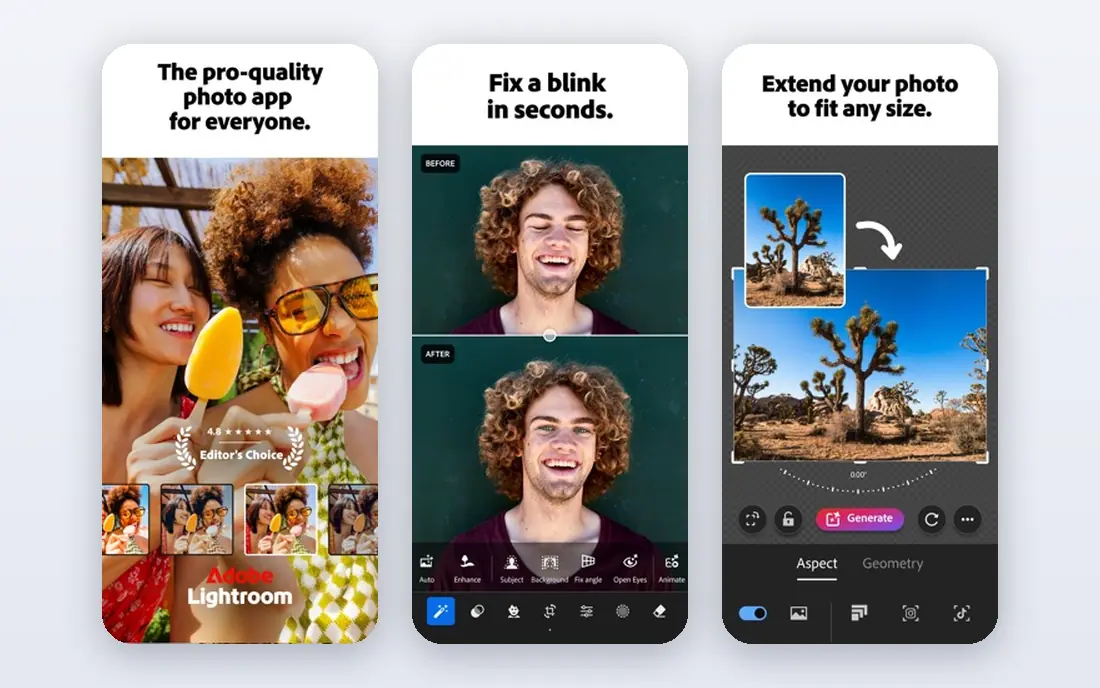
Adobe Lightroom remains the default for photographers who shoot a lot and need to organize, cull, and develop photos efficiently. It pairs a catalogue and library system with a RAW engine that handles color, noise, and lens corrections well, plus AI masking and denoise tools that speed up common edits. Lightroom Classic offers a desktop first catalogue, while the cloud based Lightroom syncs across desktop, mobile, and web.
The main drawback is the subscription model. There is no buy once license, and if you stop paying you lose the develop tools, even though your files stay on your drive. For regular photographers who value tutorials, presets, and broad camera support, Lightroom is still our pick. For occasional editors, a free or buy once tool may be better value.
- Strong RAW engine and library tools
- AI masking and denoise
- Cloud sync across devices
- Subscription only
- Cost adds up over years

Adobe Photoshop is the standard for retouching, compositing, and design work on PC. Layers, masks, advanced selections, and content aware tools let you rebuild parts of an image, combine several photos, and prepare files for print or web with precision. It is often bundled with Lightroom in the Photography plan, which makes the pair a complete workflow for many photographers.
Photoshop is overkill for simple exposure and color edits, and its subscription cost is hard to justify if you only edit a few photos a month. It also has a learning curve that rewards practice. If your work involves portraits, product retouching, or composites, Photoshop remains the benchmark. If you mainly develop RAW photos, Lightroom alone may be enough.
- Deepest retouching and compositing tools
- Layers, masks, and selections
- Huge tutorial and plugin range
- Subscription only
- More complex than a RAW editor for simple edits
Affinity Photo, now free under Canva, is the best free pixel editor for PC. It offers layers, masks, RAW development, retouching, and compositing tools that cover most Photoshop tasks for photographers and designers. It runs well on Windows PCs and handles large files without a subscription.
The trade off is ecosystem size. Photoshop has more plugins, actions, and tutorials, and some niche workflows still assume Adobe tools. Affinity also changed ownership and pricing, so check current terms on the Affinity site before you rely on it for a business. For most PC editors who want pro power for free, Affinity is the first tool to try.
- Full pixel editing free under Canva terms
- Layers and RAW support
- Fast on modern PCs
- Smaller plugin and tutorial range than Photoshop
- Terms may change over time
Capture One suits studio photographers and anyone who shoots tethered, with a camera connected to the PC during a shoot. Its tethering is fast and reliable, its color tools are precise, and it handles RAW files from many cameras well. Sessions and catalogues support studio workflows where a shoot needs to be reviewed, rated, and delivered quickly.
Capture One costs more than Lightroom on many plans, and its interface takes time to learn. It also offers subscription and perpetual options depending on plan, so check the current Capture One pricing page. For studio, fashion, and product work, Capture One is our pro pick. For general library work, Lightroom is simpler and cheaper.
- Excellent tethered shooting
- Strong color tools
- Good handling of many camera RAW files
- Higher cost than Lightroom for many plans
- Learning curve for new users
DxO PhotoLab focuses on getting the best possible image from a RAW file, with denoise and lens corrections based on lab tested camera and lens profiles. Photographers who shoot in low light or with older lenses often notice cleaner results than from a general RAW editor. It offers buy once licenses, which appeals to photographers tired of subscriptions.
The library and organizing tools are lighter than Lightroom, so photographers with huge archives may still need a separate catalogue tool. The interface is also more technical, with many controls that beginners may not need. If image quality from RAW files matters most, DxO PhotoLab is a strong choice. If organizing thousands of photos matters most, pair it with a library tool or choose Lightroom.
- Strong RAW denoise and lens corrections
- High image quality
- Buy once options
- Library tools are lighter than Lightroom
- Interface is more technical
Luminar Neo suits enthusiasts who want good results fast. AI tools can replace a sky, clean up skin, enhance a scene, or apply a look in a few clicks, which helps when you have many photos and little time. The interface is friendly, and the learning curve is lower than Photoshop or Capture One.
The catch is control. AI edits can look generic if overused, and precise manual work is easier in Lightroom, Capture One, or Affinity. Luminar also sells extensions and plans that can raise the total cost beyond the entry price. For fast, attractive edits with minimal effort, Luminar Neo is a good pick. For careful, repeatable professional work, choose a RAW workflow editor first.
- AI tools for sky, skin, and scene edits
- Fast one click looks
- Easy for enthusiasts
- Less precise manual control than Lightroom or Capture One
- Some features need subscription or extensions
ON1 Photo RAW combines browsing, organizing, RAW development, layers, and effects in one PC app, so you do not need a separate pixel editor for many tasks. It offers buy once and subscription options, which gives photographers a choice about how they pay. Effects, presets, and local adjustments cover most everyday edits without leaving the app.
The interface packs in many tools, which can feel busy at first, and performance with very large catalogues varies by PC. ON1 is a good all in one choice for photographers who want Lightroom style workflow without a subscription. If you need the deepest retouching, pair ON1 with Affinity or Photoshop for those images.
- Organizing plus editing in one app
- Layers and effects
- Buy once and subscription options
- Interface can feel busy
- Performance varies with large catalogues
GIMP is a free, open source pixel editor that covers layers, masks, selections, retouching, and compositing on PC. It has been developed for many years, it runs on Windows, Mac, and Linux, and it costs nothing to use for personal or commercial work. For photographers who need a Photoshop style editor without paying, GIMP has long been the fallback.
RAW support needs a plugin or a separate RAW developer such as darktable, and the interface is less polished than Affinity or Photoshop. GIMP also lacks some of the AI tools found in paid editors. Still, for free pixel editing on PC, GIMP remains a reliable choice, especially when paired with a free RAW tool for initial development.
- Free and open source
- Layers, masks, and retouching
- Runs on Windows, Mac, and Linux
- RAW support needs a plugin
- Interface is less polished than paid rivals
How we picked these
We compared official feature and pricing pages for PC photo editors available in October 2026, and we checked that each official homepage matches the product named. We favored tools with real PC versions, RAW support or strong pixel editing, and a clear license model. We left out mobile only apps and browser only editors, since this topic is about PC software, and we included free, buy once, and subscription options.
How to choose a PC photo editor
Start with your workflow, not with a feature list. If you shoot RAW and manage many photos, shortlist Lightroom, Capture One, DxO PhotoLab, and ON1 Photo RAW. If you retouch single images, shortlist Photoshop, Affinity, and GIMP. If you want fast AI looks, shortlist Luminar Neo.
Next, decide how you want to pay. A subscription gives updates and cloud features but costs every year. A buy once license costs more up front but stops when you stop paying for upgrades. A free tool costs nothing but may need plugins or a second app for RAW work. Finally, test with your own photos and your own PC, since performance, catalogue speed, and interface comfort vary more in practice than on a feature page.
Check before you buy
Check camera RAW support for your exact camera model, since new cameras need updates. Check whether the app supports your PC operating system and graphics hardware, and whether cloud storage is included or extra. Also check export options for print, web, and social sizes, since a good editor should export cleanly without a second tool.
Frequently asked questions
What is the best photo editing software for PC?
Adobe Lightroom is the best choice for most photographers who manage large libraries, while Affinity is the best free pixel editor. Capture One suits studio work, DxO PhotoLab suits maximum RAW quality, and GIMP suits free editing on a budget.
What is the best free photo editing software for PC?
Affinity Photo, now free under Canva, and GIMP are the strongest free PC editors. Affinity offers a more polished Photoshop style experience, while GIMP offers a long established open source editor. For free RAW workflow, darktable is also worth trying.
Is Lightroom or Photoshop better for PC?
Lightroom is better for organizing and developing many RAW photos, while Photoshop is better for retouching and compositing single images. Many photographers use both, often through the Photography plan, with Lightroom for development and Photoshop for detailed retouching.
Can I buy photo editing software once instead of subscribing?
Yes. Affinity and GIMP are free, and DxO PhotoLab, ON1 Photo RAW, and Capture One offer buy once options depending on plan. Adobe Lightroom and Photoshop are subscription only, so check current plan terms on the vendor site.
What is the best photo editing app for PC for beginners?
Affinity and Luminar Neo are good beginner options, because they offer clear interfaces and fast results. Lightroom is also beginner friendly for RAW development, with many tutorials available. Start with a free tool, then pay only when you need a specific feature.
Do I need a powerful PC for photo editing?
A modern PC with enough RAM and storage handles most photo editing well, but large RAW files, AI denoise, and tethered shooting benefit from a faster processor and graphics card. Check each vendor's system requirements for your camera file sizes before you buy.
Sources we checked (7)

Online Jobs is an independent blog about careers, online work, learning new skills and the tools that help people earn. More about us.
Keep reading
All posts
What's the Best AI App for Creating Images
Find what's the best AI app for creating images, from Midjourney and Adobe Firefly to Ideogram and Leonardo AI, with free plans and honest limits for beginners.
Best Stop Motion App
Compare the best stop motion app options for phones and computers, from simple frame capture tools to full studio software for longer projects in 2026.
Best Free Video Editing Apps for Beginners
Find the best free video editing apps for beginners, from CapCut and Clipchamp to DaVinci Resolve, iMovie, and open source editors that cost nothing at all.