Best Free Phone Cleaner App in 2026: 8 Apps Compared


Android junk and duplicate files · Starting price: Free
How we put this together: we compare official feature and pricing pages, app store listings, privacy policies and public user reviews. Prices change, so check the provider's site before you pay.
Key takeaways
- Files by Google is the best free phone cleaner app for most Android users, since it is free, ad-free, and clear about what it suggests deleting.
- On iPhone, no cleaner can clear system cache the way Android apps can, so the best phone cleaner apps focus on duplicate photos, large videos, and screenshots.
- Clever Cleaner is the strongest iPhone photo cleaner here, with duplicate grouping and a free tier within daily limits.
- Back up photos and videos before any bulk delete, and avoid apps that promise to boost speed by deleting files they will not show you first.
Quick comparison
| Name | Who it suits | Starting price | Free option | |
|---|---|---|---|---|
| Files by Google | Android junk and duplicate files | Free | Yes | Visit |
 Clever Cleaner | iPhone duplicate photos | Free | Yes | Visit |
 CCleaner | Android cache and storage analysis | Free | Yes | Visit |
 AVG Cleaner | Android junk plus app hibernation | Free | Yes | Visit |
 Norton Clean | Simple, ad-free Android cleanup | Free | Yes | Visit |
 SD Maid | Detailed Android control | Free | Yes | Visit |
 Slean | On-device photo cleanup | Free | Yes | Visit |
 Smart Cleaner | iPhone contacts and photo cleanup | Free | Yes | Visit |
The best free phone cleaner apps
We compared official feature pages and app store listings, and we focused on what each app can actually clean on its platform, whether the free version is usable without constant upsells, and how clearly it shows files before deletion. Phone cleaner apps vary a lot by platform, so read the Android or iPhone note for each pick before you install it.
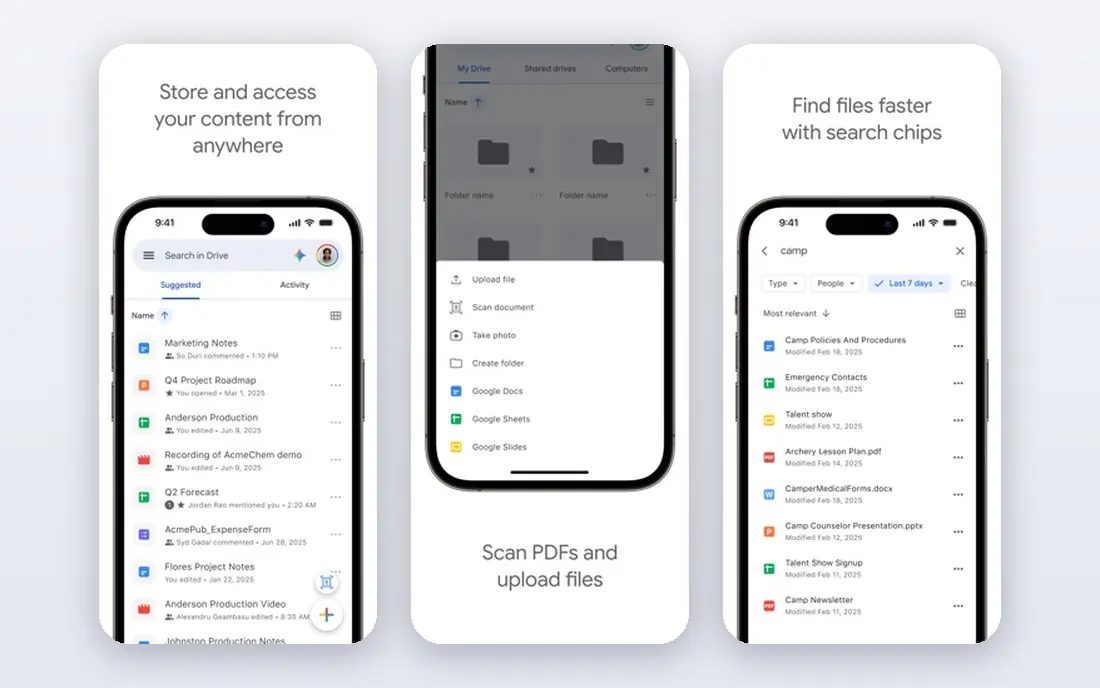
Files by Google is our pick for most Android users because it does the core job without a catch. Open the Clean tab, review each suggestion card, and delete only what you have checked. It finds temporary files, duplicate files, large files, old screenshots, and apps you rarely use, and it presents each group separately so you can keep the photos you want.
The limit is platform. Files by Google does not run on iPhone, and it will not turn an old phone into a new one. Clearing cache can free space, but it will not fix a failing battery or a full photo library on its own. For a free, trusted Android cleaner with no paid tier to open cleaning, it is hard to beat.
- Free with no paid cleaning tier
- Clear suggestion cards
- Finds junk, duplicates, large files, and unused apps
- Android only
- File management features are basic compared with paid power tools
Clever Cleaner is the best phone cleaner app for many iPhone users because it focuses on the files that actually fill iPhone storage: repeated photos, long videos, and screenshots. It marks the best photo in each similar group, sorts videos from largest to smallest, and lets you convert Live Photos to regular photos that take less space. The listing states that it has no ads, which is a welcome change from many free cleaners.
The trade-off is the daily free limit. Casual cleanup fits within it, but a large library cleanup may need several days or a paid plan. Clever Cleaner also cannot clean iOS system cache, since Apple does not allow that access. Judge it on photo cleanup, not on promises about system speed.
- Groups duplicate and similar photos
- Sorts videos by size
- Gathers screenshots in one place
- IPhone only
- Free use is within daily limits, with a paid Premium plan for unlimited use
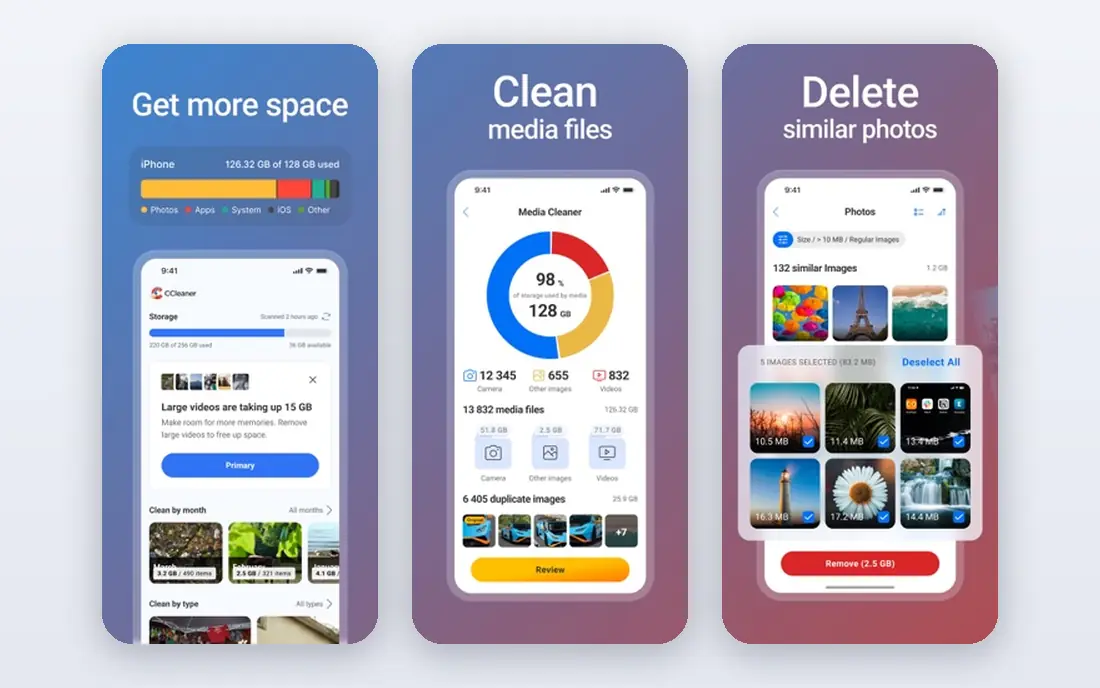
CCleaner brings a familiar name to Android cleaning, with junk file removal, cache cleaning, and a storage view that shows what is taking space. For users who already know CCleaner from computers, the phone version feels familiar, and the free version covers the basic cleanup most people need.
The catch is the ad and upsell experience in the free version, which some users find heavy. The paid tier does not offer a dramatically different cleaning engine for most phones. If ads bother you, Files by Google or Norton Clean will feel calmer. If you want the CCleaner brand and do not mind ads, the free version still does the job.
- Long-established cleaner brand
- Storage analysis and junk cleaning
- Works on Android phones and tablets
- Free version shows ads
- Some users report frequent upgrade prompts
- Paid tier mainly removes ads and adds automation
AVG Cleaner goes a step further than a simple junk cleaner by flagging apps that drain resources and offering to hibernate rarely used apps. That can help on a phone with many background apps, and its photo tools help you find large or duplicate images. The interface is straightforward, and the free version covers the main cleanup tasks.
Be realistic about speed claims. Hibernating an app can reduce background activity, but it will not fix slow hardware or a nearly full drive on its own. Use AVG Cleaner for space and tidiness, not as a cure for an ageing phone. Review every suggestion before deletion, especially for photos and downloads.
- Junk cleaning plus unused app hibernation
- Photo and file analysis
- Battery and performance views
- Android focused
- Extra optimisation features can overpromise on speed gains
- Paid features vary by store
Norton Clean is a good choice if you want a quiet cleaner without ads or a maze of extra tools. It focuses on junk files, cache, and residual files, and it shows categories clearly so you can decide what to remove. That restraint is a strength: fewer features means fewer chances to delete something by accident.
The downside is scope. Norton Clean is Android only, and it is less useful for iPhone-style photo library work than the photo cleaners here. It also cannot work miracles on storage if your largest files are videos you want to keep. Use it as a regular tidy-up tool, and move large videos to cloud storage or a computer when space stays tight.
- No ads in the core app
- Simple junk and cache cleanup
- Clear file categories
- Android only
- Fewer photo tools than Clever Cleaner or Files by Google
- No iPhone system cleaning
SD Maid is the pick for Android users who want to see exactly what is being cleaned and why. Its corpse finder looks for files left behind by uninstalled apps, and its storage and database tools give more detail than most free cleaners. For an older phone with years of app installs, that detail can reveal space that simpler apps miss.
The risk is the same as the benefit. The interface assumes you know what a leftover file is, and a rushed tap can remove something you wanted. Beginners should stick with Files by Google. Experienced users who read each result will get the most from SD Maid, and should still back up important files first.
- Detailed corpse finder and system cleaner views
- Database optimisation
- Strong control for experienced users
- Interface is technical
- Some advanced tools are paid
- Easy to misread results if you rush
Slean stands out for privacy, since its core photo sorting, duplicate detection, and compression run on the device rather than uploading your library. It separates exact duplicates from similar photos, sorts the library by file size, and lets you review items full screen before deleting. It also adds simple editing and compression tools, which help when a photo is worth keeping but not at full size.
The limit is scope. Slean works with your photo library, so it does not claim to clean app caches, improve battery life, or remove system junk. That honesty is a plus, but Android users who want cache cleaning will need a second app. For iPhone and Android users whose main problem is photos, Slean is a calm, private option.
- Photo processing stays on the device
- No account or ads in the core app
- Duplicate, similar, and size sorting
- Photo library only, so it does not clean app cache
- Newer app with a smaller support history than Files or CCleaner
Smart Cleaner is a practical iPhone option when your storage problem includes duplicate contacts as well as duplicate photos. It groups similar photos, flags large files and old screenshots, and helps merge or remove duplicate contacts, which is useful after years of syncing accounts. The review screens make it easier to keep the best version of each photo.
As with every iPhone cleaner, the boundary is set by Apple: it cannot reach system cache or other apps data. The free version is useful for a first pass, but regular use of every feature may require payment. Check the current store terms before subscribing, and back up contacts before merging them in bulk.
- Duplicate photo and contact cleanup
- Large file and screenshot grouping
- Simple review screens
- IPhone focused
- Full features often require a subscription
- Cannot clear iOS system cache
How we picked these
We compared official feature pages and app store listings, and we favoured apps that state clearly what they delete, show files before removal, and offer a usable free version. We gave extra weight to apps from known developers and to tools that respect platform limits, especially on iPhone, where system cleaning is not possible. Where a price could not be confirmed on the vendor site or store listing, we wrote See website rather than guessing, and free apps are listed as Free where the store listing states that.
What to check before you choose
Start with the built-in tools
On Android, try Files by Google or the storage view in Settings first. On iPhone, open Settings, then General, then iPhone Storage, and review the built-in suggestions for offloading unused apps and reviewing large attachments. Built-in tools are free, need no new permissions, and often free more space than a third-party app. Install a cleaner only for the specific gap that remains, such as duplicate photos.
Back up before bulk deletion
A cleaner is only as safe as your backup. Before deleting duplicates, screenshots, or large videos in bulk, make sure photos and videos are backed up to cloud storage or a computer. Review each group rather than tapping a single delete-all button, and keep the best version of similar photos. Deleted files can be hard or impossible to recover, even when an app offers a short undo window.
Ignore speed promises
No cleaner can promise a fixed speed gain, and cache that Android clears on its own will often return as you use apps again. Judge a cleaner by space freed, clarity of its reports, and whether it respects your choices. If an app hides what it deletes, shows constant ads, or asks for permissions unrelated to cleaning, remove it and use a simpler tool instead.
Frequently asked questions
What is the best free phone cleaner app?
For Android, Files by Google is the best free starting point, since it is free, ad-free, and clear about its suggestions. For iPhone, Clever Cleaner and Slean are strong photo cleaners, while the built-in iPhone Storage view handles app offloading. The best app cleaner overall depends on your phone, so match the pick to your platform first.
What is the best phone cleaner app for iPhone?
Clever Cleaner is a strong iPhone pick for duplicate and similar photos, large videos, and screenshots, with a free tier within daily limits. Slean is a good private alternative for photo cleanup, and Smart Cleaner adds duplicate contact cleanup. No iPhone app can clear system cache, so avoid any app that claims otherwise.
Do free phone cleaner apps really work?
Yes, for the right job: they can find junk files, duplicates, large files, and old screenshots, and they can help you decide what to delete. They do not fix hardware problems, replace a backup, or permanently speed up a phone. The best results come from reviewing suggestions, backing up first, and moving large videos you want to keep to other storage.
Is it safe to use a phone cleaner app?
A cleaner from a known developer is generally safe when it shows files before deletion and asks only for the permissions it needs. Risk rises with apps that delete without review, promise unrealistic gains, or request broad access. Back up first, read each suggestion, and remove any app that feels pushy or unclear.
Why is my phone storage full after cleaning?
Storage often fills again because photos, videos, messages, and app data grow every day, and cache returns as apps run. If cleaning frees little space, check large videos, downloaded files, and messaging attachments, and consider cloud backup or a larger storage plan. A cleaner helps with tidiness, but it cannot change how much media you keep on the phone.
Can a cleaner app delete my photos by accident?
It can, if you approve a bulk delete without reviewing the group, which is why review screens matter. Keep a backup, check similar-photo groups one by one, and avoid delete-all buttons for photos. If you are unsure about a group, skip it and return later rather than risking a photo you cannot replace.
Sources we checked (8)

Online Jobs is an independent blog about careers, online work, learning new skills and the tools that help people earn. More about us.
Keep reading
All posts
Zoom Alternatives
Zoom alternatives compared for 2026: Google Meet, Microsoft Teams, Webex, Jitsi and more for free calls, large meetings and webinars for teams and classrooms.

Which Software Is Best for PDF Page Removal
Which software is best for PDF page removal? We compare free and paid tools for deleting pages quickly, safely, and without harming your file in this guide.

Which Software Is Best for Data Entry
Compare the best data entry software for forms, OCR scanning, and spreadsheets, with free plans, pricing, and honest limits for each tool before you commit.