Best E-Commerce Platforms in 2026: 9 Tools Compared


New and growing stores that want a fast, reliable launch · Starting price: See website
How we put this together: we compare official feature and pricing pages, app store listings, privacy policies and public user reviews. Prices change, so check the provider's site before you pay.
Key takeaways
- Shopify is the easiest all-round choice for most new stores that want to launch fast and sell in many places.
- WooCommerce gives WordPress users full control over design and costs, at the price of more setup work.
- BigCommerce suits stores that expect higher sales volume and want strong built-in selling tools.
- Wix and Squarespace are strong picks for small stores where design and simplicity matter most.
- Always compare transaction fees, payment options, and app costs, not just the monthly plan price.
Quick comparison
| Name | Who it suits | Starting price | Free option | |
|---|---|---|---|---|
| Shopify | New and growing stores that want a fast, reliable launch | See website | No | Visit |
 WooCommerce | WordPress site owners who want full control | See website | Yes | Visit |
 BigCommerce | Stores planning for higher volume and complex catalogs | See website | No | Visit |
 Wix | Small stores that want design freedom and a simple setup | See website | No | Visit |
 Squarespace | Design-led brands with a small to medium catalog | See website | No | Visit |
 Adobe Commerce | Large stores with complex needs and developer support | See website | No | Visit |
 Square Online | Sellers who sell in person and online | See website | Yes | Visit |
 Ecwid | Adding a store to an existing website or social page | See website | Yes | Visit |
 PrestaShop | Open-source stores with technical help available | See website | Yes | Visit |
The best e-commerce platforms
A good commerce platform does more than host product pages. It handles payments, taxes, shipping, discounts, and orders without forcing you to stitch together a dozen separate tools. The best e-commerce platform for your store depends on your product range, your technical comfort, and where your customers already shop. We compared setup time, design control, payment options, selling features, and total cost.

Shopify remains the standard recommendation for most small businesses because it removes friction at every step. You can pick a theme, add products, connect payments, and start selling in a day or two, without managing hosting or security updates. Its app store covers reviews, email marketing, subscriptions, and many other needs that appear as a store grows.
Costs deserve attention. The monthly plan is only part of the total, since paid apps and payment fees add up. Stores that use Shopify Payments avoid some extra fees, while stores that prefer another provider should check the fee table carefully. Even with those costs, Shopify offers the clearest path from first product to steady sales for most sellers.
- Fast setup, large app store, strong payment and shipping tools, good multichannel selling
- Monthly cost plus app fees, transaction fees with outside payment providers, theme customization limits on lower plans
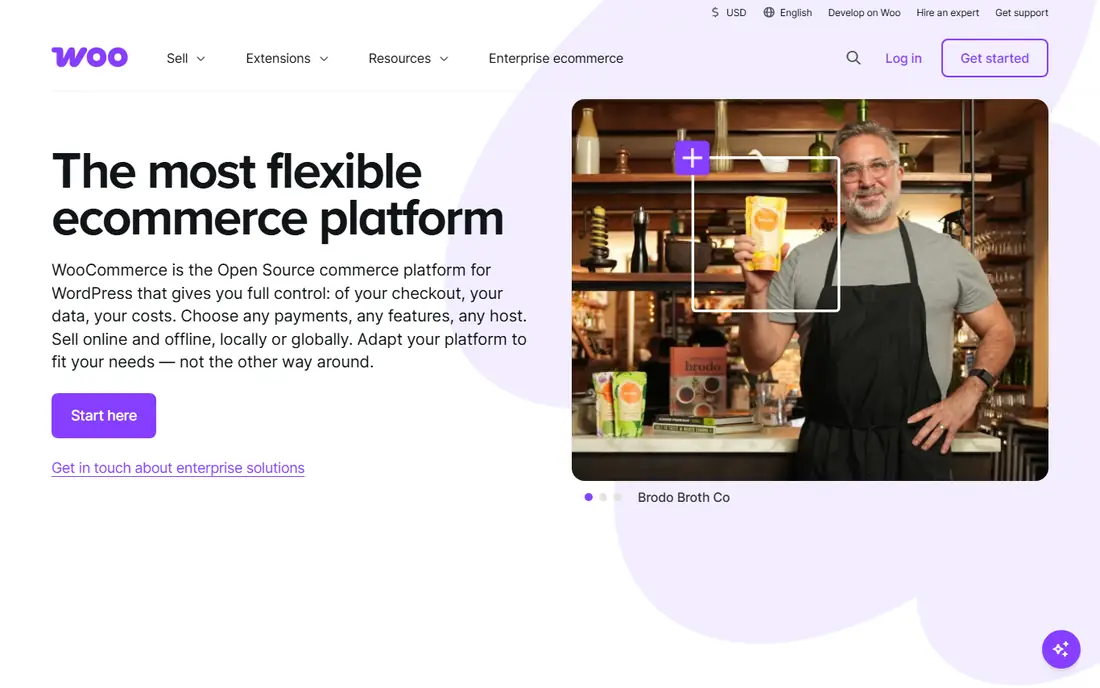
WooCommerce turns a WordPress site into a full store, which makes it ideal if you already publish content on WordPress. You control the design, the checkout flow, and the data, and you are not locked into one hosted system. The core plugin is free, and the extension library covers payments, shipping, memberships, and bookings.
That freedom comes with responsibility. You arrange hosting, updates, backups, and security, or you pay someone to handle them. A store with many plugins can also become slower if it is not maintained well. For sellers who value control and already know WordPress, WooCommerce is often the best platform for e-commerce over the long term.
- Free core plugin, full design control, no platform transaction fee, huge extension library
- Hosting and maintenance are your job, setup takes longer, plugin costs can grow

BigCommerce targets sellers who want powerful selling tools without adding dozens of apps. Built-in features cover product options, discounts, customer groups, and multi-channel selling, which helps larger catalogs stay manageable. It also avoids charging extra transaction fees on top of payment provider fees, a detail that matters as sales grow.
Beginners may find the dashboard busier than Shopify or Wix at first. Theme options are solid but less varied, and some advanced design work needs developer help. For a store that expects steady growth and wants room to scale without rebuilding, BigCommerce is a strong and practical choice.
- Strong built-in features, no extra transaction fees, good multi-currency and channel tools
- Higher starting price, theme choice is narrower, learning curve for beginners
Wix suits sellers who care about how the store looks and want to build it themselves. The editor gives fine control over layout, images, and pages, and the templates look polished without design help. Marketing tools for email, social posts, and search basics are built in, which helps a new store find early customers.
Larger stores may outgrow Wix sooner than Shopify or BigCommerce. Inventory tools, product options, and advanced reporting are useful but less deep. For a small catalog, a maker store, or a business that sells a few dozen products, Wix offers a pleasant balance of design and selling power.
- Easy drag-and-drop editor, many templates, built-in marketing tools, quick launch
- Selling features are less deep than Shopify, switching templates later is limited, transaction fees vary by provider
Squarespace has long appealed to designers, photographers, artists, and boutique brands. Its templates are clean and consistent, and the editor keeps the focus on images and typography. Selling tools cover physical and digital products, subscriptions, and appointments, which suits many creative businesses.
Commerce depth is the trade-off. The app ecosystem is smaller than Shopify, and some advanced selling features need workarounds. Stores with complex variants, large catalogs, or heavy discount rules may feel constrained. For a brand-led store where presentation drives sales, Squarespace remains one of the best ecommerce platform options.
- Beautiful templates, simple editing, good blogging and portfolio tools, integrated payments
- Fewer commerce apps, less flexible checkout, product limits on lower plans
Adobe Commerce
Who it suits: Large stores with complex needs and developer support
Adobe Commerce, formerly Magento Commerce, is built for stores that have outgrown simpler platforms. It handles large catalogs, complex pricing, multiple storefronts, and business-to-business selling with a depth that hosted tools rarely match. Companies with in-house developers or an agency partner can shape almost every part of the shopping experience.
That power is not suited to a first store. Implementation takes time, hosting needs planning, and ongoing maintenance is a real cost. Small sellers should look elsewhere. For established businesses with complex requirements, Adobe Commerce provides control that simpler platforms cannot offer.
- Deep customization, strong B2B features, large catalog handling, flexible integrations
- High cost and complexity, needs developer expertise, hosting and maintenance burden
Square Online makes sense if you already use Square at a market stall, shop counter, or salon. Inventory, orders, and payments sync between in-person and online sales, which reduces double entry and stock errors. The free plan lets a small seller test online selling before committing to a paid plan.
Design options are simpler than Wix or Squarespace, and the platform is less suited to a large standalone online catalog. Sellers who live inside the Square ecosystem will find it convenient. Sellers who need deep online-only features may prefer Shopify or BigCommerce instead.
- Free starting plan, easy sync with Square point of sale, simple setup, integrated payments
- Design flexibility is limited, advanced commerce features are modest, best within Square ecosystem
Ecwid takes a different approach from most platforms on this list. Instead of asking you to rebuild your site, it lets you add a store to a site you already have, or sell through social pages and marketplaces. That makes it a good pick for bloggers, small brands, and businesses with a site they do not want to replace.
The standalone storefront is functional but plain, and design control is narrower than on Wix or Squarespace. Paid plans raise product limits and add features such as abandoned cart recovery. For adding commerce to an existing presence, Ecwid is a practical and low-cost route among the best platforms for e-commerce.
- Free plan for small catalogs, easy embed on existing sites, social and marketplace selling
- Standalone storefront is basic, design control is limited, paid plans needed for larger catalogs
PrestaShop is a free open-source platform with a long history in European commerce. It offers solid catalog tools, customer management, and multilingual selling, which helps stores that sell across borders. The module marketplace extends it for payments, shipping, marketing, and reporting.
As with WooCommerce, you handle hosting, security, and updates, or you hire help. Module costs can also add up if you need many extras. For a team with developer support that wants an open-source base without WordPress, PrestaShop is a credible and flexible choice for an online shop platform.
- Free core software, strong product and catalog tools, large module marketplace, multilingual support
- Hosting and updates are your responsibility, modules add cost, setup needs technical skill
How we picked these
We focused on platforms that let a business sell online with payments, product management, and order handling in one system. We compared setup effort, design control, payment and transaction fees, shipping and tax tools, app or module ecosystems, and support quality. Platforms that only handled payments, or only offered a simple buy button without a store, did not qualify for this list.
We also weighed total cost, not just the headline plan price. A low monthly fee can hide app costs, transaction fees, or hosting bills. That is why open-source options sit alongside hosted platforms here. The right pick depends on how much control you want and how much maintenance you are willing to handle.
Buying guide: how to choose an e-commerce platform
Start by listing what you sell and how customers buy it. A store with ten products and simple shipping needs a different tool from a store with thousands of variants, wholesale pricing, and international tax rules. Write down your must-have features before you compare plans, so a pretty template does not distract from a missing payment or shipping feature.
Next, test the checkout as a customer. Add a product, apply a discount, and complete a test order if the platform allows it. Note how many steps the checkout takes, how payment options appear, and how shipping costs are shown. Small checkout problems cost real sales, so this test matters more than a feature list.
Finally, check the total monthly cost for your expected sales volume. Add the plan, essential apps or modules, payment fees, and any transaction fees the platform charges. If you already use WordPress, WooCommerce may save money. If you sell in person too, Square Online may save time. If you want the fastest launch with the least maintenance, a hosted platform like Shopify or BigCommerce usually wins.
Frequently asked questions
What is the best e-commerce platform for beginners?
Shopify is the easiest starting point for most beginners because setup, hosting, payments, and security are handled in one place. Wix is also friendly for very small stores where design matters. Both let you launch without coding or server work.
What is the best free e-commerce platform?
WooCommerce, Ecwid, and PrestaShop all offer free core options, but none is fully free in practice. You still pay for hosting, a domain, payment fees, and often extensions. WooCommerce is the strongest free starting point for WordPress users.
Is Shopify or WooCommerce better for a small business?
Shopify is better if you want speed, support, and low maintenance. WooCommerce is better if you already use WordPress, want full control, and are comfortable with hosting and updates. Your technical comfort and existing site usually decide the winner.
What is the best platform for selling on social media?
Shopify, BigCommerce, Ecwid, and Square Online all support selling through social channels and marketplaces. Shopify has the broadest channel options for most sellers, while Ecwid is useful if you want to add selling to pages you already run.
Do e-commerce platforms charge transaction fees?
Some do, some do not. BigCommerce does not add its own transaction fee, while Shopify adds a fee when you use an outside payment provider. Payment providers always charge their own processing fee on top. Read the fee page for each platform before you choose.
Can I move my store to another platform later?
Yes, but moving products, customers, and order history takes planning. Product data usually exports cleanly, while design and custom features rarely transfer directly. Pick a platform you can grow with, so a move becomes a choice rather than an urgent fix.
Sources we checked (9)

Online Jobs is an independent blog about careers, online work, learning new skills and the tools that help people earn. More about us.
Keep reading
All posts
DocuSign Alternatives
We compared the best DocuSign alternatives on price, free plans, templates, audit trails and ease of use, including free DocuSign alternatives for small teams.
Best subscription billing software
Looking for the best subscription billing software? We compare 9 platforms for billing, dunning, tax, revenue recognition, and team workflows in 2026.
Best Workforce Management Software
Looking for the best workforce management software? We compare 8 tools for scheduling, time tracking, payroll, and compliance for hourly teams and managers.