Best Daily Journal App in 2026: 8 Apps Compared

How we put this together: we compare official feature and pricing pages, app store listings, privacy policies and public user reviews. Prices change, so check the provider's site before you pay.
Key takeaways
- Day One is our pick for most people who want a full-featured journal with photos, audio, location, and printed books.
- Apple Journal is the best free starting point if you use Apple devices and want no subscription at all.
- Journey is the strongest cross-platform choice, covering phones, tablets, computers, and the web.
- Diarium suits people who dislike subscriptions, since it uses a one-time purchase model on each platform.
Quick comparison
| Name | Who it suits | Starting price | Free option | |
|---|---|---|---|---|
 Day One | Full-featured journaling | $49.99 per year | Yes | Visit |
 Apple Journal | Free Apple journaling | Free | Yes | Visit |
 Journey | Cross-platform journaling | See website | Yes | Visit |
 Diarium | One-time purchase journaling | See website | Yes | Visit |
 Penzu | Private web journaling | $19.99 per year | Yes | Visit |
 Grid Diary | Guided daily prompts | $2.99 per month | Yes | Visit |
 Daylio | Mood and activity logging | See website | Yes | Visit |
 Stoic | Guided reflection | See website | Yes | Visit |
The best daily journal apps
A daily journal app only works if you actually open it, so the best choice is usually the one that fits your devices and your writing habit rather than the one with the longest feature list. Some people want long written entries with photos, while others want a two-minute mood check before bed. We compared official pricing pages, platform coverage, privacy features, and export options for the apps below, using published feature pages and app store listings rather than claims of personal testing.
Start with a simple question: where will you write? If you only use an iPhone, a free Apple-only app may be all you need. If you switch between a Windows computer, an Android phone, and a browser, a cross-platform app will save you frustration. Also check what the free plan leaves out, since entry limits, photo limits, and sync are often paid features.
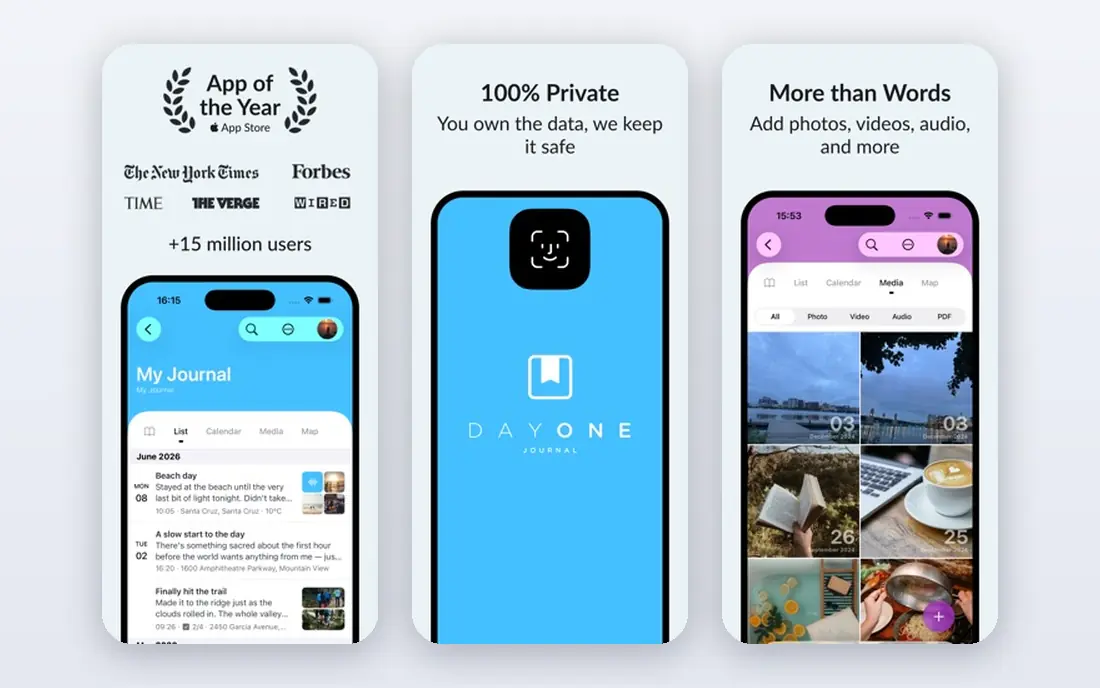
Day One has been the reference point for digital journaling for years, and its depth is the reason. Entries can hold photos, video, audio, location, weather, and tags, and the calendar and timeline views make it easy to look back at a specific day or trip. If you want a journal that doubles as a life archive, with the option to print selected entries as a book, Day One is hard to beat.
The catch is price and scope. The free plan covers basic journaling, but sync across devices, unlimited media, and several other features sit behind the paid plan, which costs $49.99 per year for the standard tier according to the official pricing page. That is fair value if you write often and use the media features, and poor value if you only write a few lines a day. Try the free plan first, and only upgrade once you hit a limit that actually bothers you.
- Rich media entries with photos, audio, and location
- Strong privacy and encryption options
- Printed book ordering
- Best features need a paid plan
- Yearly price adds up over time

Apple Journal is the easiest journal to start because it is already on your iPhone, iPad, or Mac, and it costs nothing. It offers writing prompts, entry suggestions drawn from your photos and activity, and a lock option to keep entries private on your device. For someone who wants a simple daily habit with no new account and no bill, that combination is difficult to argue against.
The limits are about ecosystem and depth. Apple Journal only works on Apple devices, so it is a poor fit if you also use Windows or Android. Its export and printing options are also thinner than Day One, which matters if you want a long-term archive you fully control. Still, as a free starting point, it sets a high bar, and many people will never need more.
- Free with no subscription
- Built into Apple devices
- Suggestions from photos and activity
- Apple devices only
- Fewer export and printing options than Day One
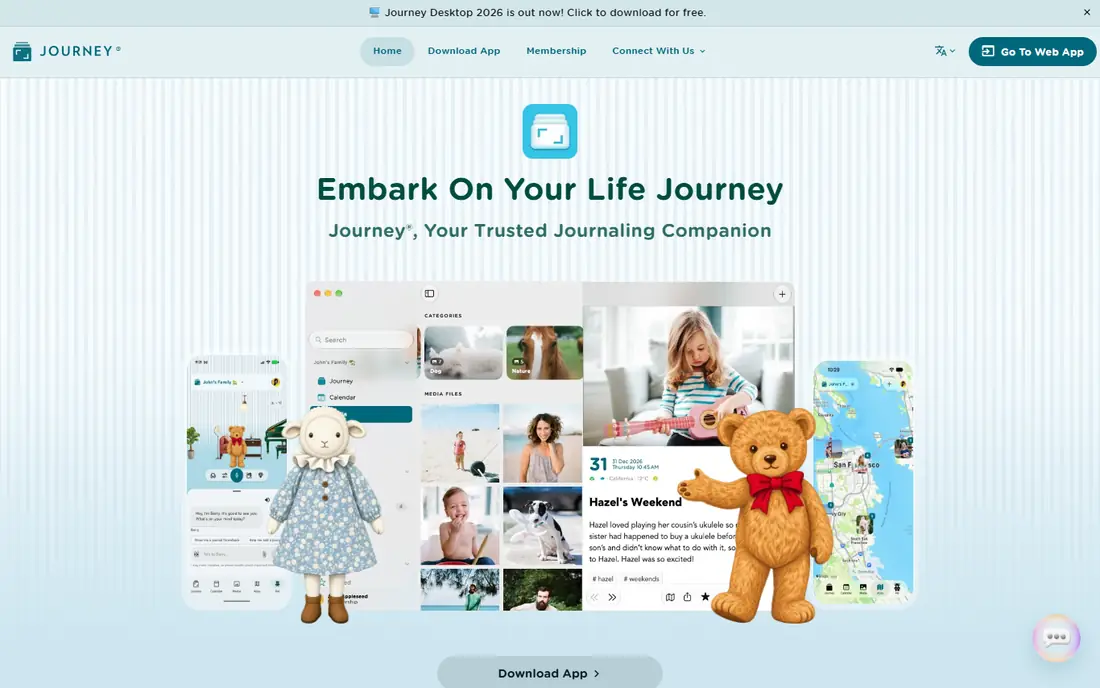
Journey is our pick for people whose devices do not all come from one company. It runs on iOS, Android, Windows, Mac, and the web, and entries sync across them, so you can start an entry on your phone and finish it on a computer. Entries support rich text, photos, and location, and the calendar view makes it easy to browse back through months of writing.
Pricing is the part to check carefully, because Journey offers several plan options and prices differ by platform and billing period. The free plan is useful for basic journaling, but sync features and some extras sit behind paid tiers. If cross-platform access is your top need, Journey earns its place on the shortlist, and the free plan is enough to confirm the sync works on your devices before you pay.
- Works on phones, tablets, computers, and the web
- Rich text and media entries
- Calendar and map views
- Pricing and plan details vary by platform
- Free plan limits some features
Diarium appeals to people who are tired of subscriptions. Instead of a monthly or yearly bill, you buy the app once per platform, and that purchase covers its full journaling features on that device. It also works well offline, with entries, photos, and calendar views that suit a daily record-keeping habit rather than a guided reflection practice.
The trade-off is that buying it on Windows does not automatically give you the iOS or Android version, so the total cost depends on how many devices you use. Sync can also depend on the cloud service you connect, which gives you more control but needs a little setup. If you mainly write on one or two devices and want to own your journal app outright, Diarium is a strong and honest choice.
- One-time purchase instead of a subscription
- Offline-friendly design
- Calendar and map views
- Purchase is per platform
- Sync depends on your own cloud storage in some setups
Penzu is a web-first journal, which makes it a good fit for people who write mainly on a computer and want to reach their entries from any browser. The writing view is clean and focused, with journals you can organize by topic, and lock features that help keep entries private. A paid plan starts at $19.99 per year according to the official pricing page, which is lower than Day One.
The mobile experience is the weaker side. Penzu has mobile apps, but they feel less refined than the dedicated mobile-first journals on this list, and some lock and backup features require a paid plan. If your journaling happens at a desk in a browser, Penzu is a calm, affordable option. If you write mostly on your phone, test the app first before committing.
- Web-first access from any browser
- Password and lock features
- Clean writing focus
- Mobile apps are less polished than Day One
- Some privacy features need a paid plan
Grid Diary suits people who stare at a blank page and write nothing. Instead of an empty box, it offers a grid of prompts for the day, such as a highlight, a gratitude note, or a goal, and you fill in short answers in each cell. That structure makes a two-minute entry feel complete, which is exactly what a daily habit needs in its first month.
Long-form writers may feel boxed in. The grid layout is not built for essays, and some templates and features sit behind a paid plan starting at $2.99 per month. But if your problem is starting rather than writing, Grid Diary solves the right problem. Use the free plan to see whether prompts help you, and only pay once the habit sticks.
- Structured prompts and templates
- Grid layout suits short daily entries
- Good for building a habit
- Less suited to long free-form writing
- Some templates need a paid plan
Daylio is the journal for people who hate writing. You tap a mood, tap the activities that shaped your day, and optionally add a short note, and the whole entry takes under a minute. Over weeks, its charts reveal patterns, such as which activities line up with better moods, and that feedback can be more useful than pages of prose for some people.
The honest limit is depth. Daylio is not the place for long reflective essays, and its free plan covers core logging while some statistics and customization options need a paid plan. Pair it with a writing app if you want both quick tracking and long entries, or use it alone if a fast daily check-in is the habit you will actually keep.
- Very fast mood and activity logging
- Charts show patterns over time
- Works without long writing
- Not built for long written entries
- Some statistics and features need a paid plan
Stoic structures your day around two short routines: a morning preparation with prompts and intentions, and an evening review of how the day went. That rhythm suits people who want journaling to feel like a practice rather than a blank notebook, and its mood tracking adds a light layer of self-review without turning the app into a statistics dashboard.
Availability is the main catch, since Stoic is focused on Apple devices, so Windows and Android users should look at Journey or Grid Diary instead. Paid features also sit behind a subscription, with pricing shown on the official site and in app store listings. If you use Apple devices and like guided reflection, Stoic is a thoughtful choice, and its free plan is enough to test whether the morning and evening routine fits your day.
- Morning and evening reflection routines
- Mood tracking and prompts
- Calm, focused design
- Apple-focused availability
- Deeper features need a paid plan
How we picked these
We compared official pricing pages, platform lists, privacy features, and export options for widely used journaling apps, and we checked app store listings for current availability. We favored apps with a clear free starting point, a lock or encryption option, and a way to export entries, since a journal you cannot leave is a poor long-term home. We left out note apps that lack a journaling structure and apps with no clear current product page. Prices change by region and store, so check the official page before buying.
How to choose the right journal app
Match the app to your writing style first. Long writers need rich text, media, and search, while short writers need prompts or mood taps. Then match it to your devices, since an app that only works on one platform will frustrate you the moment you switch phones or computers. Finally, check the exit: can you export your entries in a readable format, and does the app offer a lock or encryption option you trust?
Start free wherever possible, and give the habit two weeks before paying. A paid plan will not fix a habit that does not exist, and the best journal app is the one you open tomorrow. If you write every day for two weeks on a free plan, you will know exactly which paid feature, if any, is worth buying.
Privacy and your entries
A journal holds personal writing, so privacy deserves a direct look. Check whether the app offers a passcode or biometric lock, whether entries are encrypted in transit and at rest, and whether sync passes through the developer's servers or your own cloud storage. Read the privacy policy for how entries are used, especially for apps with AI features, and avoid putting highly sensitive details in any app whose policy you have not read. Local-first apps and apps with clear export options give you more control if you later decide to move.
Frequently asked questions
What is the best free daily journal app?
Apple Journal is the best free option if you use Apple devices, since it costs nothing and covers daily writing, prompts, and suggestions. Day One, Journey, Penzu, and Daylio also offer free plans, but each limits some features, such as sync, media, or statistics. Start with the free plan of the app that runs on your devices, and only pay when you hit a limit that matters to you.
Is Day One worth paying for?
Day One is worth paying for if you journal often, use photos and audio, and want sync across devices plus printed books. The standard paid plan costs $49.99 per year, which is reasonable for a daily tool but hard to justify if you write only a few lines a week. Try the free plan first, and upgrade only when a paid feature, such as unlimited media or full sync, becomes something you miss.
Can I move my journal entries to another app?
It depends on the app. Most journals on this list offer some form of export, but formats differ, and moving photos, tags, and location data cleanly is not always possible. Before committing to an app for years of writing, test its export with a few entries and check whether your next-choice app can import that format. Keeping a periodic export of your own is a sensible habit whatever app you choose.
Which journal app works on both Android and Windows?
Journey and Diarium are the strongest cross-platform picks here. Journey syncs across phones, tablets, computers, and the web, while Diarium offers versions for Windows, Mac, iOS, and Android with a one-time purchase per platform. Penzu also works well from any browser on Windows, with mobile apps as a companion. Check the current platform list on each official site before buying, since availability changes.
Do journal apps keep my entries private?
Most journal apps offer a lock, and several offer encryption, but the details differ. Day One and Apple Journal both emphasize encryption and device locks, while other apps vary in whether encryption covers cloud sync or only the device. Read the privacy policy, use a strong passcode, and be cautious with AI features that may send entries to outside services. No app description here is an independent security audit, so treat privacy claims as publisher statements to verify.
How do I stick with daily journaling?
Keep the entry small and attach it to an existing habit, such as writing right after breakfast or before bed. Prompt-based apps like Grid Diary and Stoic help on days when you have nothing to say, while mood apps like Daylio keep the habit alive in under a minute. Missing a day is normal, so skip the guilt and write the next day instead. A short entry you actually write beats a long entry you keep postponing.
Sources we checked (8)

Online Jobs is an independent blog about careers, online work, learning new skills and the tools that help people earn. More about us.
Keep reading
All posts
Zoom Alternatives
Zoom alternatives compared for 2026: Google Meet, Microsoft Teams, Webex, Jitsi and more for free calls, large meetings and webinars for teams and classrooms.

Which Software Is Best for Data Entry
Compare the best data entry software for forms, OCR scanning, and spreadsheets, with free plans, pricing, and honest limits for each tool before you commit.

What's the Best App to Read PDFs
Find what's the best app to read PDFs in 2026, from Adobe Acrobat Reader and Foxit to PDF Expert and Xodo, with free options and honest limits for every device.