Best Construction Scheduling Software in 2026: 9 Tools Compared

How we put this together: we compare official feature and pricing pages, app store listings, privacy policies and public user reviews. Prices change, so check the provider's site before you pay.
Key takeaways
- Procore and Autodesk Build suit large commercial teams that need scheduling inside a wider project platform, while Fieldwire suits field-first teams on a tighter budget.
- Microsoft Project and Smartsheet suit firms with a strong scheduler who wants a standalone planning tool.
- Buildertrend and JobTread suit residential builders who need scheduling tied to estimates, selections and client updates.
- The cheapest per-user price can mislead, because the real cost depends on how many people actually need to log in.
Quick comparison
| Name | Who it suits | Starting price | Free option | |
|---|---|---|---|---|
 Procore | Large commercial project platforms | See website | No | Visit |
 Autodesk Build | Teams already using Autodesk design tools | See website | Free trial | Visit |
 Buildertrend | Residential builders and remodelers | See website | No | Visit |
 JobTread | Residential builders who want job costing with scheduling | $159 per month | Free trial | Visit |
 Microsoft Project | Standalone critical path planning | $30 per user per month | Free trial | Visit |
 Smartsheet | Spreadsheet-style scheduling teams | $9 per user per month | Free trial | Visit |
 Fieldwire | Field crews and plan coordination | Free | Yes | Visit |
 Contractor Foreman | Small contractors on a flat monthly price | $49 per month | Free trial | Visit |
 Asta Powerproject | Professional schedulers needing deep critical path control | See website | No | Visit |
The best construction scheduling software
The best scheduling software for construction is the one your field team will actually update. A beautiful master schedule that sits untouched in the office helps no one. We compared official feature pages, pricing pages and public documentation, looking at Gantt views, critical path tools, lookahead planning, mobile access and how scheduling connects to budgets, drawings and daily logs.

Procore places scheduling inside a full construction management platform, so dates sit next to drawings, submittals, budgets and daily logs. That connection matters on large commercial work, where a delay in one area quickly affects another. Teams can view imported master schedules, share lookaheads and keep owners, general contractors and subcontractors working from the same project record.
The trade-off is scale and cost. Procore is priced on a quote basis, often tied to annual construction volume, and it assumes a team that can invest in setup and training. Small residential firms will usually find it too large and too costly. For a commercial general contractor running several large jobs at once, that depth is the point.
- Scheduling tied to drawings, budgets and daily logs
- Strong multi-party coordination
- Wide integration options
- Quote-only pricing
- Implementation and training take real time and effort
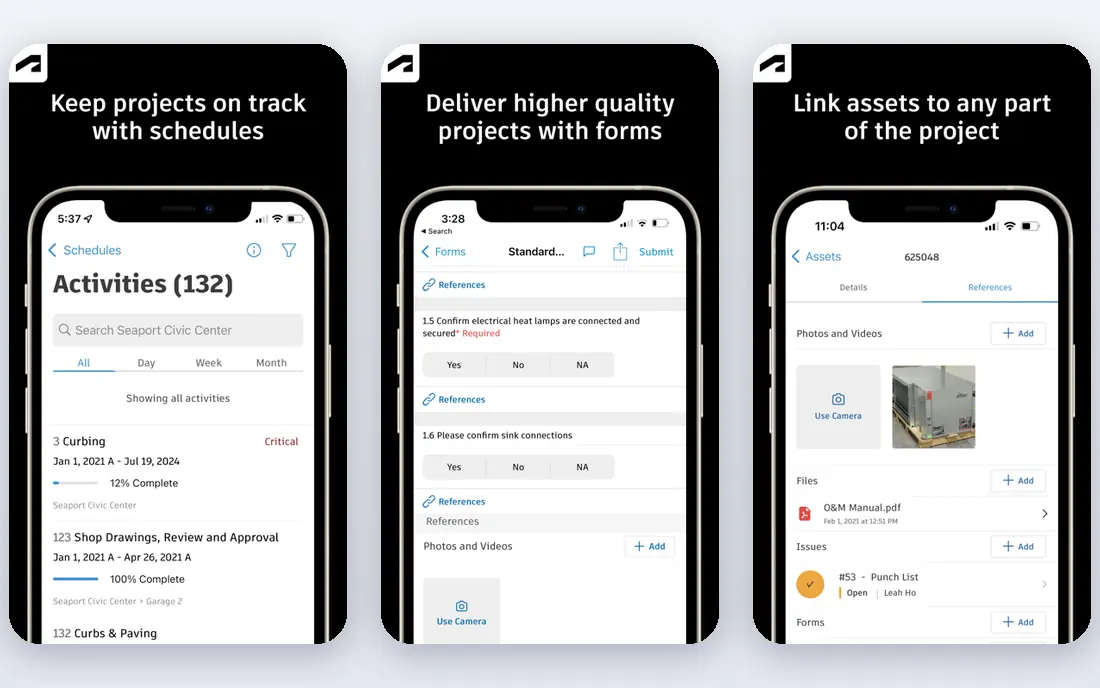
Autodesk Build, part of Autodesk Construction Cloud, connects scheduling to the design and document record that many commercial teams already use. When a drawing changes, the field team sees the current version, and schedule updates can be judged against that record rather than against an old print. Cost, quality and safety tools sit in the same system, which helps larger teams keep one source of truth.
The catch is that Autodesk pricing and packaging can be hard to compare at a glance, and the platform rewards teams that adopt it broadly. A small crew that only needs a Gantt chart will pay for depth it does not use. A team already working in Revit or AutoCAD will get more value from the connection than a team starting from scratch.
- Strong link to design and model data
- Schedule, cost and field tools in one platform
- Good document control
- Pricing is complex and tiered
- Smaller teams may use only a fraction of the platform
Buildertrend is built for home builders and remodelers, and its scheduling reflects that job. A schedule sits next to the estimate, the selection choices and the client portal, so a homeowner can see progress without calling the office for every update. Change orders, daily logs and messages feed into the same job record, which keeps the schedule honest.
It is not a standalone scheduler. Teams that want only a Gantt chart may find the wider platform heavy. Pricing is also quote-based in many cases, so you should get a written quote for your team size and project count before you compare it with a per-user tool. For residential builders who will use the full job workflow, that breadth is a strength.
- Scheduling tied to estimates, selections and client updates
- Good client portal
- Strong residential workflow
- Quote-based pricing for many plans
- More than a pure scheduling tool, so setup takes time
JobTread ties the schedule to budgets, purchase orders and job costs, so a delay is easier to judge in money terms as well as time terms. For a residential builder, that link matters: a slipped trade does not only move a date, it can move costs, payments and the next job in line. The published starting price also makes early comparison simpler than with quote-only platforms.
The limit is scope. JobTread is strongest for residential and light commercial builders, not for a large commercial general contractor with complex multi-party scheduling needs. Use the trial on a real job, with a real budget attached, and judge it on how fast your office and field staff can update progress.
- Scheduling linked to budgets and job costs
- Clear residential job workflow
- Published starting price
- Less suited to large commercial work
- The learning curve grows with the features you adopt
Microsoft Project remains the default choice for a dedicated scheduler. It handles dependencies, baselines, critical path analysis and resource views with a depth that simpler tools do not match. Many schedulers already know it, which shortens training and makes it easier to hand a schedule to another firm.
The weakness is the field. Project plans well in the office, but getting daily progress from crews still needs process discipline, and often a separate field tool. It also works best inside a Microsoft 365 setup. If you have a strong scheduler and a separate system for drawings and daily logs, Project is hard to beat. If you need one platform for office and field, look at Procore, Autodesk Build or Fieldwire.
- Deep critical path and dependency control
- Familiar to many schedulers
- Strong reporting
- Field adoption needs extra effort
- It is a planning tool, not a full field platform
Smartsheet suits teams that think in rows and columns. You can build a schedule like a spreadsheet, switch to a Gantt view, highlight the critical path and share updates with people who do not need scheduler training. That low barrier helps small and mid-size firms keep a schedule current without hiring a dedicated planner for every job.
The trade-off is that Smartsheet is a general work platform, not a construction-only system. It does not carry the same built-in drawing, submittal and daily log depth as a construction platform. Teams that pair it with a field tool, or that run simpler jobs, will get the most from it. Teams that need deep construction workflows should test that pairing before they commit.
- Familiar spreadsheet layout
- Gantt views with critical path highlights
- Easy sharing and collaboration
- Less construction-specific depth than Procore or Buildertrend
- Needs careful setup for subcontractor workflows
Fieldwire is the most field-friendly option in this list. Crews open current plans on a phone or tablet, see tasks and punch items tied to a location, and update progress from the jobsite, including offline in many cases. The free Basic plan covers up to five users and three projects in the published terms, which makes it a low-risk way to test field adoption.
It is not a full business platform. Fieldwire does not handle estimating, invoicing or full job costing, so most firms pair it with accounting software or a wider platform. If your main problem is that the field never updates the schedule, Fieldwire attacks that problem directly. If your main problem is job costing, start with JobTread or Buildertrend instead.
- Free Basic plan for small teams
- Strong mobile plan viewing
- Tasks and punch lists that work on site
- Field-focused, not a full office suite
- No estimating or invoicing
- Per-user costs rise as crews grow
Contractor Foreman packs a wide set of tools into a flat monthly price, starting at a low entry tier for a single user. Scheduling sits next to estimates, daily logs, change orders and client tools, which gives a small contractor one system for office and field work without enterprise pricing. That value is the main reason it appears on so many small-firm shortlists.
The honest catch is consistency. Public reviews mention bugs and limits in some integrations, including accounting links, so you should test the exact workflow you rely on during the trial. Run a real estimate, a real schedule update and a real invoice export before you pay for a year. If those three pass, the price is hard to argue with.
- Flat monthly pricing by user count
- Wide feature set for the price
- Scheduling with estimates and daily logs
- Some users report bugs and integration limits
- Depth varies by module
Asta Powerproject
Who it suits: Professional schedulers needing deep critical path control
Asta Powerproject is a scheduler's tool, built for complex programmes where critical path, resources and baselines need careful control. It suits firms that plan large or multi-phase work and need to show how a delay in one chain affects the whole programme. Import support for common schedule formats also helps teams that receive schedules from other firms.
It is not a casual team tool. Asta Powerproject rewards trained schedulers and can feel heavy for a small crew that only needs a lookahead and a task list. It also needs a separate field approach for daily updates. Choose it when schedule quality is the deciding factor, not when ease of field adoption is.
- Deep critical path and resource planning
- Strong for complex programmes
- Good import options for common schedule formats
- Quote-only pricing
- Needs scheduler skill to use well
- Less field-friendly than Fieldwire
How we picked these
We compared official feature pages, pricing pages and public documentation, and we favoured tools that are live now and that handle construction scheduling as a core job, not as a side feature. We included enterprise platforms, residential platforms, standalone schedulers and a field-first tool, because construction firms vary widely in size and in how they work. We did not claim hands-on testing we did not do, and we used See website where a vendor prices by quote.
What to check before you choose
Who updates the schedule
Ask who will update progress each week, on what device, and how long that update takes. A tool the field avoids will fail even if the office loves its charts.
Critical path or simple dates
If you manage complex dependencies, you need true critical path tools, as in Microsoft Project or Asta Powerproject. If you manage short residential jobs, a Gantt view with lookaheads may be enough.
Count every login
Multiply the per-user price by everyone who needs access, including office staff, site managers and regular subcontractors. Flat monthly pricing, as in Contractor Foreman, can win once that total is counted.
Trial on a real job
Use the trial on a live job, not a demo project. Import a real schedule, assign real tasks and ask the field team to update progress for two weeks. That test tells you more than any feature list.
Frequently asked questions
What is the best scheduling software for construction?
The best scheduling software for construction depends on firm size and job type. Procore and Autodesk Build suit large commercial teams, Buildertrend and JobTread suit residential builders, and Fieldwire suits field-first crews. Microsoft Project suits firms with a dedicated scheduler.
What is the best construction scheduling app for small teams?
Fieldwire is a strong small-team pick because its Basic plan is free and its mobile tools are simple to adopt. Contractor Foreman is another strong pick for small firms that want a wider feature set at a flat monthly price.
Are there best construction scheduling apps with a free plan?
Yes, Fieldwire offers a free Basic plan. Most other tools in this list offer a trial rather than a lasting free plan, and enterprise tools such as Procore are quote-only. Check the current free terms on the vendor site before you rely on them.
What are the best free construction scheduling software options?
For a truly free start, Fieldwire Basic is the clearest option here, and Smartsheet and Microsoft Project offer trials for a short test. A free plan usually limits users, projects or features, so confirm those limits against your job count.
What are the top construction scheduling software choices for critical path work?
Microsoft Project and Asta Powerproject offer the deepest critical path control in this list. Smartsheet highlights the critical path on its Gantt view, while Procore is better for viewing an imported master schedule than for building one from scratch.
Is a construction scheduling app the same as construction project management software?
No, though they overlap. A scheduling app focuses on dates, dependencies and progress. Project management software adds budgets, documents, daily logs and client tools. Tools such as Procore, Buildertrend and JobTread cover both, while Microsoft Project and Asta Powerproject focus on planning.
Sources we checked (9)

Online Jobs is an independent blog about careers, online work, learning new skills and the tools that help people earn. More about us.
Keep reading
All posts
n8n Alternatives
n8n alternatives compared for 2026, with Zapier, Make, Activepieces, and more, covering visual builders, code steps, self-hosting, and pricing models.

ZoomInfo Alternatives
The best ZoomInfo alternatives in 2026, compared on price, free plans, data coverage, and which tool fits small teams or large sales teams best in detail.

Workday Alternatives
We compared the best workday alternatives for HR, payroll, and global hiring, from BambooHR and Gusto to Rippling, Deel, and HiBob for growing teams in 2026.