Best Case Management Software for Law Firms in 2026: 8 Tools Compared

How we put this together: we compare official feature and pricing pages, app store listings, privacy policies and public user reviews. Prices change, so check the provider's site before you pay.
Key takeaways
- Clio fits firms of many sizes because of its broad integration options and mature matter, billing and client portal tools.
- MyCase and PracticePanther suit solo and small firms that want a clear, all-in-one system without a long setup.
- Filevine and Smokeball suit litigation and document-heavy firms, while CosmoLex suits firms that need built-in trust accounting.
- Most tools are priced per user per month, so add up seats, billing add-ons and payment fees before choosing.
Quick comparison
| Name | Who it suits | Starting price | Free option | |
|---|---|---|---|---|
 Clio | Firms of all sizes | See website | Free trial | Visit |
 MyCase | Solo and small firms | See website | Free trial | Visit |
 PracticePanther | Growing firms | See website | Free trial | Visit |
 Filevine | Litigation firms | See website | See website | Visit |
 Smokeball | Document-heavy firms | See website | Free trial | Visit |
 CosmoLex | Built-in accounting | See website | Free trial | Visit |
 LEAP | Forms and documents | See website | Free trial | Visit |
 Rocket Matter | Simple matter tracking | See website | Free trial | Visit |
The best case management software for law firms
Case management software keeps matters, documents, deadlines, client messages and billing in one place. For a law firm, that structure matters because a missed deadline or a lost document can affect a case. We compared official feature pages, pricing pages and public product descriptions for tools that serve US law firms. The list below covers general practice tools and specialists for litigation, document work and trust accounting, so you can match the tool to your practice area and firm size.

Clio is the most widely used cloud practice management platform for law firms, and it suits firms from solo practice to mid-size teams. It covers matters, documents, time tracking, billing, online payments and a client portal for sharing documents and messages. A large integration library connects Clio to accounting, email, calendar and other tools many firms already use.
The trade-off is tiering. The entry plan covers core work, but workflow automation, advanced reporting and some other features need higher plans. That means the price for your firm depends on which features you actually need. If you want a mature, well-supported system that can grow with the firm, Clio is a strong first shortlist choice.
- Broad matter, document and billing tools
- Large integration library
- Secure client portal
- Advanced features sit on higher tiers
- Costs rise with seats and add-ons
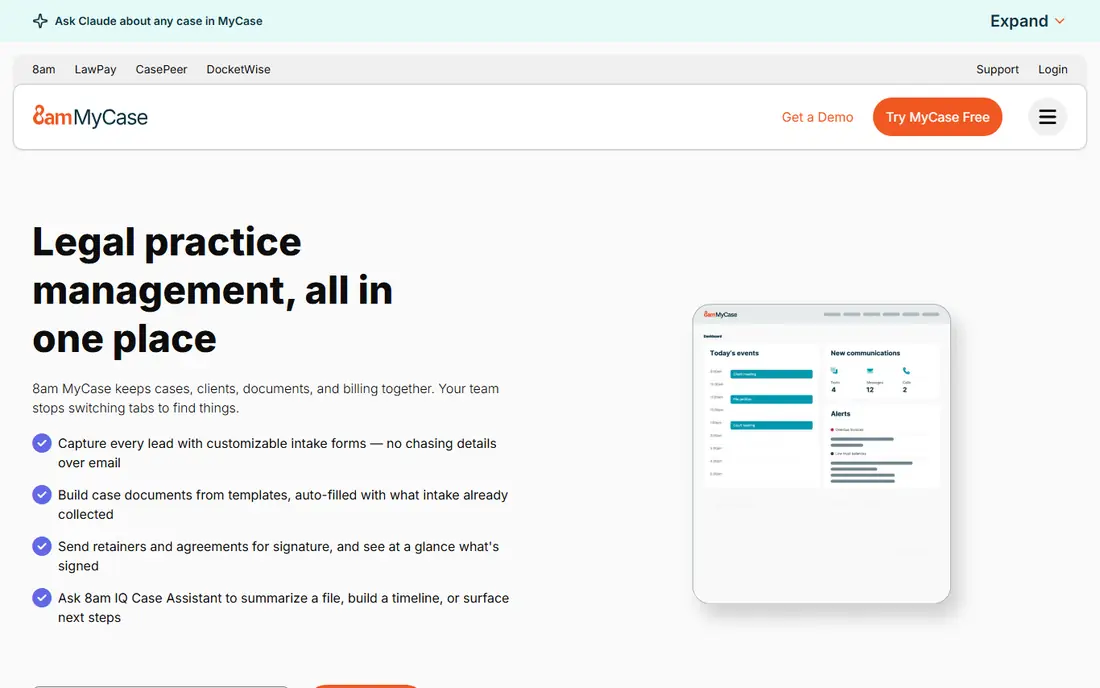
MyCase suits solo attorneys and small firms that want an all-in-one system without a complex setup. Matters, documents, calendars, billing and client communication sit in one workspace, and the client portal lets clients share documents and pay invoices online. Built-in texting helps firms that communicate with clients by phone message as well as email.
MyCase is less customisable than a litigation specialist such as Filevine, so firms with complex workflows may hit limits. For a small general practice that wants to move off spreadsheets and paper files quickly, MyCase offers a clear path. Check the current plan prices on the vendor site, because entry prices have changed over time.
- Clear interface and client portal
- Built-in texting and billing
- Easy setup for small teams
- Less deep customisation than Filevine
- Higher tiers needed for some advanced features

PracticePanther suits growing firms that want automation without hiring a developer. Staff can set rules that move a matter forward, send reminders, generate documents and trigger billing steps. Two-way texting and eSignatures are built in, which reduces the need for separate messaging and signing tools. Billing, time tracking and client portals are also included.
Automation is useful only if it is set up well. Firms should plan time to design workflows and test them on real matters before relying on them. For a firm that wants to save staff time on repeat tasks, PracticePanther is a strong option, especially for billing-heavy practices.
- Code-free workflow automation
- Two-way texting and eSignatures
- Billing and payments
- Advanced reporting needs higher tiers
- Setup time grows with automation rules
Filevine is built for litigation-heavy firms, including personal injury and mass tort practices. It offers deep customisation for matter stages, tasks, documents and reporting, so firms can track cases the way their practice actually works. Analytics help managers see case progress, deadlines and workload across the team.
That depth comes with cost and setup time. Filevine is priced by quote, and firms should expect implementation and training before the system runs smoothly. For a general small practice, Filevine may be more than needed. For a litigation firm with complex cases and many matters, it is one of the strongest specialists.
- Deep matter customisation and workflows
- Litigation and personal injury focus
- Reporting and analytics
- Pricing by quote
- Setup and training take time
Smokeball suits firms that produce many documents and want billing to reflect that work. Its automatic time capture records time spent on documents and matters, which helps firms that bill by the hour and often under-record time. A large library of legal forms supports common practice areas, and document management keeps matter files organised.
Pricing is by quote for many firms, so ask for a full price for your seat count. Smokeball has desktop roots, which some firms prefer for document work, while others may prefer a fully browser-based tool. If document volume and time capture are your main pain points, Smokeball deserves a demo.
- Automatic time capture
- Large legal form library
- Document management
- Pricing by quote for many firms
- Desktop roots may suit some teams better than others
CosmoLex is the pick for firms that need accounting built into case management. It includes legal accounting and trust accounting, with billing, matter management and document tools in the same system. Firms that hold client funds can track trust accounts without syncing to a separate accounting program, which reduces reconciliation work.
The trade-off is ecosystem size. CosmoLex has fewer third-party integrations than Clio, so firms that rely on many outside tools should check connections first. For a firm where trust accounting is the priority, and where a single system for matters and money is appealing, CosmoLex is a clear contender.
- Built-in legal accounting and trust accounting
- Billing and matter tools
- No separate accounting tool needed for many firms
- Less broad integration library than Clio
- Pricing rises with seats
LEAP combines matter management with document assembly and a library of legal forms that vary by jurisdiction. That form support helps firms in transactional and litigation work where standard forms save drafting time. LEAP also includes billing, time tracking and client tools, so it can serve as a full practice system.
Pricing is by quote, and the value of the form library depends on your state and practice area. Ask for a demo using forms from your own jurisdiction, and check whether the forms you use most are included. For firms that draft many standard documents, LEAP can save time that a general tool may not.
- Jurisdiction-specific forms and document assembly
- Matter and billing tools
- Cloud and mobile access
- Pricing by quote
- Form libraries vary by state and practice area
Rocket Matter suits firms that want simple, visual matter management without enterprise complexity. Kanban boards show matter stages at a glance, tasks and calendars keep work on track, and invoicing is fast to produce. That simplicity helps solo and small firms that want to adopt a system quickly and train staff without a long project.
Firms with complex litigation workflows may need more customisation than Rocket Matter offers. For a small firm that mainly needs matters, documents, time and billing in a clear system, Rocket Matter is a practical and lower friction choice. Check current plan prices on the vendor site before deciding.
- Simple matter and task tracking
- Kanban boards
- Fast invoicing
- Less deep litigation workflow than Filevine
- Advanced features need higher tiers
How we picked these
We compared official feature pages, pricing pages and public product descriptions for case management tools that serve US law firms. We looked for tools that cover matters, documents, deadlines, client communication and billing, and we included specialists for litigation, documents and trust accounting. We did not claim hands-on testing, and where a vendor does not publish a simple price, we wrote See website. Prices and plan names change, so confirm the current price for your seat count.
What to check before you buy
Start with your practice area and firm size. A litigation firm needs deadline and workflow depth, a transactional firm needs forms and documents, and a firm holding client funds needs trust accounting that meets your state rules. Next, check security and access controls. Ask about role permissions, audit trails, data encryption and how client data is handled when staff leave.
Then test migration and daily use. Ask how matters, documents and contacts move from your current system, and how long that process takes. Run a real matter through the trial, from intake to invoice, and check whether staff find the system clear. Finally, add up the full cost: seats, billing add-ons, payment processing and any implementation fees. A low entry price can rise once every attorney and paralegal needs a seat.
Questions to ask on a demo
Ask how court deadlines are calculated, and whether rules-based calendaring is included or an add-on. Ask how the client portal handles messages and documents, and how eSignatures work. Ask about support hours and training. The answers will show whether the tool fits legal work, rather than general project work.
Frequently asked questions
What is the best law firm case management software?
The best law firm case management software depends on firm size and practice area. Clio fits firms of many sizes, MyCase fits solo and small firms, and Filevine fits litigation-heavy firms. Start with your practice area, then compare price for your seat count.
What is the best attorney case management software for solo attorneys?
Solo attorneys often do best with MyCase, Rocket Matter or PracticePanther, because those tools cover matters, billing and client portals without a long setup. Check the entry plan for the features you use daily, and avoid paying for enterprise workflow tools you will not use.
What is the best litigation management software?
Filevine is a strong litigation choice because of its custom workflows, matter tracking and reporting for complex cases. Smokeball also suits document-heavy litigation work, thanks to automatic time capture and document management. Test both with a real case type before choosing.
What are the top case management software options for law firms with trust accounting?
CosmoLex leads on built-in trust accounting, and Clio, MyCase, PracticePanther and Rocket Matter also include trust accounting features to varying degrees. Confirm that the depth of trust accounting matches your state rules, and ask how three-way reconciliation is handled.
Does case management software include billing?
Most tools in this list include time tracking, billing and online payments, often with trust accounting support. Check whether payment processing fees are extra, and whether billing reports match how your firm invoices clients.
How much does law firm case management software cost?
Most tools are priced per user per month, with entry prices that change over time and higher tiers for automation and reporting. Several tools in this list are priced by quote. Ask for a written price for your exact seat count, including add-ons.
Sources we checked (8)

Online Jobs is an independent blog about careers, online work, learning new skills and the tools that help people earn. More about us.
Keep reading
All posts
n8n Alternatives
n8n alternatives compared for 2026, with Zapier, Make, Activepieces, and more, covering visual builders, code steps, self-hosting, and pricing models.

ZoomInfo Alternatives
The best ZoomInfo alternatives in 2026, compared on price, free plans, data coverage, and which tool fits small teams or large sales teams best in detail.

Zoom Alternatives for Webinars
Compare Zoom alternatives for webinars in 2026, from browser-based rooms to enterprise events, with prices, attendee limits, features and honest trade-offs.