Best App for Writing a Book Free in 2026: 9 Apps Compared

How we put this together: we compare official feature and pricing pages, app store listings, privacy policies and public user reviews. Prices change, so check the provider's site before you pay.
Key takeaways
- Free tools can handle a full book draft, but backups and exports matter more than extra features.
- A planner with chapters and scenes suits a novel better than a single long document.
- Cloud tools help collaboration, while offline tools help focus and file control.
- AI writing help is useful for ideas and editing, but it should not replace your own draft and voice.
- Formatting for print and ebook is a separate job, so check export options before you start.
Quick comparison
| Name | Who it suits | Starting price | Free option | |
|---|---|---|---|---|
 Reedsy Studio | Free book writing and formatting | Free | Yes | Visit |
 Google Docs | Free collaboration and drafting | Free | Yes | Visit |
 LibreOffice Writer | Free offline word processing | Free | Yes | Visit |
 FocusWriter | Free distraction-free drafting | Free | Yes | Visit |
 Obsidian | Free linked notes and planning | Free | Yes | Visit |
 yWriter | Free novel structure | Free | Yes | Visit |
 Bibisco | Free novel planning | Free | Yes | Visit |
 Wavemaker | Free browser novel writing | Free | Yes | Visit |
 Sudowrite | AI-assisted drafting and editing | See website | Free trial | Visit |
The best free book writing apps
A free book app should do three things well: keep a long draft organised, let you write without friction, and let you export the finished text. The apps below do those jobs in different ways, from simple editors to full novel planners.
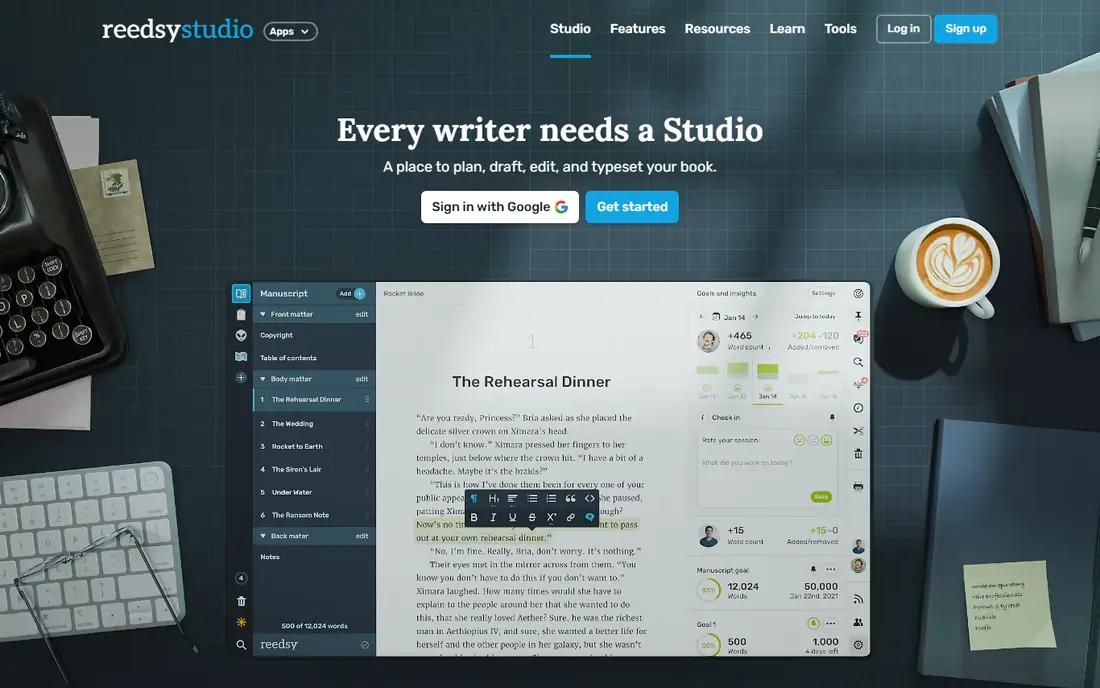
Reedsy Studio is the closest free option to an all-in-one book tool. You can plan chapters, write scenes, set writing goals and format the book for ebook or print without paying for the core editor. That combination is rare at no cost, and it suits a first-time author who wants a professional-looking export without learning a separate formatter. The main limit is that it runs in a browser, so you need an internet connection to work. There is also no mobile app for offline drafting. If you write mainly on a laptop with reliable internet, that limit is easy to live with. If you write on trains or in places without Wi-Fi, pair Reedsy with an offline editor for drafting and use Reedsy for formatting.
- Free writing and formatting
- Chapter organisation
- Clean export to ebook and print formats
- Web only, so no offline mode
- Collaboration is limited compared with Google Docs
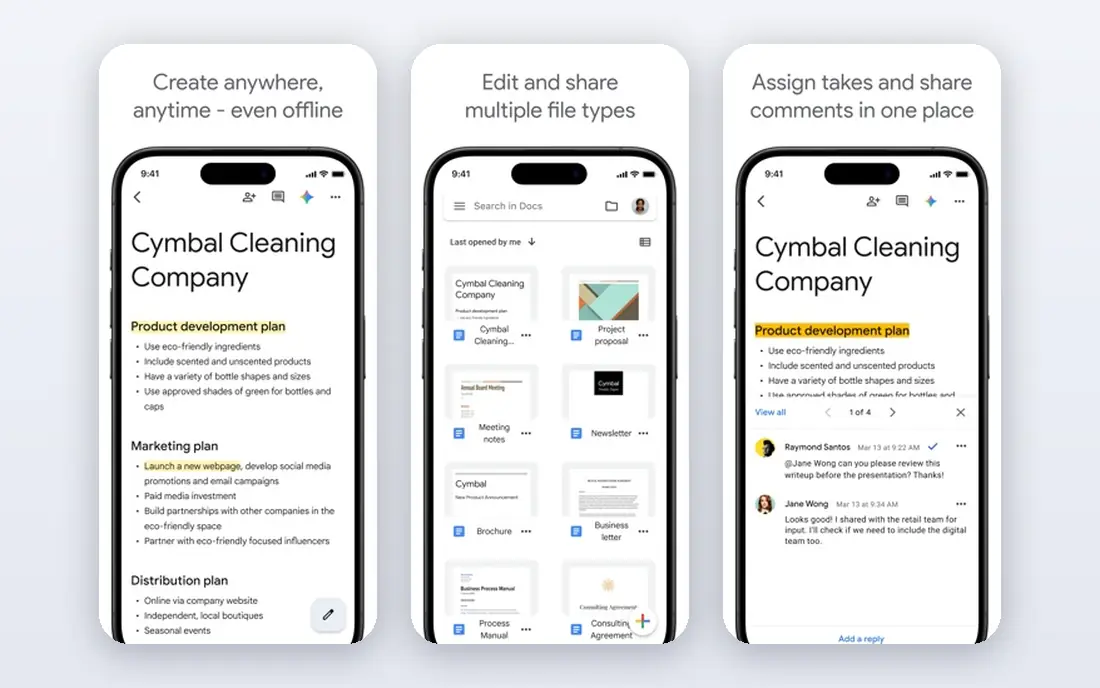
Google Docs is the simplest free starting point, and its strength is collaboration. Co-authors, editors and beta readers can comment and suggest changes in the same document, and version history makes it easy to restore an earlier draft. Autosave removes the fear of losing work after a crash, which matters on a long project. For a novel, Google Docs is less structured than a planner. You will need headings, a table of contents and separate documents or sections to keep chapters organised, and a very long manuscript can feel slow. Docs works best for drafting, sharing and editing, with a planner or formatter handling structure and final export if needed.
- Free with a Google account
- Real-time collaboration
- Autosave and version history
- Long books can slow down
- Chapter and scene tools are basic
LibreOffice Writer is a free, offline word processor that can handle a full book manuscript. It supports styles, headings, tables, footnotes and page layout, and it opens and saves common document formats used by editors and publishers. For writers who distrust cloud-only tools, local files and full control are real advantages. Writer does not offer scene cards, timelines or character sheets, so novel planning needs a separate system, such as a notebook, a spreadsheet or a planner app. That split is fine for many authors, especially those who already know their story structure. Writer is best for writers who want a dependable, free Word-style editor without a subscription.
- Free and offline
- Strong word processing features
- Works with common document formats
- No novel-specific planning tools
- Interface feels traditional
FocusWriter removes menus, notifications and clutter so the page itself becomes the focus. You can set daily word goals, track progress and write in full screen, which helps writers who get distracted by a busy interface. It is free, offline and light on system resources, so it runs well on older machines. It is a drafting tool, not a book manager. You will not get scene planning, character databases or polished ebook formatting inside FocusWriter. Use it to get words on the page each day, then move the draft to a planner or formatter for structure and export. That two-tool workflow suits writers who separate drafting from editing.
- Clean full-screen writing
- Daily goal tracking
- Free and offline
- No planning or formatting depth
- Limited collaboration
Obsidian is a note app that can become a powerful book planner when used well. Each character, location, scene and research note can be a linked page, so you can move from a plot outline to a character sheet in one click. Files are stored locally in plain text, which gives you control over backups and long-term access. The learning curve is the trade-off. Obsidian does not come set up as a novel tool, so you need to build folders, templates and links yourself, or use community plugins. Writers who enjoy building a personal system will like that freedom. Writers who want a ready-made novel structure may prefer yWriter or Bibisco instead.
- Free for personal use
- Linked notes for plots and characters
- Local files you control
- Learning curve for new users
- Needs plugins for book-specific workflows
yWriter breaks a novel into chapters and scenes, which is exactly how many fiction writers think about a book. You can track viewpoints, characters, locations and items per scene, and see word counts for each part of the story. That structure helps when a plot has many threads and you need to check where a character last appeared. The interface looks dated, and final formatting still needs a word processor or formatter. yWriter is not trying to be pretty, it is trying to keep a complex novel organised. For a writer with a long, multi-viewpoint story, that focus is worth more than a modern design.
- Free novel organisation by chapter and scene
- Character and location tracking
- Word counts
- Interface looks dated
- Export needs a word processor for final polish
Bibisco guides you through novel planning with sections for premise, characters, locations, chapters and scenes. That guided structure helps new novelists who know they need planning but are not sure where to start. Questions and prompts in each section encourage you to define motives, conflicts and settings before you draft too far ahead. The full structure can feel like a lot of work if you prefer to discover the story as you write. Bibisco suits planners more than discovery writers, and some advanced features sit in a paid version. If you like a clear plan before drafting, Bibisco gives you that plan in a free, organised form.
- Guided novel structure
- Character and world building
- Chapter and scene organisation
- Paid version adds some features
- Learning curve for the full structure
Wavemaker is a free, browser-based writing tool with card planning for novels. You can arrange plot cards, write chapters and keep notes in one workspace, without installing software. It also works offline in the browser once loaded, which helps writers who move between devices or who use a Chromebook. Support and long-term development are smaller than for Google Docs or LibreOffice, so backups matter even more. Export your work regularly to a standard document format. Wavemaker suits writers who want a free, card-based planner in the browser and who are happy to keep their own backups.
- Free in the browser
- Card-based planning
- Offline use in the browser
- No install needed
- Smaller community and support
- Export options are simpler than Reedsy
Sudowrite is the AI option on this list, and it is best used as a helper rather than a ghostwriter. It can suggest descriptions, expand a scene, offer alternative phrasing or help you move past a block. That help can speed up a draft, especially for writers who know the story but struggle with a particular passage. The trial is limited, and the paid plans cost more than a free editor. AI output also needs editing, because it can drift from your characters, tone and plot. Use Sudowrite to support your own writing, keep your draft as the source of truth, and check any AI suggestions against your story before you keep them.
- AI help for ideas, descriptions and rewrites
- Useful for overcoming blocks
- Works alongside a draft
- Paid after trial
- AI text needs careful editing to keep your voice
How we picked these
We compared official feature pages, pricing pages, app store listings, privacy policies and public reviews. We looked for a genuinely free way to write a book, not just a short trial, and we checked chapter or scene handling, export options, collaboration, offline use and backup control. We favoured tools that can handle a long manuscript, not just short notes or essays. We did not claim hands-on testing. We also separated free drafting from paid formatting and AI tools, so a reader can see which parts of the process are free and which parts may later need a paid tool or a different app.
How to run a book project on free tools
Keep one master draft
Pick one app as the master draft and keep other apps for planning or editing. If chapters live in three places, version confusion is almost certain. Export a dated backup each week to a second location, such as an external drive or a cloud folder you control.
Plan before you format
Do not worry about print layout while you are still drafting. Use headings, chapter breaks and scene markers that survive export, then format at the end in Reedsy Studio, LibreOffice or a dedicated formatter. Early formatting wastes time and can break when text changes.
Use AI as an editor, not an author
AI can suggest ideas and clean up a sentence, but the story, characters and choices should stay yours. Read every AI suggestion aloud, check it against your plot, and rewrite it in your own voice where needed. That habit keeps the book coherent and keeps you in control of the final text.
Frequently asked questions
What is the best free novel writing software?
Reedsy Studio is a strong all-round free pick for writing and formatting, while yWriter and Bibisco suit writers who need stronger novel planning. Google Docs suits collaboration, and LibreOffice suits offline drafting. The best pick depends on whether you value planning, collaboration or formatting most.
Can I write a whole book for free?
Yes, you can draft, plan and format a book with free tools such as Reedsy Studio, LibreOffice and yWriter. You may later pay for editing, cover design or publishing services, but the writing itself does not need a paid app. Keep regular backups, because a free tool is only safe if your files are safe.
What is the best AI tool for writing a book?
Sudowrite is a popular AI writing helper for fiction, with tools for ideas, description and rewriting. It works best alongside your own draft, not as a replacement for it. Check its current trial and pricing on its site, and edit AI output carefully before you keep it.
Is Scrivener free?
Scrivener is not free, although it usually offers a trial. It is a paid, one-time purchase tool for Mac, Windows and iOS. If you need a free alternative, Reedsy Studio, yWriter and Bibisco cover much of the same planning and drafting ground without a purchase.
What is the best free software for writing a book on a Chromebook?
Browser tools such as Reedsy Studio, Google Docs and Wavemaker work well on a Chromebook because they need no install. Google Docs is the simplest for collaboration, while Reedsy Studio adds book formatting. Keep an offline backup where possible, since browser tools depend on internet access.
How do I export a book from a free app?
Most free apps export to common formats such as document, PDF or ebook files. Check export before you start a long project, and test a short sample early. A clean export with chapters intact saves hours at the end, while a messy export can force a manual rebuild.
Sources we checked (9)

Online Jobs is an independent blog about careers, online work, learning new skills and the tools that help people earn. More about us.
Keep reading
All posts
Zoom Alternatives
Zoom alternatives compared for 2026: Google Meet, Microsoft Teams, Webex, Jitsi and more for free calls, large meetings and webinars for teams and classrooms.

Which Software Is Best for Data Entry
Compare the best data entry software for forms, OCR scanning, and spreadsheets, with free plans, pricing, and honest limits for each tool before you commit.

What Is the Best Free Tool to Rotate a PDF
What is the best free tool to rotate a PDF? We compare eight free rotation tools on per-page control, limits, privacy and saved output quality in detail.