Best AI Mobile Apps in 2026: 8 Apps Compared

How we put this together: we compare official feature and pricing pages, app store listings, privacy policies and public user reviews. Prices change, so check the provider's site before you pay.
Key takeaways
- The best ai mobile apps are now close on everyday chat quality, so your phone, your apps, and your privacy settings matter more than a single model name.
- ChatGPT is the broadest first choice, Gemini fits Google users best, and Copilot fits Microsoft 365 users best, while Claude and Perplexity win on specific jobs.
- Every app on this list has a free tier, so start free for a few weeks and pay only when you hit a limit you actually feel.
- Check what data an app keeps, whether history can be paused or deleted, and whether you are comfortable pasting work or personal details into it.
Quick comparison
| Name | Who it suits | Starting price | Free option | |
|---|---|---|---|---|
 ChatGPT | Everyday writing, ideas, and images | $20 per month | Yes | Visit |
 Gemini | Google apps and Android users | $19.99 per month | Yes | Visit |
 Claude | Long documents and careful writing | $20 per month | Yes | Visit |
 Microsoft Copilot | Microsoft 365 and Windows users | $19.99 per month | Yes | Visit |
 Perplexity | Research with sources | $20 per month | Yes | Visit |
 Grok | Fast answers and social context | $10 per month | Yes | Visit |
 Meta AI | Social apps and quick questions | See website | Yes | Visit |
 DeepSeek | Low cost reasoning and chat | See website | Yes | Visit |
The best ai mobile apps
The best mobile ai app is the one you will actually open on your phone, and that depends on voice quality, widgets, camera features, and how well it fits the apps you already use. The eight apps below all run on iOS and Android in some form, and all offer a free tier, so you can test two or three before paying for one. We compared official pricing, app store listings, and public feature pages rather than relying on a single benchmark.
ChatGPT is the easiest first pick for most people, because it handles writing, brainstorming, planning, coding help, and image generation in one app. Voice mode works well for hands free questions on a walk or in the car, and the app lets you upload photos, files, and screenshots for help with what you are looking at. Custom GPTs and connectors extend it further, although the free tier will not give you unlimited access to the newest features.
The catch is cost and limits. ChatGPT Plus costs $20 per month, and the free tier, while useful, will throttle heavier use. If you already pay for a Google or Microsoft bundle, you may get similar value there without a second subscription. For a general user who wants one AI app that does most jobs well, ChatGPT remains the safest starting point, and you can judge the paid upgrade after a few weeks of free use.
- Broadest feature set
- Strong voice mode
- Image generation and file help
- Free tier has usage limits
- Paid plan is $20 per month for most users
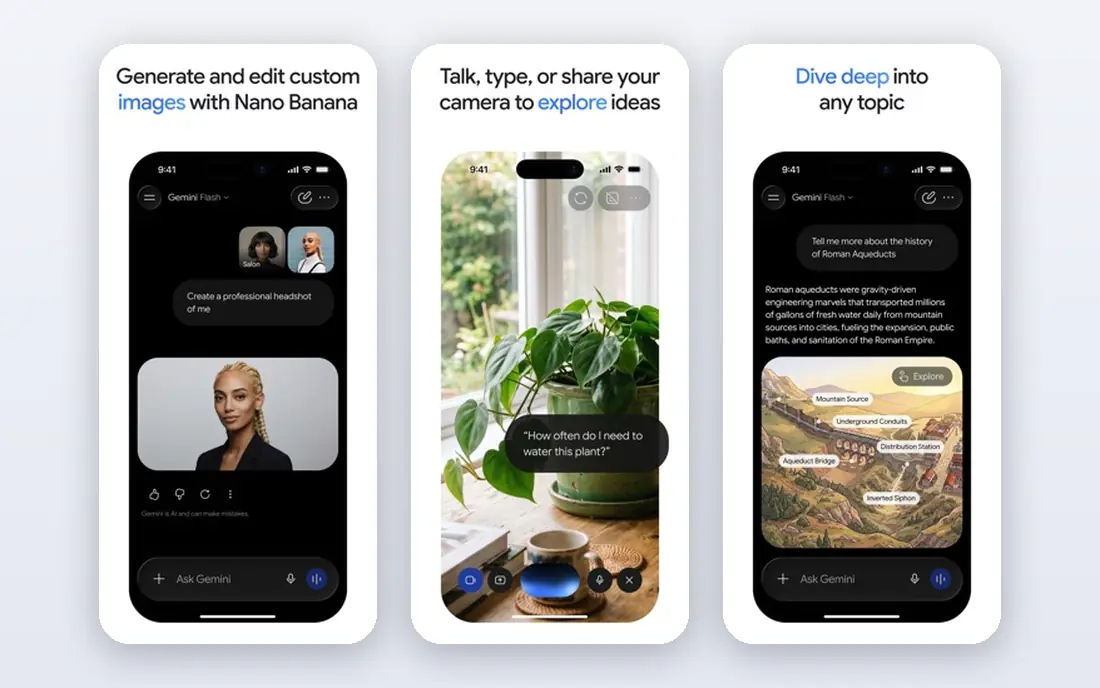
Gemini is the natural AI phone app for anyone who lives in Gmail, Google Docs, Drive, and Android, because it can pull context from those apps and work across them. On Android, Gemini can replace the default assistant, handle live conversations with camera input, and help with what is on screen. It also handles long documents well, which suits students and professionals who work with PDFs and research.
The limit is ecosystem. On iPhone, Gemini is a separate app rather than a system assistant, so it feels less integrated than on Android, and some advanced features sit behind Google AI Pro at $19.99 per month. If you are a heavy Google user, those trade offs are minor, because the integration saves time every day. If you are not, ChatGPT or Claude may feel more neutral.
- Deep Google integration
- Strong live camera and voice features
- Long document handling
- Best experience is on Android
- Some features vary by device and region
Claude, from Anthropic, is the pick for readers and writers who work with long documents, research papers, and nuanced drafts. It is good at summarizing a long PDF, comparing versions, and explaining a complex argument without rushing to a short answer. The mobile app also works well with shortcuts and widgets on iPhone, which helps for quick capture and follow up.
The honest weakness is breadth. Claude does not offer native image generation in the way ChatGPT and Gemini do, so a user who wants images, voice, and writing in one app will need a second tool. Claude Pro costs $20 per month, or less on annual billing in some listings, and the free tier is enough for light use but not for daily heavy work. For writing and analysis first, Claude is the strongest specialist on this list.
- Thoughtful long form writing
- Strong document analysis
- Clear and careful tone
- No native image generation
- Free tier is more limited for heavy use
Microsoft Copilot is the obvious choice if your work already lives in Word, Excel, PowerPoint, Outlook, and Teams, because Copilot can draft, summarize, and analyze inside those apps. The standalone mobile app also gives free chat, image generation, and voice, so you can try it without paying. For a Windows user, that integration is more useful than a slightly better chat model in a separate app.
The catch is that the full paid value is tied to Microsoft 365 pricing, which varies by plan, and the free tier has its own limits. Copilot also feels less polished as a general creative app than ChatGPT or Gemini, especially for image work. If you already pay for Microsoft 365, Copilot is the easy add on. If you do not, start with the free app and judge whether the work features justify a paid plan.
- Built into Word, Excel, PowerPoint, and Outlook
- Good for work documents
- Free app is useful
- Paid value depends on a Microsoft 365 subscription
- Voice and image features trail leaders
Perplexity is built for a different job from the general chatbots: answering a question with sources you can open and verify. That makes it the best ai app for mobile research, fact checking, and exploring an unfamiliar topic, because you can follow the citations instead of trusting a single paragraph. The mobile app is fast, and it handles follow up questions well when you want to dig deeper.
The limit is creative range. Perplexity is not the best choice for long creative writing, brainstorming, or image generation, and its free tier limits the number of Pro searches per day. Perplexity Pro costs $20 per month and lifts those limits. For a student, journalist, or curious reader who checks facts often, it pairs well with a general app such as ChatGPT, rather than replacing it entirely.
- Answers show sources you can check
- Strong for news and research
- Fast and focused
- Less suited to open ended creative writing
- Pro plan is $20 per month
Grok, from xAI, is a fast conversational app that is particularly useful for current events, social trends, and quick questions where freshness matters. Its entry paid tier is lower than the $20 standard of several rivals, which makes it an affordable second app for users who want a different voice and a different take on the news. The mobile app is simple to use, and it handles image generation in some plans.
The trade off is depth for work. Grok is less established as a document analysis and long form writing tool than Claude or ChatGPT, and some features depend on which paid tier you choose. If your main need is a quick, current, and conversational assistant, Grok is worth trying free first. If your main need is careful work documents, start with Claude or ChatGPT instead.
- Fast and conversational
- Useful for current events and social trends
- Lower entry paid price
- Less polished for long work documents
- Availability and features vary by plan
Meta AI is the assistant that lives inside WhatsApp, Instagram, Facebook, and Messenger, plus a standalone app, which makes it the most convenient AI for quick questions while you are already in a social app. You can ask for ideas, summaries, and image help without opening a new app, and the free tier covers casual use well. For a user who wants AI as a light helper rather than a work tool, that convenience is the whole point.
The honest limit is depth and privacy. Meta AI is not the best choice for long documents, coding, or sensitive work, and you should review what data is kept and how it is used before pasting personal details. Because it is free and embedded, it is easy to use casually, but that ease also makes it easy to share more than you intended. Use it for everyday questions, and keep sensitive work in an app whose privacy controls you have checked.
- Built into WhatsApp, Instagram, and Facebook
- Free to use
- Quick for everyday questions
- Less suited to deep work
- Privacy settings need careful review
DeepSeek is the low cost surprise on this list, because its free chat app offers strong reasoning and coding help without a subscription. The interface is simple, the answers are often detailed, and for a student or developer who wants a capable second opinion, it is a useful addition to a phone. It also appeals to users who want to try a capable model without committing to a $20 monthly plan.
The trade off is ecosystem. DeepSeek does not integrate with Google, Microsoft, or Apple apps in the way Gemini, Copilot, or Apple Intelligence do, and its mobile features are narrower than ChatGPT. It is best used as a free companion app for chat and reasoning, rather than as your only AI tool. Try it alongside your main app, and keep it if its answers earn a place on your home screen.
- Free chat app
- Strong reasoning for the price
- Simple and fast interface
- Fewer ecosystem integrations
- App features are narrower than larger rivals
How we picked these
We compared official pricing pages, app store listings, and public feature pages for AI apps that work on a phone today, with a free tier and a clear paid upgrade. We favored apps with a real mobile experience, including voice, camera, or widget features, rather than web only tools. Prices are US list prices from vendor pages and recent comparisons, and they change often, so check the app store listing and the vendor pricing page before you pay.
How to choose the right AI app for your phone
Start with the apps you already use. A Google user gets more from Gemini, a Microsoft 365 user gets more from Copilot, and an Apple user may get value from Apple Intelligence alongside a general app. That fit matters more than a small difference in chat quality, because an assistant that can reach your email, calendar, and files saves time every day.
Test free before you pay
Use two apps free for two weeks and note which one you open without thinking. Pay attention to voice quality, how well it handles photos and files, and whether its answers need heavy editing. A paid plan is worth it only when you hit a free limit on a task you do often, such as image generation, long documents, or voice. If you do not hit a limit, keep the free tier and save the money.
Protect your privacy
Before you paste work, health, or financial details into any AI app, check its history, training, and deletion settings. Pause history where the app allows it, delete sensitive chats, and avoid pasting passwords, account numbers, or private client data. A good AI phone app should make those controls easy to find, and if it does not, that is a reason to choose a different app for sensitive work.
Frequently asked questions
What is the best mobile ai app for most people?
For most people, ChatGPT is the best mobile ai app to start with, because it covers writing, ideas, images, voice, and file help in one free app. Gemini is a close second for Google and Android users, and Copilot is the better pick for Microsoft 365 users. Try ChatGPT free first, then add a specialist only if you have a specific job it does not handle well.
What are the best ai tools for mobile writing and research?
For writing, Claude is the strongest specialist for long and careful work, while ChatGPT is the best all rounder. For research, Perplexity is the best ai app for mobile because its answers include sources you can check. Many readers use both: Perplexity to find and verify facts, and Claude or ChatGPT to turn those facts into a draft.
What is the best ai phone app for Android?
For Android, Gemini is the best ai phone app for most users, because it can act as the system assistant and work with Google apps, camera, and live voice. ChatGPT is still a strong second choice on Android, especially for images and voice, and it works well alongside Gemini. If you use a Samsung or Pixel phone, check which assistant features are built in before you install a second app.
Is there a best ai mobile app that is completely free?
All of the apps on this list have a free tier, and ChatGPT, Gemini, Copilot, Perplexity, Meta AI, and DeepSeek all cover everyday questions free. The free tiers have limits on advanced models, image generation, and voice, but they are enough for light daily use. If you need heavy daily use, a paid plan from $10 to $20 per month is the normal price, and you should test free first to see if you need it.
Which AI app is best for images on a phone?
For images on a phone, ChatGPT and Gemini are the strongest general choices, because both generate and edit images inside a chat app. Midjourney and other image specialists offer higher artistic control, but they are less convenient as a phone app for everyday use. If images are your main job, compare ChatGPT and Gemini side by side with the same prompt and pick the style you prefer.
Sources we checked (8)

Online Jobs is an independent blog about careers, online work, learning new skills and the tools that help people earn. More about us.
Keep reading
All posts
iPhone Alternatives
Looking for iPhone alternatives in 2026? Compare 9 Android phones from Samsung, Google, OnePlus, and more, with cameras, battery life, and honest trade-offs.

Who Has the Best Home Internet Service
Find who has the best home internet service for your address, with fiber, cable, 5G, and satellite providers compared on price, speed, and coverage here.
Best Robotics Companies
Compare the best robotics companies in 2026, from humanoids to factory robots, with focus areas, deployments, and honest limits for buyers and pilots.