Alternatives to Julia in 2026: 8 Languages Compared

How we put this together: we compare official feature and pricing pages, app store listings, privacy policies and public user reviews. Prices change, so check the provider's site before you pay.
Key takeaways
- Python is the most versatile alternative to Julia, with large libraries for data science, machine learning, and general programming.
- R leads for statistical analysis and visualization, with a vast package ecosystem for data work.
- GNU Octave and Scilab are the closest free, MATLAB-style options, with Octave aiming for high MATLAB compatibility.
- MATLAB and Mathematica suit engineering and symbolic work where toolboxes, support, and institutional licenses matter, at a higher price.
Quick comparison
| Name | Who it suits | Starting price | Free option | |
|---|---|---|---|---|
 Python | Versatile data and ML work | Free | Yes | Visit |
 R | Statistics and visualization | Free | Yes | Visit |
 MATLAB | Engineering toolboxes | See website | Free trial | Visit |
 GNU Octave | Free MATLAB-style computing | Free | Yes | Visit |
 Scilab | Free numerical computing | Free | Yes | Visit |
 Mathematica | Symbolic and technical computing | See website | Free trial | Visit |
 Fortran | High-performance numerical code | Free | Yes | Visit |
 Go | Fast compiled services and tools | Free | Yes | Visit |
The best alternatives to Julia
Julia is a high-level language built for technical computing, combining readable syntax with just-in-time compilation for fast numerical work. People look for alternatives when they need a larger library ecosystem, a specific toolset for statistics or engineering, an institutional standard, or a language with a bigger hiring pool. The options below cover those needs, from general-purpose Python to specialized MATLAB and Mathematica, and from free open-source tools to commercial platforms.
Python is our pick for most people moving away from Julia. With NumPy for arrays, SciPy for scientific routines, pandas for data frames, and libraries for machine learning, plotting, and data pipelines, Python covers more ground than any other alternative here. Its syntax is readable, its community is very large, and its job market is broader than Julia for data science and general software work.
The catch is speed for pure numerical loops. Python itself is slower than Julia for tight loops, though NumPy, SciPy, and Numba close much of that gap for array and compiled work. Environment management also needs discipline, since projects can depend on many packages with different versions. For data pipelines, machine learning, and general technical work, Python is the most practical Julia alternative. For pure high-performance numerical code written from scratch, Julia still has an edge.
- Huge ecosystem with NumPy, SciPy, pandas, and machine learning libraries
- Readable syntax
- Large community and job market
- Slower than Julia for raw numerical loops without Numba or compiled extensions
- Package and environment management needs care
R is the best alternative when statistics and visualization are the main job. Its package ecosystem covers modeling, inference, time series, spatial data, and reporting, and its plotting tools, led by ggplot2, remain a benchmark for clear statistical graphics. R is widely taught in statistics, economics, and life sciences, so teams in those fields will find collaborators and code easily.
The weakness is general programming. R syntax reflects decades of history and can feel inconsistent, and it is less suited than Python or Go to building large applications or services. Dependency management also needs care, since R projects often rely on many packages. Choose R when your work is statistical analysis, data exploration, and reporting. Choose Python when the same project also needs pipelines, apps, or machine learning production work.
- Vast statistical package ecosystem
- Strong visualization with ggplot2 and related tools
- Standard in statistics and data analysis courses
- Syntax can feel inconsistent
- Slower for general programming
- Less suited to building large applications
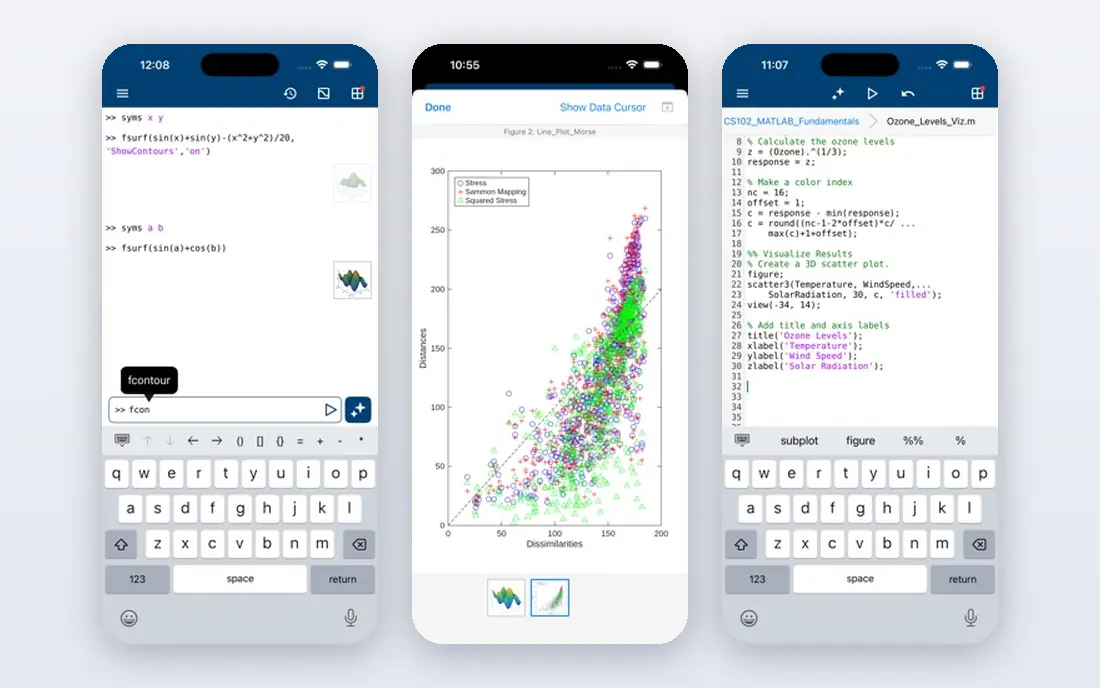
MATLAB suits engineering teams and institutions where its environment and toolboxes are already standard. It offers a high-level language for matrix operations, plotting, simulation, and app building, with toolboxes for control systems, signal processing, image processing, and other specialties. Its integrated debugger, profiler, and documentation help engineers move from prototype to tested code.
The catch is cost and scope. MATLAB is commercial software with license fees that vary by user type and toolboxes, and published comparisons note it can be slower and less library-rich than Python for some modern data and machine learning work. It remains useful when a team, a course, or a client already works in MATLAB, or when a specific toolbox is required. For a new, budget-conscious project, Python or Octave will usually be cheaper.
- Integrated environment for numerical computing
- Extensive toolboxes for engineering, control, and signal work
- Strong institutional support
- Commercial licensing cost
- Slower and less library-rich than Python for some modern data work in published comparisons
GNU Octave is the closest free alternative to MATLAB, and the best pick for MATLAB-style code without a license. It provides a high-level interpreted language for numerical computations, with built-in functions, plotting, and user-defined functions and scripts. It aims for compatibility with MATLAB, so many MATLAB projects run in Octave with little or no change, which helps students and researchers moving off a campus license.
The limit is toolbox depth. Octave does not match MATLAB breadth of specialized toolboxes, and its interface and speed can differ on larger or more specialized workloads. For core numerical work, teaching, and MATLAB-compatible scripts, Octave is excellent. For a project that depends on a specific MATLAB toolbox, check Octave package coverage before switching.
- Free and open source
- Aims for high MATLAB compatibility
- Runs on Linux, Windows, and macOS
- Fewer specialized toolboxes than MATLAB
- Interface and performance differ from MATLAB in some areas
Scilab is another free, open-source option for numerical computation, similar in scope to MATLAB and Octave but without aiming for exact MATLAB compatibility. It covers matrix operations, plotting, simulation, signal processing, and optimization, with a graphical environment for interactive work. For teams that want a free numerical platform and do not need to run existing MATLAB code unchanged, Scilab is a solid, independent choice.
The trade-off is ecosystem size. Scilab community and package range are smaller than Python, R, or Octave, so finding help and ready-made code for a niche problem can take longer. Its MATLAB-like feel still helps newcomers, but code written for MATLAB may need edits. Choose Scilab when you want a self-contained free numerical environment. Choose Octave when MATLAB compatibility is the priority.
- Free and open source
- Broad numerical features
- Runs on Windows, macOS, and Linux
- Less MATLAB compatibility than Octave by design
- Smaller community than Python or R
Mathematica, built on the Wolfram Language, suits symbolic mathematics, technical documentation, and integrated computation where algebra, calculus, visualization, and reporting sit in one notebook. It handles symbolic simplification, equation solving, and high-quality plots in a way array-focused languages do not, and its notebook format suits teaching and technical reports.
The catch is price and fit. Mathematica is commercial software with pricing that varies by license type, and it is less suited than Python to large data pipelines, web services, or production machine learning. Teams that need symbolic work, or that already use Wolfram tools, will find it powerful. Teams that need data pipelines or general software should start with Python or R instead.
- Strong symbolic computation
- Integrated visualization and documentation
- Wolfram Language for technical workflows
- Commercial pricing
- Less suited to large-scale data pipelines than Python
- Learning curve for Wolfram Language
Fortran remains relevant for high-performance numerical work, especially in weather, climate, physics, and engineering simulations where decades of tested code already exist. Modern Fortran offers array operations, modules, and parallel features, and compiled Fortran code runs fast for large numerical workloads. For time-critical code inside a larger system, Fortran is still a serious choice, and Julia itself is often compared with Fortran for numerical speed.
The weakness is breadth. Fortran is less convenient than Python or R for data cleaning, visualization, interactive exploration, or building applications, and its modern library ecosystem is smaller. Choose Fortran for performance-critical numerical kernels, for legacy scientific code, or for simulations where speed and numerical tradition matter. Choose Python or Julia for exploratory data work around those kernels.
- Long record in high-performance numerical computing
- Fast compiled code
- Strong for simulations and legacy scientific codebases
- Older language with a smaller modern ecosystem
- Less convenient for data analysis, plotting, and interactive work
Go is the alternative when a Julia project needs to become a fast, deployable tool or service rather than a research script. It compiles quickly, produces single binaries, and handles concurrency well, which suits data tools, APIs, and infrastructure around scientific work. Its standard library and ecosystem for networking, CLIs, and cloud services are large.
The limit is scientific depth. Go lacks the mature numerical, statistical, and plotting libraries of Python and R, and it is not designed for interactive notebook exploration. Use Go to wrap, serve, or scale a numerical model, and use Python, R, or Fortran for the model itself where libraries matter. For a team that already ships Go services, that split keeps both sides in their strongest language.
- Fast builds and compiled performance
- Simple syntax
- Strong for tools, services, and concurrent programs
- Smaller scientific library ecosystem than Python or R
- Less convenient for interactive numerical exploration
How we picked these
We compared official language and product documentation, scientific computing comparisons, and ecosystem notes, focusing on languages and platforms that cover Julia core ground: numerical computing, data analysis, statistics, or high-performance technical work. We kept a mix of free open-source languages, free MATLAB-style tools, and commercial platforms, and we used "See website" where vendors use varied commercial licensing rather than a single published entry price. All free languages here are open source, so the choice comes down to libraries, speed, and team skill, not license cost.
What to check before you switch from Julia
Start with the workload, not the language popularity. A statistics project needs R or Python with stats libraries. An engineering simulation needs MATLAB, Octave, or Fortran. A data pipeline or machine learning project needs Python. A symbolic project needs Mathematica. A service around a model needs Go. Naming the workload first prevents choosing a popular language that lacks the libraries your project depends on.
Next, test library coverage and speed on a real slice of your work, not a toy example. Port one representative calculation, including data loading, the core numerical step, and a plot or output, then measure runtime, code length, and readability. Julia speed advantage shows most in custom numerical loops, while Python advantage shows most in library-rich pipelines. That small port tells you more than a benchmark table.
Finally, check team, teaching, and collaboration fit. A language your collaborators, reviewers, or students already know will get used and reviewed, while a faster language no one else reads will stall. Check hiring, course materials, and package maintenance for your field, and confirm how results will be shared, whether as notebooks, scripts, packages, or reports. The best alternative is the one your team can maintain after the first author moves on.
Speed versus ecosystem
Julia offers a strong balance of speed and readability for custom numerical code. Python offers the largest ecosystem at the cost of slower raw loops without compiled help. Fortran offers raw speed for kernels at the cost of convenience. Choose speed when custom loops dominate runtime, and choose ecosystem when libraries, data handling, and hiring dominate project time.
Interactive work versus production code
R, Python notebooks, Octave, and Mathematica suit interactive exploration, teaching, and reporting. Fortran and Go suit production kernels, tools, and services. Many successful projects use both: an interactive language for exploration, and a compiled language for the hot path or the deployed service. Plan that split early, rather than forcing one language to serve both roles poorly.
Frequently asked questions
What is the best alternative to Julia for data science?
Python is the best general alternative for data science, thanks to NumPy, SciPy, pandas, and machine learning libraries, plus a large job market. R is best when the work is mainly statistical analysis and visualization. Choose Python for pipelines and machine learning, and R for statistics-led analysis and reporting.
Is Python faster than Julia?
For raw numerical loops written directly in each language, Julia is generally faster, thanks to just-in-time compilation designed for numerical work. Python closes much of that gap with NumPy, SciPy, and Numba for array and compiled sections. For library-rich data work, Python speed is usually sufficient, and its ecosystem advantage outweighs the raw loop difference.
Is Octave a good replacement for MATLAB?
Yes, for core numerical work and many MATLAB-compatible scripts, since Octave aims for high MATLAB compatibility and is free. It does not match MATLAB on specialized toolboxes, support, or some performance areas, so check toolbox coverage for your project. For teaching, basic engineering, and MATLAB-style scripts without a license, Octave is the strongest free replacement.
Can R replace Julia for scientific computing?
R can replace Julia for statistical computing, data analysis, and visualization, where its package ecosystem is strongest. It is less suited to high-performance custom numerical loops, general application building, or large-scale simulation work, where Julia, Python with Numba, or Fortran fit better. Use R for statistics, and pair it with another language when performance or production code matters.
Is MATLAB still worth using in 2026?
Yes, in engineering and institutional settings where its toolboxes, integrated environment, and support are already standard. MATLAB is expensive compared with free alternatives, and Python offers a broader modern data ecosystem, but a team that already works in MATLAB, or that needs a specific toolbox, will still get value from it. New budget-conscious projects should compare Python and Octave first.
Should I learn Julia or Python first?
Learn Python first if your goal is data science, general programming, or the broadest job market. Learn Julia first if your goal is high-performance technical computing and you want a language designed for numerical work from the start. Many researchers learn both, using Python for pipelines and Julia for custom numerical code where speed matters.
Sources we checked (8)

Online Jobs is an independent blog about careers, online work, learning new skills and the tools that help people earn. More about us.
Keep reading
All posts
iPhone Alternatives
Looking for iPhone alternatives in 2026? Compare 9 Android phones from Samsung, Google, OnePlus, and more, with cameras, battery life, and honest trade-offs.

Who Has the Best Home Internet Service
Find who has the best home internet service for your address, with fiber, cable, 5G, and satellite providers compared on price, speed, and coverage here.
Software Engineering Best Practices
Learn software engineering best practices through 8 tools for CI, testing, code review, and observability that support better engineering for growing teams.