Smartsheet Alternatives in 2026: 9 Tools Compared

How we put this together: we compare official feature and pricing pages, app store listings, privacy policies and public user reviews. Prices change, so check the provider's site before you pay.
Key takeaways
- monday.com is the easiest visual move from Smartsheet, while ClickUp gives the most features per dollar.
- Asana suits clear task ownership, and Airtable suits teams that run projects off linked data.
- Zoho Projects is the cheapest paid start here at 4 dollars per user per month.
- Free plans are real but capped, so test with real project size before a rollout.
- Import one real project first, since formulas and automations rarely transfer cleanly.
Quick comparison
| Name | Who it suits | Starting price | Free option | |
|---|---|---|---|---|
 monday.com | Visual boards and timelines | $9 per month | Yes | Visit |
 Asana | Clear task ownership across teams | $10.99 per month | Yes | Visit |
 ClickUp | Most features per dollar | $7 per month | Yes | Visit |
 Airtable | Projects built on linked data | $20 per month | Yes | Visit |
 Wrike | Structured planning at scale | $10 per month | Yes | Visit |
 Trello | Simple kanban boards | $5 per month | Yes | Visit |
 Zoho Projects | Low-cost planning for Zoho users | $4 per month | Yes | Visit |
 Notion | Docs, wikis, and light projects | $10 per month | Yes | Visit |
 Teamwork.com | Agencies that bill time | $9.99 per month | Yes | Visit |
The best Smartsheet alternatives
Smartsheet suits teams that think in rows and columns. The best replacement keeps that structure where it helps, and adds views, automations, or reporting where Smartsheet feels thin.
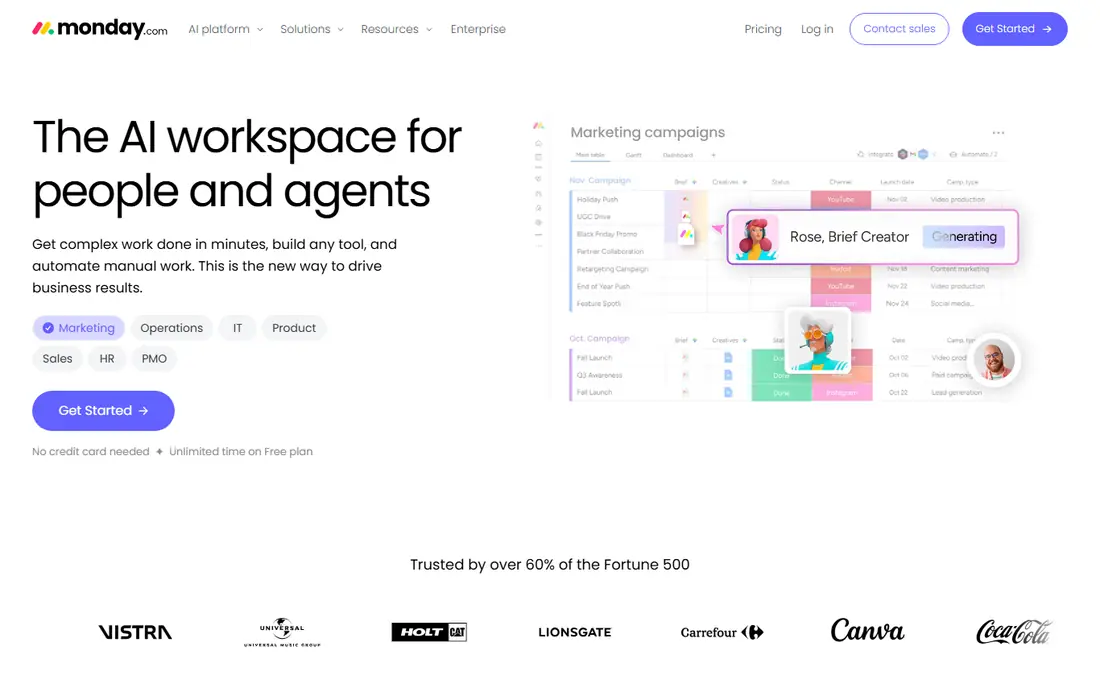
For teams moving from sheets to visual boards, monday.com is a strong starting point. The core strength here is boards where each row is a work item and each column tracks status, owner, or date. That combination makes it a sensible shortlist entry for buyers who want that specific strength without paying for a much larger platform.
The honest catch is that the seat minimum matters for very small teams, so price it for your real headcount, not a single user. Check the current pricing page and free plan limits on your own device before you commit, since plans and limits change. We think it earns its place here because it solves a clear job well, even if it is not the right fit for every buyer.
- Visual boards that are easy to read
- Timeline and Gantt views
- Strong automation options
- Three-seat minimum on paid plans
- Costs rise with larger teams

If you need cross-functional teams that need clear ownership and deadlines, Asana deserves a close look. The main draw is a clean task model that makes it clear who owns each piece of work and when it is due. That combination makes it a sensible shortlist entry for buyers who want that specific strength without paying for a much larger platform.
The honest catch is that teams that need portfolios and advanced reporting should budget for the higher tier from the start. Check the current pricing page and free plan limits on your own device before you commit, since plans and limits change. We think it earns its place here because it solves a clear job well, even if it is not the right fit for every buyer.
- Clean task and project views
- Portfolios and goals on higher plans
- Good for cross-team work
- Free plan is limited
- Advanced reporting sits on higher plans
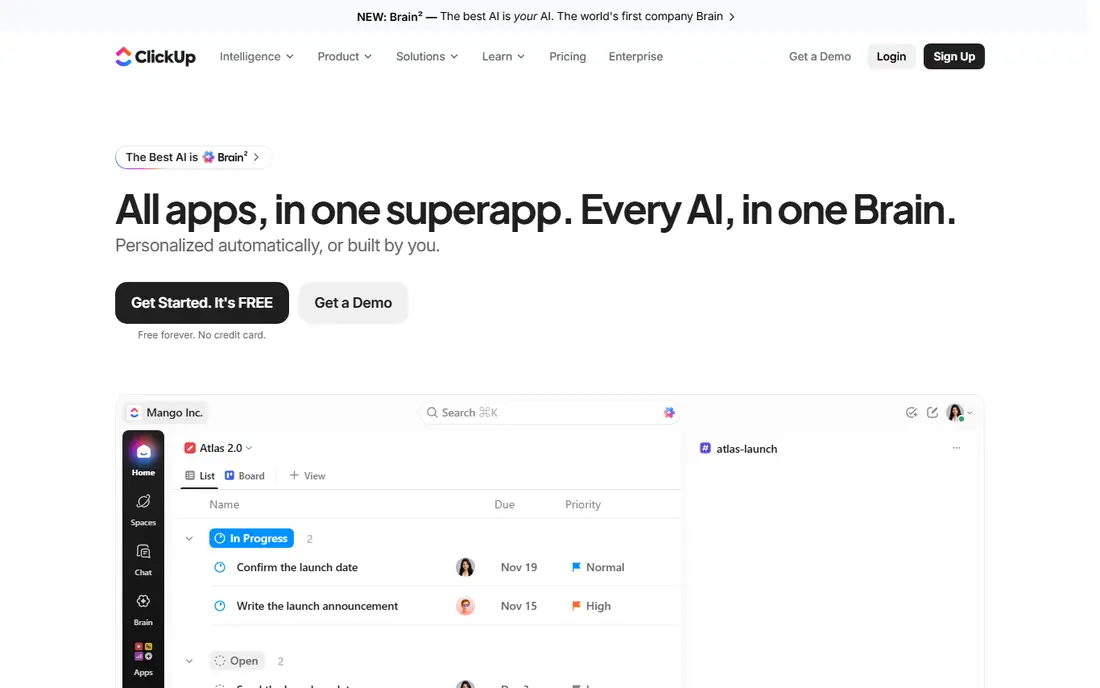
ClickUp fits budget-conscious teams that want one app for tasks, docs, and planning well, with a clear focus on what matters. In practice, buyers praise breadth, with docs, whiteboards, goals, and many views under one login. That combination makes it a sensible shortlist entry for buyers who want that specific strength without paying for a much larger platform.
The honest catch is that the same breadth can slow the first setup, so start with one project template and add views only as needed. Check the current pricing page and free plan limits on your own device before you commit, since plans and limits change. We think it earns its place here because it solves a clear job well, even if it is not the right fit for every buyer.
- Docs, tasks, goals, and views in one app
- Low paid starting price
- Flexible custom fields
- Depth can slow setup
- Some teams find the options overwhelming
Teams looking for operations teams that run projects off structured data will find Airtable a practical choice. What keeps users with it is linked records that connect projects, clients, and tasks without copying data between sheets. That combination makes it a sensible shortlist entry for buyers who want that specific strength without paying for a much larger platform.
The honest catch is that record limits on the free plan mean growing teams should test with real data volumes before committing. Check the current pricing page and free plan limits on your own device before you commit, since plans and limits change. We think it earns its place here because it solves a clear job well, even if it is not the right fit for every buyer.
- Spreadsheet-like grid with linked records
- Interfaces for different roles
- Good automations
- Free plan caps records
- Paid price rises fast for larger teams
When mid-size teams and PMOs that need resource planning is the priority, Wrike stands out for a clear reason. What sets it apart is resource views and approvals that help managers see workload across many projects. That combination makes it a sensible shortlist entry for buyers who want that specific strength without paying for a much larger platform.
The honest catch is that smaller teams may find the setup heavy, so use the free plan to test one real workflow first. Check the current pricing page and free plan limits on your own device before you commit, since plans and limits change. We think it earns its place here because it solves a clear job well, even if it is not the right fit for every buyer.
- Resource planning and approvals
- Flexible project views
- Strong for larger teams
- Setup takes longer than simpler tools
- Higher plans are quote-based
Trello is built around small teams that want simple kanban without a learning curve, and that focus shows in daily use. Where it earns its place is simplicity, with cards, lists, and drag-and-drop work that new users grasp in minutes. That combination makes it a sensible shortlist entry for buyers who want that specific strength without paying for a much larger platform.
The honest catch is that complex projects with dependencies and resource planning will outgrow Trello faster than the other tools here. Check the current pricing page and free plan limits on your own device before you commit, since plans and limits change. We think it earns its place here because it solves a clear job well, even if it is not the right fit for every buyer.
- Very easy kanban boards
- Fast to learn
- Good Power-Ups for extra features
- Weak for complex dependencies
- Reporting is basic
For buyers who need cost-sensitive teams, especially those already using Zoho, Zoho Projects offers a direct route. Its clearest strength is price, with Gantt planning and time tracking at a lower starting cost than most rivals. That combination makes it a sensible shortlist entry for buyers who want that specific strength without paying for a much larger platform.
The honest catch is that teams outside Zoho may find fewer native integrations, so check the apps you already use first. Check the current pricing page and free plan limits on your own device before you commit, since plans and limits change. We think it earns its place here because it solves a clear job well, even if it is not the right fit for every buyer.
- Low paid starting price
- Gantt charts included
- Works well with other Zoho apps
- Interface feels older than rivals
- Some integrations are limited
If teams that want docs and light project tracking in one place matters most, Notion is worth testing first. The standout feature is flexibility, with pages, databases, and templates that adapt to docs, wikis, and simple projects. That combination makes it a sensible shortlist entry for buyers who want that specific strength without paying for a much larger platform.
The honest catch is that heavy project planning with dependencies and resource views is better served by a dedicated PM tool. Check the current pricing page and free plan limits on your own device before you commit, since plans and limits change. We think it earns its place here because it solves a clear job well, even if it is not the right fit for every buyer.
- Docs and databases in one workspace
- Flexible templates
- Good for team knowledge
- Project features are lighter than dedicated PM tools
- Permissions need care at scale
Teamwork.com suits agencies and client-service teams that bill by the hour, with strengths that match that job. In daily use, the strength is time tracking tied to tasks, which makes client billing and workload reporting much easier. That combination makes it a sensible shortlist entry for buyers who want that specific strength without paying for a much larger platform.
The honest catch is that the free plan is small, so agencies should price the paid plan for the full team including collaborators. Check the current pricing page and free plan limits on your own device before you commit, since plans and limits change. We think it earns its place here because it solves a clear job well, even if it is not the right fit for every buyer.
- Time tracking built in
- Client project views
- Good for billable work
- Free plan caps users
- Learning curve for advanced setup
How we picked these
We compared pricing pages, free plan limits, views, automations, and import options for each tool. We favoured tools with a real free plan or trial, a clear import route from sheets or CSV, and Gantt or timeline views for planning. Prices below are the entry paid prices shown on vendor pages in October 2026, billed annually where stated, and they can change.
We also weighed ease of setup, support quality, and how well each product fits its stated best use. A product that is strong in general but weak for the stated job did not make the list. Where a price or free tier could not be verified on a vendor page, we wrote See website rather than guessing a number.
How to switch from Smartsheet without losing work
Export a real Smartsheet project to CSV and import it into your top two choices before you decide. Test the views your team uses daily, such as Gantt, timeline, or kanban, and check whether formulas, dependencies, and automations carry over. Price the plan for your full team, including guests and viewers, since seat minimums change the total fast. Run one live project in the new tool for two weeks, then judge by how often the team updates it without prompting.
Make a short list of two or three options and test each one on a real task from your own work. Note setup time, daily friction, and total cost, including any paid tier you will actually need. The best choice is usually the one your team or household keeps using after the first week, not the one with the longest feature list.
Frequently asked questions
What is the best free alternative to Smartsheet?
ClickUp, Trello, Asana, and monday.com all offer free plans, but each caps users, views, or features in different ways. ClickUp gives the most features on free use, while Trello is the simplest for kanban. Test your real project size on the free plan before rolling it out to a whole team.
Which Smartsheet alternative is best for Gantt charts?
monday.com, Wrike, Zoho Projects, and ClickUp all offer Gantt or timeline views, though some need a paid plan for the full view. Check whether dependencies, milestones, and critical path are included on the plan you will actually buy. A free plan may show a timeline but hide the features planners need.
Can I import Smartsheet data into these tools?
Most tools here accept CSV import, and several offer direct sheet import or a guided migration. Formulas and complex automations rarely transfer cleanly, so plan to rebuild those parts. Import one project first and check dates, owners, and dependencies before moving the rest.
Is Asana better than Smartsheet?
Asana suits teams that want clean task ownership and cross-team coordination, while Smartsheet suits teams that want spreadsheet-style planning and reporting. If your work lives in rows, formulas, and reports, Smartsheet or Airtable may fit better. If your work lives in tasks and deadlines, Asana is often easier to adopt.
Which alternative is cheapest for a small team?
Zoho Projects starts at 4 dollars per user per month, followed by Trello at 5 dollars and ClickUp at 7 dollars, on annual billing. Free plans can cover very small teams, but seat minimums and feature caps matter. Price for your real team size, not a single user.
Sources we checked (6)

Online Jobs is an independent blog about careers, online work, learning new skills and the tools that help people earn. More about us.
Keep reading
All posts
Trello Alternatives
We compared the best free and paid Trello alternatives for 2026, from Asana and monday.com to ClickUp, Notion and Zoho Projects, on price and kanban boards.
Best Project Portfolio Management Software
We compared the best project portfolio management software for planning, capacity, and reporting across many projects, with pricing and free plans included.

Best Jira Alternatives
Looking for Jira alternatives in 2026? We compare 9 tools for issue tracking, sprints, projects and cross-team work, without heavy Jira administration.