Home / Office and writing software
8 Microsoft Word Alternatives That Are Free or Low Cost

How we put this together: we compare official feature and pricing pages, app store listings, privacy policies and public user reviews. Prices change, so check the provider's site before you pay.
Key takeaways
- Google Docs suits real-time collaboration, while LibreOffice Writer suits offline desktop writing with no account.
- Free alternatives to Microsoft Word differ: some are fully free, others offer a free tier inside a paid product.
- For Word file fidelity, ONLYOFFICE and WPS Office are strong, but complex Word files can still shift in any rival.
- Apple Pages is free on Apple devices, but Windows users should pick a cross-platform option instead.
- The best word processing software for you depends on collaboration, offline access, and file formats, not on price alone.
Quick comparison
| Name | Who it suits | Starting price | Free option | |
|---|---|---|---|---|
 Google Docs Google Docs | Real-time collaboration | Free | Yes | Visit |
 LibreOffice Writer LibreOffice Writer | Free offline desktop writing | Free | Yes | Visit |
 Apple Pages Apple Pages | Apple device users | Free | Yes | Visit |
 WPS Office WPS Office | Word-like interface on a budget | Free | Yes | Visit |
 Zoho Writer Zoho Writer | Clean online writing for teams | Free | Yes | Visit |
 ONLYOFFICE ONLYOFFICE | Word file compatibility | Free | Yes | Visit |
 FreeOffice TextMaker FreeOffice TextMaker | Light desktop writing | Free | Yes | Visit |
 Notion Notion | Notes, docs, and team wikis | Free | Yes | Visit |
The best microsoft word alternatives
We compared alternatives to Microsoft Word on price, Word file handling, collaboration, offline access, and platform support. The free alternatives to Word below cover web, desktop, and mobile needs.
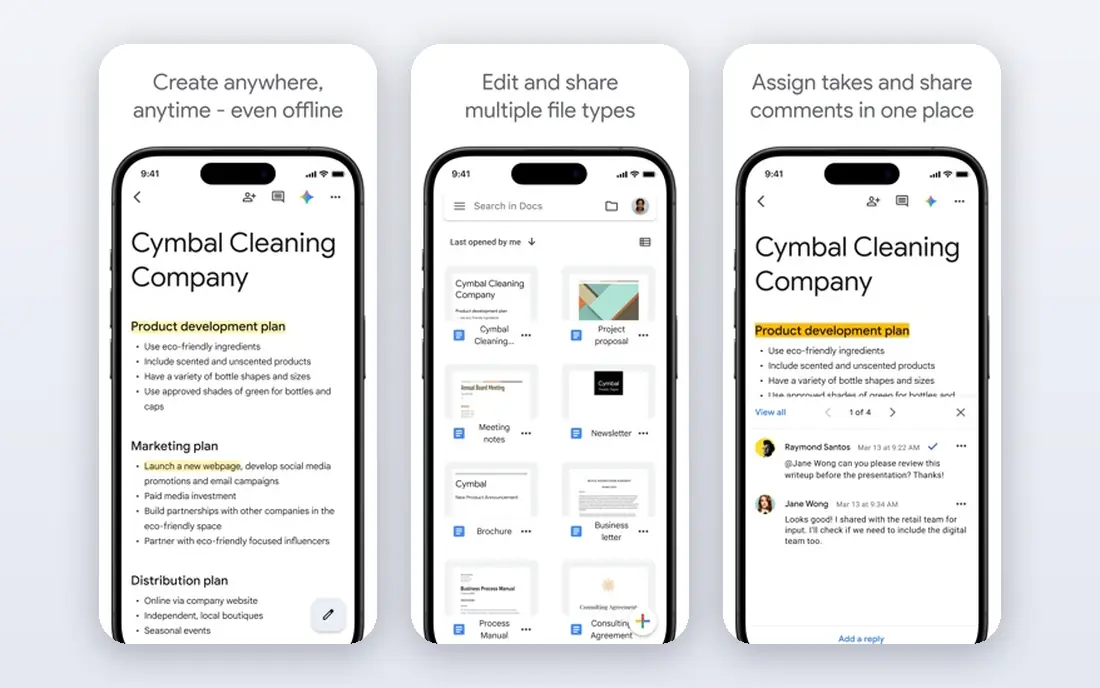
Google Docs fits teams, students, and editors who write together. Several people can edit, comment, and suggest changes at once, and version history makes it easy to undo a bad edit. For shared drafts, school work, and fast feedback, that workflow is hard to beat, and it costs nothing for personal use. The honest catch is offline and layout depth. Google Docs handles everyday documents well, but a complex Word file with careful styles, footnotes, or tracked changes may not look identical. If you mainly write and share online, Google Docs is the easiest good alternative to Microsoft Word. If you need deep desktop layout, pair it with LibreOffice Writer.
- Free with a Google account
- Real-time co-editing and comments
- Automatic saving and version history
- Needs internet for full use
- Advanced Word layout can shift
- Offline mode needs Chrome or Edge setup
LibreOffice Writer fits a writer who wants installed software with no subscription and no account. It runs on Windows, macOS, and Linux, works fully offline, and includes styles, tables of contents, mail merge, and track changes. For long reports, theses, and books, its document controls are deeper than most web editors. The weakness is collaboration. Writer is not built for several people editing one document live, so teams should use it for solo drafting and use a web tool for joint edits. As a free Word alternative for a single writer, LibreOffice Writer is the strongest overall pick on this list.
- Fully free and open source
- Strong styles and long-document tools
- Opens and saves DOCX files
- No dependable real-time co-editing
- Interface feels older
- Complex Word files can shift
Apple Pages fits a Mac or iPhone user who wants a clean, fast word processor without a subscription. Templates look polished, layout tools are simple, and iCloud sync keeps documents current across Apple devices. For letters, reports, and school work on Apple hardware, Pages is more than enough. The catch is platform lock-in. Windows and Android users cannot use the full app, though iCloud web access offers a limited route. If your household or office mixes Apple and Windows devices, pick Google Docs or LibreOffice Writer instead. For an Apple-only user, Pages is an excellent free alternative to Word.
- Free on Mac, iPhone, and iPad
- Polished templates
- Exports to Word and PDF
- Mac and iOS only for full use
- Word compatibility is good, not perfect
- Fewer business features than Word
WPS Office fits a Word user who wants a familiar screen without a Microsoft 365 bill. The Writer app looks and feels close to Word, opens and saves DOCX files well, and includes spreadsheets and slides in the same suite. That familiarity cuts learning time for staff moving from Word. The honest weakness is the free tier. Ads appear in the free version, and fuller PDF tools and cloud storage sit behind paid plans. Check privacy and ad settings after install, and consider the paid tier if ads annoy your team. For a Word-like free alternative, WPS Office is still a strong pick.
- Familiar Word-like layout
- Good DOCX handling
- Desktop, mobile, and web apps
- Free version includes ads
- Some PDF and cloud features need paid plans
- Privacy settings need a check
Zoho Writer fits a small team or a solo writer who wants a clean web editor at no cost. Real-time editing, comments, and version control cover joint work, and automation features can help with forms and approvals in a business workflow. For everyday business documents, Writer feels calmer than a full office suite. The catch is offline access and ecosystem fit. Writer works best online, and its full value shows when a firm also uses Zoho Workplace or CRM. If you need strong offline desktop writing, LibreOffice Writer is better. If you want a free online editor with team features, Zoho Writer is a solid good alternative to Microsoft Word.
- Free for individuals
- Real-time collaboration
- Clean interface with automation options
- Offline use is limited
- Best value needs other Zoho apps
- Template range is smaller than Word
ONLYOFFICE fits teams and firms that share Word files daily and need layouts to stay intact. Its editors are built around Office formats, so DOCX files open and save with fewer shifts than many rivals. Desktop apps are free for personal use, and cloud or self-hosted options suit firms that want control over data. The weakness is cost for business cloud use and effort for self-hosting. A solo writer may not need those options, but a firm that does should budget for them. For best free office software with a focus on Word compatibility, ONLYOFFICE deserves a trial with your own most complex documents.
- Strong DOCX fidelity
- Desktop and cloud editors
- Co-editing and version control
- Cloud business plans are paid
- Setup for self-hosting takes skill
- Template library is smaller
FreeOffice TextMaker fits a user with an older PC or a simple desktop need. It installs quickly, runs well on modest hardware, and handles everyday Word files for letters, reports, and CVs. The free licence covers personal and commercial use, which makes it useful for small firms on a tight budget. The catch is collaboration and cloud depth. TextMaker is a desktop editor, not a team platform, so joint editing needs another tool. For a solo writer who wants a fast, free desktop alternative to Word, it is a practical pick. For a team, pair it with Google Docs or Zoho Writer for shared drafts.
- Free for personal and commercial use
- Fast on older PCs
- Good Word compatibility for everyday files
- No real-time co-editing
- Fewer cloud features
- Interface is functional rather than polished
Notion fits a team that writes docs, notes, and wikis in one place, rather than a writer who needs print-perfect Word files. Pages can hold text, tables, tasks, and embeds, and teams can link docs into a shared knowledge base. For internal guides, meeting notes, and project docs, that structure beats a folder of Word files. The honest weakness is print and Word fidelity. Notion is not built for careful page layout, headers, or complex Word styles, and exports can need cleanup. Use Notion for living team docs, and use LibreOffice Writer or Google Docs when you need a formal Word document to send outside the firm.
- Flexible pages, docs, and wikis
- Good for team knowledge
- Free plan for personal use
- Not a full Word replacement for print layout
- Offline use is limited
- Export to Word needs care
How we picked these
We compared official feature pages, pricing pages, app-store listings, and public reviews for each product. We tested the logic against everyday needs: opening and saving DOCX files, collaborating, working offline, and writing on each major platform. We did not claim hands-on testing. Where a price could not be confirmed on the vendor site, we wrote See website, though most picks here are free for the use described.
How to choose a Word alternative
Start with how you work, not with the feature list. A solo writer needs offline access and strong styles. A team needs comments, suggestions, and version history. A student needs free access and easy sharing. Write down your top three needs, then shortlist only the tools that meet all three.
Check Word files with your own documents
Open your five most complex Word files in each shortlisted tool: a CV, a report with tables, a document with footnotes, a tracked-changes draft, and a template. Check headings, tables, images, and page breaks. A tool that passes that test with your files is worth more than a general claim about compatibility.
Decide on offline and mobile needs
If you write on trains, planes, or in areas with weak internet, a desktop app such as LibreOffice Writer or FreeOffice TextMaker is essential. If you write mainly in a browser and share links, Google Docs or Zoho Writer will feel faster. Many writers use both: a desktop app for long drafts and a web app for shared edits.
Mind privacy and cost over time
Free does not always mean no cost. Some free suites show ads, limit cloud storage, or charge for AI and PDF tools. Read the free plan limits, check ad and data settings, and confirm what happens to your files if you stop paying. The best free office software is the one whose limits you can live with for years.
Frequently asked questions
What are the best free alternatives to Microsoft Word?
LibreOffice Writer is the best free desktop alternative, Google Docs is the best free collaboration tool, and Apple Pages is the best free option on Apple devices. ONLYOFFICE and WPS Office also offer free tiers with strong Word file handling. Pick by offline needs and collaboration needs, not by price alone.
Is Google Docs a good alternative to Word?
Yes, for online teamwork and everyday documents. Google Docs offers real-time editing, comments, suggestions, and version history for free. It is weaker for complex print layout and for offline work, where a desktop editor is a better fit.
Does LibreOffice Writer open and save Word files?
Yes. LibreOffice Writer opens and saves DOCX files, and handles most everyday formatting well. Very complex Word files with macros or unusual styles can shift, so test your own files before a full switch.
What is the best word processing software for a team?
Google Docs suits teams that edit together in real time. Zoho Writer suits small teams that want a clean online editor. ONLYOFFICE suits teams that share Word files and need layout fidelity. For internal wikis and living docs, Notion is also worth a look.
Can I use Word for free?
Microsoft offers a free web version of Word with a Microsoft account, with limited features and cloud storage. It is useful for light edits and for opening Word files in Word itself, but it is not a full desktop replacement.
Which alternative looks most like Word?
WPS Office and ONLYOFFICE look closest to Word in layout and menus. That familiarity helps staff who move from Word, though both still differ in some advanced features and in free plan limits.
Sources we checked (8)

Online Jobs is an independent blog about careers, online work, learning new skills and the tools that help people earn. More about us.
Keep reading
All posts
Zoom Alternatives
Zoom alternatives compared for 2026: Google Meet, Microsoft Teams, Webex, Jitsi and more for free calls, large meetings and webinars for teams and classrooms.

Top Rated Poster Maker Software
Top rated poster maker software compared for 2026: Canva, Adobe Express, VistaCreate, PosterMyWall and more for events, sales and classrooms for US users.

Surfshark Alternatives
Looking for Surfshark alternatives? We compare 8 VPN services on price, privacy, streaming, and device limits to help you find a VPN that fits your needs.