Home Gym Best App in 2026: 8 Products Compared

Free guided home workouts · Starting price: Free
How we put this together: we compare official feature and pricing pages, app store listings, privacy policies and public user reviews. Prices change, so check the provider's site before you pay.
Key takeaways
- Nike Training Club is the best free starting point for guided home workouts, while Fitbod is best for a strength plan that adapts to your equipment.
- Apple Fitness+ and Peloton suit people who want classes and coaching, while Hevy and Strong suit people who want a simple log for their own programme.
- The best home gym app is the one you will open three times a week, so test a free tier for two weeks before paying for a year.
- Check equipment needs before you subscribe, since some apps assume dumbbells or a barbell and others work with bodyweight only.
Quick comparison
| Name | Who it suits | Starting price | Free option | |
|---|---|---|---|---|
| Nike Training Club | Free guided home workouts | Free | Yes | Visit |
 Fitbod Fitbod | Adaptive strength plans | See website | Free trial | Visit |
 Apple Fitness+ Apple Fitness+ | Classes on Apple devices | See website | Free trial | Visit |
 Peloton App Peloton App | Live and on-demand classes | See website | Free trial | Visit |
 FitOn FitOn | Free class variety | Free | Yes | Visit |
 Hevy Hevy | Simple strength logging | Free | Yes | Visit |
 Freeletics Freeletics | Bodyweight progression | See website | Free trial | Visit |
 Strong Strong | Minimal gym logging | See website | Free trial | Visit |
The best home gym app
We compared official feature pages, pricing pages, app store listings, and public reviews to find home workout apps that fit different goals, equipment levels, and budgets.
Nike Training Club is the best place to start if you train at home and do not want to pay yet. The library covers bodyweight strength, HIIT, yoga, Pilates, and mobility, with video guidance and coaching cues that help a beginner learn form. Multi-week programmes give structure without a subscription, which is rare for a free app of this quality.
The limit is adaptation. Nike Training Club does not rebuild your next session from your last weights and recovery in the way Fitbod does. For general fitness, home strength, and habit building, that preset structure is enough. For a lifter who wants precise progression on weights, pair Nike Training Club with a logger such as Hevy, or move to Fitbod when you want a tailored plan.
- Large free library of guided workouts
- Programmes for strength, HIIT, yoga, and mobility
- No subscription needed for core workouts
- Workouts are preset rather than fully adaptive
- Less detailed strength progression than Fitbod
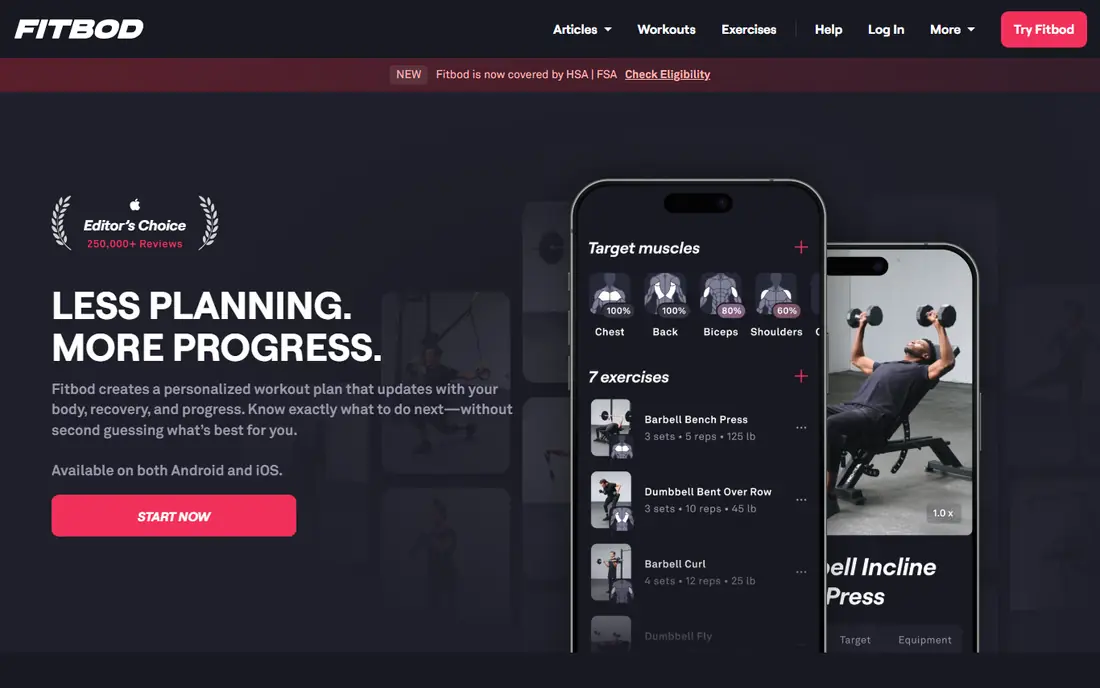
Fitbod is the best home gym app for strength training with limited equipment. Tell it you have dumbbells, kettlebells, resistance bands, or just bodyweight, and it builds a session that fits that gear and your recent training. It tracks muscle recovery and adjusts weights over time, which helps you progress without writing your own programme each week.
Fitbod is paid after a trial, so test it for a full week with your actual equipment before you commit. Beginners may find the options busy at first, but the core flow is simple: open the app, follow the session, log your sets. If you train at home with dumbbells and want a plan that grows with you, Fitbod is the strongest pick in this list.
- Sessions built from your equipment and recovery
- Progressive overload tracking
- Large exercise library
- Paid after trial
- Interface can feel busy for beginners
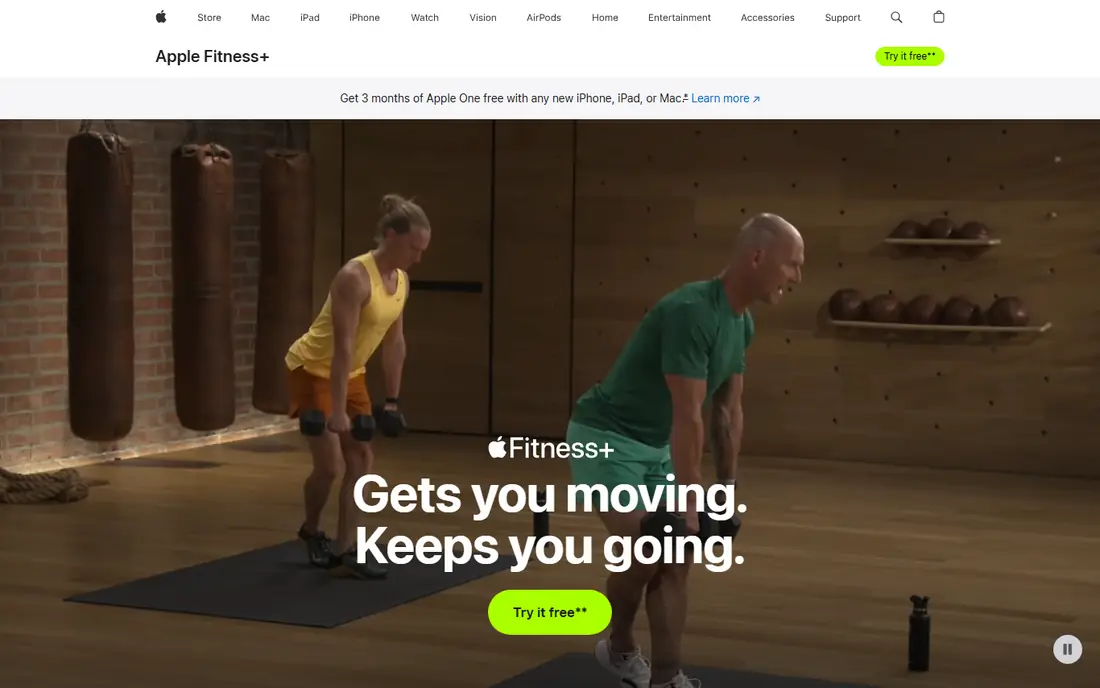
Apple Fitness+ suits people who already use an iPhone, iPad, or Apple TV and want guided classes at home. Strength, HIIT, yoga, Pilates, dance, and meditation classes are led by trainers, with Apple Watch metrics shown on screen during a workout when you use a watch. New workouts arrive each week, so the library does not feel stale.
The catch is ecosystem fit. Apple Fitness+ is most useful if you already live in Apple devices, and it is less appealing if you use Android as your main phone. It also focuses on following a class, not on building a long-term strength programme with precise load progression. For class lovers with Apple devices, it is a polished and motivating choice.
- Wide class library
- Apple Watch metrics on screen
- New workouts each week
- Works best inside the Apple ecosystem
- Needs an Apple device for full use
Peloton App gives you classes without needing a Peloton bike or treadmill. You can follow strength, HIIT, yoga, running, and meditation classes on a phone, tablet, or TV, join live sessions, and track streaks and milestones. That community and schedule structure helps many people stay consistent, which is often the hardest part of home training.
Peloton is a subscription, and the class style is energetic and instructor-led, which suits some people and not others. If you prefer quiet, self-paced training, Nike Training Club or Fitbod may fit better. If you train best with a schedule, a live class, and a leaderboard feeling, Peloton App is a strong home gym choice even without Peloton hardware.
- Large live and on-demand class library
- Strong community and streak features
- Strength, cardio, yoga, and meditation
- Subscription cost
- You do not need Peloton hardware, but the full experience is built around it
FitOn is a strong free alternative to Nike Training Club, with a wide range of classes including cardio, strength, HIIT, yoga, Pilates, and dance. Many workouts need little or no equipment, which makes FitOn useful in a small flat or while travelling. Programmes and challenges give structure if you want more than single workouts.
FitOn offers a paid tier for extra features, so check what is free on your device before you rely on a specific programme. Class quality varies by instructor and style, as with any large library, so save favorite trainers early. For free class variety at home, FitOn and Nike Training Club are the two best starting points.
- Free classes across many styles
- Programmes and challenges
- Works without equipment for many workouts
- Paid tier adds features
- Class depth varies by style
Hevy is the best free logger for lifters who already have a programme or who train with a simple routine at home. Logging sets is fast, routines are easy to save and repeat, and the free tier covers core tracking well. Social features let you follow friends and share routines, which can add motivation without turning the app into a class platform.
Hevy does not design your programme for you in the way Fitbod does. You bring the plan, Hevy tracks it. That is ideal if you follow a programme from a coach, a book, or your own experience, and you just need clean tracking. For home lifters with dumbbells who want to track progress week to week, Hevy is an excellent free choice.
- Generous free tier
- Fast set logging
- Social and routine sharing features
- Does not build a full programme like Fitbod
- Some features need Pro
Freeletics is built for bodyweight training at home, with adaptive journeys that get harder as you give feedback after each session. That progression matters, because home bodyweight training often stalls when a person repeats the same easy routine. Freeletics adjusts difficulty, volume, and exercise choice based on your feedback, which keeps a home routine moving forward.
Freeletics is less suited to heavy barbell training, and full coaching needs a subscription. If your home gym is a mat, a pull-up bar, and your own bodyweight, Freeletics is a strong fit. If you have dumbbells and want precise weight progression, Fitbod may suit you better. Test the free elements first to see whether the coaching style motivates you.
- Adaptive bodyweight journeys
- Feedback-based progression
- Works with little equipment
- Subscription for full coaching
- Style suits bodyweight training more than heavy lifting
Strong is the minimal logger in this list, and that is its appeal. It does one job well: record sets, reps, and weights quickly, show your history, and get out of the way. Lifters who already follow a programme love Strong because it does not add classes, social feeds, or coaching prompts they did not ask for. The interface stays focused on the next set.
Strong does not teach workouts, build programmes, or offer classes, so beginners who need guidance should start with Nike Training Club or FitOn first. For a home lifter with a set routine and dumbbells or a barbell, Strong keeps tracking simple and reliable, and that simplicity helps you stay consistent over months.
- Fast and minimal logging
- Clear history and charts
- Good for lifters who know their programme
- No guided classes
- No adaptive programme building
How we picked these
We compared official feature pages, pricing pages, app store listings, and public reviews for apps that work at home with little equipment. We favored apps that are available today, that cover guided workouts, strength plans, classes, or logging, and that serve different budgets from free to subscription. Where a price could not be verified on the vendor site or store listing at the time of writing, we wrote See website instead of guessing. We did not claim hands-on testing, and we treated public reviews as a guide to common strengths and limits, not as a personal training result.
How to choose a home gym app
Start with your goal and your space. If you want general fitness and you have no equipment, start with Nike Training Club or FitOn. If you want strength with dumbbells, start with Fitbod or Hevy. If you want classes and motivation, start with Apple Fitness+ or Peloton App. If you want bodyweight progression, start with Freeletics. Matching the app to the goal matters more than picking the app with the longest feature list.
Next, test for two weeks. Track whether you open the app three times a week, whether the workouts fit your space and time, and whether you understand the next session without extra planning. A paid app you open twice is worse than a free app you open five times. Use the trial or free tier fully, and only pay for a year after a month of regular use.
Finally, check equipment, time, and safety. Make sure you have room to move, a mat if needed, and weights that match the app's assumptions. Learn basic form for squats, hinges, presses, and rows before adding load, and stop if a movement causes sharp pain. An app can guide you, but it cannot see your form, so consider a coach session if you are new to barbell lifts or training around an injury.
Building a simple home routine
Pick three days a week, with one lower body, one upper body, and one full body or cardio day. Keep sessions to 30 to 45 minutes, warm up for five minutes, and finish with mobility or stretching. Log your sessions in the app, and increase load or reps slowly each week. Consistency for eight weeks beats a perfect plan you follow for one week.
When to change apps
Change apps when your goal changes, not when you get bored for a week. Move from a free class app to Fitbod when you want strength progression. Move from a logger to a class app when you need motivation and structure. Keep your history where possible, or note your best lifts before you switch, so you do not lose progress.
Frequently asked questions
What is the best home gym app for beginners?
Nike Training Club is best for beginners because it is free, guided, and covers many workout styles. FitOn is a close free alternative for class variety. Start with one of these for two weeks, then add a logger or a strength plan app if you want more progression.
What is the best app for home workouts with no equipment?
Nike Training Club, FitOn, and Freeletics all work well with no equipment, with Freeletics offering the most structured bodyweight progression. Nike Training Club and FitOn offer more free guided classes, while Freeletics adapts difficulty based on your feedback.
Is Fitbod worth paying for at home?
Fitbod is worth paying for if you train with weights at home and want a plan that adapts to your equipment and recovery. If you already have a programme and just need logging, Hevy or Strong may be enough for free or at lower cost. Test Fitbod with your actual dumbbells or bands during its trial first.
Do I need a smartwatch for these apps?
No, but a watch helps for heart rate, timers, and quick logging in some apps, especially Apple Fitness+ with an Apple Watch. Nike Training Club, Fitbod, Hevy, and Freeletics all work well on a phone alone. Start without a watch, and add one later if you want more data.
Can I get fit at home with just an app?
Yes, for general fitness, strength, and cardio, if you train regularly and progress over time. Apps help with structure and tracking, but results depend on consistency, sleep, and nutrition as well. If you have a health condition or an injury, check with a clinician before starting a new programme.
What is the best home gym app for strength training?
Fitbod is best for adaptive strength plans at home, while Hevy and Strong are best for logging a programme you already follow. Fitbod builds sessions from your equipment, while Hevy and Strong track sets quickly. Pick Fitbod for planning, and Hevy or Strong for simple tracking.
Sources we checked (8)

Online Jobs is an independent blog about careers, online work, learning new skills and the tools that help people earn. More about us.
Keep reading
All posts
Zoom Alternatives
Zoom alternatives compared for 2026: Google Meet, Microsoft Teams, Webex, Jitsi and more for free calls, large meetings and webinars for teams and classrooms.

Workday Alternatives
We compared the best workday alternatives for HR, payroll, and global hiring, from BambooHR and Gusto to Rippling, Deel, and HiBob for growing teams in 2026.

WordPress Alternatives
WordPress alternatives guide: we compare 8 platforms for builders, designers, stores, and publishers to leave WordPress without losing your full site content.