Best Free Alternatives to Similarweb in 2026: 10 Tools Compared

How we put this together: we compare official feature and pricing pages, app store listings, privacy policies and public user reviews. Prices change, so check the provider's site before you pay.
Key takeaways
- No free tool matches Similarweb full competitor traffic estimates, because free tools mostly measure your own site, not rivals.
- Google Analytics 4 and Search Console are the essential free pair for your own traffic, clicks, and search queries.
- Ahrefs Webmaster Tools and Semrush free lookups help with your own site and limited competitor checks.
- Matomo, Umami, and Cloudflare Web Analytics offer privacy-friendly free analytics for your own site.
- Use several free tools together and read trends, not single numbers, because third-party estimates are modelled, not exact.
Quick comparison
| Name | Who it suits | Starting price | Free option | |
|---|---|---|---|---|
 Google Analytics 4 | Your own site traffic | Free | Yes | Visit |
 Google Search Console | Your own search clicks | Free | Yes | Visit |
 Google Trends | Relative search interest | Free | Yes | Visit |
 Ubersuggest | Free competitor keyword checks | Free | Yes | Visit |
 Ahrefs Webmaster Tools | Free SEO data for your sites | Free | Yes | Visit |
 Semrush | Free domain lookups | Free | Yes | Visit |
 Matomo | Privacy-friendly analytics | Free | Yes | Visit |
 Umami | Simple self-hosted analytics | Free | Yes | Visit |
 Cloudflare Web Analytics | Privacy-friendly site analytics | Free | Yes | Visit |
 SparkToro | Audience research free searches | Free | Yes | Visit |
The best free alternatives to Similarweb
Similarweb estimates traffic for any website, including competitors, using panel and modelled data. Free alternatives split into two groups: tools that measure your own site accurately, and tools that estimate competitor traffic with limits. The list below covers both, so you can build a free stack that answers different questions without paying for Similarweb.
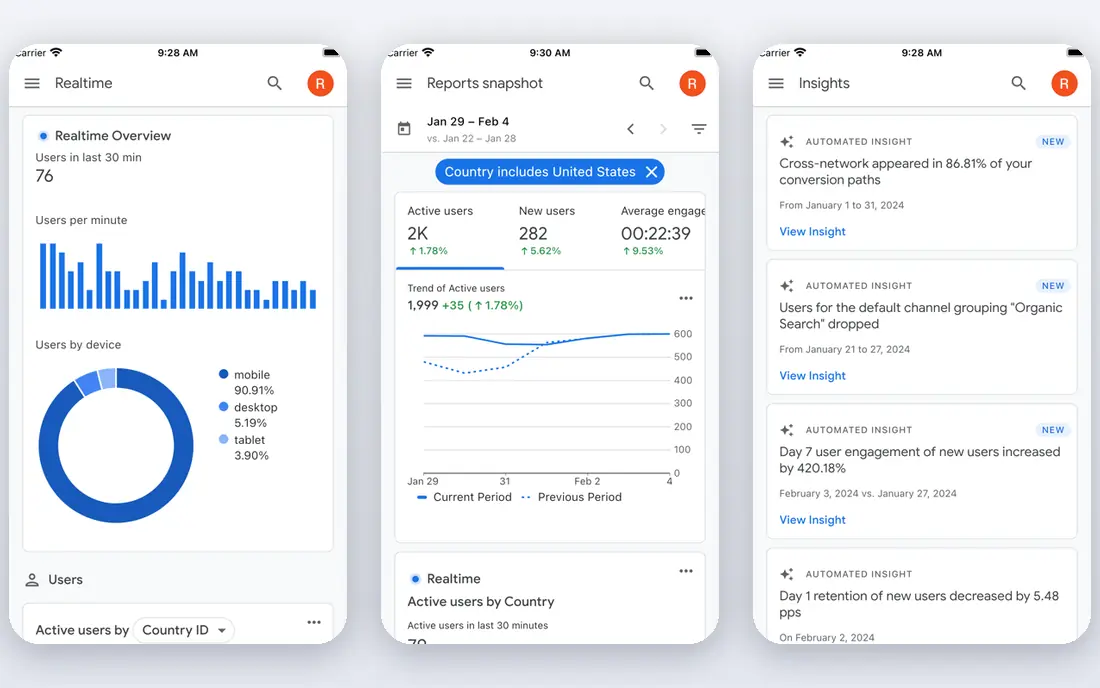
Google Analytics 4, or GA4, is the standard free alternative for your own site traffic. It counts real visits to your pages, shows traffic sources, devices, locations, and conversions, and it integrates with Google Ads and Search Console. For questions about your own performance, GA4 is more accurate than any third-party estimate, because it measures actual activity on your site. The catch is scope. GA4 cannot show competitor traffic, and it only works after you install it and collect data. Privacy rules also matter: you need a clear privacy notice, cookie consent where required, and data retention settings that fit your region. For your own site, GA4 should be the first free tool you install, not an optional extra.
- Free and widely supported
- Measures real visits, sources, and conversions
- Integrates with Google Ads and Search Console
- Only for sites you own or manage
- Setup and privacy settings need care
Google Search Console is the free companion to GA4, focused on Google Search. It shows which queries bring clicks, which pages rank, average position, and indexing or mobile usability issues. That query data is gold for content planning, because it shows real search demand for terms you already rank for, including terms you had not targeted. The limit is ownership. Search Console only shows data for sites you verify, so it cannot replace Similarweb for competitor research. Its clicks also differ from GA4 sessions, because a click and a visit are counted differently, and that gap is normal. Use Search Console for search performance and technical health, and GA4 for on-site behaviour and conversions.
- Free search clicks and queries for your site
- Shows indexing and technical issues
- No code changes needed beyond verification
- Only for verified sites you own
- Click data differs from GA4 session data
Google Trends is a free way to compare search interest for topics, brands, and keywords over time and by region. It helps you spot seasonality, rising topics, and regional differences before you commit content time. For example, you can compare two product terms and see which one is gaining interest, even if neither tool gives you exact visit counts. The catch is that Trends scores are relative, scaled from 0 to 100, not absolute traffic numbers. A score of 100 does not mean a set number of visits, and small topics can look volatile. Use Trends for direction and timing, then use Search Console, GA4, or a paid tool for absolute figures where you need them.
- Free and unlimited for basic use
- Shows interest over time and by region
- Useful for seasonality checks
- Shows relative interest, not absolute visits
- Cannot estimate a rival site traffic
Ubersuggest is one of the closest free Similarweb alternatives for competitor checks, because its free plan lets you enter a domain and see organic keywords, estimated search traffic, and top pages. That view helps you spot which search terms drive a rival site, and which content performs best for it. For small competitor checks, that is often enough to plan content. The limit is daily free searches and estimate accuracy. Ubersuggest figures are modelled estimates, so treat them as directional, not exact. Free use is limited, so save searches for domains that matter, and cross-check a rival in two tools before you act on a single number. At $12 per month for an individual plan in figures we reviewed, paid access is also cheap if free limits frustrate you.
- Free searches for domain and keyword checks
- Shows organic keywords and top pages
- Simple interface for beginners
- Free searches are limited each day
- Estimates are modelled, not exact traffic
Ahrefs Webmaster Tools gives free Site Explorer and site audit access for websites you verify as your own. That means you can check backlinks, organic keywords, and technical issues for your site without paying for Ahrefs. For site owners, that free data is more detailed than GA4 alone, because it adds search and link context to your own performance. The catch is that full competitor exploration needs a paid Ahrefs plan. Webmaster Tools is designed for your own sites, so it will not give you the same rival traffic view as Similarweb. Use it to improve your own site, fix technical issues, and track your own keywords, and use free lookups elsewhere for occasional rival checks.
- Free Site Explorer and audit for your verified sites
- Backlink and keyword data for your own domains
- Useful for technical fixes
- Competitor data is limited on the free tier
- Only your verified sites get full free access
Semrush free account offers limited domain lookups, keyword checks, and project tools, which makes it useful for occasional competitor research without a subscription. You can enter a rival domain, see an overview of organic and paid search, top keywords, and traffic estimates, and compare that view with Ubersuggest or Ahrefs free data. That cross-check helps you avoid trusting one estimate alone. The limit is volume. Free lookups run out quickly, and full Traffic Analytics, with channel breakdowns and audience data, sits behind paid plans that start at $139 per month in figures we reviewed. Use Semrush free for spot checks and keyword ideas, not for daily competitor monitoring. For regular monitoring, a paid plan or a different free stack will serve you better.
- Free account with limited lookups
- Domain overview and traffic estimates
- Keyword and competitor data in one place
- Free limits are tight
- Full traffic analytics need a paid plan
Matomo is a free, open source analytics platform you can self-host, which gives you full ownership of your visitor data. It measures visits, sources, goals, and on-site behaviour, with privacy features such as IP anonymisation and cookie-less tracking options. For sites that want Google Analytics data without sending data to Google, Matomo is the most complete free alternative. The trade-off is hosting. Self-hosted Matomo needs a server, updates, and backups, which adds work compared with a hosted tool. Matomo Cloud is paid, so the free route is self-hosting. Matomo also measures only your own site, so it does not replace Similarweb competitor estimates. For privacy-conscious site owners, that trade is often worth it.
- Free self-hosted analytics
- Full data ownership
- Privacy-friendly by design
- Self-hosting needs server setup
- Cloud version is paid for larger use
Umami is a simple, open source web analytics tool that suits small sites and personal projects. Its dashboard is clean, its script is lightweight, and it focuses on core metrics: visits, page views, referrers, devices, and locations. That simplicity helps owners who find GA4 overwhelming and just want to know which pages get traffic and where visitors come from. The catch is feature depth. Umami does not offer the same conversion, audience, and integration depth as GA4 or Matomo, and free use means self-hosting it yourself. Cloud hosting is paid. Umami also covers only your own site. For a small site that values simplicity and privacy, it is an excellent free alternative to GA4, if not to Similarweb competitor data.
- Free and open source
- Very simple dashboard
- Lightweight script and privacy focus
- Fewer features than GA4 or Matomo
- Self-hosting needed for free use
Cloudflare Web Analytics
Who it suits: Privacy-friendly site analytics
Cloudflare Web Analytics offers free, privacy-friendly analytics for your own site, without cookies for basic measurement. It shows visits, page views, referrers, countries, and devices, and it is easy to set up if your site already uses Cloudflare. For site owners who want a simple, free dashboard without GA4 complexity, it is a practical choice. The limit is depth and scope. Cloudflare Web Analytics is simpler than GA4 for goals and e-commerce tracking, and it cannot estimate competitor traffic. Use it as a clean, free view of your own traffic, or as a second source to cross-check GA4. For competitor research, pair it with Ubersuggest, Semrush free, or Google Trends.
- Free and privacy-friendly
- No cookies needed for basic analytics
- Easy setup via Cloudflare or a script
- Only for your own sites
- Less detailed than GA4 for conversions
SparkToro takes a different angle: instead of estimating visits to one site, it shows audience behaviour, such as which websites, social accounts, podcasts, and channels an audience follows. That view helps you plan content and promotion, because you learn where to reach people who care about a topic, not just how much traffic a rival gets. The catch is that SparkToro is not a direct traffic checker. Free searches are limited, and full audience reports need a paid plan. Use SparkToro free searches to understand an audience, then use GA4, Search Console, and keyword tools to plan and measure your own content. Together, they cover audience, search, and site performance without Similarweb.
- Free searches for audience insights
- Shows where an audience spends time online
- Useful for channel and content planning
- Free searches are limited
- Not a traffic estimator for a single site
How we picked these
We reviewed official product pages, pricing pages, and help documentation for each tool, and we checked free plan limits, data ownership, and privacy claims. We compared own-site analytics, search data, competitor lookups, and audience research, because no single free tool replaces Similarweb on its own. Public traffic tool comparisons helped us spot estimate accuracy issues, but we did not treat any estimate as exact, and we did not claim hands-on traffic audits. We kept tools with a genuinely usable free tier in 2026, from GA4 and Search Console to self-hosted Matomo and Umami. Where a free tier is limited to your own verified sites, we stated that plainly, because it changes what the tool can do for competitor research. Check current free limits on each vendor site, because free tiers change often.
How to build a free Similarweb alternative stack
Start with GA4 plus Search Console for your own site, because those two give you real visits and real search clicks. Add Google Trends for topic timing, and add one free competitor lookup tool, such as Ubersuggest or Semrush free, for occasional rival checks. That four-tool stack covers most free research needs without a subscription.
Read estimates as trends, not facts
Third-party traffic estimates are modelled from panels, search data, and other signals, and independent tests have found large errors, especially for small sites. Compare the same rival in two tools, look at direction over months rather than a single month, and check channel mix and top keywords for plausibility. If two tools disagree wildly, trust neither figure alone, and use your own GA4 and Search Console data for decisions about your own site.
Choose privacy tools with eyes open
Matomo, Umami, and Cloudflare Web Analytics all offer privacy advantages over GA4, but they differ in hosting work and feature depth. Self-hosted tools give you data ownership at the cost of maintenance, while hosted free tools give you simplicity at the cost of less control. Pick the privacy level your audience and your region require, and document your choice in your privacy notice.
Frequently asked questions
What is the best free Similarweb alternative?
There is no single best free replacement, because Similarweb estimates competitor traffic while most free tools measure your own site. For your own site, GA4 plus Search Console is best. For limited competitor checks, Ubersuggest and Semrush free lookups are useful. For privacy-friendly own-site analytics, Matomo, Umami, and Cloudflare Web Analytics are strong free picks.
Are Similarweb free alternatives accurate?
Own-site tools such as GA4 and Search Console are accurate for your own verified site, within their counting rules. Competitor estimates from free tools are modelled and can be far from exact, especially for small sites. Use estimates for trends and comparisons, not for precise traffic claims, and cross-check rivals in more than one tool.
Can I check a competitor website traffic for free?
Yes, with limits. Ubersuggest and Semrush free accounts offer limited domain lookups, and Similarweb itself offers limited free views. Google Trends can compare relative interest, but it cannot give a rival visit count. For regular, detailed competitor traffic, a paid tool is usually needed, because free tiers are designed for occasional checks.
Is Google Analytics free?
Yes, Google Analytics 4 is free for most sites, with limits that affect very large sites. It measures your own site only, after you install its tracking code or use Google Tag Manager. Pair it with Search Console for search clicks and queries, because GA4 alone does not show the full search picture.
What is the difference between Matomo and Google Analytics?
Matomo is open source and can be self-hosted, giving you full data ownership and stronger privacy controls. Google Analytics 4 is hosted by Google, offers deeper integrations and conversion tools, and is free for most sites. Matomo suits privacy-focused owners willing to host it, while GA4 suits owners who want a hosted, widely supported standard.
Should I use more than one analytics tool?
Yes, for most sites, two tools are useful: GA4 or a privacy alternative for on-site behaviour, plus Search Console for search data. Adding a third tool for competitor or audience research, such as Ubersuggest or SparkToro, covers planning as well. Avoid adding many tools that measure the same thing, because conflicting numbers can confuse decisions without adding insight.
Sources we checked (10)

Online Jobs is an independent blog about careers, online work, learning new skills and the tools that help people earn. More about us.
Keep reading
All posts
n8n Alternatives
n8n alternatives compared for 2026, with Zapier, Make, Activepieces, and more, covering visual builders, code steps, self-hosting, and pricing models.

ZoomInfo Alternatives
The best ZoomInfo alternatives in 2026, compared on price, free plans, data coverage, and which tool fits small teams or large sales teams best in detail.

Yotpo Alternatives
Find cheaper alternatives to Yotpo for reviews and loyalty, with Judge.me, Loox, Stamped, and more compared for Shopify stores in 2026, all in one guide.