Best Workout Apps for Beginners in 2026: 8 Apps Compared

How we put this together: we compare official feature and pricing pages, app store listings, privacy policies and public user reviews. Prices change, so check the provider's site before you pay.
Key takeaways
- Nike Training Club is our pick for most beginners, because its guided workouts are free, cover many styles, and need little or no equipment.
- FitOn is the best free alternative for class variety, with a large library of cardio, strength, yoga, and dance classes.
- Apple Fitness+ and Peloton suit beginners who want instructor-led classes and a polished experience, though both require a subscription.
- Hevy and JEFIT help beginners learn strength training with tracking and exercise libraries, while Couch to 5K gives new runners a clear, gradual plan.
- This is general fitness information, not medical advice. Start slowly, stop if you feel pain, and talk with a clinician before starting a new program if you have a health condition, injury, or are pregnant.
Quick comparison
| Name | Who it suits | Starting price | Free option | |
|---|---|---|---|---|
 Nike Training Club | Free guided workouts | Free | Yes | Visit |
 FitOn | Free class variety | Free | Yes | Visit |
 Apple Fitness+ | Instructor-led classes | $9.99 per month | Free trial | Visit |
 Peloton App | Guided classes at home | $12.99 per month | Free trial | Visit |
 Fitbod | Personalized strength plans | See website | Free trial | Visit |
 Hevy | Strength tracking | Free | Yes | Visit |
 Couch to 5K | Beginner running | See website | Free trial | Visit |
 JEFIT | Gym workout planning | Free | Yes | Visit |
The best workout apps for beginners
Starting exercise is easier with guidance, short sessions, and clear progress. These eight apps cover guided workouts, classes, strength tracking, and running, so you can pick a style you will actually enjoy and stick with for more than a week.
Nike Training Club is the best starting point for most beginners because it removes the cost barrier completely. The app offers guided workouts across strength, conditioning, mobility, yoga, and other categories, with sessions for different levels and durations. Many workouts need only body weight or light dumbbells, which means you can start at home without buying equipment or joining a gym. Multi-week plans also give structure, so you do not have to decide what to do each day.
The limits are depth and tracking. The library is smaller than paid platforms such as Peloton, and the coaching style is more instructional than motivational, which some beginners miss. Strength tracking is also basic compared with a dedicated log such as Hevy, so lifters who want detailed progression may outgrow it. For a free, guided start that covers many styles, Nike Training Club is still our first recommendation, and you can add a tracker later if you need one.
- Large free workout library
- Plans for different levels
- Bodyweight and minimal-equipment options
- Library is smaller than paid class platforms
- Instructor personality is lighter than Peloton
- Strength tracking is basic
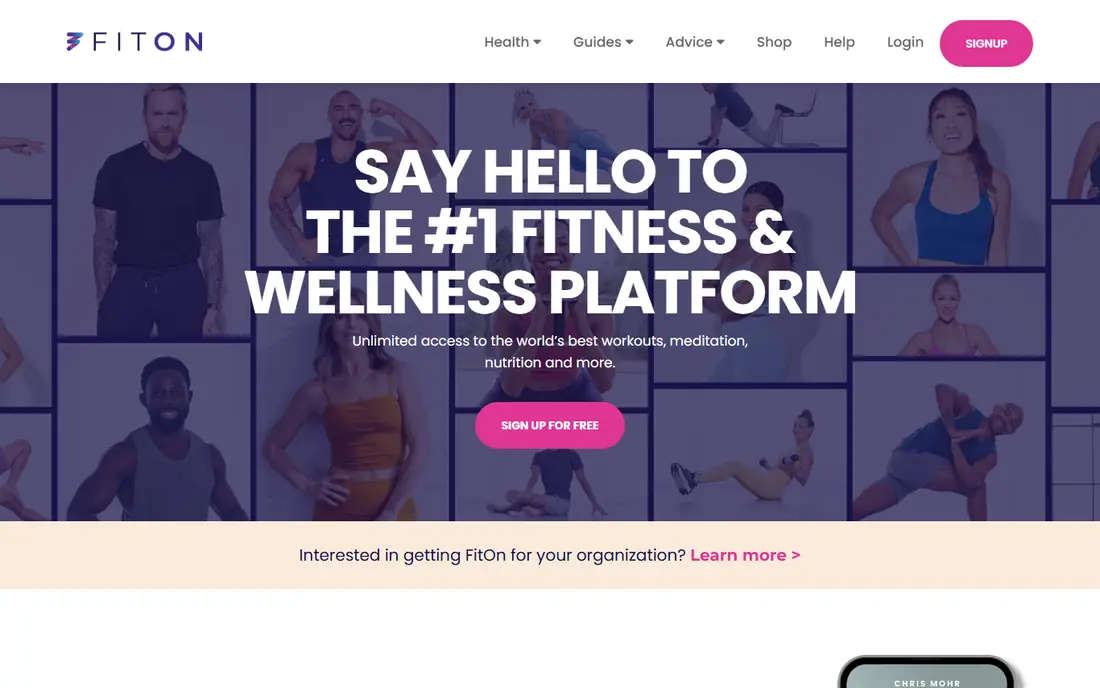
FitOn is the strongest free alternative to Nike Training Club, especially if you like class-style workouts. The free library covers cardio, strength, HIIT, yoga, Pilates, dance, and meditation, with trainers who guide each session. That variety helps beginners discover what they enjoy, whether that is a short dance cardio session or a calm yoga flow. The app also offers challenges and programs that add structure without requiring a subscription for core classes.
The main annoyance is upselling. The home screen promotes the paid tier, which can distract from the free classes, and class quality varies by trainer, so you may need to try a few instructors to find favorites. Tracking is also basic, so FitOn works best as a workout library rather than a detailed progress log. If you want free variety and you enjoy following along with a class, FitOn is an excellent second app to try alongside Nike Training Club.
- Large free class library
- Celebrity and professional trainers
- Cardio, strength, yoga, and dance options
- Home screen pushes paid upgrades
- Class quality varies by trainer
- Tracking features are basic

Apple Fitness+ suits beginners who already use Apple devices and want a studio-style class experience at home. Workouts cover strength, HIIT, yoga, Pilates, dance, cycling, treadmill, rowing, and meditation, with trainers who offer modifications for different levels. If you own an Apple Watch, live metrics appear on screen during workouts, which helps beginners learn pacing and effort. Beginner programs also guide new users through foundational movements before harder classes.
The ecosystem limit is real. Apple Fitness+ works best with an iPhone, iPad, or Apple TV, and Apple Watch integration is a major part of the experience. The monthly price we found is $9.99, or $79.99 per year in many listings, so it is a real subscription cost compared with free rivals. Android users should look at Peloton or FitOn instead. For Apple users who want polished classes and clear beginner paths, Fitness+ is a strong paid pick.
- Polished instructor-led classes
- Integrates with Apple Watch for live metrics
- Good beginner programs and modifications
- Works best inside the Apple ecosystem
- Requires a subscription after trial
- No Android app in the same form
Peloton App, without a bike or tread, gives beginners access to a large library of instructor-led classes at home. Strength, bodyweight cardio, yoga, stretching, and meditation classes cover most beginner needs, and the instructor energy and community features help many people stay consistent. Programs and class collections also guide new users toward a structured start, rather than leaving them to browse endlessly. For motivation, Peloton instructors are a major draw.
The price and difficulty need a check. The app-only price we found is $12.99 per month in recent guides, though pricing changes by plan and region, so confirm the current figure on the Peloton site. Some classes also skew toward intermediate exercisers, and true beginners may need to filter for beginner classes and use modifications. Peloton suits beginners who respond to instructor-led motivation and who will use the app several times a week. If you prefer a quieter style or a free app, Nike Training Club or FitOn may fit better.
- Large class library with strong instructors
- Strength, cardio, yoga, and meditation
- Community features for motivation
- App-only price has risen in some listings
- Some classes skew intermediate
- No bike or tread required but equipment helps for some classes
Fitbod is built for beginners who want to learn strength training without guessing which exercises to do. You enter your goals, available equipment, and experience level, and Fitbod generates a workout that targets different muscle groups and adjusts as you log sets and weights. Exercise videos show form, and the app tracks progression over time, which helps beginners see improvement. That structure is valuable for people who feel lost in a gym or with a set of dumbbells at home.
Pricing is why we list Fitbod as See website, because annual and monthly billing figures vary and change over time, with annual plans often listed near $79.99 to $95.99 per year in recent guides. Fitbod is also a strength tool first, not a class platform, so it will not replace Peloton or Apple Fitness+ for cardio classes. For a beginner who wants a personalized strength plan and clear tracking, Fitbod is one of the best paid options, especially after a free trial confirms the style fits.
- Generates workouts based on your equipment and goals
- Adapts as you progress
- Clear exercise videos and muscle targeting
- Pricing varies by billing period, so check the vendor site
- Best for gym or home strength, not classes
- Free access is limited
Hevy is a workout tracker rather than a class app, and that focus makes it ideal for beginners who want to learn strength training by logging every set. The interface is clean, routines are easy to build and reuse, and the free tier covers core tracking without a subscription. Social features let friends follow workouts and offer encouragement, which helps consistency. For a beginner who already knows basic exercises, or who follows a simple program from a coach or guide, Hevy keeps progress visible.
The limitation is guidance. Hevy does not teach a full beginner program the way Nike Training Club or Fitbod does, so new lifters must choose routines themselves or import a plan. Advanced features, such as detailed analytics and custom exercise libraries, sit in the paid tier. Hevy pairs well with a guided app: use Nike Training Club or Fitbod to learn movements, then log strength sessions in Hevy as you progress. For pure tracking, it is our favorite free option.
- Clean workout logging
- Free tier covers core tracking
- Social features for accountability
- No guided class library like Peloton
- Advanced features need a paid plan
- Beginners must choose their own routines at first
Couch to 5K is the classic beginner running plan, and several apps implement it with audio cues that tell you when to walk and when to run. The plan builds gradually over about eight to nine weeks, starting with short run intervals and longer walks, which makes running feel achievable for people who have never run before. Sessions are short, usually 20 to 30 minutes, and the clear progression gives beginners a goal that is easy to understand: run 5 kilometers without stopping.
The app market needs care, because several developers publish Couch to 5K apps with different prices and features, so check the exact listing before you download. Pricing is therefore listed as See website here. Couch to 5K also only covers running, so pair it with strength or mobility work from another app on this list for a balanced routine. For a new runner who wants one clear plan and no guesswork, Couch to 5K remains the best single-purpose pick.
- Gradual walk-run plan for absolute beginners
- Clear audio cues
- Short sessions that build over weeks
- Focused only on running, not strength or flexibility
- App versions vary by developer, so check the listing
- Some versions charge for full access
JEFIT helps beginners plan gym workouts with a large exercise library and prebuilt routines for different goals. You can follow a beginner strength plan, log sets and weights, and track progress over time, all from a phone at the gym. The free tier covers core planning and tracking, which makes it a good companion for a first gym membership. Exercise instructions and videos help new lifters learn movements safely, though form still benefits from a coach or experienced training partner for complex lifts.
The free tier includes ads and caps some features, and the interface packs in many options, which can feel busy at first. Premium plans add more analytics and customization, with prices varying by billing period. JEFIT suits beginners who want a gym-focused planner with many routines to choose from, rather than a class app. If you train at home with body weight, Nike Training Club or FitOn may be simpler. If you train in a gym, JEFIT gives you a structured plan from day one.
- Large exercise library
- Prebuilt beginner routines
- Free tier for tracking and planning
- Free tier includes ads and some limits
- Interface can feel busy
- Premium features need a subscription
How we picked these
We compared official app listings, pricing pages, and public beginner fitness guides, and we checked free tiers, beginner programs, and equipment needs. We favored apps that are actively maintained in the United States, that offer clear beginner paths or modifications, and that cover different styles, including guided workouts, classes, strength tracking, and running. We excluded apps focused only on advanced athletes, apps with no beginner content, and apps with no current listing.
We did not test every workout ourselves, and we did not measure fitness outcomes. Instead, we weighed published features, pricing, free access, and how each app guides a new user through the first weeks. Prices change with promotions and billing terms, so the starting prices above reflect figures found during research in October 2026. Always confirm the current price and free trial terms on the vendor or app store listing before you subscribe.
How to start without burning out
Start with two or three short sessions per week, not daily intense workouts. A 20-minute guided session you enjoy beats a 60-minute session you dread, because consistency matters more than intensity in the first month. Choose an app whose style you like, whether that is a quiet Nike Training Club session, a lively Peloton class, or a walk-run plan, and stick with it for at least three weeks before judging it. Early soreness is common, but sharp pain is a sign to stop and seek advice.
Next, add strength and mobility gradually. Beginners often focus only on cardio, yet basic strength work protects joints, improves posture, and makes daily tasks easier. Use bodyweight exercises first, learn form from videos, and add weight slowly. Include a short warm-up and cool-down in each session, and stretch or do mobility work on rest days. A balanced week might include two strength sessions, one cardio session, and daily walking, adjusted to your schedule and health.
Finally, track progress in a way that motivates you, not in a way that punishes you. Log sessions, note how you feel, and celebrate consistency rather than only weight or speed changes. Rest days are part of training, not a failure, and sleep and nutrition affect recovery more than any app feature. If you have a health condition, injury, or are pregnant, talk with a clinician before starting, and choose low-impact options first. The best workout app is the one you will still open in three months.
Frequently asked questions
What is the best workout app for beginners?
Nike Training Club is the best free starting point for most beginners, thanks to guided workouts and minimal equipment needs. FitOn is the best free alternative for class variety, while Apple Fitness+ and Peloton suit beginners who want instructor-led classes. The best app for you depends on whether you prefer guided workouts, classes, strength tracking, or running.
What is the best beginner workout app that is free?
Nike Training Club and FitOn both offer large free workout libraries without a subscription for core classes. Hevy and JEFIT also offer free tiers for strength tracking and planning. Try two free apps for a week each, and keep the one whose style and schedule fit your life.
What is the best fitness app for beginners at home?
Nike Training Club, FitOn, Apple Fitness+, and Peloton all work well at home with little or no equipment. Choose Nike Training Club or FitOn if you want free home workouts, and Apple Fitness+ or Peloton if you want instructor-led classes and are willing to pay. Start with bodyweight sessions and add dumbbells only when you feel ready.
How often should a beginner work out?
Most beginners do well with two to three sessions per week, plus daily walking, and rest days between strength sessions. Start with short sessions, increase duration or intensity gradually, and listen to your body. If you feel sharp pain, unusual dizziness, or chest discomfort, stop and seek medical advice promptly.
Do I need a gym to use these workout apps?
No, Nike Training Club, FitOn, Apple Fitness+, Peloton, and Couch to 5K all work at home or outdoors with little or no equipment. Fitbod, Hevy, and JEFIT can be used at home with dumbbells or in a gym, depending on the routine you choose. A gym adds equipment options, but it is not required to start getting fitter.
Sources we checked (8)

Online Jobs is an independent blog about careers, online work, learning new skills and the tools that help people earn. More about us.
Keep reading
All posts
Leg Extension Alternatives
We compare leg extension alternatives that build quad strength at home or in the gym, with honest notes on form, equipment, and knee comfort. for 2026.
Best workout apps for women
Compare the best workout apps for women in 2026, from free guided classes to structured strength plans, with current prices, free plans and honest trade-offs.
Best app for counting calories
Find the best app for counting calories in 2026. We compare MyFitnessPal, Cronometer, Lose It and more on food databases, free plans and ease of use today.