Best Web Scraping Tools in 2026: 10 Options Compared
 Online Jobs·Updated Oct 26, 2026·12 min read
How we put this together: we compare official feature and pricing pages, app store listings, privacy policies and public user reviews. Prices change, so check the provider's site before you pay.
Key takeaways
- You can start for free with most of these tools. Octoparse, Browse AI, Apify, Firecrawl and Bright Data's Web Scraper API all list a free tier, and Scrapy is free open-source software.
- No-code tools suit marketers and researchers: Octoparse's free plan includes 10 tasks and 50,000 exported rows a month, and its Standard plan starts at $69 per month billed annually.
- Scraping APIs bill by usage. ScraperAPI starts at $49 per month for 100,000 credits, and Bright Data's Web Scraper API is $1.50 per 1,000 records pay as you go.
- Firecrawl is built for AI projects, turning web pages into clean data for language models, with a free plan of 1,000 credits a month.
- Scraping is legal in many cases but not all. Respect site terms, avoid personal data, and get legal advice for commercial projects.
Quick comparison
| Name | Who it suits | Starting price | Free option | |
|---|---|---|---|---|
 Octoparse Octoparse | No-code scraping on a desktop app | Free | Yes | Visit |
 Browse AI Browse AI | Monitoring websites for changes | Free | Yes | Visit |
 Web Scraper Web Scraper | A free Chrome extension for simple jobs | Free | Yes | Visit |
 Apify Apify | Ready-made scrapers for popular sites | Free | Yes | Visit |
 Firecrawl Firecrawl | Feeding web data to AI apps | Free | Yes | Visit |
 Bright Data Bright Data | Large-scale data and proxy network | Free | Yes | Visit |
 Oxylabs Oxylabs | Enterprise scraping API with strong proxies | $30 per month | Free trial ($5 credit) | Visit |
 Zyte Zyte | Pay-per-request API from the Scrapy team | See website | Free trial ($5 credit) | Visit |
 ScraperAPI ScraperAPI | Developers who want a simple API | $49 per month | Free trial (7 days) | Visit |
 Scrapy Scrapy | Python developers who want full control | Free | Yes | Visit |
The best web scraping tools
Web scraping tools fall into three groups: no-code apps you click through, scraping APIs that handle proxies and blocking for you, and code frameworks for developers. We picked the strongest options in each group so you can match one to your skills and budget.
A quick note before you start: scraping public data is often allowed, but website terms, copyright and privacy laws still apply. This is not legal advice. Avoid collecting personal data, keep request rates polite, and check with a lawyer before you build a business on scraped data.
Octoparse is the tool we would hand to a marketer or analyst who has never written code. You load a page in its app, click the data you want, and it builds the scraper. The free plan allows 10 tasks, local extraction on one device and up to 50,000 rows of export a month.
The Standard plan starts at $69 per month billed annually and adds cloud extraction, IP rotation, residential proxies, automatic CAPTCHA solving and scheduling. Professional is $249 per month. All paid plans have a 5-day money-back guarantee. The catch is that heavily protected sites may need its paid add-ons, which are billed separately.
- Free forever plan with 10 tasks
- Point-and-click setup with 500+ preset templates on paid plans
- Exports to Excel, CSV, JSON and databases
- Cloud extraction, IP rotation and scheduling need a paid plan
- Desktop app has a learning curve on complex sites
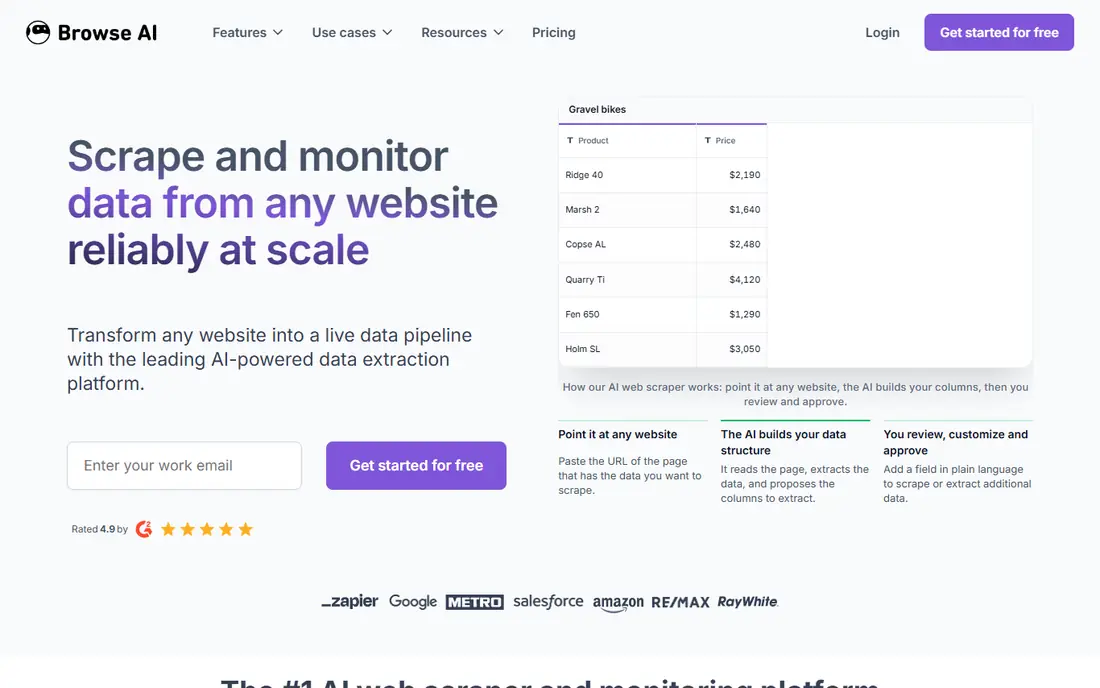
Browse AI is a no-code tool that shines at watching pages over time. You show a robot what to extract, then schedule it to check for changes and alert you or send data to a spreadsheet. It also offers more than 250 prebuilt robots for popular websites.
The free plan gives 50 credits a month, 2 websites and 3 users. When we checked, the Personal plan was $19 per month billed annually (with a much higher monthly price), and Professional started at $69 per month billed annually. It is ideal for tracking a competitor's prices. For one-off bulk scrapes of thousands of pages, credits run out quickly.
- Train a robot by recording your clicks
- Built for monitoring prices, listings or job posts
- Unlimited robots on every plan
- The free plan has only 50 credits a month
- Monthly billing costs much more than annual
Web Scraper started as a Chrome extension, and that extension remains a favorite for students and small business owners. You build a "sitemap" that tells it which links to follow and which elements to grab, and it exports the results.
For larger jobs, Web Scraper Cloud runs scrapers on its servers with datacenter proxies included and pricing from $0.03 per 1,000 URLs. The Scale plan is priced per concurrent scraper, from $200 per month, with a 7-day free trial. That is a big jump from free, so most individuals stay on the extension.
- Free browser extension, no account needed to start
- Visual sitemap builder for multi-page sites
- Cloud version adds scheduling and proxies
- Cloud plans start at $200 per month
- Extension runs in your browser, so big jobs are slow
Apify is a cloud platform where you run "Actors", which are scrapers and automation tools that others have already built for sites such as maps, social networks and online stores. You can run one with a few settings and download the data, or write your own.
The free plan includes $5 of usage a month with no credit card. Starter is $19 per month and Scale $199 per month, each including that amount in usage, with compute billed at $0.20 per compute unit on the lower plans. Store Actors use either pay-per-event or pay-per-usage pricing, so check each Actor's cost before a large run.
- Large store of ready-made scrapers called Actors
- Free plan includes $5 of monthly usage
- Developers can build and even sell their own scrapers
- Usage-based pricing can be hard to predict
- Quality of community Actors varies
Firecrawl is the newer name on this list and is popular with developers building AI tools. You send it a URL or a whole site, and it returns clean Markdown or structured data that a language model can use, without the clutter of menus and ads.
Its pricing page lists Free with 1,000 credits a month, Hobby at $19 per month for 5,000 credits, Standard at $99 per month for 100,000 credits, and higher Growth and Scale tiers, with discounts on annual billing. It is excellent for AI and research projects. If you want a spreadsheet of product prices with no code, a no-code tool is easier.
- Turns pages into clean Markdown or structured data
- Free plan with 1,000 credits a month
- Clear published tiers
- Aimed at developers, not point-and-click users
- Hobby plan includes only 5,000 credits
Bright Data is one of the biggest names in web data. It sells proxy networks, scraping APIs, a scraping browser, a SERP API and ready-made datasets, so larger companies can buy data instead of collecting it themselves.
For most readers, the Web Scraper API is the place to start. Its pricing page lists a free tier of 5,000 records a month with no credit card, pay as you go at $1.50 per 1,000 records, and a Scale plan at $499 per month including 384,000 records. You pay only for successful deliveries. Smaller teams may find the product menu overwhelming, so start with one product.
- Web Scraper API free tier of 5,000 records a month
- Pay only for successful results
- Huge proxy network plus ready datasets
- Product range is large and confusing at first
- Costs climb quickly at enterprise volume
Oxylabs is a strong pick for businesses that need reliable scraping at volume, with security paperwork that procurement teams ask for. Its Web Scraper API handles JavaScript rendering and CAPTCHAs, and returns structured data for big targets such as Google, Amazon and Walmart.
Plans start at $30 per month (Starter), then $100 and $500, with per-result pricing from $0.50 per 1,000 results down to $0.25 at high volume. New users get $5 in welcome credit. It is more than a hobbyist needs, but well suited to a growing ecommerce or SEO team.
- Handles JavaScript-heavy pages and CAPTCHAs
- Outputs HTML, Markdown, parsed JSON or screenshots
- ISO/IEC 27001 and SOC 2 Type II certified
- No free ongoing tier
- Pricing gets complex across products
Zyte maintains Scrapy, the open-source framework, and sells Zyte API for the hard parts: bans, proxies and browser rendering. Pricing is per 1,000 responses and depends on how difficult a site is. Pay as you go, a plain HTTP response costs $0.13 to $1.27 per 1,000, and a browser-rendered response costs $1.01 to $16.08 per 1,000.
Committing to a monthly minimum lowers those rates. The free trial gives $5 of credit for 30 days. Zyte fits teams that already use Scrapy and want to plug in an unblocking service without changing their code. Because there is no single starting price, we list it as "See website".
- Made by the company that maintains Scrapy
- Pay only for what you use, priced by site difficulty
- $5 free credit for 30 days
- Tiered pricing takes time to understand
- Browser-rendered pages cost far more than plain HTTP
ScraperAPI keeps things simple. You send a URL to its endpoint, and it returns the page after rotating proxies and handling blocks. That lets a developer write a basic scraper in any language without managing proxy lists.
The Hobby plan is $49 per month for 100,000 API credits and 20 concurrent threads, and Startup is $149 for 1 million credits, with about 10% off for annual billing. The trial includes 5,000 credits for 7 days, and the FAQ also describes a small free plan with 1,000 credits. Watch how many credits each request uses on tougher sites.
- One API call handles proxies, retries and CAPTCHAs
- 7-day trial with 5,000 credits and no card
- Clear credit-based plans
- Paid plans start at $49 per month
- Credits are used faster on protected sites
Scrapy calls itself the world's most-used open-source data extraction framework, and it is the backbone of many professional scrapers. You write "spiders" in Python that follow links, extract data with CSS or XPath selectors, and export to JSON, CSV or cloud storage.
It costs nothing, and you own your code. The trade-off is that you handle hosting, scheduling and anti-bot measures yourself, or pair it with a service such as Zyte API or ScraperAPI. If you can write basic Python, learning Scrapy is one of the best investments in this field.
- Free and open source under the BSD license
- Fast asynchronous engine with pipelines and exports
- Maintained by Zyte and more than 500 contributors
- Requires Python skills
- You manage proxies and blocking yourself unless you add a service
How we picked these
We compared each tool's official pricing page, documentation and feature pages in October 2026, and we only list prices the vendor publishes. Where a vendor shows several prices or tiers, we report the starting point and say so. We did not run a large benchmark against protected websites, so our notes on reliability come from vendor documentation and published features rather than our own test results.
We wanted a mix of no-code apps, scraping APIs and a developer framework, because the best tool for a marketer is rarely the best tool for a Python developer.
How to choose a web scraping tool
Start with your skills
If you do not code, start with Octoparse, Browse AI or the Web Scraper extension. If you write some code, ScraperAPI, Firecrawl or Apify will save you hours. If you are comfortable in Python, Scrapy gives you the most control for the least money.
Estimate your volume
A few hundred pages a week fits any free plan. Tens of thousands of pages a day means you need an API with proxy rotation, such as Bright Data, Oxylabs, Zyte or ScraperAPI. Run a small test first and calculate cost per 1,000 pages before you commit.
Check how hard the target site is
Simple pages cost very little to scrape. Sites that use heavy JavaScript or bot protection need browser rendering and residential proxies, which cost much more. Zyte's tiered pricing shows how big that gap can be.
Stay on the right side of the rules
Read the website's terms of use and robots.txt, avoid logging in to scrape private areas, and do not collect personal data you have no lawful reason to hold. Some sites offer an official API, which is usually the safer and more stable route.
Frequently asked questions
What is the best web scraping tool for beginners?
Octoparse is our pick for beginners because its free plan covers 10 tasks and it works by pointing and clicking. The free Web Scraper extension is another easy starting point for simple sites. Browse AI is best if you mainly want to monitor pages for changes.
What is the best free web scraping software?
Scrapy is completely free and open source if you can write Python. Without code, Octoparse's free plan, the Web Scraper extension and Browse AI's free tier are the best options. Apify and Firecrawl also include free monthly usage.
What are the best web scraping services for large projects?
Bright Data, Oxylabs and Zyte are built for large-scale jobs, with big proxy networks and pricing that drops at volume. Bright Data and Oxylabs also sell ready-made datasets if you would rather buy data than collect it. Talk to sales once you pass a few hundred dollars a month.
Is web scraping legal?
It depends on what you scrape, how and where you are. Collecting public, non-personal data is often allowed, while ignoring terms of service, bypassing logins or collecting personal data can create legal risk. This is not legal advice, so speak to a lawyer for commercial use.
What is the difference between a web scraper and a web crawler?
A crawler discovers pages by following links, while a scraper extracts specific data from those pages. Most tools on this list do both. Scrapy and Firecrawl can crawl an entire site, then extract data from each page they find.
Which data scraping tools work best with AI?
Firecrawl is designed to turn web pages into clean Markdown and structured data for language models. Apify and Oxylabs also offer integrations for AI agents, and Scrapy has an MCP server for AI tools. Clean input matters, because AI models handle tidy text much better than raw HTML.
Sources we checked (11)
- https://www.octoparse.com/pricing
- https://www.browse.ai/pricing
- https://webscraper.io/pricing
- https://apify.com/pricing
- https://www.firecrawl.dev/pricing
- https://brightdata.com/pricing
- https://brightdata.com/pricing/web-scraper
- https://oxylabs.io/products/scraper-api/web
- https://www.zyte.com/pricing/
- https://www.scraperapi.com/pricing/
- https://scrapy.org/
Online Jobs is an independent blog about careers, online work, learning new skills and the tools that help people earn. More about us.
Keep reading
All posts
Best Tools to Find Company Decision Makers
The best tools to find company decision makers in 2026: LinkedIn Sales Navigator, Apollo, ZoomInfo, Lusha, Hunter and more, with real prices and free plans.
Best Software for Real Estate Agents
The best software for real estate agents in 2026, from CRMs like Follow Up Boss and Wise Agent to dotloop, DocuSign, Canva and Matterport, with current prices.

Best Tools for Vector Design
The best tools for vector design in 2026, from Adobe Illustrator and CorelDRAW to free options like Affinity, Inkscape and Penpot, with prices and trade-offs.