Best Registration Platforms in 2026: 8 Platforms Compared

How we put this together: we compare official feature and pricing pages, app store listings, privacy policies and public user reviews. Prices change, so check the provider's site before you pay.
Key takeaways
- Eventbrite is the easiest starting point for public events, with free events carrying no platform fee and paid tickets charged per ticket.
- RegFox is the cheapest per-registrant option for form-heavy events, with a fee cap that protects high-priced registrations.
- Cvent and Bizzabo suit large conferences and enterprise teams, but both need a sales quote and longer setup.
- Whova is best when the attendee app and networking matter as much as the registration form itself.
- Always model the fee on your real ticket price and order size, since a flat per-ticket fee hits low-priced tickets hardest.
Quick comparison
| Name | Who it suits | Starting price | Free option | |
|---|---|---|---|---|
 Eventbrite | Public events and discovery | Free | Yes | Visit |
 RegFox | Low-cost form-heavy registration | $0.99 per registrant | No | Visit |
 Cvent | Large enterprise conferences | See website | No | Visit |
 Whova | Conferences with an attendee app | See website | No | Visit |
 TicketSpice | Ticketing with your own payments | See website | Yes | Visit |
 Bizzabo | Hybrid enterprise events | See website | No | Visit |
 Splash | Branded corporate event pages | See website | No | Visit |
 Ticket Tailor | Low-cost prepaid ticketing | See website | Yes | Visit |
The best registration platforms
We compared official pricing pages and product pages for the best online event registration software, and we focused on the total cost for a real event, not just the headline plan price. Registration platforms charge in different ways: per ticket, per registrant, per month, or by quote. A platform that looks free for a free event can still charge for paid add-ons, and a platform with a low monthly price can still charge high per-ticket fees. The eight platforms below cover public ticketing, form-heavy registration and enterprise conferences.
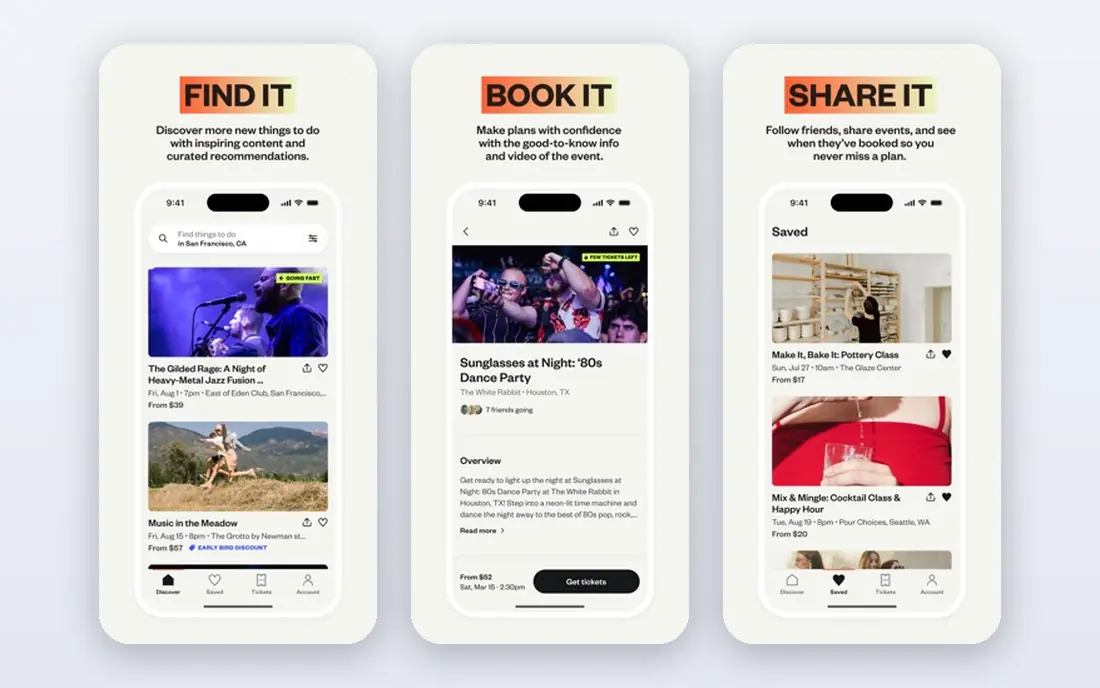
Eventbrite is our general pick for public events, classes, workshops and small conferences because it combines registration, ticketing, payment processing and a public marketplace in one setup. Free events carry no platform fee in the pricing we checked, while paid tickets carry a service fee of 3.7% plus $1.79 per ticket, plus a 2.9% payment processing fee per order. Buyers pay those fees by default, or the organiser can absorb them, which changes the margin maths in a clear way.
The catch is the flat $1.79, which hits low-priced tickets hardest. On a $10 ticket it is a large share of the price, while on a $100 ticket it is a small share, so model your real ticket price before you commit. Eventbrite Pro, listed from $15 per month on annual billing in recent summaries, adds branding, analytics and email tools, but it does not remove per-ticket fees. For a public event that needs discovery, Eventbrite is hard to beat. For a private, high-priced conference, a capped-fee platform may be cheaper.
- Large public marketplace for discovery
- Free events carry no platform fee
- Simple setup for first-time organisers
- Paid ticket fees add up on low-priced tickets
- Pro subscription does not remove per-ticket fees

RegFox is the value pick for organisers who run form-heavy registrations, such as camps, courses, conferences and races, and who want to keep the platform fee low. Standard is listed at $0.99 plus 1% per paid registrant, capped at $4.99, with no monthly fee, while Premium is $1.99 plus 1% capped at $5.99. Card processing through Webconnex Payments is 2.9% plus 30 cents per transaction, and free events are charged per registrant rather than being free, which is an important difference from Eventbrite.
The fee cap is the detail that matters for high-priced events. On a $500 registration, the Standard platform fee still stops at $4.99, while an uncapped percentage fee would keep rising. RegFox also offers conditional logic, group registration, badge printing and a check-in app, which suit events with tracks, add-ons and complex pricing rules. For a free community event, Eventbrite may be cheaper. For a paid, form-heavy event, RegFox is often the lowest total.
- Low per-registrant fee with a cap
- Strong conditional form logic
- No monthly fee on Standard and Premium
- Card processing is extra
- Some features, such as white-label domain, cost extra
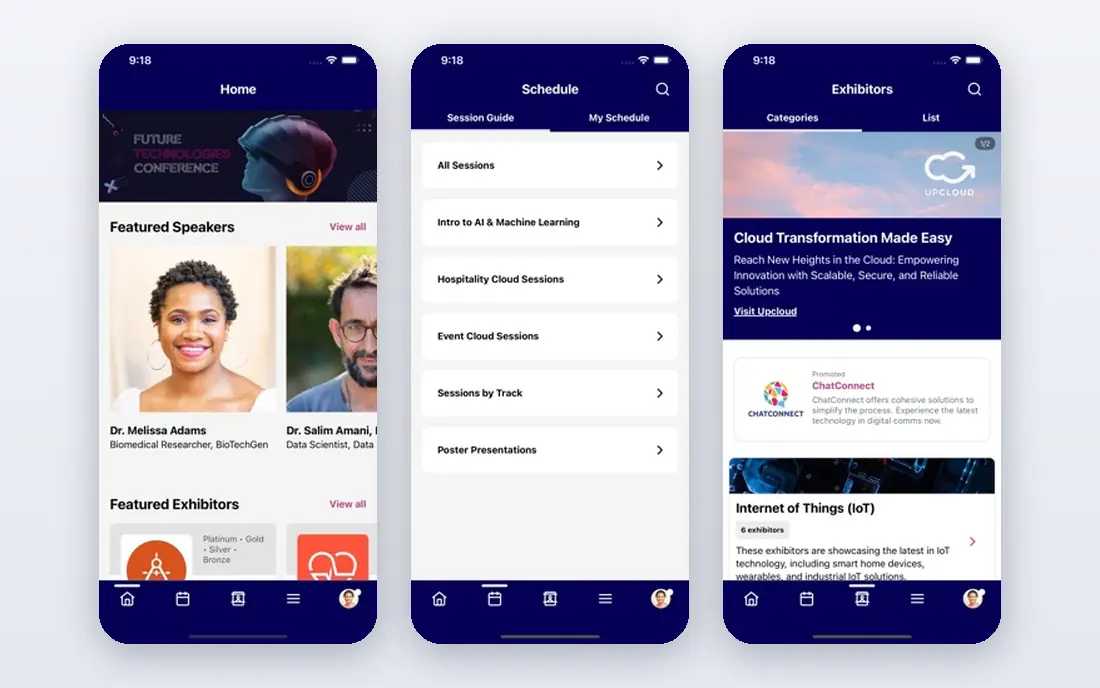
Cvent suits large annual conferences, corporate gatherings and multi-team event programmes that need more than a simple form. Its registration tools cover complex agendas, session selection, housing, travel and onsite check-in, with venue sourcing and enterprise reporting alongside. That depth helps a team running several large events a year, where consistency, approvals and data controls matter as much as the form itself.
The trade-off is cost transparency and setup time. Cvent uses quote-based pricing that combines an annual licence with per-registrant fees, so budgeting needs a sales conversation and a clear event volume estimate. Setup runs through a sales-led implementation, which adds time before launch compared with a self-serve tool. For a small workshop, Eventbrite or RegFox will be faster and cheaper. For a large enterprise conference, Cvent's depth can justify the process.
- Deep enterprise registration, venue sourcing and onsite tools
- Strong reporting
- Multi-team controls
- Quote-based pricing
- Sales-led setup takes longer
- Overkill for a single small event
Whova is the pick when the attendee experience matters as much as the form. Its mobile app gives attendees agendas, speaker profiles, networking, messaging and session engagement, while registration and ticketing sit alongside. That combination suits mid-size conferences where attendees need to plan sessions, meet other attendees and stay engaged across several days, rather than simply buy a ticket and turn up.
The limits are pricing and form depth. Whova does not publish pricing, with its pricing page taking a quote request instead, so budgeting needs a conversation. Registration form customisation is also lighter than a dedicated registration platform such as RegFox, so an event with complex conditional logic may need a second tool or a compromise. For a conference buying the engagement layer first, Whova is strong. For a form-first event, start with RegFox or Cvent.
- Strong attendee app with networking and agendas
- Registration and ticketing included
- Session engagement tools
- Quote-based pricing
- Registration form customisation is lighter than dedicated registration tools
TicketSpice suits organisers who want ticketing without giving up control of payments or paying a high percentage on every ticket. It lets payments flow to your own payment gateway in many setups, and volume comparisons put it among the cheaper options for a 500-ticket event, behind Ticket Tailor but ahead of Eventbrite on total fees. That structure helps a recurring event organiser who wants predictable costs and direct access to funds.
The catch is discovery and fee checking. TicketSpice does not offer the same public marketplace audience as Eventbrite, so you need your own marketing to fill seats. Fee totals also depend on ticket price, volume and gateway charges, so run your real event numbers through the pricing page before you commit. For an organiser with an audience and a paid event, TicketSpice is a strong low-cost choice. For a public event that needs discovery, Eventbrite still wins.
- Low per-ticket costs in volume comparisons
- Payments can go to your own gateway
- Free for free events with paid events
- Fee detail needs checking for your volume
- Less public discovery than Eventbrite
Bizzabo suits hybrid enterprise events and large summits that need registration, a virtual broadcast layer, an event app and analytics in one system. It handles in-person and virtual attendees together, with engagement tools, sponsor features and reporting that help a large team prove event value to stakeholders. That breadth is the reason enterprise teams choose it over a simple ticketing tool.
The limit is cost and complexity. Published summaries list Bizzabo event software from $17,999 per year with a three-user minimum, which puts it out of reach for a small organiser, and complex workflows take onboarding time to set up well. A team running one small conference a year will find Eventbrite or RegFox faster and far cheaper. A team running a large hybrid summit programme will find Bizzabo's combined tools worth the investment.
- Strong hybrid and virtual event tools
- Event app and analytics
- Enterprise engagement features
- High entry cost for small teams
- Complex setup needs onboarding time
Splash is built for corporate and marketing teams that need beautiful, on-brand event pages, invitations and guest lists, rather than a public ticket marketplace. It offers page design, email campaigns, RSVP tracking and integrations with marketing tools, which suit product launches, executive dinners, webinars and brand events where presentation matters. The guest list and check-in tools help a host manage who attends and follow up afterwards.
The trade-off is ticketing depth and price transparency. Splash uses quote-based pricing, and its ticketing and payment features are lighter than Eventbrite, RegFox or TicketSpice, so a paid public event with complex ticket types may need another tool. For a branded corporate event where the page and the guest experience are the priority, Splash is a strong pick. For a paid conference, compare it against Cvent and Bizzabo first.
- Strong branded event pages and email tools
- Good for corporate and marketing events
- Guest list management
- Quote-based pricing
- Ticketing depth is lighter than dedicated ticketing platforms
Ticket Tailor suits organisers who want low, predictable ticketing costs without a percentage fee on every ticket. It uses prepaid credits, with volume comparisons putting a 500-ticket event among the cheapest in this list, and payments go directly to your own Stripe, PayPal or Square account as buyers pay, rather than being held by the platform. Free events are free up to a yearly ticket limit in its pricing summaries, which helps community organisers.
The limits are discovery and credit planning. Ticket Tailor does not offer the same public marketplace as Eventbrite, so you need your own audience, and the credit model means you must buy enough credits for your expected volume. For a recurring organiser with a mailing list and a paid event, Ticket Tailor is one of the cheapest routes in this list. For a first public event that needs new attendees, Eventbrite's marketplace may be worth the higher fee.
- Prepaid credits keep costs predictable
- Payments go to your own Stripe, PayPal or Square account
- Free for free events up to a limit
- Less public discovery than Eventbrite
- Credit model needs planning for volume
How we picked these
We compared official pricing pages and product pages, and we kept only platforms that handle registration or ticketing for real events in October 2026. We favoured platforms with clear fee pages, a working check-in route and a distinct audience, and we noted where pricing is quote-based rather than published. We did not claim hands-on testing, and we treated third-party fee comparisons as a check on vendor pages, not as a replacement for them. Fees vary by country, ticket price and payment route, so check the live pricing page for your event before you publish.
What to check before you choose
Model the fee on your real event, not on a generic example. A flat per-ticket fee, a percentage fee, a capped fee and a monthly subscription produce very different totals at $10, $50 and $500 ticket prices, and the answer changes again when buyers buy in groups. Add payment processing, add-on features and payout timing to the same model, since a cheap platform fee with slow payouts can still hurt cash flow.
Forms, check-in and attendee data
Check whether the form supports conditional logic, group registration, discount codes and add-ons, and whether check-in works offline at the door. Ask who owns attendee data, whether you can export it, and whether the platform markets other events to your guests, since data control matters for repeat events. Test the full flow, from form to confirmation email to check-in, on a phone before you launch.
Free events are not always free
Free events are free on Eventbrite, but RegFox charges per registrant even for free events, and other platforms set yearly free ticket limits. If your event is free, confirm the platform fee, the payment fee on paid add-ons, and any limit that could trigger a charge mid-registration. A free event that suddenly charges per registrant is a common surprise, and it is easy to avoid with one check.
Frequently asked questions
What is the best free event registration platform?
Eventbrite is the simplest free option for free events, since free events carry no platform fee in the pricing we checked. Ticket Tailor also offers free tickets up to a yearly limit, while RegFox charges per registrant even for free events. Check the free limit and any paid add-on fees before you publish a free event.
What is the best online event registration software for conferences?
Cvent suits large enterprise conferences, Whova suits conferences that need a strong attendee app, and RegFox suits form-heavy conferences that need conditional logic at a low cost. Pick Cvent for scale, Whova for engagement, and RegFox for form depth and fee control. Trial the form and check-in flow on a real session plan before you commit.
How much does event registration software cost?
It depends on the model. Eventbrite charges 3.7% plus $1.79 per paid ticket plus 2.9% processing per order, while RegFox charges $0.99 plus 1% per registrant capped at $4.99. Enterprise tools such as Cvent, Whova and Bizzabo use quotes, so ask for a total based on your registrant count and ticket prices.
What is the best registration platform for paid events?
RegFox and Ticket Tailor are among the cheapest for paid events in volume comparisons, thanks to a capped fee and prepaid credits. Eventbrite is better when public discovery matters, even though its per-ticket fee is higher. Model your ticket price, volume and payout timing before you choose, since the cheapest platform at $500 a ticket may not be cheapest at $15.
Can I use a registration platform for virtual events?
Yes, most platforms in this list support virtual or hybrid events, with Bizzabo and Whova offering the strongest virtual and app layers. Check whether streaming, session tracking and virtual networking are included in your plan, since some virtual features sit on higher tiers or need a quote.
What should I check before publishing a registration page?
Test the full flow on a phone, including the form, payment, confirmation email and check-in, and confirm who pays the fees, who owns attendee data and when payouts arrive. Check refund rules, discount codes and group registration, since those details cause most organiser problems after launch. Publish a test event first, then open the real event.
Sources we checked (8)

Online Jobs is an independent blog about careers, online work, learning new skills and the tools that help people earn. More about us.
Keep reading
All posts
n8n Alternatives
n8n alternatives compared for 2026, with Zapier, Make, Activepieces, and more, covering visual builders, code steps, self-hosting, and pricing models.

ZoomInfo Alternatives
The best ZoomInfo alternatives in 2026, compared on price, free plans, data coverage, and which tool fits small teams or large sales teams best in detail.

Yotpo Alternatives
Find cheaper alternatives to Yotpo for reviews and loyalty, with Judge.me, Loox, Stamped, and more compared for Shopify stores in 2026, all in one guide.