Best Meal Planning Apps in 2026: 9 Apps Compared


Calorie and macro targets · Starting price: $5 per month
How we put this together: we compare official feature and pricing pages, app store listings, privacy policies and public user reviews. Prices change, so check the provider's site before you pay.
Key takeaways
- Eat This Much Premium costs 5 dollars per month on an annual plan and builds weeks around calorie and macro targets you set.
- eMeals costs 4.99 dollars per month on a 12-month plan and hands you a new dinner menu each week with a grocery list.
- Plan to Eat costs 49 dollars per year and suits cooks who want to plan from their own recipe collection rather than generated menus.
- Samsung Food is free for recipe saving and planning, with a Food+ upgrade at 6.99 dollars per month for AI-personalized plans.
- Two former leaders, Mealime and PlateJoy, have shut down, so older roundups that still list them are out of date.
Quick comparison
| Name | Who it suits | Starting price | Free option | |
|---|---|---|---|---|
| Eat This Much | Calorie and macro targets | $5 per month | Yes | Visit |
 eMeals eMeals | Done-for-you family dinners | $4.99 per month | Free trial | Visit |
 Plan to Eat Plan to Eat | Your own recipe collection | $4.08 per month | Free trial | Visit |
 Paprika Paprika | Recipe organizing | See website | No | Visit |
 Samsung Food Samsung Food | Free all-rounder | Free | Yes | Visit |
 Yummly Yummly | Recipe discovery | See website | Yes | Visit |
 SideChef SideChef | Guided cooking | See website | Yes | Visit |
 Prepear Prepear | Family meal planning | See website | Yes | Visit |
 DinnerDrop DinnerDrop | Quick family dinners | Free | Yes | Visit |
The best meal planning apps
Meal planning apps split into two camps: ones that generate the plan for you, and ones that organize recipes you already love. We compared official pricing pages, feature lists, and app store listings, and we dropped two well-known names, Mealime and PlateJoy, because both have shut down and no longer work today.
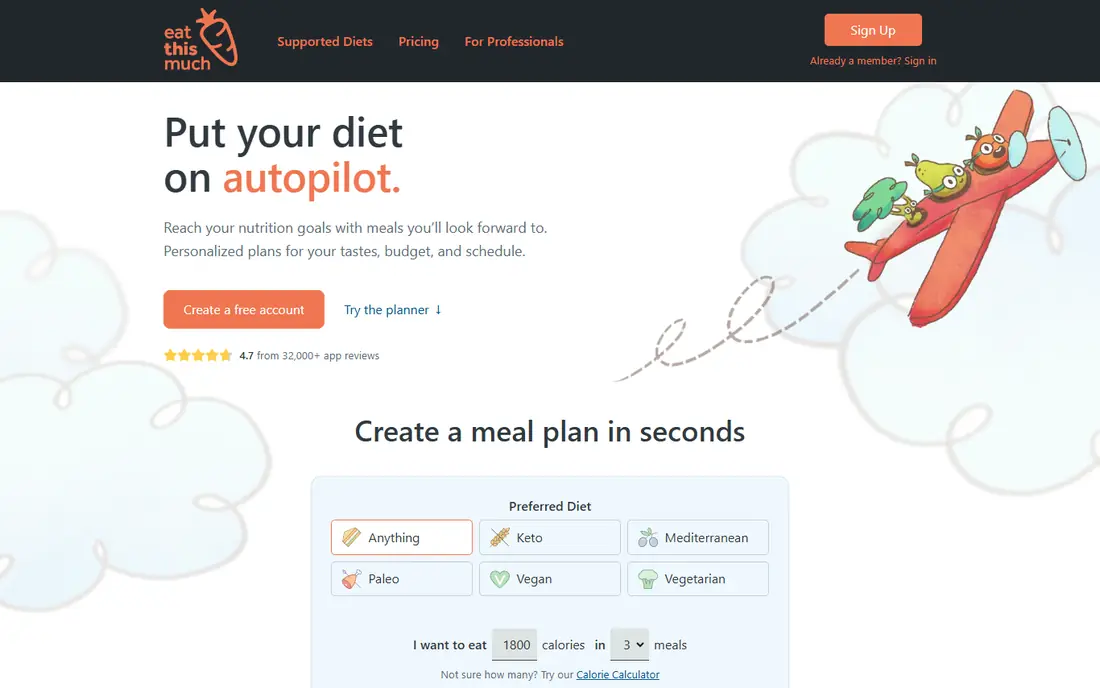
Eat This Much is our pick if numbers drive your eating. You set a calorie target, protein, carb and fat goals, and any foods you avoid, and it generates meals for the day or the week. Premium costs 5 dollars per month on an annual plan, or 14.99 dollars month to month, and adds weekly planning, automatic grocery lists, leftover handling, and grocery delivery integration. A free plan covers daily planning with limits.
The honest catch is repetition. The more foods you rule out, the smaller the recipe pool becomes, and strict combinations like dairy-free plus nut-free plus a tight budget can serve the same dinners often. Still, no other app on this list ties the plan so directly to macro targets, and the free tier is a fair way to test whether that approach suits you.
- Plans built to your exact calorie and macro goals
- Automatic grocery lists on Premium
- Free plan for daily planning
- Free plan covers one day at a time
- Recipe variety narrows with many exclusions

eMeals answers the nightly question of what to cook. Each week brings a new dinner menu matched to a food style you pick, from keto to budget-friendly to family meals, plus a grocery list that can go to Walmart, Kroger, Instacart, and other stores. Dinner plans cost 4.99 dollars per month on a 12-month plan, with a 14-day free trial, and you can add your own family recipes alongside the weekly menu.
The limit is scope. eMeals is built around dinner, so if you want full-day plans with breakfasts and lunches, you will need to fill those gaps yourself. For a household that mainly struggles with dinner, though, it is one of the cheapest done-for-you options, and the grocery integration saves a real trip-planning step.
- New weekly menu for your chosen food style
- Lists send to major grocers
- Low price on the annual plan
- Dinner-focused, so breakfast and lunch need other plans
- 14-day trial only

Plan to Eat is a planner, not a menu generator, and that distinction matters. You import recipes from any website, drag them onto a calendar, and the app builds a shopping list from the plan. It costs 5.95 dollars per month or 49 dollars per year, and the 14-day trial asks for no card. Households can share the calendar, which helps when two people cook and shop.
The trade-off is effort. If you have no recipe collection and want the app to decide dinner, Plan to Eat will feel empty on day one. If you already save recipes from blogs and cookbooks and want one place to turn them into weeks and lists, it is one of the most dependable tools in this category.
- Unlimited recipe imports from the web
- Shared calendar for households
- No card needed for the trial
- No generated menus
- You supply the recipes yourself
Paprika is a recipe manager first, and it is beloved for that focus. You clip recipes from the web, scale servings up or down, and build menus from your own collection, with grocery lists generated from the recipes you pick. It is sold as a one-time purchase per platform rather than a subscription, which keeps the long-term cost low, and it works offline in the kitchen.
The weakness is automation. Paprika will not generate a week of meals from your goals, and its lists need more manual care than a dedicated planner. Cooks who already know what they like and want a tidy, permanent recipe library will get more from Paprika than from any subscription planner, especially over several years of use.
- One-time purchase per platform, no subscription
- Strong recipe clipping and scaling
- Works offline
- No meal plan generation
- Grocery lists are manual compared with planners
Samsung Food is the strongest free option in this roundup. The free tier covers saving recipes from any website, building meal plans, and making grocery lists, with online ordering from partner grocers in supported regions. Food+ costs 6.99 dollars per month or 59.99 dollars per year and adds AI-personalized plans and deeper nutrition features, with a 7-day trial.
The catch is that the free version, while generous, holds back the personalization that makes the app feel tailored. The interface also packs in a lot, from community recipes to pantry features, which can feel cluttered at first. If you want a capable free planner without committing to a subscription, Samsung Food is the first one to try.
- Free recipe saving, planning and lists
- Saves recipes from any website
- Food+ adds AI-personalized plans
- Best features sit behind Food+
- Interface can feel busy
Yummly works best as a discovery engine. Search millions of recipes, filter by diet, allergy, cuisine, and cooking time, and the app learns your tastes to recommend new dishes. Guided cooking mode walks you through steps with timers, which suits newer cooks, and saved recipes feed into meal plans and lists.
Planning is not Yummly's strongest suit. It will not generate a macro-targeted week like Eat This Much, and its premium features differ by region, so check the pricing page for your area. Use Yummly to find and save great recipes, then pair it with a planner if you want the week fully organized.
- Large recipe search with diet filters
- Personalized recommendations
- Guided cooking mode
- Premium features vary by region
- Planning tools are lighter than dedicated planners
SideChef stands out in the kitchen itself. Its guided cooking mode reads steps aloud, shows photos for each stage, and adjusts to your pace, which helps when your hands are busy. You can search recipes by diet and ingredient, build meal plans, and generate lists, with a free tier covering the basics and a premium tier for deeper planning.
The downside is consistency. Recipes come from many sources, so quality varies more than in a curated app like eMeals, and the full planning experience sits behind the premium tier. For a cook who wants a calm voice guiding dinner rather than another list to manage, SideChef earns its place.
- Step-by-step voice-guided cooking
- Recipe search with diet filters
- Meal planning and lists
- Premium subscription needed for full planning
- Recipe quality varies by source
Prepear is built around households. Families can plan meals on a shared calendar, keep a pantry inventory, and build one grocery list everyone can add to. Recipe import from the web works well, and the free tier covers the core planning loop, with a premium tier adding deeper features.
The library is smaller than Samsung Food or Yummly, so discovery takes more of your own input. Prepear suits a family that already has favorite recipes and wants a shared, simple system for turning them into weeks and shopping trips, rather than a service that invents the menu.
- Family-friendly planning with shared lists
- Recipe import and meal calendar
- Pantry tracking
- Smaller recipe library than bigger rivals
- Premium features behind a subscription
DinnerDrop is a newer free option aimed squarely at busy families. It plans five personalized dinners a week, deduplicates the grocery list, and fills an Instacart cart in one step, with no card needed to start. The optional Family plan costs 4.99 dollars per month or 39 dollars per year and adds household features like texting the week's ideas to everyone and a shared list anyone can add to.
Being newer means a smaller community and fewer recipes than the long-established apps, and the focus is dinner rather than full-day eating. For a family that wants tonight's dinner decided and shopped with minimal effort, and likes that the core planning stays free, DinnerDrop is worth a look.
- Free planning with an Instacart cart
- Built for busy families
- Optional Family plan for household features
- Newer and smaller than established rivals
- Dinner-focused rather than full-day
How we picked these
We compared official pricing pages, feature lists, and app store listings for each app, and we kept only apps that work today in October 2026. That rule removed two famous names: Mealime closed on October 21, 2026, and PlateJoy shut down in 2025, so neither appears here despite older roundups still listing them. Prices quoted are the standard published rates from each vendor's own site, and where a vendor does not publish a simple rate we say so rather than guessing.
What to check before you choose
Start with how you actually cook. A planner that generates menus saves decision time but can bore a confident cook, while a recipe manager rewards a cook who already knows what they like. Your household size matters too, since some apps cap servings or handle shared lists better than others.
Decide between generated plans and your own recipes
Generated plans suit weight loss goals and busy weeks, because the app does the deciding and the list follows automatically. Recipe managers suit cooks with strong preferences, family recipes, or dietary needs that generated menus handle poorly. Many households end up with one of each, which is fine as long as the list stays in one place.
Check the free tier honestly
Free tiers differ a lot. Eat This Much free covers a day at a time, Samsung Food free covers full planning, and Plan to Eat offers a trial with no card. Try the free tier for a full week, including a grocery trip, before paying. A plan that looks good on screen but fails at the store is not a bargain.
Watch for shutdowns and lock-in
Mealime and PlateJoy both closed with limited export options, which is a warning for any app holding your recipes. Before committing, check whether you can export your recipes and plans, and keep a backup of family favorites outside the app.
Frequently asked questions
What is the best meal planning app for weight loss?
Eat This Much is our pick for weight loss, because it builds plans around calorie and macro targets and tracks them as you go. Samsung Food is a strong free alternative with nutrition features, and its Food+ tier adds personalized plans. For structured dinner plans on a budget, eMeals is a cheaper route that still keeps portions sensible.
What is the best free meal planning app?
Samsung Food offers the most complete free tier, with recipe saving, planning, and lists at no cost. Eat This Much free is useful for daily planning, and DinnerDrop plans family dinners free with an Instacart cart. If you want a fully free week of planning without a trial clock, Samsung Food is the safest start.
What is the best meal planning app for families?
Plan to Eat and Prepear both handle shared calendars and lists well, which matters more than recipe counts for a household. eMeals suits families that want dinner decided for them each week, while DinnerDrop adds texting the week's ideas to everyone on its Family plan. Pick based on who cooks and who shops in your house.
What is the best meal plan app for weight loss with a grocery list?
Eat This Much Premium pairs macro-targeted plans with automatic grocery lists and delivery integration, which is why it leads here. Plan to Eat also builds lists, but from recipes you choose yourself rather than generated plans. Either way, check that the list groups by store aisle and handles quantities for your household size.
Is there a free meal planning app that really stays free?
Samsung Food and DinnerDrop both keep core planning free with no trial expiry, though each sells a premium tier for deeper features. Eat This Much free stays free too, but it limits planning to a day at a time. Be wary of apps that call a short trial a free plan, and check the pricing page before signing up.
Why do some older lists recommend Mealime and PlateJoy?
Both apps were popular for years, and many roundups have not been updated since they closed. Mealime shut down on October 21, 2026, and PlateJoy shut down in 2025. If you used either one, Samsung Food and DinnerDrop are the closest free replacements, while eMeals covers the done-for-you dinner role PlateJoy once filled.
Sources we checked (9)

Online Jobs is an independent blog about careers, online work, learning new skills and the tools that help people earn. More about us.
Keep reading
All posts
Best workout apps for women
Compare the best workout apps for women in 2026, from free guided classes to structured strength plans, with current prices, free plans and honest trade-offs.

Best Yoga App
Find the best yoga app for home practice in 2026, with verified prices, free options, class styles, trials and honest limits for 10 yoga apps compared.
Best Workout Tracker App
We compared the best workout tracker app options for gym, home, and running training, checking prices, free plans, and logging tools in detail. See inside.