Best Legal AI Tools in 2026: 8 Tools Compared


Large firms that want a broad legal assistant · Starting price: See website
How we put this together: we compare official feature and pricing pages, app store listings, privacy policies and public user reviews. Prices change, so check the provider's site before you pay.
Key takeaways
- Harvey suits large firms that want a broad legal assistant for research, drafting and analysis.
- CoCounsel suits firms that already use Westlaw and Practical Law content.
- Lexis+ AI suits firms that already use LexisNexis research and want AI inside that system.
- Spellbook suits transactional teams that draft contracts inside Microsoft Word.
- Luminance, Legora, Everlaw and Clio Duo cover contract review, collaborative drafting, litigation review and practice management support.
Quick comparison
| Name | Who it suits | Starting price | Free option | |
|---|---|---|---|---|
| Harvey | Large firms that want a broad legal assistant | See website | No | Visit |
 CoCounsel | Firms that use Westlaw and Practical Law | See website | No | Visit |
 Lexis+ AI | Firms that use LexisNexis research | See website | No | Visit |
 Spellbook | Contract drafting and review inside Microsoft Word | See website | See website | Visit |
 Luminance | Contract review, M&A diligence and compliance review | See website | No | Visit |
 Legora | Collaborative drafting and multi-jurisdiction legal work | See website | No | Visit |
 Everlaw | Litigation review, e-discovery and case building | See website | No | Visit |
 Clio Duo | Small and mid-size firms using Clio for practice management | See website | No | Visit |
The best legal AI tools
We compared legal AI tools for research, drafting, contract review and litigation, with a focus on fit for firm size and existing systems. The best legal AI software is rarely a single general tool, since research, contracts and litigation need different content and controls. A tool that fits a large firm may be too heavy for a solo practice, while a simple Word tool may lack the research depth a litigation team needs. Note throughout: AI output needs lawyer review, and these tools do not provide legal advice on their own.
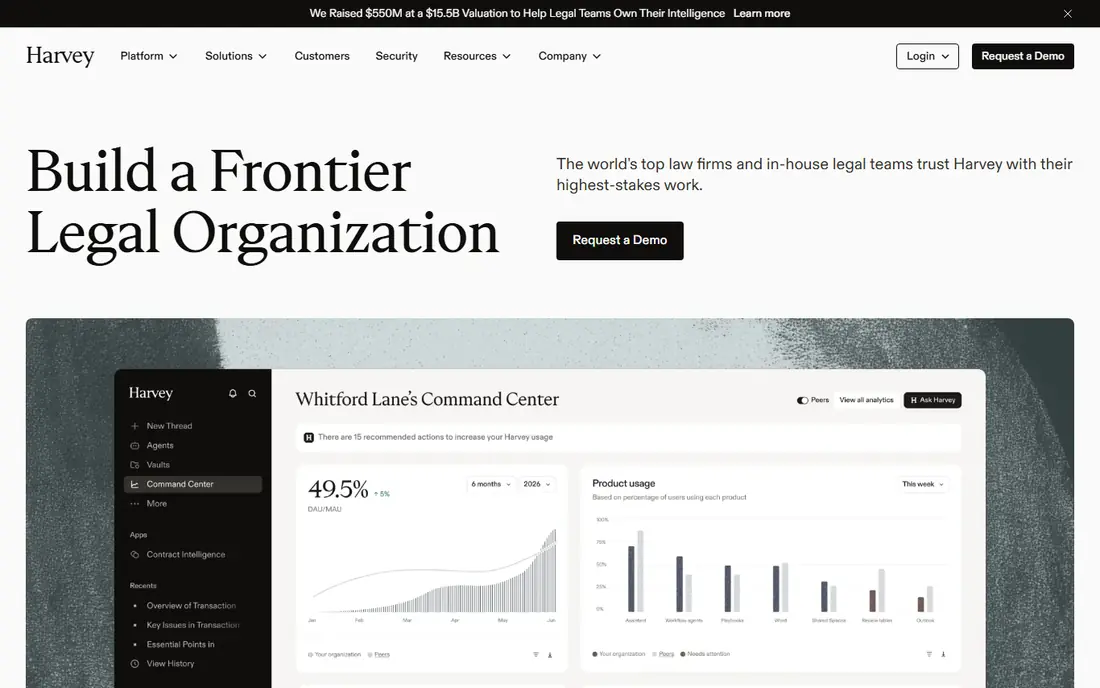
Harvey is a purpose-built legal AI platform for research, drafting, document analysis and matter work. Large firms use it to search across matter documents, draft memos and contracts, summarise documents and test arguments, with workflows designed for legal teams rather than general chat. Word integration helps lawyers work inside the document they already use. The main limits are access and governance. Pricing is enterprise and quote-based, and a firm needs clear policies on data, review and citation checking before rollout. AI output can contain errors or missing citations, so a lawyer must verify every citation and legal claim before use. For a large firm with governance in place, Harvey offers broad coverage in one platform.
- Broad research and drafting coverage, matter-aware workflows, Word integration, enterprise security focus
- Enterprise pricing needs a quote, less suited to solo firms, setup and governance work needed
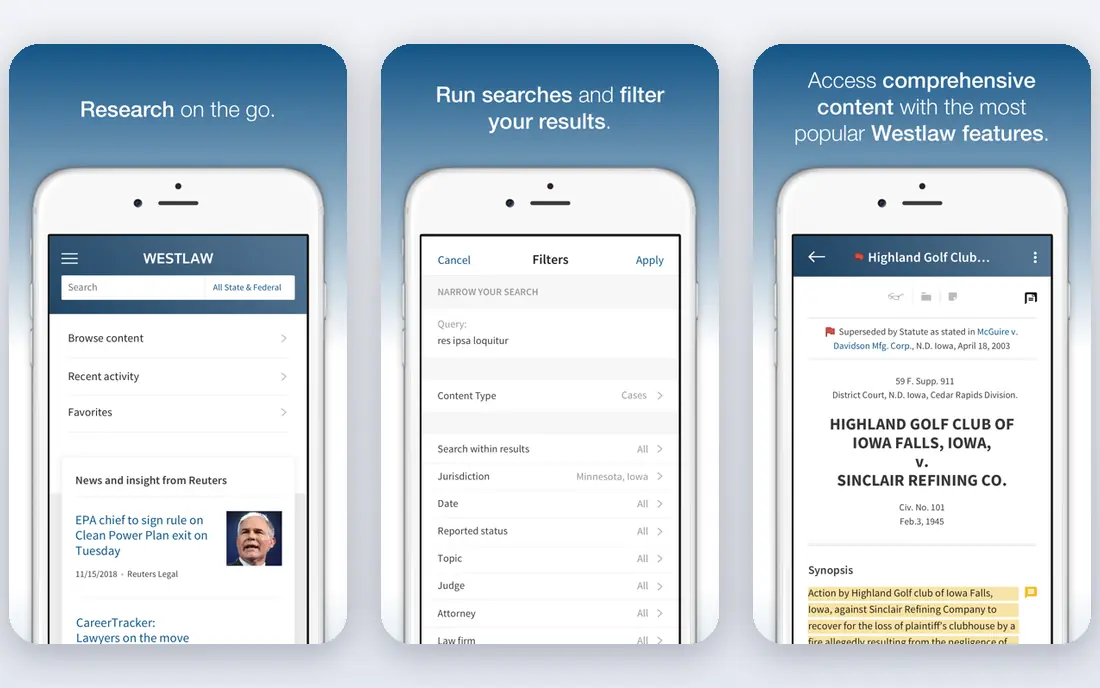
CoCounsel, from Thomson Reuters, builds on Casetext and links AI assistance to Westlaw and Practical Law content. That link matters for research, since answers can draw on trusted legal sources rather than general web text alone. Tools cover research, drafting, document review and deposition preparation, which suits litigation and advisory teams. The ecosystem tie-in is both a strength and a limit. Firms already on Westlaw will get more value, while firms on another research system should compare total cost. As with all legal AI tools, a lawyer must check citations, jurisdiction and current law before relying on output. For Westlaw firms, CoCounsel is a natural first AI assistant to test.
- Linked to Westlaw and Practical Law content, research and drafting tools, document review, deposition prep support
- Cost and ecosystem tie-in, smaller firms need to check plan options, AI output still needs verification
Lexis+ AI adds AI research, summarising and drafting tools inside the LexisNexis research system. Lawyers can ask research questions in plain language, review linked sources, and use Shepard's tools to check whether a case is still good law. That source-linked workflow helps reduce the risk of relying on an uncited AI summary. Pricing is often an add-on to an existing Lexis subscription, so firms should check the current vendor terms for their plan size. AI output still needs lawyer review, especially for jurisdiction, date and citation accuracy. For a Lexis firm, Lexis+ AI offers a familiar research path with AI assistance layered on top.
- AI inside Lexis research, linked citations, drafting and summarising tools, Shepard's verification links
- Add-on pricing for many firms, ecosystem tie-in, verification still required for every answer
Spellbook lives inside Microsoft Word and helps transactional lawyers draft and review contracts with clause suggestions, redlines and review checklists. That Word-native design suits deal teams who already draft in Word and do not want to move contracts into a separate platform for each review. It can flag risky language, suggest standard clauses and speed up first drafts. It is not a research tool and does not cover litigation or regulatory research. Clause suggestions also need lawyer judgment, since a standard clause may not fit a specific deal, client or jurisdiction. For a transactional team that works in Word daily, Spellbook is a focused and practical AI tool.
- Works inside Word, clause suggestions, redlining help, contract review checklists, transactional focus
- Contracts only, Word only, not a general legal research tool, needs review for clause risk
Luminance uses AI to analyse large sets of contracts for diligence, compliance and risk review. It can surface unusual clauses, missing provisions and patterns across hundreds of documents, which helps M&A and compliance teams work faster than manual review alone. Data room and batch review tools suit large transactions. The platform is enterprise-focused, so smaller firms should check plan fit and total cost. AI flags are a starting point, not a final legal call, and a lawyer must verify findings against the full contract and deal context. For a team facing a large contract review, Luminance offers scale that a general assistant may not match.
- Contract analysis at scale, clause and risk flagging, M&A diligence support, data room review tools
- Enterprise focus and pricing, setup for large reviews, needs lawyer review for final calls
Legora, formerly Leya, offers a collaborative legal AI workspace for drafting, research and review, with a Word add-in for lawyers who draft in Word. It suits firms that work across jurisdictions or teams, where shared workflows, templates and review matter as much as single-document drafting. The platform aims to cover research, drafting and document work in one place. Pricing is enterprise and quote-based, so smaller firms should check access options. As with other tools, output needs lawyer review for citations, jurisdiction and client-specific risk. For a firm that wants a collaborative drafting platform rather than a single-user assistant, Legora is worth a demo.
- Collaborative drafting, research and review tools, Word add-in, multi-language support in some workflows
- Enterprise pricing needs a quote, newer brand in some markets, verification still required
Everlaw is a litigation platform with AI-assisted review, clustering and case-building tools for e-discovery and disputes. Legal teams can review large document sets, group related documents, build timelines and prepare for trial from a single case workspace. That litigation focus suits firms with heavy document review, rather than firms that mainly draft contracts. It is not a general legal assistant for research memos or contract drafting, so a firm may need a second tool for those tasks. Pricing is quote-based and depends on case size and users. For a litigation team, Everlaw offers review depth and collaboration that a general AI chat tool cannot match, but final review calls remain with lawyers.
- Document review at scale, AI-assisted review and clustering, case timelines, collaboration for litigation teams
- Litigation focus, not a general drafting assistant, pricing needs a quote, setup for large cases
Clio Duo adds AI assistance inside Clio, the practice management system used by many small and mid-size firms. It can help draft documents, summarise matters, support intake and surface task help inside the workflow a firm already uses. That embedded design suits a small firm that wants AI help without buying a separate enterprise platform. AI depth is narrower than a dedicated research assistant, so firms with heavy research or large contract review needs will still need another tool. Clio Duo also requires a Clio plan, so check the current Clio pricing for AI access. For a Clio firm that wants practical, workflow-level AI help, Duo is a sensible starting point, with lawyer review still required for all output.
- AI inside Clio workflows, drafting and summarising help, intake and task support, familiar for Clio users
- AI depth is narrower than Harvey or CoCounsel, needs a Clio plan, not a standalone research system
How we picked these
We picked tools that cover the main legal AI jobs: research, drafting, contract review, litigation review and practice management support. We included both large-firm platforms and tools for smaller firms, and we noted ecosystem fit, since many legal AI tools work best inside the research or practice system a firm already uses. We did not rank by a single score, because a litigation tool and a contract tool solve different problems. Where pricing was not published on the vendor site at the time of writing, we used See website. Legal AI pricing is often quote-based and depends on firm size, users and content access, so request a quote based on your matter types and existing research subscriptions. Always confirm data handling, confidentiality and retention terms before uploading client matter documents.
What to look for when choosing a legal AI tool
Start with matter type and existing systems. A research-heavy firm should test citation accuracy and source links, a transactional firm should test Word drafting and clause review, and a litigation firm should test document review at scale. Run a pilot with real, non-confidential sample matters, and check how the tool handles jurisdiction, date and source verification. A demo with vendor sample data will not show those limits. Next, set governance before rollout. Decide who may use the tool, what data may be uploaded, how output is reviewed, and how citations are checked. Require lawyer review for every AI draft, memo and research summary, and keep a record of sources checked. A clear review step protects clients and the firm, and it matters more than any single AI feature.
Frequently asked questions
What is the best legal AI tool?
Harvey suits large firms that want broad research and drafting, CoCounsel suits Westlaw firms, and Lexis+ AI suits Lexis firms. Spellbook suits contract drafting in Word, while Everlaw suits litigation review. The best legal AI software depends on firm size, matter type and the research or practice system you already use.
Do legal AI tools replace lawyers?
No. Legal AI tools assist with research, drafting and review, but they do not provide legal advice on their own and they can make errors. A lawyer must verify citations, check current law and jurisdiction, and exercise judgment on client matters. Firms should treat AI output as a draft for review, not as a final legal answer.
Is AI output safe to use in court filings?
AI output should never go into a filing without full lawyer verification. Check every citation, quote, case and legal proposition against a trusted source, and confirm jurisdiction and current status. Courts and regulators have sanctioned filings with false AI citations, so a careful citation check is essential before any filing.
What is the best legal AI software for law firms that are small?
Small firms often suit Clio Duo if they already use Clio, or Spellbook if they focus on contracts in Word. CoCounsel also offers small-firm plan options through Thomson Reuters in some markets, so check current vendor terms. Start with one workflow, such as drafting or intake, and expand only after a review process is working.
How do legal AI tools handle client confidentiality?
Handling varies by vendor, plan and settings, so check data retention, training, encryption and sub-processor terms before uploading client documents. Some enterprise plans offer stronger controls and no-training commitments, while consumer chat tools may not suit client matter work. Confirm terms in writing and follow your firm data policy.
Can legal AI tools draft contracts on their own?
Legal AI tools can draft contract language, suggest clauses and flag risks, but a lawyer must review the draft for deal terms, client instructions, jurisdiction and risk allocation. Standard clauses may not fit a specific transaction, and AI may miss context from negotiations or side agreements. Treat AI drafts as a starting point for lawyer review.
Sources we checked (8)

Online Jobs is an independent blog about careers, online work, learning new skills and the tools that help people earn. More about us.
Keep reading
All posts
ZoomInfo Alternatives
The best ZoomInfo alternatives in 2026, compared on price, free plans, data coverage, and which tool fits small teams or large sales teams best in detail.

Zoom Alternatives
Zoom alternatives compared for 2026: Google Meet, Microsoft Teams, Webex, Jitsi and more for free calls, large meetings and webinars for teams and classrooms.

Workday Alternatives
We compared the best workday alternatives for HR, payroll, and global hiring, from BambooHR and Gusto to Rippling, Deel, and HiBob for growing teams in 2026.