Best Home Workout App in 2026: 8 Apps Compared

How we put this together: we compare official feature and pricing pages, app store listings, privacy policies and public user reviews. Prices change, so check the provider's site before you pay.
Key takeaways
- Nike Training Club and FitOn are the best free starting points, with guided workouts at no monthly cost.
- Peloton and Apple Fitness+ suit people who want instructor led classes and a strong sense of routine, with Peloton at $12.99 per month and Apple Fitness+ at $9.99 per month.
- Daily Burn, Sweat, and Ladder offer more structure and coaching, but their prices rise to $19.99, $24.99, and $29.99 per month, so a trial matters.
- Hevy is the best simple tracker on this list for lifters who already know what to do and just want to log sets cleanly.
- This is a general fitness guide, not medical advice. Start gently, stop if something hurts, and talk to a clinician before starting a new program if you have a health condition, an injury, or are pregnant.
Quick comparison
| Name | Who it suits | Starting price | Free option | |
|---|---|---|---|---|
 Nike Training Club | Free guided workouts | Free | Yes | Visit |
 Peloton App | Instructor led classes | $12.99 per month | Free trial | Visit |
 Apple Fitness+ | Apple Watch workouts | $9.99 per month | Free trial | Visit |
 FitOn | Free classes and plans | Free | Yes | Visit |
 Daily Burn | Variety and beginner structure | $19.99 per month | Free trial | Visit |
 Sweat | Trainer led programs | $24.99 per month | Free trial | Visit |
 Ladder | Coach led strength teams | $29.99 per month | Free trial | Visit |
 Hevy | Simple strength tracking | Free | Yes | Visit |
The best home workout apps
We compared home workout apps on price, workout variety, beginner friendliness, equipment needs, and tracking. The list below favours apps that work without a gym, although some, such as Ladder and Hevy, work best if you have dumbbells or a home gym setup.
Nike Training Club is our pick for most people starting at home, because it costs nothing and still offers structured plans rather than a random pile of videos. Workouts cover strength, cardio, yoga, and mobility, with options for no equipment, dumbbells, and short sessions when time is tight. The plans give beginners a path to follow instead of asking them to build a routine from scratch.
The catch is depth. Paid apps offer larger libraries, live classes, and stronger community features, and Nike Training Club can feel quiet by comparison. For a free app, though, the trade is easy to accept, and it is the best place to learn what kind of training you actually enjoy before paying for anything.
- Full app is free
- Guided workouts for all levels
- Multi week training plans with bodyweight and minimal equipment options
- Library is smaller than paid platforms
- Instructor personality is lighter than class based apps
- App investment has varied over time
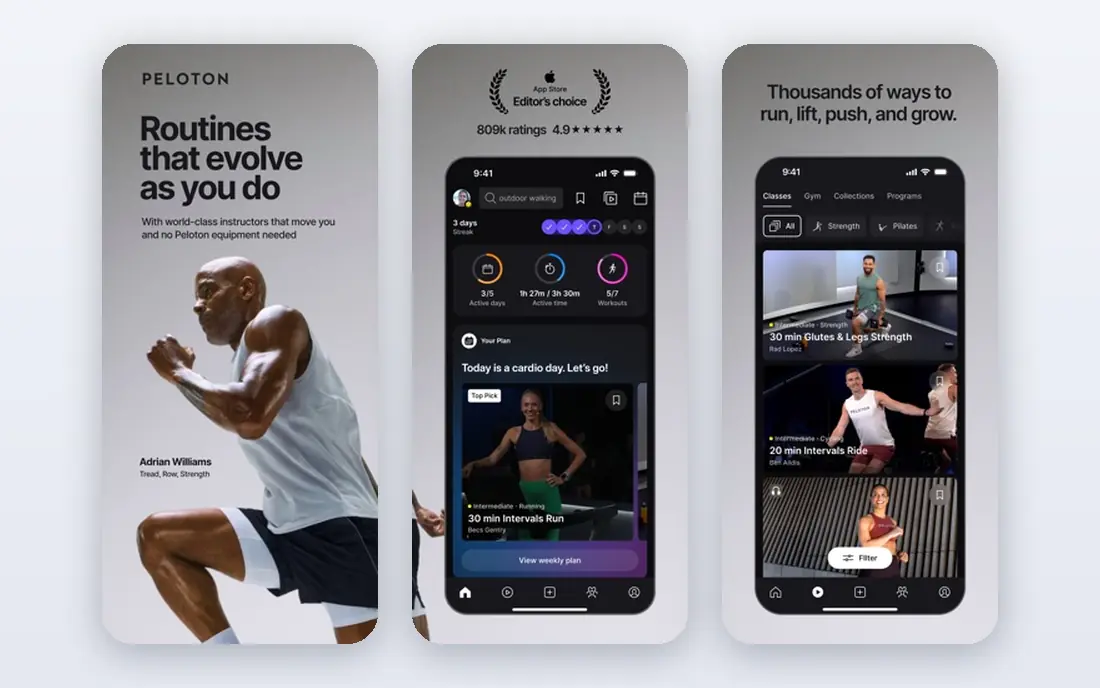
Peloton App, at $12.99 per month for the App One plan, brings studio style classes into a living room without requiring Peloton equipment. Classes range from short bodyweight strength sessions to longer yoga and meditation, and the instructor energy helps many people stay consistent when self guided plans fade. The app works on a phone, tablet, or television, which makes it flexible for small spaces.
The honest limit is level. Some classes assume a base level of fitness, and beginners may need to search for beginner labelled sessions and use modifications. Peloton fits people who like being told what to do, who enjoy music driven classes, and who will actually open the app several times a week.
- Large library of strength, yoga, Pilates, and cardio classes
- Live and on demand options
- No bike or treadmill required for the app
- Content can feel intermediate for true beginners
- Best experience needs a screen and space to move
- Price rises if you add equipment memberships

Apple Fitness+ costs $9.99 per month, or $79.99 per year, and it is the most polished option for Apple Watch owners. During a workout, your heart rate, calories, and activity rings appear on screen, which helps you pace effort without guessing. Classes are short, well produced, and cover a broad range, from 10 minute core sessions to longer strength and dance workouts.
The catch is ecosystem. Without an Apple Watch you lose the live metrics that set Fitness+ apart, and Android users should choose another app on this list. Apple Fitness+ fits iPhone and Apple Watch owners who want simple, high quality classes and who like seeing their effort in real time.
- Live metrics on screen with an Apple Watch
- Wide class range including strength, HIIT, yoga, and dance
- Family sharing available
- Needs an Apple Watch for full metrics
- Best inside the Apple ecosystem
- Less useful for Android users
FitOn is the other strong free option on this list, and it suits people who want more class variety than Nike Training Club without paying. Its library covers cardio, strength, yoga, Pilates, and dance, with plans that group workouts into a weekly routine. Many sessions need no equipment, which keeps the barrier to starting low.
The trade off is polish. Some classes feel less produced than Peloton or Apple Fitness+, and the paid tier adds personalised plans and offline access that free users do not get. FitOn fits budget conscious exercisers, beginners who want to try many styles, and anyone who wants a free plan to follow at home.
- Large free class library
- Plans for different goals
- Works without equipment for many workouts
- Paid plan adds features some users may want
- Class quality varies by instructor
- Social features are lighter than Peloton
Daily Burn, at $19.99 per month, is built for people who get bored doing the same routine. It offers programs across cardio, strength, yoga, Pilates, dance, and mobility, with beginner tracks that explain form and pacing rather than assuming experience. The variety helps households where different people want different workouts from one subscription.
The downside is price and tracking. At $19.99 per month it costs more than Peloton App One and Apple Fitness+, and it does not track barbell progress as deeply as a dedicated lifting app. Daily Burn fits beginners and variety seekers who want a structured program, a new workout each day, and a clear starting point.
- Wide workout variety
- Beginner friendly programs
- New workouts added regularly
- Price is higher than Peloton App One
- No free tier beyond a trial
- Less strength tracking depth than Hevy or Ladder
Sweat, at $24.99 per month, is for people who want a trainer to plan the whole program. Its multi week programs progress week by week, with home options that use minimal equipment and gym options for heavier training. The structure removes daily decision making, which is often the hardest part of sticking with exercise.
The catch is intensity and cost. Some programs move fast for complete beginners, and $24.99 per month is a real commitment, so use the trial to test a full week before paying. Sweat fits intermediate exercisers, people who like following one trainer, and anyone who wants a plan that tells them exactly what to do each day.
- Trainer led programs with clear progression
- Home and gym options
- Strong focus on structured multi week plans
- No free tier beyond a trial
- Price is high at $24.99 per month or $134.99 per year
- Programs can feel intense for complete beginners
Ladder, at $29.99 per month or $179.99 per year, is the closest thing on this list to having a strength coach in your home. You join a team led by a coach, follow weekly programming with audio guidance, and train alongside other members, which adds accountability that solo apps lack. The programming is strength focused, so it suits people who want to get stronger rather than just move more.
The trade offs are price and equipment. Ladder costs more than every other app here, it is iPhone focused, and you will get more from it with dumbbells, a bench, or a home gym setup. Ladder fits lifters who already have basic equipment, who want coaching, and who stay consistent when they train as part of a team.
- Coach led team strength training with audio coaching
- Structured weekly programming
- Community accountability inside teams
- Highest price on this list at $29.99 per month
- IPhone focused
- Needs dumbbells or home gym equipment for best results
Hevy is different from the rest of this list, because it does not teach workouts, it tracks them. Lifters log sets, reps, and weights, build routines, and watch progress over weeks, with a social feed for sharing workouts. The free tier covers logging and a limited number of routines, while Pro costs $2.99 per month or $23.99 per year for unlimited routines and extra features.
The honest limit is guidance. If you do not know what exercises to do, Hevy will not teach you, and you should pair it with a guided app or a coach at first. Hevy fits experienced lifters, people following a program from elsewhere, and anyone who wants a fast, clean log without video classes or subscriptions getting in the way.
- Clean workout logging
- Free tier covers basic routines
- Works on iOS, Android, and watches
- No guided classes
- Paid Pro needed for unlimited routines
- Beginners must know exercises already
How we picked these
We compared official app pages, pricing pages, and public comparisons checked in October 2026, and we favoured apps that work at home, that publish clear prices, and that cover different needs, from free guided workouts to coach led strength training. We did not claim hands on testing of every program, because fitness results depend on consistency, health, equipment, and prior experience. Use a free tier or trial to test the teaching style, the session length, and the equipment needs before paying.
How to choose a home workout app
Start with the kind of exercise you will actually repeat. If you like classes, choose Peloton, Apple Fitness+, or FitOn. If you like a plan, choose Nike Training Club, Daily Burn, or Sweat. If you like lifting, choose Ladder for coaching or Hevy for tracking. Then check the practical details: session length, equipment, space, phone platform, and whether the app works on a television or tablet in the room where you train.
A simple starting routine
Pick one app, pick three days a week, and pick sessions of 20 to 30 minutes for the first two weeks. Short, regular sessions build a habit faster than occasional long sessions that leave you sore and reluctant to return. Add a rest day between strength sessions, keep water nearby, and use the easiest version of each exercise until the movement feels comfortable.
Frequently asked questions
What is the best free home workout app?
Nike Training Club is the best free home workout app for most people, because the full app is free and includes guided workouts and multi week plans. FitOn is a close second, with a large free class library and plans for different goals.
What are the best free workout apps for beginners at home?
Nike Training Club and FitOn are the best free starting points for beginners at home, because both offer beginner friendly sessions with no equipment options. Daily Burn is a strong paid step up when you want more structure and a new program each day.
Do I need equipment for a home workout app?
No, many workouts on Nike Training Club, Peloton App, Apple Fitness+, and FitOn need no equipment, although dumbbells, resistance bands, or a mat expand your options. Ladder and Hevy work best with dumbbells or home gym equipment, so check the equipment list before subscribing.
Is Peloton App worth it without a bike?
Yes, for many people, because the App One plan at $12.99 per month gives access to strength, yoga, Pilates, and cardio classes that need no equipment. If you only want cycling classes, a bike or a compatible setup matters more, but the app alone is a full home workout library.
How often should I work out at home?
Three to four sessions a week is a realistic starting point for most adults, with rest days between strength sessions and lighter movement on other days. Consistency matters more than a perfect schedule, so choose a frequency you can repeat for months rather than a plan you abandon in week two.
Can a home workout app replace a gym?
For many goals, yes, especially general fitness, strength with dumbbells, yoga, and cardio at home. A gym still offers heavier weights, machines, classes in person, and a social setting that some people need to stay motivated, so the best choice is the setting you will actually use.
Sources we checked (8)

Online Jobs is an independent blog about careers, online work, learning new skills and the tools that help people earn. More about us.
Keep reading
All posts
Best workout apps for women
Compare the best workout apps for women in 2026, from free guided classes to structured strength plans, with current prices, free plans and honest trade-offs.
Best Yoga App
Find the best yoga app for home practice in 2026, with verified prices, free options, class styles, trials and honest limits for 10 yoga apps compared.
Best Workout Tracker App
We compared the best workout tracker app options for gym, home, and running training, checking prices, free plans, and logging tools in detail. See inside.