Best Coin Identifier App Free in 2026: 8 Apps Compared

How we put this together: we compare official feature and pricing pages, app store listings, privacy policies and public user reviews. Prices change, so check the provider's site before you pay.
Key takeaways
- CoinSnap suits quick photo scans for beginners, while Coinoscope suits unlimited free scans for casual collectors.
- PCGS CoinFacts and NGC Coin App suit serious collectors who want professional reference data, not just a photo guess.
- CoinHix and CoinKnow suit United States collectors who want error detection and tighter grading estimates.
- App values are estimates, not a professional appraisal, so get a graded opinion before you buy or sell a coin that may be valuable.
Quick comparison
| Name | Who it suits | Starting price | Free option | |
|---|---|---|---|---|
 CoinSnap | Quick beginner scans | Free | Yes | Visit |
 Coinoscope | Unlimited free scans | Free | Yes | Visit |
 PCGS CoinFacts | Professional reference data | Free | Yes | Visit |
 NGC Coin App | Certified coin research | Free | Yes | Visit |
 CoinHix | Value tracking for US coins | Free | Yes | Visit |
 CoinKnow | Precise grading for US coins | Free | Yes | Visit |
 Maktun | World coins | Free | Yes | Visit |
 Numista | World coin catalog | Free | Yes | Visit |
The best coin identifier app free
A coin identifier app photographs a coin, matches it to a catalog entry, and often gives a grade estimate and a value range. Accuracy depends on photo quality, coin condition, and catalog coverage. United States coins have the deepest app coverage, while world coins need a broader catalog app. We compared official app pages, app-store listings, and public reviews.
CoinSnap suits a beginner who just found an old coin and wants a fast answer. Photograph the front and back in good light, and the app returns a likely match with basic details and a value range. That speed makes it a good first scan when sorting a jar or an inherited box. The free tier limits scans per day in published guides, with paid access opening more scans and features. Value ranges are estimates based on catalog and market data, not a guarantee of sale price. Use CoinSnap to sort and learn, then check a valuable match in PCGS CoinFacts or with a dealer before you act on the value.
- Fast photo scan workflow
- Simple results for beginners
- Collection tracking in the app
- Free scans are limited per day in published guides
- Value estimates are broad, not a firm appraisal
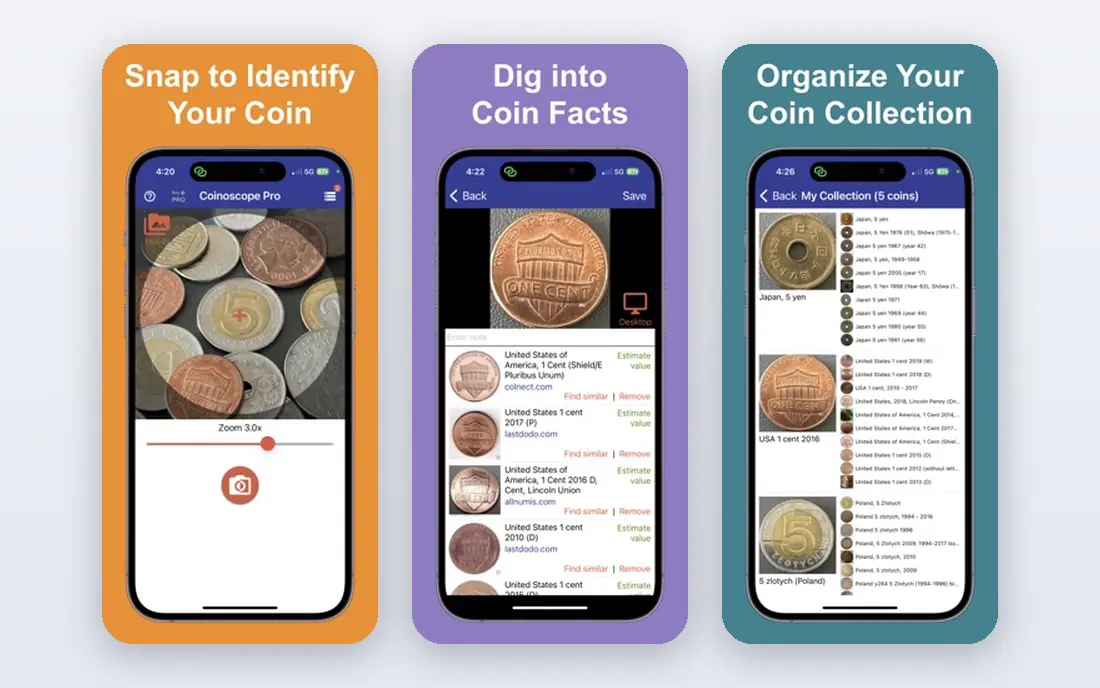
Coinoscope fits a casual collector who scans many coins and does not want to count daily scans. The app matches a photo against a visual catalog and returns likely matches with links to more detail. That workflow suits world coins as well as United States coins, which is a plus over United States-only scanners. The trade-off is depth. Coinoscope identifies well for common coins, but grading estimates and value data are less detailed than professional reference apps. Take clear, well-lit photos of both sides, crop tightly to the coin, and check the match details yourself. Coinoscope is our pick for free, frequent scanning, not for a final valuation.
- Visual recognition for many world coins
- Free scans without a tight daily cap in published guides
- Simple catalog links
- Grading and value data are thinner than PCGS or NGC
- Photo quality strongly affects matches
PCGS CoinFacts suits a serious United States collector who wants reference data they can trust. The app and site cover tens of thousands of United States coins, with auction records, population data for graded coins, and price guide information. That depth helps a collector check whether a scanner match is plausible and what similar graded coins have sold for. PCGS CoinFacts is not mainly a one-tap photo scanner. Use it after a scan, or search by date, mint mark, and type to confirm a coin. The free tier covers a large share of reference data, with paid features for deeper access. Every serious United States collector should keep PCGS CoinFacts on their phone, even if another app does the first scan.
- Deep United States coin data
- Millions of auction records in published guides
- Population and price guide data
- Not a photo scanner in the same way as CoinSnap
- Best as a reference tool alongside a scanner
NGC Coin App fits a collector who owns or buys NGC-certified coins and wants to verify them. Enter a certification number to check the coin, grade, and population data, and use the price guide and registry tools to track a set. That verification step matters when buying a graded coin, because it confirms the holder matches the record. The app is less useful as a first scanner for raw, ungraded coins found in change. Use a scanner such as CoinSnap or Coinoscope for the first match, then NGC Coin App to verify a certified example. Free access covers core lookup and reference features, with deeper tools on paid tiers in some regions.
- Official NGC certification lookup
- Population data for NGC-graded coins
- Price guide and registry tools
- Focus is NGC-certified coins, so raw coin identification is thinner
- Free features are limited in places
CoinHix suits a United States collector who tracks values over time, not just identifies coins once. The app adds price trend charts, auction alerts, and portfolio tracking around its photo identification, with pricing drawn from auction results and price guides in published guides. Automatic error detection is claimed to flag doubled dies and other varieties on scans. The limit is coverage. CoinHix covers United States coins only, so world collectors need a second app such as Coinoscope or Maktun. Free daily scans cover core use, with paid plans opening more scans and tracking features. Treat error flags as a lead to verify with a dealer or grading service, not as a final verdict on a rare variety.
- Market tracking with price trends and auction alerts in published guides
- Automatic error coin detection claims
- Portfolio tracking
- United States coins only
- Some advanced features need a paid plan
CoinKnow fits a United States collector who cares most about identification precision and grade. Published guides describe grading within about two points on the Sheldon Scale, with copper color and proof detection for relevant coins. That precision helps a collector sort a collection by likely grade before deciding which coins merit professional grading. As with CoinHix, coverage is United States only, and the grade remains an app estimate. A coin that CoinKnow grades highly still needs a professional grade before a high-value sale, because buyers pay for certified grades, not app estimates. Free use covers core scans, with paid features for deeper access. CoinKnow is our pick when grading precision matters more than portfolio tracking.
- Tight grading estimates in published guides
- Automatic error variety detection claims
- Detailed coin data for United States coins
- United States coins only
- Grading is an estimate, not a professional grade
Maktun suits a world coin collector who finds coins from many countries and needs a scanner that does not stop at United States types. The app identifies coins by photo, gives catalog details, and helps track a collection across countries and eras. That breadth makes it a useful second app alongside a United States scanner. Value data for world coins is thinner and more variable than for United States coins, because markets are smaller and sales data is sparser. Use Maktun for identification and cataloging, then check dealer listings and auction results for a valuable world coin. Free access covers core identification, with paid plans for fuller features.
- World coin coverage beyond United States coins
- Photo identification for many countries
- Collection features
- Free features are limited in places
- Value data is thinner than United States professional guides
Numista fits a world collector who wants a catalog, not a scanner. The site and app hold a huge catalog of world coins, banknotes, and tokens, with type details, years, mints, and images contributed by collectors. Collection tools let you track what you own, what you want, and what you can swap with other collectors. The catch is workflow. Numista does not identify a coin from a photo in the same way as CoinSnap. You search by country, denomination, year, and design details, which takes longer but often gives a more reliable match for world coins. Pair Numista with a scanner: scan first for a lead, then confirm the exact type in Numista before you record a value or a swap.
- Huge world coin catalog built with collector input
- Detailed type, year, and mint data
- Collection and swap tools
- Not a photo scanner
- Identification needs manual search by country, year, and design
How we picked these
We compared official app pages, app-store listings, and public reviews, and we checked that each homepage loads and matches the product named. We kept apps with a real free tier for identification or reference, and we left out apps that only offer a paid trial with no usable free scans. Prices are shown as Free where a free tier exists, and we advise checking in-app prices before paying, because scan limits and feature limits change by plan.
What to check before you trust a scan
Photograph both sides of the coin in bright, even light on a plain background, with the coin filling most of the frame. Avoid glare, shadows, and fingers in the shot. A clean photo gives every app a better chance, and a poor photo gives every app a worse chance, regardless of marketing claims.
Confirm the match yourself
Check date, mint mark, design details, and edge lettering against the app match. A close match with a different mint mark or date is a different coin with a different value. For a coin that may be valuable, confirm the type in PCGS CoinFacts, NGC Coin App, or Numista before you trust a value range.
Treat values as estimates
App values come from catalog data, price guides, and past sales, and they vary with grade, condition, and market timing. A value range is a starting point for research, not a sale price. For a coin that may be worth more than a modest sum, get a dealer opinion or a professional grade before you sell or insure it.
Check privacy and photo use
Read the app privacy policy before you upload photos of a valuable collection. Check whether photos are stored, used for training, or shared, and delete uploads when you no longer need them. Keep records of valuable coins offline as well as in an app, so a lost account does not lose your catalog.
Frequently asked questions
What is the best coin identifier app for free?
CoinSnap suits quick beginner scans, Coinoscope suits unlimited free scans, and PCGS CoinFacts suits serious reference work. The best free app depends on whether you need a fast scan, world coverage, or professional data. Most collectors benefit from one scanner plus one reference app.
What is the best free coin identifier app for United States coins?
CoinHix and CoinKnow suit United States collectors, with error detection and grading estimates, while PCGS CoinFacts suits reference and auction data. Use a scanner for the first match, then PCGS CoinFacts to confirm the type and check comparable sales.
What is the best coin identifier app for world coins?
Coinoscope and Maktun suit world coin scanning, and Numista suits world coin catalog confirmation. World coverage is thinner than United States coverage in most apps, so confirm a world match manually in Numista by country, year, and design.
Are free coin identifier apps accurate?
Accuracy is good for common coins with clear photos, and weaker for worn, rare, or unusual coins. Always check date, mint mark, and design details yourself, and treat grade and value as estimates. A professional grade is needed for a high-value sale.
How do coin identifier apps value a coin?
Apps combine catalog data, price guides, and past auction or sale listings to estimate a range for a given type and grade. The range varies with condition and market timing, so it is not a firm offer. Check recent sales for the same grade before you set a sale price.
Do I need to pay for a coin identifier app?
No, for basic identification. CoinSnap, Coinoscope, PCGS CoinFacts, NGC Coin App, CoinHix, CoinKnow, Maktun, and Numista all offer free tiers. Paid plans add more scans, tracking, or deeper data, which suit active collectors more than occasional users.
Sources we checked (8)

Online Jobs is an independent blog about careers, online work, learning new skills and the tools that help people earn. More about us.
Keep reading
All posts
Top AI Financial Software
Searching for top AI financial software? We compared 9 AI finance tools for AP, spend, close, forecasting and bookkeeping to help teams choose wisely.

Quicken Alternatives
Compare the best quicken alternatives for Mac, Windows, and small business owners, from Monarch Money and YNAB to Copilot, Tiller, and Banktivity in 2026.
QuickBooks Online Alternatives
Looking for quickbooks online alternatives? We compared 8 accounting tools on invoicing, bank feeds, payroll, pricing and fit for small businesses today.