Home / Machine Learning Platforms
Best Apps for Creating ML Accounts in 2026: 8 Tools Compared

How we put this together: we compare official feature and pricing pages, app store listings, privacy policies and public user reviews. Prices change, so check the provider's site before you pay.
Key takeaways
- We read ML as machine learning, so this guide covers platforms where you create an account to learn, build, and run machine learning projects.
- Google Colab and Kaggle are the best free starting points for beginners with no powerful computer of their own.
- Hugging Face suits builders who want ready-made models, datasets, and a community around machine learning.
- Deepnote and Paperspace suit learners and developers who want a smoother notebook or GPU workspace.
- Azure Machine Learning and Amazon SageMaker suit teams that need production, governance, and cloud scale.
Quick comparison
| Name | Who it suits | Starting price | Free option | |
|---|---|---|---|---|
 Google Colab | Free notebooks with GPU access | Free | Yes | Visit |
 Kaggle | Learning, datasets, and competitions | Free | Yes | Visit |
 Hugging Face | Ready-made models and datasets | Free | Yes | Visit |
 Deepnote | Collaborative notebooks | Free | Yes | Visit |
 Paperspace | GPU workspaces for developers | See website | Free trial | Visit |
 DataCamp | Guided ML courses | See website | Free trial | Visit |
 Azure Machine Learning | Enterprise ML in Azure | See website | Free trial | Visit |
 Amazon SageMaker | Production ML on AWS | See website | Free trial | Visit |
The best apps for creating ML accounts
Creating a machine learning account should take minutes, not days of setup. The platforms below all let you sign up, open a notebook or workspace, and start working with data and models in a browser, without installing a complex local environment first. They differ in learning support, GPU access, model libraries, and how far they take you from a first tutorial to a production project.
Google Colab is the easiest way to create a machine learning account and start coding, because you sign in with a Google account and open a notebook in the browser. Popular libraries for data work and modelling are pre-installed, and free users can access GPU runtimes for training small models, which is a major advantage if your own computer has no powerful graphics card. Sharing a notebook is as simple as sharing a document.
The honest catch is limits. Free sessions can time out, GPU availability varies with demand, and Colab does not publish exact free usage limits, so a long training run may be interrupted. Paid plans add more compute and longer runtimes, but beginners should start free and learn the workflow first. Colab fits students, self-learners, and anyone who wants to try machine learning without setup or cost.
- Free notebooks in the browser
- GPU access for learning
- Google Drive integration
- Free sessions time out and GPU availability varies
- Usage limits are not fully published
Kaggle is both a learning platform and a data science community, and creating a free Kaggle account gives you notebooks, datasets, courses, and competitions in one place. Its short courses cover Python, data cleaning, and intro to machine learning with hands-on exercises, while competitions let you test skills against real problems and public leaderboards. That structure helps a beginner move from tutorials to independent projects with a portfolio to show.
The trade-off is ecosystem fit. Kaggle notebooks are excellent for learning and competitions, but a general production project may feel more natural in Colab, Deepnote, or a cloud platform. Kaggle also has weekly GPU quotas that vary, so check your account limits before a large run. Kaggle fits learners who want guided practice, real datasets, and a community, all for free.
- Free notebooks and GPU time
- Huge dataset library
- Guided courses and competitions
- Tied to the Kaggle ecosystem
- Interface feels less flexible for general projects
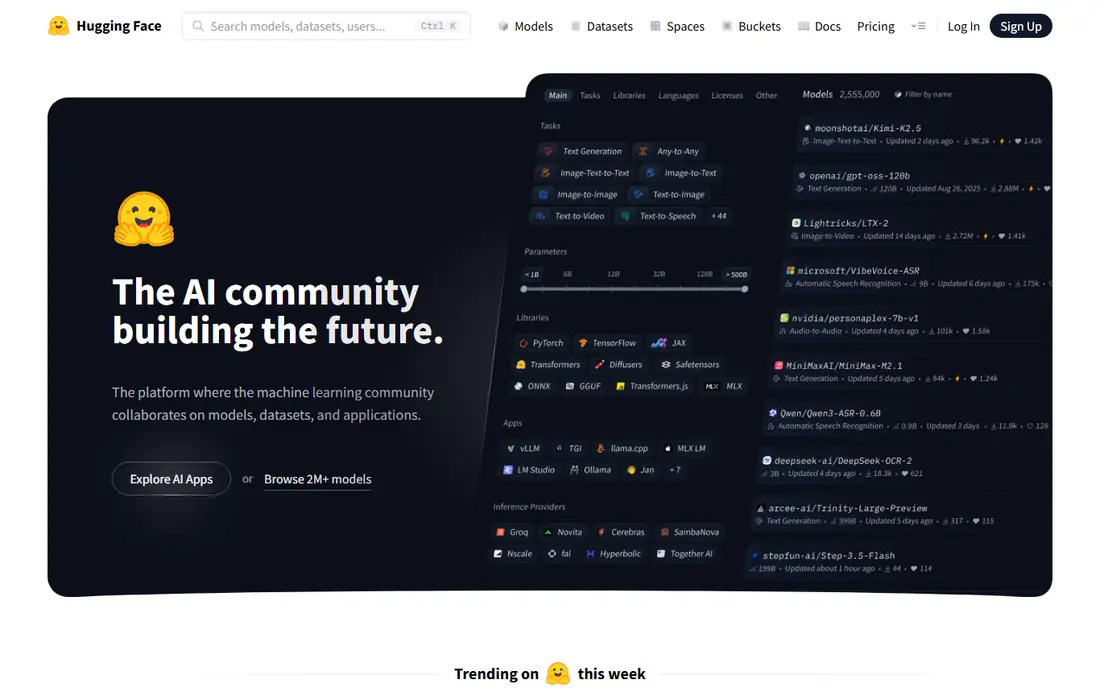
Hugging Face is the central hub for modern machine learning models, datasets, and demos, and a free account lets you browse, download, and try thousands of models for text, image, audio, and more. Its Spaces feature lets you publish an interactive demo of a model in minutes, which is ideal for a portfolio or a team prototype. The community, documentation, and model cards also help you understand what a model does and where it may fail.
The catch is compute. Browsing and small demos are free, but running large models at scale needs paid inference or GPU resources, and deployment still requires technical knowledge. Hugging Face fits builders who want to use existing models rather than train everything from scratch, and learners who want to see how real models behave. Start with small, well-documented models before you try large ones.
- Huge model and dataset hub
- Spaces for demos
- Strong open-source community
- Running large models needs paid compute
- Learning curve for deployment
Deepnote is a collaborative notebook platform that feels more polished than a basic notebook, with real-time editing, comments, and integrations for data sources and cloud storage. Teams can work on the same analysis, share results with stakeholders, and keep notebooks organised as projects grow. For a small team or a study group, that collaboration layer is a real advantage over a solo notebook.
The limitation is compute cost. Free plans cover basic work, but GPU access and larger projects need paid plans, so check pricing for your workload. Deepnote also has a smaller community and fewer public notebooks than Kaggle. Deepnote fits teams, classrooms, and analysts who want a clean, shared notebook environment for data and machine learning work.
- Clean collaborative notebooks
- Real-time editing
- Integrations with data sources
- GPU and advanced features need paid plans
- Smaller community than Colab or Kaggle
Paperspace, part of DigitalOcean, offers cloud GPU workspaces and notebooks for developers who need more power than a free Colab session provides. You can choose a machine with a suitable GPU, run notebooks or full workspaces, and pay for the compute you use. That flexibility suits developers training larger models, fine-tuning, or running experiments that need a consistent GPU.
The honest trade-off is cost management. GPU time adds up, and you need to stop machines when you are done, or you will pay for idle time. Paperspace also offers less guided learning content than Kaggle or DataCamp, so it fits developers who already know what they want to build. Use it when free notebooks hit their limits and you need reliable, on-demand GPU power.
- On-demand GPU machines
- Notebook and workspace options
- Developer-friendly setup
- Costs rise with GPU time
- Less learning content than Kaggle
DataCamp is a learning platform rather than a notebook provider, and creating an account gives you structured courses in Python, data analysis, and machine learning with interactive exercises in the browser. Its career tracks guide a learner from basics to job-ready skills step by step, with progress tracking and projects to build a portfolio. For someone who learns best with structure, that guidance beats a blank notebook.
The catch is that DataCamp is not a general workspace for your own projects. You will still need Colab, Kaggle, or another notebook platform to build independent work outside the courses. Full course access also needs a paid plan, though a free trial lets you test the format. DataCamp fits beginners who want a clear curriculum before they tackle open-ended machine learning projects.
- Structured courses with in-browser exercises
- Tracks for data and ML careers
- Progress tracking
- Less suited to free-form projects
- Full access needs a paid plan
Azure Machine Learning is Microsoft cloud platform for building, training, and deploying machine learning models at scale, with managed notebooks, pipelines, and model registries. It integrates with Azure data services, identity controls, and monitoring, which suits companies that already use Azure and need governance, security, and audit trails. Teams can move from experiments to production deployments with versioning and automated pipelines.
The limitation is complexity. Azure Machine Learning is built for teams, not for a first tutorial, and its pricing depends on compute, storage, and other Azure services, so a small experiment can still incur cloud costs if resources are left running. It fits data teams, enterprises, and developers building production models in Azure. Beginners should start with Colab or Kaggle, then move here when a project needs production controls.
- Managed training and deployment
- Integration with Azure data tools
- Governance and monitoring
- Complex setup for beginners
- Costs depend on compute and storage
Amazon SageMaker is Amazon Web Services platform for the full machine learning lifecycle, from data preparation and notebook development to training, tuning, and deployment. Its managed notebooks, built-in algorithms, and deployment tools help teams build production models without managing servers directly, and it integrates with the wider AWS data ecosystem. For companies already on AWS, that integration is a strong reason to choose SageMaker.
The honest catch is learning curve and cost control. SageMaker has many components, and a beginner can feel lost among studios, jobs, endpoints, and pipelines. AWS pricing also depends on instance types and runtime, so you must monitor usage and stop endpoints when they are not needed. SageMaker fits AWS-based teams and production projects, while learners should start free elsewhere and graduate to SageMaker when scale demands it.
- Full ML lifecycle on AWS
- Managed notebooks and training
- Strong deployment options
- Steep learning curve
- AWS pricing needs careful management
How we picked these
We compared official platform pages, pricing pages, and documentation, along with recent guides to learning and building machine learning in 2026. We looked for platforms that are actively maintained, let you create an account quickly, and offer a free tier or trial for learning. We mixed free learning platforms, model hubs, collaborative notebooks, GPU workspaces, and enterprise cloud platforms, because a machine learning account means different things at different stages.
We did not claim hands-on testing of every platform with a large training job, and we did not invent GPU quotas, prices, or feature claims. Free limits, GPU availability, and cloud pricing change, so check the current terms in your account before a large run. Start free, build a small project end to end, and only pay for compute when you know your workload needs it.
Choosing your first ML account
If you are learning, create free accounts on Google Colab and Kaggle first, and use Hugging Face to explore models. If you want structured lessons, add DataCamp for a guided track. If you are building a team project, try Deepnote for collaboration, Paperspace for GPU power, and Azure Machine Learning or Amazon SageMaker when the project moves to production in your cloud.
Keep costs and data safe
Set a habit of stopping GPU sessions, deleting unused resources, and checking your usage dashboard. Do not upload sensitive personal data to a public notebook or demo, and check dataset licences before you use data in a commercial project. A small, well-documented project that you can explain is more valuable than a large, expensive run that you cannot reproduce.
Frequently asked questions
What does ML mean in this guide?
In this guide, ML means machine learning, the field of building models that learn patterns from data. The keyword in the source list was ambiguous, so we state this reading clearly here. If you meant a different ML, such as a game account, the platforms here will not fit that need, and you should check the official game or service for its own account rules.
What is the best free app for creating a machine learning account?
Google Colab and Kaggle are the best free starting points. Colab gives you a browser notebook with GPU access using a Google account, while Kaggle adds datasets, courses, and competitions. Both are free to start, and both let you build a portfolio without buying hardware.
Do I need a powerful computer to learn machine learning?
No, for most beginner work. Colab, Kaggle, Deepnote, and Hugging Face run in the browser and provide cloud compute, so a basic laptop with a stable internet connection is enough. You only need a powerful local computer, or paid cloud GPU time, when you move to larger models or longer training runs.
Is Hugging Face free to use?
Yes, Hugging Face offers a free account for browsing models and datasets, and for small demos and projects. Running large models at scale, or using dedicated inference and GPU resources, needs paid plans. Start free with small models, and check pricing before you deploy a model for heavy use.
Should I use Azure Machine Learning or Amazon SageMaker?
Choose the platform that matches your existing cloud. Azure Machine Learning suits teams already using Microsoft Azure, while Amazon SageMaker suits teams already using AWS. Both cover the full lifecycle, and both need cost management. For learning, neither is the best first step; start with Colab or Kaggle instead.
How do I create a machine learning account safely?
Use a unique password, turn on two-factor authentication where available, and avoid uploading sensitive data to public notebooks. Check the platform privacy settings, keep API keys private, and never share credentials in a notebook or public demo. Those habits matter more than which platform you choose first.
Sources we checked (8)

Online Jobs is an independent blog about careers, online work, learning new skills and the tools that help people earn. More about us.
Keep reading
All posts
n8n Alternatives
n8n alternatives compared for 2026, with Zapier, Make, Activepieces, and more, covering visual builders, code steps, self-hosting, and pricing models.

eBay Alternatives
Looking for ebay alternatives? We compared 9 marketplaces for sellers on fees, buyer reach, categories and ease of listing, to help you sell with confidence.

ZoomInfo Alternatives
The best ZoomInfo alternatives in 2026, compared on price, free plans, data coverage, and which tool fits small teams or large sales teams best in detail.