Best AI Analytics Platforms in 2026: 8 Platforms Compared


Microsoft ecosystem teams · Starting price: $14 per user per month
How we put this together: we compare official feature and pricing pages, app store listings, privacy policies and public user reviews. Prices change, so check the provider's site before you pay.
Key takeaways
- Power BI suits Microsoft-centered teams, with a low per-user entry price and Copilot help for summaries and questions.
- Tableau suits teams that prize visual exploration and executive dashboards, with AI features for monitoring and explanations.
- ThoughtSpot suits business users who want to search data in plain language instead of learning a query language.
- Looker suits governed teams that need shared metric definitions and version control, but pricing is quote-based.
- Free and low-cost options such as Looker Studio and Metabase suit small teams, with limits on governance and scale.
Quick comparison
| Name | Who it suits | Starting price | Free option | |
|---|---|---|---|---|
| Power BI | Microsoft ecosystem teams | $14 per user per month | Yes | Visit |
 Tableau | Visual dashboards and exploration | $15 per user per month | Free trial | Visit |
 ThoughtSpot | Search-driven business analytics | $25 per user per month | Free trial | Visit |
 Looker | Governed metric definitions | See website | No | Visit |
 Looker Studio | Free Google reporting | Free | Yes | Visit |
 Metabase | Open-source self-service analytics | Free | Yes | Visit |
 Zoho Analytics | Affordable small-team BI | See website | Free trial | Visit |
 Sigma | Spreadsheet-style warehouse analytics | See website | No | Visit |
The best AI analytics platforms for data analytics
AI analytics tools promise faster answers, but the value depends on whether the AI uses approved metric definitions, runs on live data, and shows its work. The platforms below cover search-driven analysis, visual dashboards, governed modeling, and low-cost reporting, so match the tool to your data stack first.
Power BI is the natural pick for teams already using Microsoft 365, Azure, and Teams. Pro starts at $14 per user per month, and Copilot can summarize visuals, answer questions in plain language, and draft insights from a report. Semantic models let analysts define measures once, so business users see the same revenue or churn figure across reports, which matters more than any single AI feature.
The limits appear at scale and outside Microsoft tools. Some Copilot and advanced features need Fabric capacity, which adds cost, and teams that run mainly on Google Cloud or Snowflake may find another platform fits their stack better. Per-user pricing also adds up for hundreds of viewers, so model viewer counts before you commit. Choose Power BI if Microsoft tools run your business. Choose a warehouse-native tool if your data lives elsewhere.
- Low per-user entry price
- Copilot summaries and Q and A
- Strong semantic models and Microsoft 365 links
- Advanced AI features may need Fabric capacity
- Per-user costs rise at scale
- Best value stays inside Microsoft tools
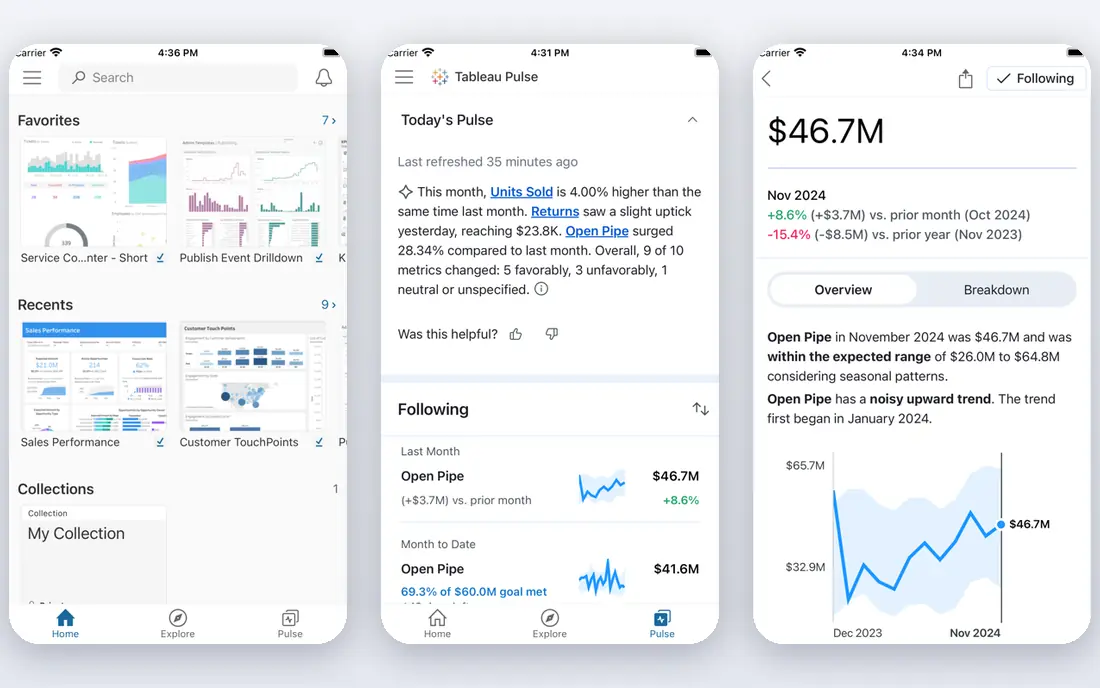
Tableau suits analyst-led teams and executives who learn from charts, not tables. Viewer pricing starts at $15 per user per month, while Creator pricing for analysts who build content is higher, and Tableau AI adds agent help, Pulse monitoring for KPI changes, and explanations for shifts in a metric. Visual exploration is the strength: a team can filter, drill, and compare without writing code for every question.
Governance is the trade. Tableau offers modeling and permissions, but it does not enforce shared metric definitions as strictly as Looker, so teams need discipline to avoid two dashboards showing different versions of the same metric. AI features also vary by plan, so check which Pulse and agent features your tier includes. Pick Tableau if dashboards and visual analysis drive decisions. Pick Looker if strict metric governance comes first.
- Strong visual exploration and dashboards
- Tableau AI for summaries and monitoring
- Wide connector range
- Creator pricing is higher for analysts
- Governance is lighter than Looker
- AI features vary by plan
ThoughtSpot is built for business users who do not want to learn SQL or wait for an analyst for every question. You type a question in plain language, Spotter helps refine it, and the platform returns charts and tables from live data, with anomaly alerts when a metric moves in an unusual way. Entry pricing starts at $25 per user per month, which makes it easy to test with a small team.
The cost model needs care. Seat pricing plus consumption credits can rise as usage grows, and governed answers still need good modeling and metric definitions underneath the search box. Without that setup, plain-language answers can look confident while using the wrong definition. Choose ThoughtSpot if business users need fast, self-service answers. Choose a governed modeling tool first if your metrics are still inconsistent across teams.
- Search data in plain language
- Spotter conversational help
- Anomaly alerts and live board monitoring
- Consumption and seat costs can rise with use
- Modeling needs setup for governed answers
- Embedded pricing is quote-based
Looker, part of Google Cloud, suits teams that need one definition of each metric, enforced in code. LookML lets data engineers define measures, joins, and rules in version-controlled files, so every dashboard and AI answer draws on the same logic. Gemini help for natural-language questions sits on top of that governed layer, which reduces the risk of AI answers using a wrong or outdated definition.
The price and setup are the barriers. Pricing is quote-based and can run high for a full deployment, and a team without data engineering support will struggle to maintain LookML well. Smaller teams may find the setup slower than Power BI or Metabase. Pick Looker if governance, BigQuery, and version control are central to your analytics. Pick a simpler tool if you need quick dashboards without a modeling team.
- LookML semantic layer with version control
- Strong Google Cloud and BigQuery links
- Consistent metrics across reports
- Quote-based pricing can be high
- Needs data engineering support
- Slower to set up than simpler tools
Looker Studio is the free starting point for small teams that report from Google Sheets, Google Analytics, or BigQuery. It costs nothing for core use, sharing is simple, and a small team can build a departmental dashboard in an afternoon without a procurement process. For a startup or a single team that needs basic charts and scheduled reports, that is enough.
The limits show as the team grows. Native AI features are limited, metric definitions are not governed in code, and large or complex reports can run slowly. Metric drift, where two reports define the same term differently, is a common problem. Choose Looker Studio for free, simple reporting. Move to Power BI, Tableau, or Looker when governance, scale, or AI answers become daily needs.
- Free for core reporting
- Easy Google Sheets and Analytics links
- Simple sharing for small teams
- Limited native AI
- Weak governance for shared metrics
- Performance and data limits on large reports
Metabase suits small teams and developers who want self-service analytics without a large vendor contract. The open-source version is free to self-host, the visual query builder lets non-technical users ask questions without SQL, and SQL users can go deeper in the same tool. Dashboards, alerts, and simple sharing cover most small-team reporting needs.
AI help is limited compared with Power BI, Tableau, or ThoughtSpot, and governance features are lighter than Looker, so larger teams will need extra discipline around metric definitions. Cloud pricing also rises with users, so self-hosting costs in time and maintenance should be counted beside the free license. Pick Metabase if open-source control and low cost matter most. Pick a commercial AI platform if conversational analysis is a core need.
- Open-source version is free to self-host
- Visual query builder plus SQL
- Simple dashboards and alerts
- AI features are limited
- Cloud pricing rises with users
- Governance is lighter than Looker
Zoho Analytics is a strong budget option for small and growing teams that already use Zoho tools, or that want an affordable BI platform without enterprise pricing. Zia, the AI assistant, can answer questions, suggest insights, and help blend data from spreadsheets, cloud apps, and databases. Setup is faster than Looker, and pricing stays accessible for a small team.
The trade is enterprise depth. Governance, large-scale modeling, and advanced AI features are thinner than in Power BI, Tableau, or Looker, and AI answers depend heavily on clean, well-labeled data. Larger teams may outgrow it as reporting needs become more complex. Choose Zoho Analytics if affordable, approachable BI is the priority. Choose an enterprise platform if governance and scale drive the decision.
- Affordable for growing small teams
- Zia AI assistant for questions and insights
- Auto data blending from many sources
- Less depth for large enterprise governance
- AI quality varies by data quality
- Higher tiers needed for larger teams
Sigma suits finance and operations teams that think in spreadsheets but need to work on live warehouse data. Users build analyses with spreadsheet formulas, pivot tables, and charts, without copying data into a separate BI store, and a conversational assistant can help draft formulas and summaries. That familiarity shortens training for teams that live in Excel or Google Sheets.
The cost model needs a full view. Pricing is quote-based, and warehouse compute costs sit on top of the Sigma bill, so a team that runs heavy queries will pay more than the headline quote suggests. Sigma also works best with a cloud warehouse such as Snowflake or BigQuery already in place. Pick Sigma if spreadsheet-style work on live warehouse data fits your team. Pick a traditional BI tool if you do not run a cloud warehouse yet.
- Spreadsheet formulas on live warehouse data
- No data copies for most analysis
- Conversational assistant for questions
- Quote-based pricing
- Warehouse compute costs add to the bill
- Needs a cloud warehouse to shine
How we picked these
We compared official pricing pages, product documentation, and recent vendor comparisons for AI features, governance, data sources, and entry pricing, and we kept only platforms still sold and supported in October 2026. We favored platforms that cover distinct needs, from free reporting to governed enterprise analytics, and we wrote See website where pricing is quote-based, rather than repeating a third-party estimate. We weighed whether AI answers use approved metrics and live data, since those factors affect trust more than a demo answer.
How to choose an AI analytics platform
AI answers are only as good as the metrics, data, and governance behind them, so test those before you judge the AI.
Check metric governance first
Ask how each metric is defined, who can change it, and whether AI answers use that definition or guess from column names. A platform with version-controlled models, such as Looker, reduces the risk of conflicting answers. A platform without that control needs a human owner for each key metric.
Test AI answers on your own data
Run the same business questions through a trial, and check the SQL or logic behind each answer where the tool shows it. Test edge cases, such as a metric with missing data, a renamed product, or a seasonal spike, and see whether the AI flags uncertainty or answers with false confidence.
Model total cost at your user count
Entry per-user prices hide viewer counts, capacity charges, consumption credits, and warehouse compute. Model cost at 50, 100, and 300 users, including viewers who only read dashboards, and ask whether viewer pricing differs from analyst pricing.
Confirm live data and export options
Check whether the tool queries live warehouse data or copies it on a schedule, how fresh the data is, and whether you can export results and definitions. Live data suits operational decisions, while scheduled copies may suit monthly reporting, but the difference should be a conscious choice.
Frequently asked questions
What is the best AI analytics platform for data analytics?
Power BI leads for Microsoft-centered teams, Tableau leads for visual dashboard teams, and ThoughtSpot leads for search-driven business users. Looker leads for governed teams that need shared metric definitions, so the best platform depends on your data stack and governance needs.
What is the best AI data analytics tool for small teams?
Looker Studio and Metabase suit small teams on cost, with Looker Studio free for Google-based reporting and Metabase free to self-host for self-service analytics. Zoho Analytics is a strong paid middle option when a small team wants an AI assistant and data blending without enterprise pricing.
How much do AI analytics platforms cost?
Entry prices in this guide start at $14 per user per month for Power BI, $15 per user per month for Tableau, and $25 per user per month for ThoughtSpot, while Looker, Sigma, and several enterprise tools are quote-based. Total cost depends on users, capacity, consumption, and warehouse compute, so model cost at your real user count.
Do AI analytics tools replace data analysts?
No, AI tools speed up routine questions and summaries, but analysts still own metric definitions, data quality, and complex analysis. The best setup lets business users answer simple questions themselves, while analysts focus on modeling, governance, and decisions that need judgment.
What is the difference between ThoughtSpot and Tableau?
ThoughtSpot is search-first: users type plain-language questions and get charts without building a dashboard first. Tableau is dashboard-first: analysts build visual reports that executives explore by filtering and drilling, with AI help for monitoring and explanations.
Can AI analytics tools work with my data warehouse?
Most platforms in this guide connect to cloud warehouses such as Snowflake, BigQuery, and Redshift, but the depth of live querying, governance, and cost varies. Sigma and Looker are built around warehouse-native work, while Power BI and Tableau also support warehouse sources beside their own models.
Sources we checked (8)

Online Jobs is an independent blog about careers, online work, learning new skills and the tools that help people earn. More about us.
Keep reading
All posts
n8n Alternatives
n8n alternatives compared for 2026, with Zapier, Make, Activepieces, and more, covering visual builders, code steps, self-hosting, and pricing models.

ZoomInfo Alternatives
The best ZoomInfo alternatives in 2026, compared on price, free plans, data coverage, and which tool fits small teams or large sales teams best in detail.

Yotpo Alternatives
Find cheaper alternatives to Yotpo for reviews and loyalty, with Judge.me, Loox, Stamped, and more compared for Shopify stores in 2026, all in one guide.