Best Alternatives to FreshBooks in 2026: 8 Tools Compared

How we put this together: we compare official feature and pricing pages, app store listings, privacy policies and public user reviews. Prices change, so check the provider's site before you pay.
Key takeaways
- Xero is the closest full accounting replacement for a growing business, while QuickBooks Online suits teams that already work with a QuickBooks accountant.
- Wave and Zoho Books are the strongest low cost starts, with Wave free for basic invoicing and Zoho Books free for businesses under a revenue limit.
- Bonsai and Plutio suit freelancers who also need proposals, contracts, and project tracking, not just bookkeeping.
- Check client limits, payroll add-ons, and bank feed coverage before you switch, since those three items drive most migration pain.
Quick comparison
| Name | Who it suits | Starting price | Free option | |
|---|---|---|---|---|
 Xero | Growing businesses | $25 per month | Free trial | Visit |
 QuickBooks Online | Accountant friendly accounting | $38 per month | Free trial | Visit |
 Zoho Books | Low cost full accounting | $15 per month | Yes | Visit |
 Wave | Free invoicing for solos | Free | Yes | Visit |
 Sage Business Cloud Accounting | Established small businesses | See website | Free trial | Visit |
 Bonsai | Freelancers with clients and contracts | $15 per month | Free trial | Visit |
 Plutio | Freelancers with projects | $19 per month | Free trial | Visit |
 ZipBooks | Simple low cost bookkeeping | Free | Yes | Visit |
The best FreshBooks alternatives
We focused on tools that replace the core FreshBooks job: invoicing, expenses, time tracking where offered, and clear books for tax time, with options for solos and for growing teams.
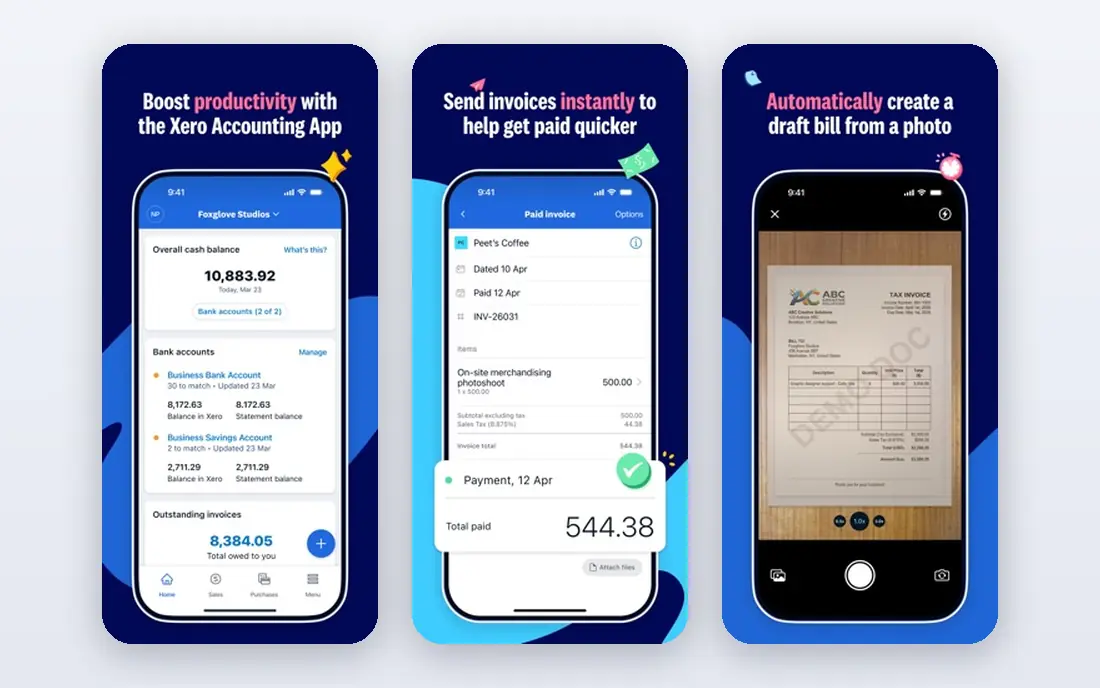
Xero fits a business that has outgrown simple invoicing and needs proper double entry accounting, bank feeds, and reports an accountant can trust. Its dashboard gives a clear view of cash, bills, and invoices, and its app connections cover payroll, inventory, and payment tools. That breadth is why many accountants recommend it for growing firms. The catch is the entry plan. Early plans limit invoices and bills per month, so a busy service business may need to move up a tier sooner than expected. Check your monthly invoice count, your payroll needs, and your accountant's preference before you commit, and use the trial to test bank feeds with your real accounts.
- Strong bank reconciliation
- Multi-currency support
- Large app marketplace
- Accountant friendly
- Client and invoice limits on the entry plan
- Payroll is separate in some regions
- Learning curve is steeper than FreshBooks
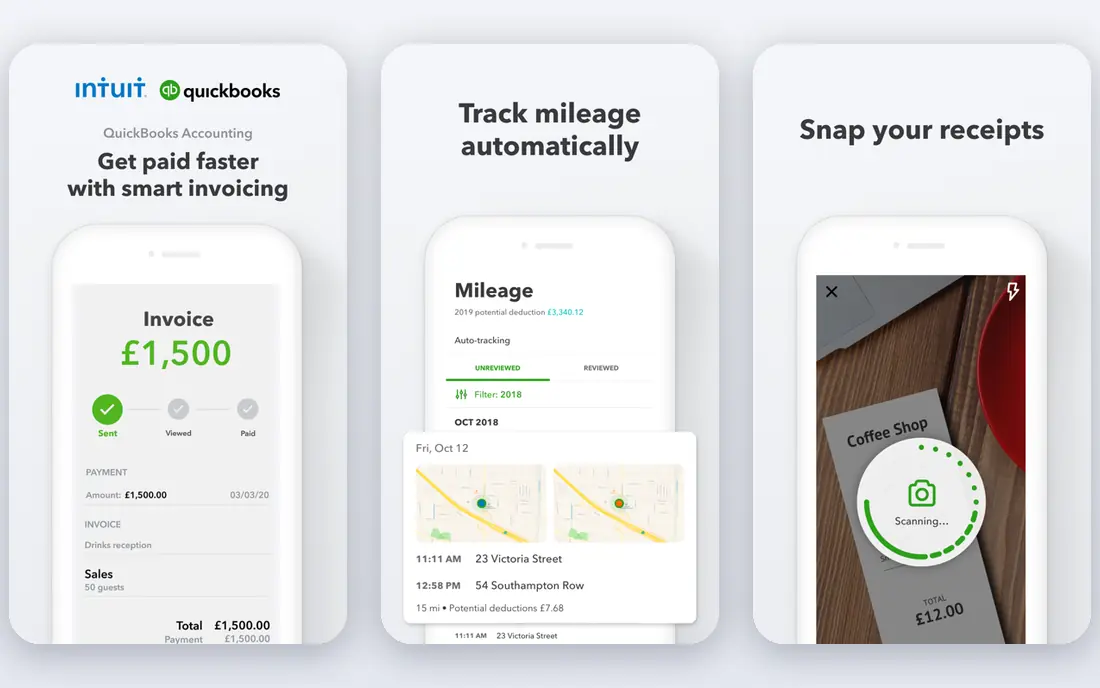
QuickBooks Online fits a small business that wants the most widely supported accounting system in the United States. If your accountant already uses QuickBooks, sharing books, reports, and year end work becomes simpler. Its invoicing, expense tracking, and bank reconciliation cover the daily work, and payroll can be added when hiring starts. The trade-off is price and complexity. FreshBooks users who liked a clean, client centered view may find QuickBooks Online more formal at first. It is still the safer pick when you need deep accounting, inventory, or a large accountant network, but it is more than a solo freelancer usually needs.
- Widely used by accountants
- Strong reporting
- Payroll and payments add-ons
- Large integration range
- Higher entry price than Wave or Zoho Books
- Interface can feel busy
- Some features sit on higher tiers
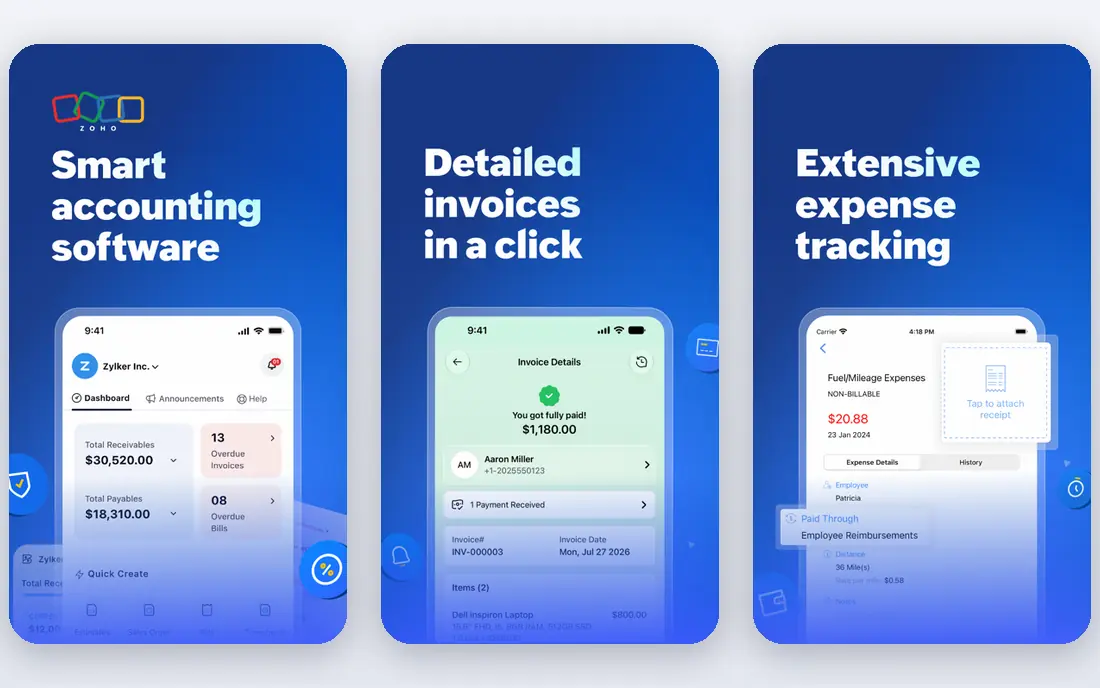
Zoho Books fits a budget conscious business that still wants full accounting, not just invoicing. Its free tier helps a new business start without a monthly fee, and its paid plans add automation, custom workflows, and client portal features at a lower price than Xero or QuickBooks Online. If you already use Zoho CRM or Zoho Inventory, the connection is a real advantage. The catch is limits. The free plan is tied to revenue and user counts, and some advanced features require higher tiers. Check those limits against your current revenue and team size, and test invoicing, bank feeds, and tax reports during a trial before you move your books.
- Free plan for businesses under a revenue limit
- Strong automation
- Good value on paid plans
- Zoho app connections
- Free plan limits users and features
- Interface takes time to learn
- Payroll support varies by region
Wave fits a solo freelancer or very small business that needs to send invoices and track income without a monthly subscription. Its free starter plan covers unlimited invoices, estimates, bills, and bookkeeping records, which is enough for many early stage businesses. Setup is fast, and the interface stays simple. The honest limit is growth. Wave does not offer the project tools, inventory depth, or payroll range of larger platforms, and support options are narrower. Use Wave to start free, and plan a move to Xero, Zoho Books, or QuickBooks Online when you hire staff, need payroll, or need deeper reporting.
- Free invoicing and bookkeeping
- Simple setup
- No revenue cap on the free starter plan
- Payment processing available
- No project management
- Payroll is limited by region
- Fewer advanced accounting features than Xero
Sage Business Cloud Accounting
Who it suits: Established small businesses
Sage fits an established business that wants a steady, well supported accounting system and does not mind a more traditional interface. Its invoicing, bank reconciliation, and cash flow views cover the core work, and its payroll options help when a team grows. Sage also suits businesses that already use other Sage products. The catch is that Sage pricing and feature availability differ by country, so a US price or feature list may not match a UK plan. Check the plan for your region, confirm payroll coverage, and compare the total cost with Xero and QuickBooks Online before you switch.
- Long track record in small business accounting
- Solid invoicing and cash flow tools
- Payroll options in supported regions
- Pricing varies by region and plan
- Interface feels more traditional than FreshBooks
- Some features need add-ons
Bonsai fits a freelancer or small agency whose work starts with a proposal and a contract, not just an invoice. It brings client onboarding, contracts, time tracking, and payments together, which saves time for service businesses that juggle several clients. Its templates also help a new freelancer look professional from the first project. The limit is accounting depth. Bonsai is a business management tool with accounting features, not a full replacement for Xero or QuickBooks Online at year end. Many freelancers pair Bonsai with an accountant or a separate bookkeeping tool, so factor that into the total cost.
- Proposals, contracts, and invoicing in one place
- Time tracking
- Client portals
- Tax and payment tools
- Not a full double entry accounting system
- Higher cost if you only need invoicing
- Some features need higher tiers
Plutio fits a freelancer or small studio that wants to run projects and billing from one workspace. You can track tasks, share files with clients, send proposals, and invoice from the same system, which reduces the need for several separate apps. Its flexible setup also suits businesses with varied services and workflows. The trade-off is that Plutio is not the simplest invoicing tool, and its accounting side is lighter than a dedicated accounting platform. If your main need is clean books for an accountant, Xero or Zoho Books will serve you better. If your main need is running client work end to end, Plutio is a strong FreshBooks alternative.
- Projects, tasks, proposals, and invoicing in one workspace
- Flexible setup
- Client collaboration tools
- No free plan
- Accounting features are lighter than Xero
- Setup takes time if you use every module
ZipBooks fits a small business that wants simple, low cost bookkeeping without a steep learning curve. Its free starter plan covers basic invoicing and bookkeeping, and paid plans add time tracking and smarter reporting. That simplicity is a real advantage for owners who do their own books and want to finish them fast. The catch is scale. ZipBooks does not match the integration range, payroll depth, or accountant network of Xero or QuickBooks Online. Use it when simplicity and cost matter most, and move to a larger platform when your team, payroll, or reporting needs grow beyond its scope.
- Free starter option
- Simple invoicing and bookkeeping
- Time tracking on paid plans
- Easy setup
- Smaller feature set than larger platforms
- Fewer integrations
- Support and payroll options are limited
How we picked these
We compared official pricing pages, feature pages, and app store listings, plus public reviews, and we kept tools that handle invoicing and bookkeeping for freelancers or small businesses. We favored a mix of full accounting systems and freelancer tools, so readers can match the tool to their stage, not just to a feature list. Prices change often, so we used entry plan prices where vendors publish them and marked other cases as See website, and we did not treat promotional prices as permanent.
What to check before you switch from FreshBooks
Start by listing what you actually use in FreshBooks: invoicing, time tracking, projects, expenses, or payroll. Then check the replacement for client limits, bank feed support for your banks, and whether your accountant can work in it. Export your clients, invoices, and expense history before you cancel, and run both systems for one billing cycle if you can. That overlap catches missing features early, when they are easy to fix, instead of at tax time.
Frequently asked questions
What is the best FreshBooks alternative for freelancers?
Wave is the best free start for a solo freelancer, while Bonsai suits freelancers who need proposals and contracts beside invoicing. Zoho Books is a good middle option when you want full accounting at a low price. Pick based on whether client work or bookkeeping is your main daily job.
What are the best free alternatives to FreshBooks?
Wave and ZipBooks offer free starter plans for invoicing and basic bookkeeping, and Zoho Books offers a free plan for businesses under its revenue limit. Free plans limit users, features, or both, so check those limits before you rely on them for a growing business.
Is Xero better than FreshBooks?
Xero is better for growing businesses that need full double entry accounting, bank reconciliation, and accountant support. FreshBooks is simpler for service freelancers who live in invoices and time tracking. If your books are getting complex, Xero is the safer long term pick.
Can I migrate from FreshBooks to Xero or QuickBooks Online?
Yes, both tools support imports, and many accountants help with the move, but the transfer is not always complete. Export clients, invoices, payments, and expenses first, check what the importer brings across, and reconcile the opening balances before you close FreshBooks.
Do FreshBooks alternatives include payroll?
Some do, but payroll coverage varies by region and plan. QuickBooks Online and Xero offer payroll add-ons in supported regions, while Wave and Zoho Books have narrower payroll options. Check payroll for your state or country before you switch, since it is often a paid add-on.
Sources we checked (12)
- https://ownworkhq.com/best-accounting-software-for-freelancers/
- https://www.spotsaas.com/blog/best-quickbooks-alternatives-2026
- https://fitsmallbusiness.com/best-quickbooks-alternative/
- https://www.plutio.com/alternatives/freshbooks
- https://www.xero.com
- https://quickbooks.intuit.com
- https://www.zoho.com/books
- https://www.waveapps.com
- https://www.sage.com
- https://www.hellobonsai.com
- https://www.plutio.com
- https://www.zipbooks.com

Online Jobs is an independent blog about careers, online work, learning new skills and the tools that help people earn. More about us.
Keep reading
All posts
n8n Alternatives
n8n alternatives compared for 2026, with Zapier, Make, Activepieces, and more, covering visual builders, code steps, self-hosting, and pricing models.

eBay Alternatives
Looking for ebay alternatives? We compared 9 marketplaces for sellers on fees, buyer reach, categories and ease of listing, to help you sell with confidence.

ZoomInfo Alternatives
The best ZoomInfo alternatives in 2026, compared on price, free plans, data coverage, and which tool fits small teams or large sales teams best in detail.