Best Astrology App UI UX Design in 2026: 8 Apps Compared

How we put this together: we compare official feature and pricing pages, app store listings, privacy policies and public user reviews. Prices change, so check the provider's site before you pay.
Key takeaways
- Co-Star has the most distinctive visual style on this list, with a stark black and white look and short, blunt daily notes.
- The Pattern is the easiest app to read if zodiac jargon puts you off, because it talks about timing and personality patterns instead.
- CHANI is the warmest design for learning, with weekly readings, audio, and a clear voice running through the app.
- TimePassages is the best design for serious chart study, even though its denser screens suit experienced users more than beginners.
- Good astrology design is not just pretty screens, it is also clear labels, a readable chart, and a daily habit you can follow in under a minute.
Quick comparison
| Name | Who it suits | Starting price | Free option | |
|---|---|---|---|---|
 Co-Star | Distinctive design and friend charts | Free | Yes | Visit |
 The Pattern | Jargon-free, calm reading | Free | Yes | Visit |
 CHANI | Warm weekly learning | See website | No | Visit |
 Sanctuary | Live astrologer chats | Free | Yes | Visit |
 TimePassages | Deep chart study | See website | No | Visit |
 Nebula | Horoscopes, tarot, and live readers in one place | Free | Yes | Visit |
 Astrology Zone | Classic daily horoscopes by sign | Free | Yes | Visit |
 AstroMatrix | Dense, detailed free reports | Free | Yes | Visit |
The best astrology app UI UX design
We judged these apps as design, not just as astrology. A good layout shows your chart without a wall of symbols, keeps daily readings short enough to finish, and makes it easy to find yesterday's note or a friend's chart. We compared official feature pages, app store listings, and public reviews, and we favoured apps that stay readable after the novelty wears off.
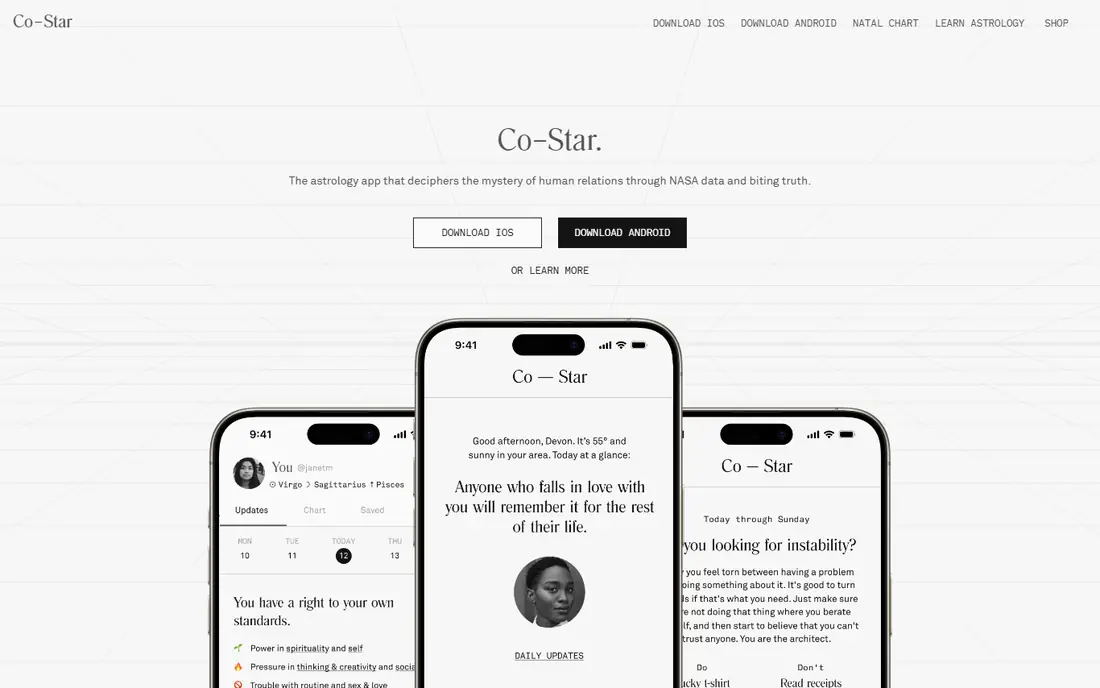
Co-Star is the design reference point for this whole category. Its stark black and white screens, spare type, and short daily updates look unlike any other astrology app, and that visual discipline makes the daily habit fast. You open it, you see what the current sky is doing to your chart, and you move on.
The friend comparison feature is also well handled, with charts laid out so you can see shared placements without digging through menus. The downside is tone: Co-Star is famously blunt, and a short push notification can land harder than a longer reading would. If you like clean design and you do not mind direct language, this is the first app to try.
- Striking black and white visual style
- Full birth chart at the centre
- Easy chart comparison with friends
- Daily tone can feel blunt
- Deeper content sits behind a paid plan
- Less hand-holding for beginners
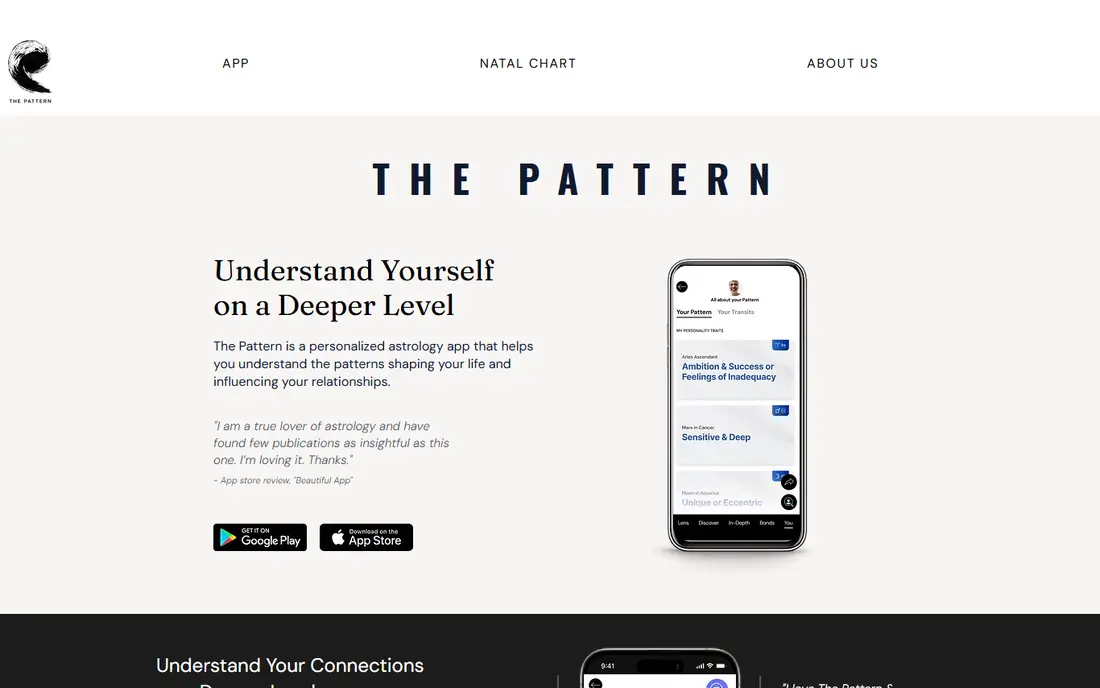
The Pattern wins on readability for people who bounce off astrology language. Instead of leading with houses and aspects, it describes life cycles, timing, and relationship patterns in sentences that read like a personality profile. That choice makes the design feel calm, because you are not asked to decode a chart before you understand the message.
Bonds let you compare patterns with friends and partners, which is a neat social touch without the clutter of a full chart overlay. The trade-off is depth: if you want to see exactly which planet is doing what, The Pattern keeps that machinery mostly out of sight. For a daily reflection habit, that restraint is a strength, not a flaw.
- Plain language instead of zodiac jargon
- Long, thoughtful pattern reports
- Relationship bonds with contacts
- Less chart detail on screen
- Timing reports can feel vague
- Deeper content needs a paid plan
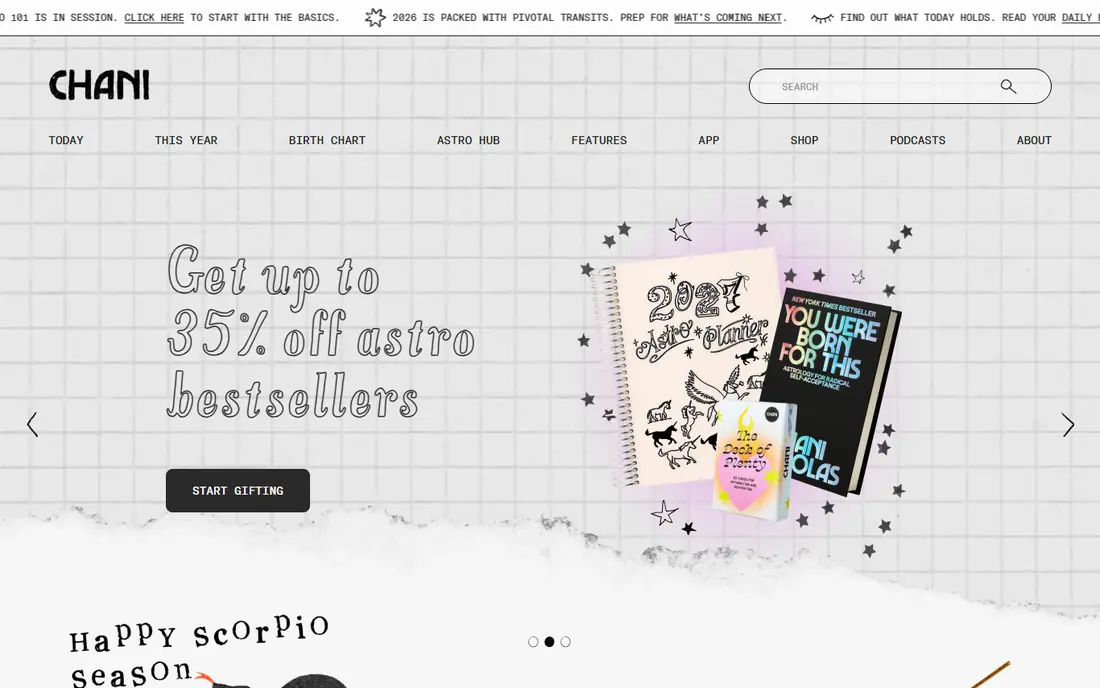
CHANI feels like a guided course wrapped in an app. Weekly readings are written in a warm, direct voice, and audio meditations and rituals sit alongside the text so you can listen instead of reading when that suits you better. The layout is uncluttered, with one clear next step at a time, which helps if other astrology apps leave you scrolling without a plan.
The main catch is cost: full access needs a subscription, with a free trial offered on the store listing, so check the current terms before you sign up. CHANI is also less interested in quick social comparisons than Co-Star. If you want to learn astrology properly, with a consistent teacher voice, CHANI is the most considered design here.
- Clear, human voice throughout
- Weekly readings plus audio meditations
- Good for learning traditional astrology
- Paid subscription for full access
- Less social chart comparison
- Weekly rhythm suits some users more than daily checkers
Sanctuary is designed around a simple idea: sometimes you want to ask a person, not read a generated paragraph. Daily horoscopes and birth chart notes give you a free starting point, and live chat sessions let you ask a human astrologer a specific question. The colourful, welcoming screens suit newcomers who might find Co-Star too stark or TimePassages too dense.
That human help is the catch, because live readings are charged on top of any subscription, so costs can grow if you chat often. Sanctuary is also not the best place to study chart technique. Use it when you want a friendly daily read and an occasional human answer, and use a study app alongside it if you want to learn the system.
- Daily horoscopes written for real people
- Live chat with human astrologers
- Friendly, colourful design
- Live readings cost extra
- Less chart depth than study apps
- Chat quality varies by reader
TimePassages is the app for people who actually want to read a chart, not just receive a horoscope. It shows natal charts, current transits, progressions, and compatibility comparisons in detail, and its long history means its calculations and interpretations are well established. For a student, that depth matters more than a pretty home screen.
The design trade-off is real: screens carry a lot of information, and a beginner can feel lost among symbols and tables. Think of it as a study desk rather than a morning notification. If you are learning astrology, pair TimePassages with a gentler daily app, and use TimePassages when you sit down to study a chart properly.
- Full natal charts, transits, and progressions
- Synastry comparison tools
- Trusted by serious students
- Dense screens for beginners
- Interface feels more like a tool than a daily habit app
- Paid features for full charts
Nebula tries to be the all-in-one astrology app. You get a birth chart tool, daily horoscopes, tarot readings, numerology content, and access to live readers, all behind one home screen. For someone who is still exploring what they like, that breadth is useful, because you can try several formats without installing five apps.
Breadth brings clutter, though. The app has more prompts to upgrade and more sections to navigate than the simpler apps here, and live reader fees add up. If you know you only want a clean daily horoscope, Co-Star or The Pattern will feel calmer. If you want to sample tarot and live readings too, Nebula is a practical single download.
- Birth chart, horoscopes, and tarot in one app
- Live psychic and astrologer options
- Broad content library
- Many upsells inside the app
- Live sessions cost extra
- Design can feel busy compared with Co-Star
Astrology Zone is the classic option, built around monthly horoscopes written by sign rather than a personal birth chart app. The design is simple: pick your sign, read a long, detailed forecast, and come back next month. That simplicity suits readers who want one trusted voice and a longer monthly view instead of daily notifications.
It is not a chart app, so do not expect friend comparisons, transits mapped to your exact birth time, or live chats. The app experience also feels closer to a mobile website than to a polished modern design. If you grew up reading monthly horoscopes and you want that format done well, Astrology Zone still earns its place.
- Long-form monthly horoscopes by a well-known astrologer
- Simple sign-based navigation
- Free core content
- Less personalised than chart apps
- Design is more website than modern app
- No live reader feature
AstroMatrix is for the reader who wants detail without paying first. Its free reports go deeper than most free tiers, covering chart placements, transits, and compatibility in full paragraphs rather than one-line summaries. That makes it a good second app for someone who started with Co-Star or The Pattern and now wants to understand why a reading says what it says.
The design is the compromise: screens are text-heavy and the navigation is less polished than the leaders here. Treat AstroMatrix as a reference book, not a daily habit app. Open it when you want a full report on a chart, and keep a simpler app for your morning check-in.
- Detailed free chart reports
- Many chart types and tools
- Good value for curious learners
- Dense text and busy screens
- Design feels dated next to Co-Star
- Some features need patience to find
How we picked these
We compared official feature pages, app store listings, and public reviews, and we judged design by how each app handles a chart, a daily reading, and a return visit after a week. A beautiful first screen that becomes tiring to read did not score as well as a plainer layout that stays clear. We left out apps that have shut down or that no longer offer a working astrology product, and we noted where live readings or subscriptions add cost beyond the free tier.
How to judge astrology app design for yourself
Start with your morning test. Open the app half asleep, and see whether you can find today's reading in under a minute without hunting through menus. If you cannot, the design is working against the habit it is supposed to support. Next, open your birth chart and ask whether the labels make sense to you. A good design explains symbols in plain words, or at least keeps the explanation one tap away.
Then check the notification style. Some apps send short, blunt notes, others send gentle weekly summaries, and the right choice depends on how you like to be nudged. Finally, look at what happens when you want more detail. The best apps let you go from a short daily note to a fuller chart reading without starting over in a different section. If every deeper answer means a new paywall and a new screen, the design is selling you steps instead of helping you learn.
Frequently asked questions
What makes a good astrology app design?
A good design shows your chart clearly, keeps daily readings short, labels symbols in plain words, and makes it easy to return to past readings. The best apps also match their tone to their layout, so a calm app reads calmly and a bold app like Co-Star looks bold without becoming hard to read.
Which astrology app has the best user interface?
Co-Star has the most distinctive interface, with stark black and white screens and a very short daily format. The Pattern has the easiest interface for beginners who dislike jargon, while CHANI has the warmest guided layout for learning over weeks rather than days.
Are astrology apps free?
Most astrology apps on this list are free to download, with a useful free tier for charts or daily readings. Full content, live readings, and deeper reports usually need a subscription or a per-session fee, so check the store listing for the current price before you commit to one app.
Which astrology app is best for beginners?
The Pattern is the best beginner pick if you dislike zodiac jargon, because it explains timing and personality in plain language. Co-Star is also easy to start with, though its tone is blunter. Beginners who want to learn the system should add TimePassages or AstroMatrix once they are ready for chart detail.
Can astrology apps replace a human astrologer?
No, an app gives you a general reading based on your birth data, while a human astrologer can ask follow-up questions and adjust to your situation. Sanctuary is the closest option here for a human answer, because it offers live chats with astrologers, but even those short sessions are not a substitute for a full consultation.
Do I need my exact birth time for these apps?
Your birth time matters for an accurate rising sign and house placements, so a chart app works best when you enter it correctly. Daily sun-sign horoscopes do not need it, but friend comparisons and transit readings are more precise with a correct birth time and place.
Sources we checked (8)

Online Jobs is an independent blog about careers, online work, learning new skills and the tools that help people earn. More about us.
Keep reading
All posts
Best Wishlist App
Best wishlist app options for birthdays, holidays, weddings, and Secret Santa, compared on price, sharing, duplicate protection, and ease of use in 2026.

Best Wedding Planning Apps
Compare the best wedding planning apps in 2026, from The Knot and Zola to Joy and Appy Couple, with free tools, registries, RSVP features and budget tools.

Best Wedding Budget Apps
Looking for the best wedding budget apps? We compare Zola, Joy, The Knot and more on budget tracking, guest lists, seating and extra fees before you plan.