Best Apps for Handyman Business in 2026: 8 Products Compared

How we put this together: we compare official feature and pricing pages, app store listings, privacy policies and public user reviews. Prices change, so check the provider's site before you pay.
Key takeaways
- Jobber and Housecall Pro are the most practical starting points for small handyman teams.
- Workiz suits teams that want a phone system and dispatch in one place, with a free Lite option for very small teams.
- ServiceTitan suits larger crews that need deep reporting and pricebook control, but it is priced by quote.
- Service Fusion, FieldPulse, ServiceM8, and Kickserv cover different trade-offs on users, price, and mobile workflow.
- Estimating quality matters as much as scheduling: check templates, photos, and approval flow before you buy.
Quick comparison
| Name | Who it suits | Starting price | Free option | |
|---|---|---|---|---|
 Jobber | Small handyman teams starting out | See website | Free trial | Visit |
 Housecall Pro | Growing teams wanting marketing tools | See website | Free trial | Visit |
 Workiz | Dispatch plus built-in phone system | Free | Yes | Visit |
 ServiceTitan | Larger crews needing deep reporting | See website | No | Visit |
 Service Fusion | Teams wanting flat plan pricing | See website | Free trial | Visit |
 FieldPulse | Simple, fast scheduling for trades | See website | Free trial | Visit |
 ServiceM8 | Small mobile teams | See website | Yes | Visit |
 Kickserv | Smaller teams wanting core features | See website | Free trial | Visit |
The best apps for handyman business
A handyman app should handle the full job cycle: booking, scheduling, dispatch, estimating, invoicing, and payment. The tools below do that in different ways, from simple mobile-first apps for solo pros to larger platforms for multi-crew companies. The right choice depends on team size, job volume, and how much admin you want to automate.
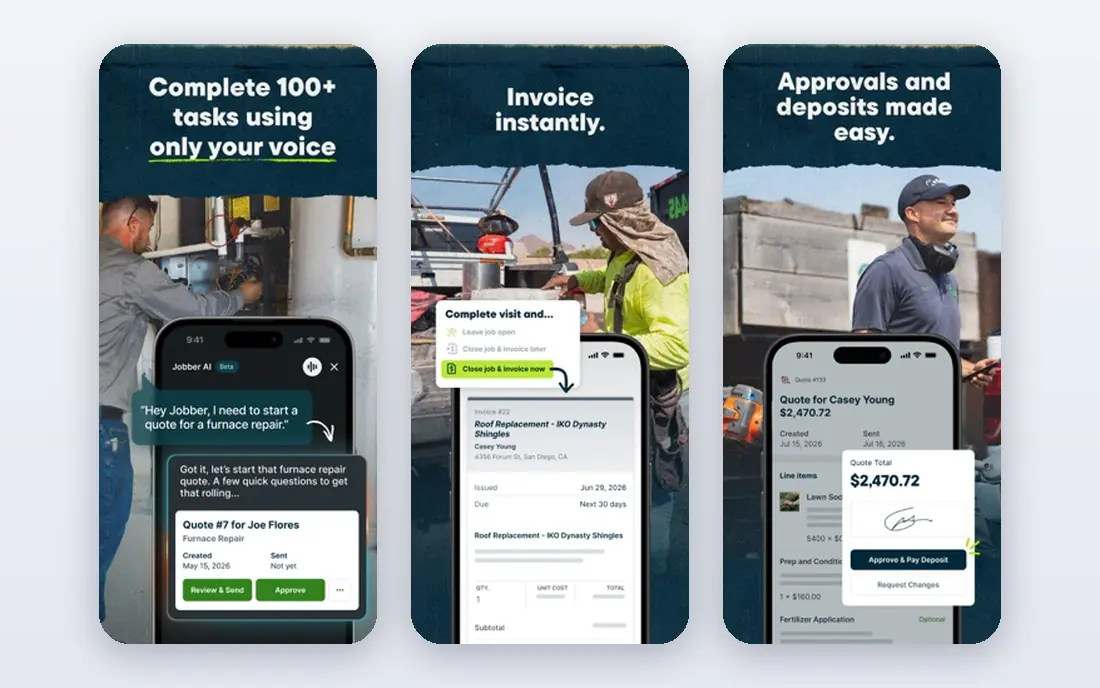
Jobber is a field service platform for home service businesses, including handyman work. It covers quoting, scheduling, dispatch, invoicing, and payments, with a mobile app for field staff and online booking for customers. That full cycle helps a solo pro or small crew move from phone calls and paper notes to a single system without a long setup.
Jobber suits teams that want a clear price and a simple workflow. The main cost question is user count, since pricing scales with seats. Check how many users your plan includes, how quoting templates work for common handyman jobs, and how QuickBooks sync works on your tier before committing.
- Clear scheduling and quoting workflow
- Customer notifications and online booking
- Invoicing and payments in one place
- Cost rises with each added user
- Some advanced features sit on higher tiers
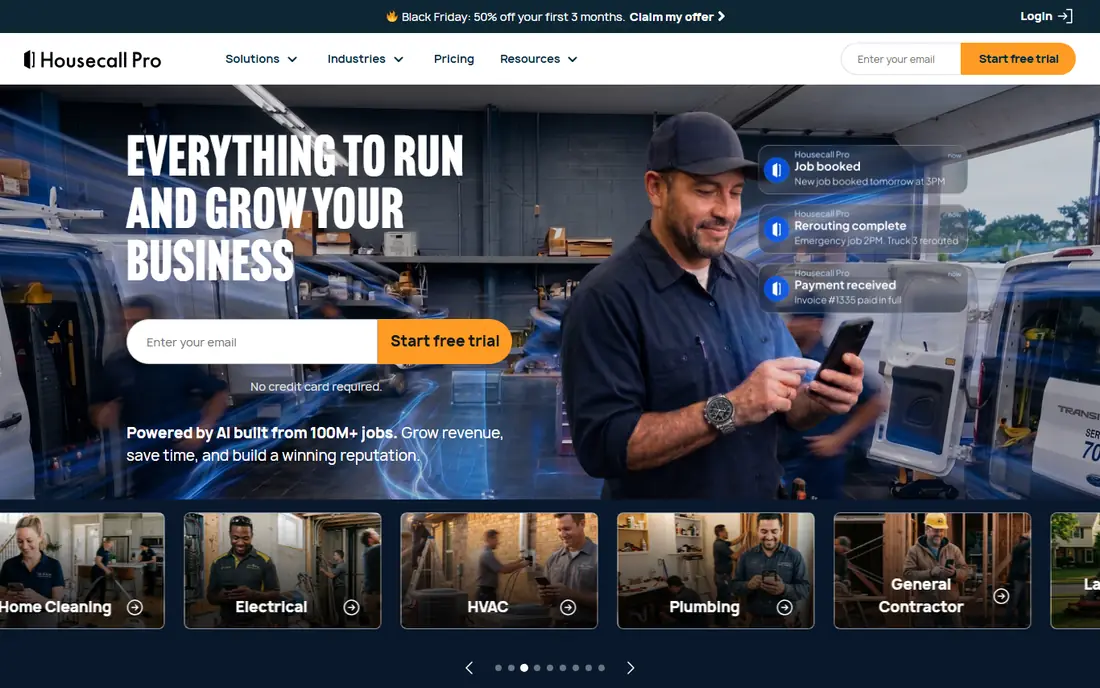
Housecall Pro covers the full job cycle for home service teams, with scheduling, dispatch, estimates, invoicing, payments, and customer communication. It also includes follow-up, review, and marketing tools that help a growing handyman business win repeat work and referrals. The mobile app lets field staff see jobs, update status, and collect payment on site.
Housecall Pro fits a team that is ready to invest in growth tools, not just scheduling. Buyers should compare plan tiers carefully, since user limits and feature access vary. Test the estimate-to-invoice flow on a typical handyman job, such as a repair with parts and labour, to see how clean the paperwork stays.
- Strong scheduling, dispatch, and invoicing
- Built-in follow-up and review tools
- Mobile app for field staff
- Higher tiers are needed for some features
- User costs add up as teams grow
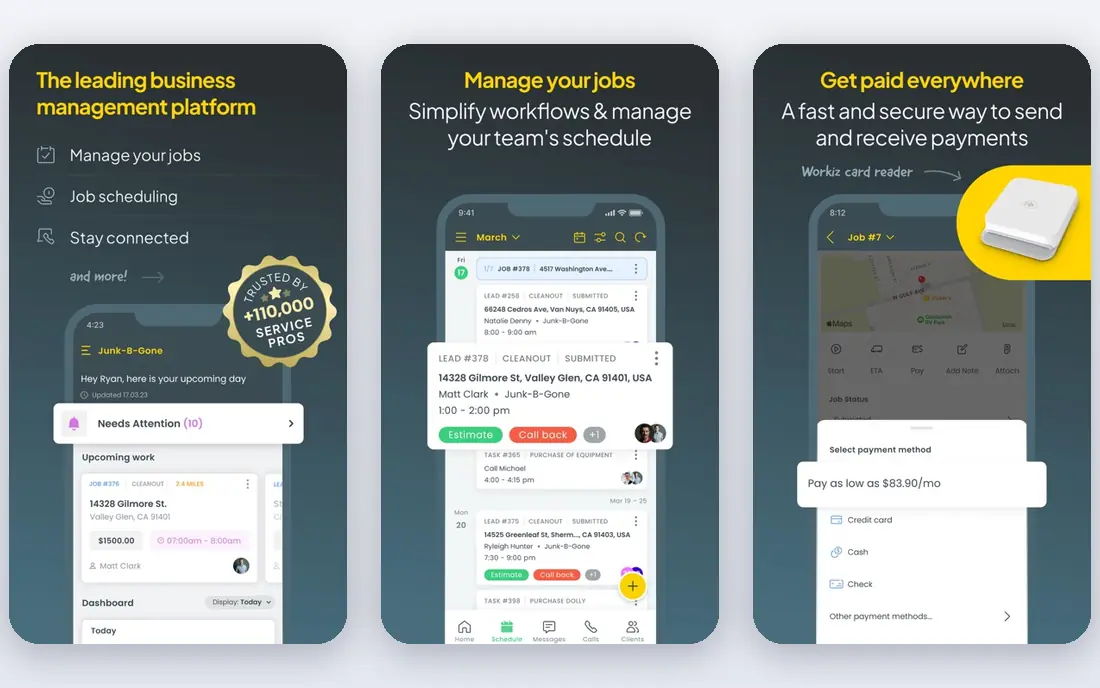
Workiz combines scheduling, dispatch, invoicing, and payments with a built-in phone system, so calls and messages sit alongside jobs. That helps a handyman business that takes many phone bookings and wants to track where each call goes. The Lite plan, for up to two users, gives very small teams a free way to start without paying per seat from day one.
Workiz suits teams that value communication tools as much as scheduling. Paid plans vary, so ask for a written quote for your team size and feature needs. Check how the phone system works in your area, how dispatch handles urgent jobs, and whether the features you need are on the plan you are quoted.
- Free Lite plan for very small teams
- Built-in phone system
- Dispatch and messaging in one place
- Paid pricing is often by quote
- Some features need higher tiers
ServiceTitan is built for larger home service companies with multiple crews, dispatchers, and office staff. It covers scheduling, dispatch, estimating with pricebooks, invoicing, payments, marketing, and reporting in one platform. Pricebook control helps a larger handyman or multi-trade company keep pricing consistent across techs and job types.
ServiceTitan is overkill for a solo pro or a two-person crew in most cases. It fits when a company has grown past simple scheduling and needs control, reporting, and marketing in one system. Buyers should ask for total cost per technician, onboarding time, and the training needed for office and field staff.
- Deep reporting and pricebook control
- Marketing and dispatch tools
- Built for larger operations
- Priced by quote and costly for small teams
- Onboarding takes time
Service Fusion offers field service management with scheduling, dispatch, estimates, invoicing, and payments, with unlimited users on its plans. That pricing model helps mid-size teams that do not want cost to rise with every hire. GPS tracking and dispatch tools help office staff follow jobs and respond when a schedule changes.
Service Fusion suits an established small or mid-size handyman business that wants predictable plan pricing. Check which features are included versus add-ons, and test the mobile app on a real job, since field usability matters more than office features for daily work. Confirm how QuickBooks and payment processing work on your plan.
- Unlimited users on plans
- GPS tracking and dispatch tools
- Invoicing and payments included
- Some tools are add-ons
- Interface feels more traditional than newer apps
FieldPulse is a field service app for trades businesses that want simple, fast scheduling without a heavy platform. It covers job scheduling, dispatch, estimates, invoicing, and payments, with custom job stages that can trigger customer updates. That simplicity helps a handyman team go live quickly and keep office work light.
FieldPulse fits teams that value speed and ease over deep reporting or marketing tools. Buyers should check seat-based pricing for their team size, how estimates handle parts and labour, and which accounting data syncs. A trial with real jobs will show whether the simple workflow covers the full job cycle or leaves gaps.
- Simple scheduling and job tracking
- Custom job stages
- Customer updates tied to job progress
- Pricing is by quote
- Accounting sync has limits to check
ServiceM8 is a mobile-first field service app for small teams, with job management, scheduling, quoting, invoicing, and payments. Paid plans include unlimited users, which helps a small crew add office or field staff without a per-seat jump. The free tier gives solo pros a way to test the core workflow before paying.
ServiceM8 suits a handyman who works mostly from a phone and wants a simple job flow. Check the free tier limits, the differences between mobile platforms if your team mixes devices, and how quoting and payment work on site. It is a strong low-cost starting point, but larger teams should compare reporting and dispatch depth against Jobber or Housecall Pro.
- Free tier for very small use
- Mobile-first job workflow
- Unlimited users on paid plans
- Some workflows differ between iOS and Android
- Advanced features need higher tiers
Kickserv is a field service platform for smaller service businesses, covering scheduling, job tracking, estimates, invoicing, and payments. Its strength is a straightforward workflow that a small handyman team can learn quickly, without paying for enterprise features it will not use. That simplicity helps a team move from spreadsheets to a proper system with less friction.
Kickserv fits a smaller team that wants core features done well. Buyers should check which tier includes dispatch mapping, GPS check-ins, and other field tools, since those sit on higher plans. Test the full cycle from booking to payment on a typical job to confirm the workflow fits how your team actually works.
- Straightforward job tracking and billing
- Scheduling and dispatch tools
- Simple setup
- Dispatch mapping and GPS features need higher tiers
- Smaller feature set than large platforms
How we picked these
We reviewed official feature pages, pricing pages, and product documentation for handyman and field service apps, plus public review summaries for 2026. We kept apps that cover the full handyman job cycle, that are actively sold, and that suit solo pros or small to mid-size crews. Where pricing is by quote or varies by user count and tier, we wrote See website rather than repeating a third-party estimate. That keeps the price column honest for tools that do not publish one flat price.
Choosing by team size and job type
A solo handyman needs a simple mobile app, fast quoting, and easy payment. A two to five person crew needs dispatch, scheduling, and customer notifications. A larger crew needs pricebooks, reporting, and marketing tools. Write down your team size, weekly job count, and the jobs you do most often, then shortlist tools that handle those jobs well, not tools with the longest feature list.
Test estimating, not just scheduling
Estimating is where handyman profit is won or lost. Test templates for common jobs, how parts and labour are added, how photos are attached, and how a customer approves an estimate. A tool with good scheduling but weak estimating will create extra admin work and pricing errors. Ask whether estimates convert cleanly to invoices without re-keying.
Check payments, accounting, and mobile use
On-site payment, invoicing, and accounting sync save time and improve cash flow. Check which payment methods are supported, what fees apply, and how data syncs to QuickBooks or your accounting tool. Also test the mobile app in the field, including offline access, since a tool that only works well in the office will frustrate field staff.
Plan for growth without a painful switch
A tool that fits today should also fit in a year if you add staff or job types. Check user limits, plan tiers, and whether data can be exported. Starting free is useful, but only if the paid path is clear and affordable when you grow. Avoid a tool that forces a full rebuild of templates and customer data when you move tiers.
Frequently asked questions
What is the best software for handyman business?
Jobber and Housecall Pro are the strongest general starting points for most small handyman teams, because both cover scheduling, estimating, invoicing, and payments. Jobber is often cheaper at small scale, while Housecall Pro adds stronger follow-up and marketing tools. Workiz is worth checking if you want a built-in phone system or a free start for a very small team.
What is the best handyman estimating software?
Jobber, Housecall Pro, Workiz, and ServiceM8 all include estimating as part of a full field service app, which is usually better than a standalone estimating tool for a handyman. The best choice depends on template quality, photo support, and how easily an estimate becomes an invoice. Test estimating on your most common job types before choosing.
What is the best app for handyman businesses with one person?
ServiceM8 and Workiz Lite suit solo pros because both offer a free starting point. Jobber is also a strong option for a solo pro that wants a clear, low-cost plan and room to grow. Choose based on mobile usability and quoting quality, since those two tasks dominate a solo workflow.
Do handyman apps integrate with QuickBooks?
Yes, most apps in this guide offer QuickBooks integration, but the depth varies by plan. Some sync invoices and payments automatically, while others sync only part of the data or need a higher tier. Confirm your QuickBooks version, what syncs in each direction, and whether sync is automatic or manual on your plan.
How much does handyman business software cost?
Costs vary by users, plan tier, and add-ons. Some tools offer free tiers for very small teams, while paid plans for small teams are often quoted or tiered by user count. Larger platforms such as ServiceTitan are priced by quote and cost more per technician. Ask for a written quote for your team size, including payment processing fees.
Can a handyman app handle scheduling and payments in one place?
Yes. Most modern handyman apps combine scheduling, dispatch, invoicing, and payments, so a job can move from booking to paid invoice without switching tools. Check that on-site payment works on the mobile app, that invoices match estimates, and that customers can pay online without extra steps.
Sources we checked (8)

Online Jobs is an independent blog about careers, online work, learning new skills and the tools that help people earn. More about us.
Keep reading
All posts
Best Tools for Pest Management
Compare the best tools for pest management, from pest control scheduling and routing to chemical records, billing and customer portals, with honest trade-offs.

n8n Alternatives
n8n alternatives compared for 2026, with Zapier, Make, Activepieces, and more, covering visual builders, code steps, self-hosting, and pricing models.

eBay Alternatives
Looking for ebay alternatives? We compared 9 marketplaces for sellers on fees, buyer reach, categories and ease of listing, to help you sell with confidence.