Best Wallpaper App in 2026: 10 Apps Compared

How we put this together: we compare official feature and pricing pages, app store listings, privacy policies and public user reviews. Prices change, so check the provider's site before you pay.
Key takeaways
- Zedge offers the largest all-round library, with wallpapers, live wallpapers, and ringtones in one free app.
- Unsplash suits photography lovers, with high-quality free photos and no watermarks on downloads.
- Backdrops and Walli suit curated, artistic designs, with hand-picked collections rather than endless uploads.
- Muzei and Tapet suit users who want a wallpaper that changes automatically, without choosing a new image each day.
- Check resolution, AMOLED fit, and lock screen cropping before you settle on a wallpaper, because a good image can still look poor behind widgets.
Quick comparison
| Name | Who it suits | Starting price | Free option | |
|---|---|---|---|---|
 Zedge | Largest wallpaper library | Free | Yes | Visit |
 Unsplash | Photography wallpapers | Free | Yes | Visit |
 Backdrops | Curated daily wallpapers | Free | Yes | Visit |
 Walli | Artist-designed wallpapers | Free | Yes | Visit |
 Vellum Wallpapers | Clean curated collections | Free | Yes | Visit |
 Muzei | Rotating art wallpapers | Free | Yes | Visit |
 Tapet | Generated pattern wallpapers | Free | Yes | Visit |
 Abstruct | Abstract artistic wallpapers | Free | Yes | Visit |
 Resplash | Unsplash wallpapers for Android | Free | Yes | Visit |
 Wallpapers.com | High-resolution web gallery | Free | Yes | Visit |
The best wallpaper apps
A wallpaper app should do more than show pretty pictures. It should offer sharp resolution for your screen, categories you actually browse, and a way to set lock and home screens without awkward cropping. The apps below cover photography, artist designs, live wallpapers, and automatic rotation, so you can pick the style that fits your phone and your taste.
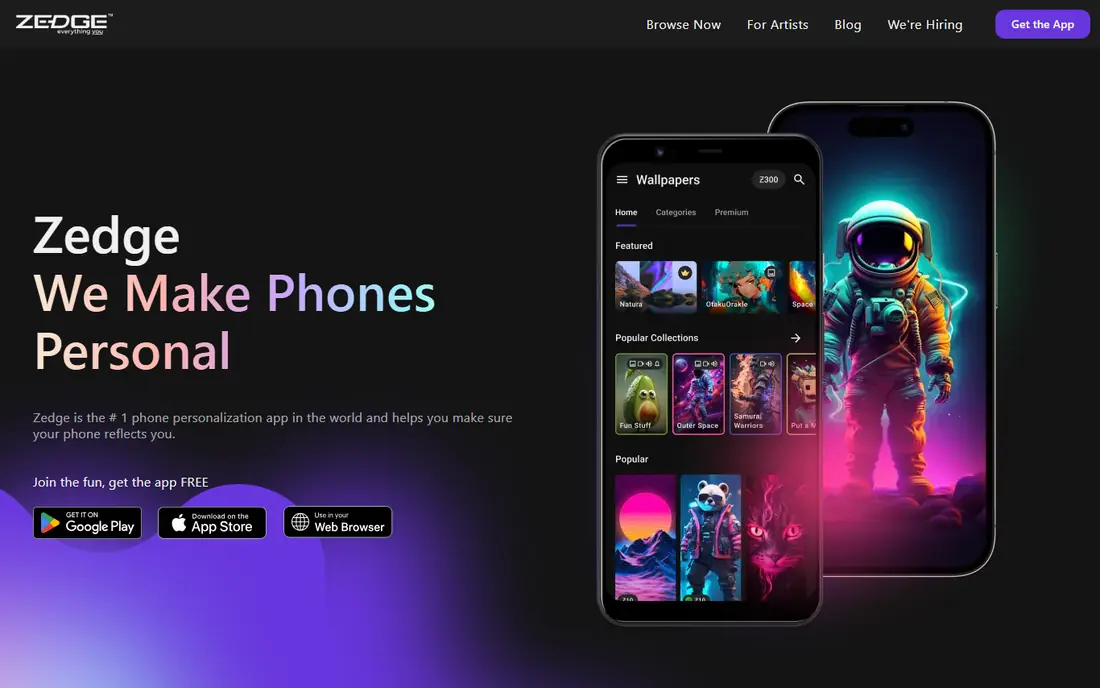
Zedge is the best all-round wallpaper app for most users, because its library is vast and its categories are easy to browse. You can search by theme, colour, or style, preview an image on a phone mockup, and set it as a home or lock screen in a few taps. Live wallpapers and video wallpapers add motion for Android users who want more than a static image. The catch is ads and premium content. The free version is usable and generous, but ads appear, and some premium designs need credits or a subscription. That trade is fair for the size of the library, and you can still find plenty of free designs without paying. If you want one app that covers wallpapers, live wallpapers, and ringtones, Zedge is the first download.
- Huge wallpaper and live wallpaper library
- Ringtones and notification sounds included
- Regular new uploads
- Free version includes ads
- Premium content needs credits or a subscription in places
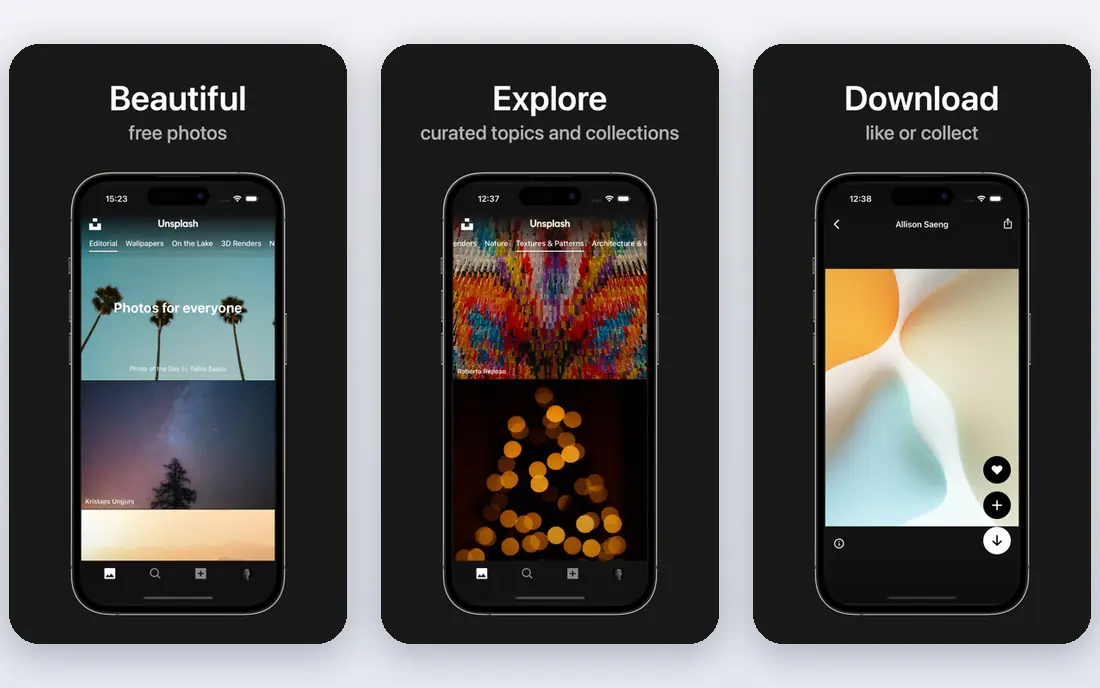
Unsplash is a free photo library, and it doubles as one of the best wallpaper sources for photography lovers. Images come from professional and semi-professional photographers, cover nature, architecture, travel, minimalism, and abstract photography, and download in high resolution with no watermarks. Search by topic, mood, or colour helps you find a wallpaper that matches your home screen style. The limit is format. Unsplash offers photos, not illustrations, live wallpapers, or phone-specific packs, so you need to crop and preview carefully for your screen size. It also lacks auto-change features in the main app. If you want a beautiful photo wallpaper and you enjoy browsing photography, Unsplash quality is hard to beat, and it is completely free.
- High-quality photography from real photographers
- Free downloads with no watermarks
- Strong search by topic and colour
- Photo-only, no illustrations or live wallpapers
- Less phone-specific curation than dedicated wallpaper apps
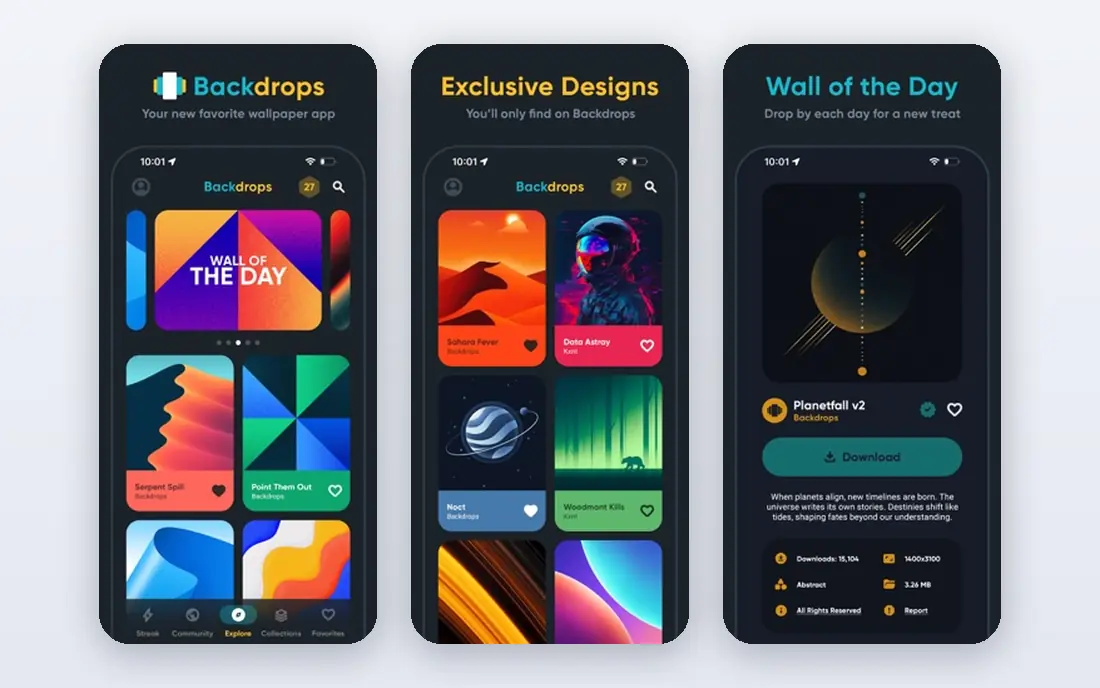
Backdrops takes a curated approach: instead of millions of uploads, it offers a smaller set of hand-picked wallpapers, updated regularly. That curation suits users who feel overwhelmed by huge libraries and just want a good wallpaper without scrolling for an hour. Categories cover abstract, nature, minimal, and geometric designs, with a clean interface that makes browsing pleasant. The trade-off is volume. Backdrops will not match Zedge for sheer choice, and some premium packs cost extra. For users who value taste over quantity, that limit is a benefit, because every wallpaper in the feed has already passed a quality check. Backdrops also works well for AMOLED screens, where dark, minimal designs look sharp and save battery on supported devices.
- Hand-picked daily wallpapers
- Clean, minimal interface
- High-resolution downloads
- Smaller library than Zedge
- Some packs are paid
Walli focuses on wallpapers designed by independent artists, which gives it a distinct look compared with photo libraries and mass-upload apps. Designs cover illustration, pattern, character art, and abstract work, and artists are credited in the app. That artist focus suits users who want a wallpaper that feels unique, not a stock photo seen on a thousand other phones. The catch is choice and price. Walli library is smaller than Zedge, and some artist packs are paid, which is fair given that artists should be paid for their work. Free designs are still plentiful, and the app is easy to browse by artist or style. If you want a wallpaper with personality and you like supporting artists, Walli is a strong pick.
- Exclusive designs from independent artists
- High-quality artistic wallpapers
- Supports artists through the app
- Smaller library than mass-upload apps
- Some designs are paid
Vellum Wallpapers is known for daily curated collections that feel polished and consistent, rather than a random feed of uploads. Categories include abstract, nature, minimal, and gradient designs, with new wallpapers added regularly. The app design is clean, which makes it easy to preview a wallpaper against a home screen layout before you set it. The limit is platform history. Vellum started with a strong iPhone focus, and Android availability and feature parity should be checked in your app store before you rely on it. Library size is also smaller than Zedge. For users who want a daily, well-chosen wallpaper without endless browsing, Vellum is a calm, reliable choice.
- Carefully curated collections
- Daily new wallpapers
- Clean, ad-light browsing in many versions
- IPhone-focused history, Android support varies
- Smaller library than Zedge
Muzei is a live wallpaper app that rotates famous artworks on your home screen, changing each day or on a schedule you choose. It dims and blurs the artwork slightly behind icons and widgets, so the art enhances the home screen without making it hard to read. That rotating art model suits users who want variety without choosing a new wallpaper every morning. The catch is style. Muzei is built around art, not photography, nature shots, or fan art, so it will not suit everyone. It is also Android-first, with a different experience on other platforms. If you like art and automatic rotation, Muzei is free, elegant, and low-effort, and it pairs well with a photo app for lock screen images.
- Rotating famous artwork wallpapers
- Automatic daily changes
- Blurs and dims art behind icons where supported
- Art-focused, not photography
- Android-first experience
Tapet generates a new pattern wallpaper each day, or on demand, from a set of pattern styles and colour palettes. No two Tapet wallpapers are quite the same, which suits users who like abstract, geometric backgrounds and do not want to browse a library. The app is lightweight, simple, and free, with automatic changes that keep the home screen fresh. The limit is content type. Tapet makes patterns, not photos, illustrations, or fan art, so it suits minimal and abstract tastes best. It is also Android-focused, so iPhone users should check current availability. For a clean, ever-changing background that never distracts from icons, Tapet is a smart, free pick.
- Generates unique pattern wallpapers
- Automatic wallpaper changes
- Lightweight and simple
- Patterns only, no photos or illustrations
- Android-focused
Abstruct offers abstract wallpapers designed by Hampus Olsson, known for his work on OnePlus wallpapers. The designs are bold, colourful, and abstract, with gradients and shapes that look sharp on modern phone screens. That focused library suits users who want a distinctive, artistic background without browsing thousands of similar images. The trade-off is narrow scope. Abstruct covers abstract designs only, so photography lovers and minimalists may prefer Unsplash or Backdrops. Some packs are paid, while a free set gives you a good taste of the style. If you like abstract art and want a wallpaper that stands out, Abstruct is worth a look.
- Abstract wallpapers from a known designer
- High-resolution designs
- Simple, focused library
- Abstract only, no photos
- Library is smaller than mass apps
Resplash brings Unsplash photography to Android in a wallpaper-focused app, with search, collections, and an auto-change option that rotates your wallpaper on a schedule. That combination solves the main Unsplash gap: you get high-quality photos plus phone-friendly setting and rotation, without manually downloading and cropping each time. The catch is platform and source. Resplash is Android-focused, and its content comes from Unsplash, so it inherits Unsplash photo-only scope. If you use Android and love photography wallpapers, Resplash is one of the best free ways to keep your home screen fresh. iPhone users can use the Unsplash app or website directly for similar photos.
- Unsplash photos in a phone-friendly app
- Auto wallpaper change option
- Free and simple to use
- Android-focused
- Depends on Unsplash photo library
Wallpapers.com is a large web gallery for high-resolution wallpapers, with categories for nature, anime, gaming, abstract, cars, and more. It suits users who prefer browsing on a computer, downloading a high-resolution image, and setting it manually on phone or desktop. Resolution options help you pick an image that fits your screen without softness or cropping problems. The limit is app experience. Wallpapers.com is web-first, so mobile app polish and auto-change features lag dedicated apps such as Zedge and Resplash. Ads also appear on the free web experience. For desktop wallpapers and for finding a specific high-resolution image, it remains a useful free gallery, and it pairs well with a phone app for daily rotation.
- Large high-resolution gallery
- Web browsing plus mobile use
- Many categories and resolutions
- Web-first experience, less app polish than Zedge
- Ads on the free web experience
How we picked these
We reviewed official app pages, app store listings, and help pages for each app, and we checked library size, resolution, categories, live wallpaper support, auto-change options, and free access. We compared photography, artist, curated, and generated wallpaper styles, because a single style does not suit every user. Public reviews helped us spot ad levels, premium limits, and platform gaps, but we did not treat review scores as proof of image quality. We kept apps with a usable free tier in 2026, from mass libraries to curated and generated options. Where an app is Android-focused or web-first, we stated that plainly, because platform fit decides whether the app is useful at all. Check your app store listing for current availability, because wallpaper apps change platform support and pricing often.
How to choose the best wallpaper app for your phone
Start with style, then check screen fit. Photography lovers should start with Unsplash or Resplash, artist design lovers with Walli, curated minimal lovers with Backdrops or Vellum, and automatic rotation lovers with Muzei or Tapet. A huge library helps only if you enjoy browsing, while a curated app helps if you want a good choice fast.
Check resolution, AMOLED, and cropping
Download at or above your screen resolution, and preview the image behind your clock, widgets, and icons before you set it. Dark, AMOLED-friendly wallpapers can save battery on AMOLED screens and look cleaner at night, while busy photos can make icons hard to read. For lock screens, keep the main subject below the clock area, so the time does not cover the face or focal point of the image.
Use live and auto-change with care
Live wallpapers look good, but they can use more battery than static images, especially on older phones. Auto-change is useful, but set it to Wi-Fi only or to a local collection if you have limited data. Test a live or rotating wallpaper for a day, check battery use, and switch back to a static image if the trade-off is not worth it for you.
Frequently asked questions
What is the best wallpaper app for Android?
Zedge is the best all-round wallpaper app for Android, with a huge library, live wallpapers, and ringtones. Resplash suits photography lovers, Muzei suits rotating art, and Tapet suits generated patterns. The best app depends on whether you want photos, art, live motion, or automatic changes.
What is the best wallpaper app for iPhone?
Zedge, Unsplash, Backdrops, Walli, and Vellum all work well on iPhone, with different strengths. Zedge offers the largest library, Unsplash offers the best photography, Walli offers artist designs, and Vellum offers curated daily collections. Check the App Store for current availability, because some Android-first apps have limited iPhone features.
Are wallpaper apps free?
Yes, most wallpaper apps on this list offer a free tier with a large library, supported by ads or premium packs. Zedge, Unsplash, Backdrops, Walli, Muzei, Tapet, and Resplash all offer free wallpapers, with paid options for premium designs or ad-free use. Free apps still offer plenty of quality choices without paying.
What are the best wallpaper apps for AMOLED screens?
Backdrops, Muzei, Tapet, and Abstruct suit AMOLED screens well, because dark, minimal, and abstract designs look sharp and can save battery where pixels turn off for black areas. Zedge also offers AMOLED categories if you search for them. Preview a wallpaper at full brightness and in dark mode before you settle on it.
Can a wallpaper app change my wallpaper automatically?
Yes. Muzei rotates artwork automatically, Tapet generates a new pattern on a schedule, and Resplash offers auto-change for Unsplash photos. Zedge and other apps also offer rotation or daily wallpaper features in some versions. Check the app settings for change frequency, Wi-Fi-only options, and whether rotation uses mobile data.
How do I set a wallpaper without cropping problems?
Choose an image at or above your screen resolution, preview it as both home and lock screen, and keep the main subject away from the clock and widget areas. Many wallpaper apps show a phone preview before you set the image, which helps you spot cropping early. For tall phones, use portrait images that match your screen ratio.
Sources we checked (10)

Online Jobs is an independent blog about careers, online work, learning new skills and the tools that help people earn. More about us.
Keep reading
All posts
Best Wishlist App
Best wishlist app options for birthdays, holidays, weddings, and Secret Santa, compared on price, sharing, duplicate protection, and ease of use in 2026.

Best Wedding Planning Apps
Compare the best wedding planning apps in 2026, from The Knot and Zola to Joy and Appy Couple, with free tools, registries, RSVP features and budget tools.

Best Wedding Budget Apps
Looking for the best wedding budget apps? We compare Zola, Joy, The Knot and more on budget tracking, guest lists, seating and extra fees before you plan.