Best Trip Planning App in 2026: 8 Apps Compared

How we put this together: we compare official feature and pricing pages, app store listings, privacy policies and public user reviews. Prices change, so check the provider's site before you pay.
Key takeaways
- Wanderlog is our pick for building a day-by-day trip on a map with other people, while TripIt is best after bookings are made.
- Roadtrippers leads for US road trips, especially when stops, fuel, and camping matter more than flights.
- Tripsy suits Apple-only travelers who want a clean timeline, but Android users should look elsewhere.
- Most core planning is free, and paid plans mainly add offline access, flight alerts, and route tools.
- No single app covers flights, hotels, road routes, budgets, and documents equally well, so pairing two apps often works best.
Quick comparison
| Name | Who it suits | Starting price | Free option | |
|---|---|---|---|---|
 Wanderlog Wanderlog | Day-by-day plans on a map | Free | Yes | Visit |
 TripIt TripIt | Organizing confirmed bookings | Free | Yes | Visit |
 Roadtrippers Roadtrippers | US road trips and camping | Free | Yes | Visit |
 Tripsy Tripsy | Polished Apple itineraries | Free | Yes | Visit |
 Lambus Lambus | Group trips and shared costs | Free | Yes | Visit |
 Google Travel Google Travel | Free trip research and tracking | Free | Yes | Visit |
 Rome2Rio Rome2Rio | Getting between two places | Free | Yes | Visit |
 Stippl Stippl | AI-assisted group itineraries | See website | Yes | Visit |
The best trip planning apps
A trip planning app has to solve a specific problem, not just look nice. Some trips need a map with days in order. Others need one place for every confirmation email. Road trips need routes and stops, while group trips need shared costs and a plan everyone can edit. We compared official feature and pricing pages, app store listings, and public reviews, and we kept apps that are active in 2026 and useful for US travelers.
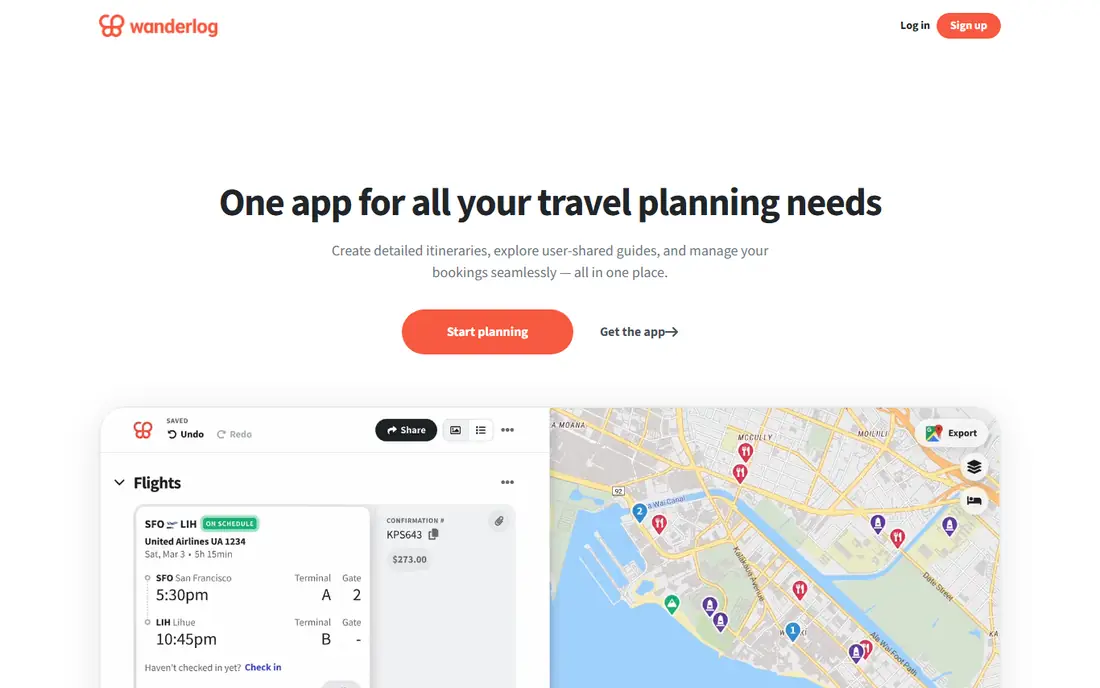
Wanderlog is the closest thing to a planning desk for a vacation. You add places, sort them into days, see them on a map, and share the plan so travel partners can edit in real time. The free plan covers the core workflow, including places, collaboration, imports, and budgeting tools, which makes it easy to test on a real trip before paying.
Pro is listed at $39.99 per year and adds offline mobile access, automatic Gmail scanning, Google Maps export, and route optimization. That is worth paying for on a rural road trip or an international trip with patchy data, but casual city trips may never need it. The main limit is that Wanderlog plans the trip; it does not replace a flight tracker or a booking site.
- Map and itinerary in one view
- Live collaboration
- Budget and expense tools included
- Offline access and route optimization need Pro
- AI help is limited on the free plan
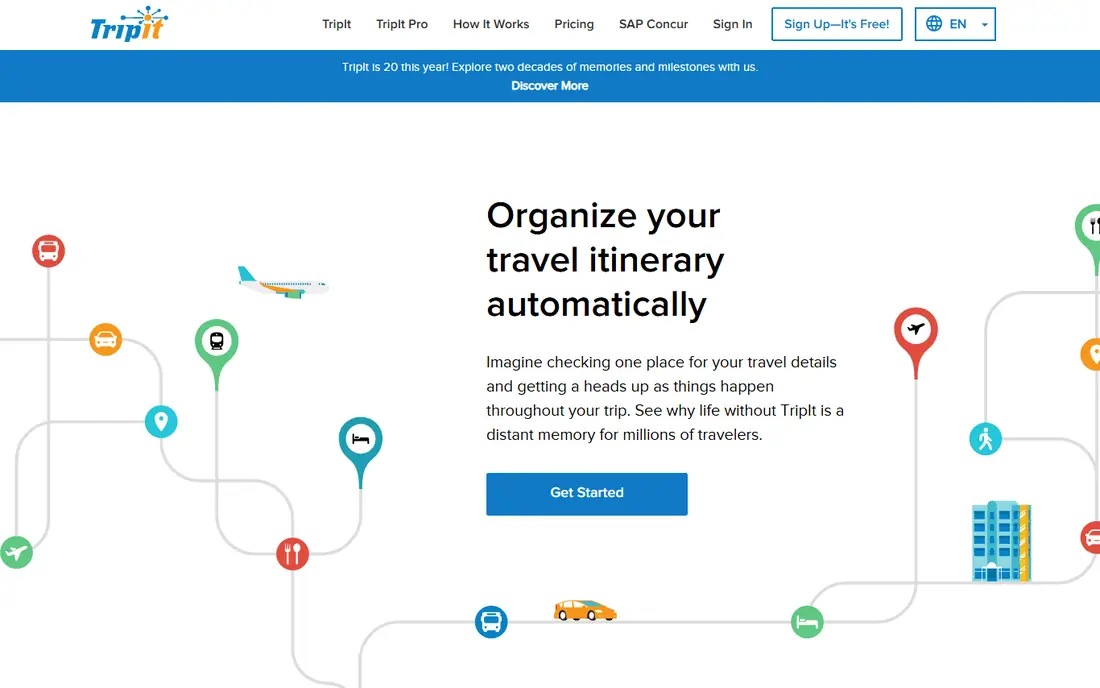
TripIt works after the booking stage. Forward confirmation emails and it builds a single itinerary with flights, hotels, rental cars, and activities, plus maps and calendar sync. For a complex business trip or a multi-flight vacation, that single timeline saves a lot of digging through inboxes.
The free plan covers that core organizing job well. TripIt Pro at $49 per year adds real-time flight alerts, fare monitoring, seat tracking, alternate flight help, and airport reminders. If you fly only once or twice a year, the free plan plus your airline app may be enough. Frequent flyers get more value from Pro, but TripIt will not help much with choosing where to go each day.
- Turns confirmation emails into one itinerary
- Calendar sync
- Easy sharing
- Weak for designing a trip from scratch
- Best travel-day alerts need Pro

Roadtrippers starts with the road, not the hotel. You set a route, add stops, and see attractions, campgrounds, and fuel estimates along the way. That makes it natural for a multi-stop drive, where the order of stops matters as much as the destinations themselves. The free plan works for short trips with a limited number of stops.
Paid plans are listed from $35.99 per year for Basic, with Pro and Premium adding more stops, RV-safe routing, and extra features. RV routing is US-only, so check coverage before relying on it abroad. For a fly-and-stay vacation, Wanderlog or TripIt will feel more natural, but for a driving holiday, Roadtrippers is hard to beat.
- Route-first planning with stops and attractions
- RV and camping features
- Fuel estimates
- Best coverage is in the US, Canada, Australia, and New Zealand
- Paid tiers needed for longer trips
Tripsy is built for travelers who want an itinerary that looks good and reads clearly. Trips are shown as a timeline with days, places, bookings, and documents, and you can share the plan with permissions for different people. It feels lighter than a full planning suite, which suits travelers who already know where they are going.
The catch is platform. Tripsy is Apple-first, with iPhone and Mac apps and only a browser view for others, so a mixed-device group will struggle. Paid plans start from $39.99 per year, with a lifetime option also listed in some comparisons. If everyone in the group uses Apple devices, Tripsy is a pleasure to use. If not, Wanderlog is the safer group choice.
- Clean timeline design
- Document storage
- Offline access
- Good sharing controls
- Apple devices only for the full app
- Paid plan needed for full features
Lambus treats the group as the main user, not an afterthought. Trips include an itinerary, a group chat, documents, and expense tools that track who paid and who owes what, with settlement help. That removes the usual end-of-trip spreadsheet argument, at least for money.
The free plan covers core trip and group planning, while Pro adds advanced routing, currencies, and exports. Prices vary by store and region, with annual and lifetime options reported, so check the checkout shown for your account before paying. Lambus is less useful as a solo discovery tool, but for friends or family traveling together, its group focus is a real advantage.
- Group planning with chat
- Expense splitting and settlement
- Packing and document tools
- Smaller community and guide content than larger rivals
- Advanced routing needs Pro
Google Travel is less an app and more a research layer that sits across Google Search, Flights, and Hotels. You can track flight and hotel prices, explore destinations, and see trips assembled from bookings found in Gmail. For the early stage of planning, when you are comparing dates and prices, it is fast and free.
Its limits show once the trip takes shape. Day-by-day planning, shared editing, and expense tools are weaker than in Wanderlog or Lambus, and the experience is web-first. Use Google Travel to decide when to fly and where to stay, then move the settled plan into a dedicated itinerary app for the days themselves.
- Flight and hotel price tracking
- Trips built from Gmail bookings
- No extra app needed for basics
- Not a full day-by-day itinerary builder
- Collaboration is limited
Rome2Rio answers one question very well: how do I get from here to there. Enter two places and it shows routes by plane, train, bus, ferry, and car, with rough times and costs side by side. That is invaluable for multi-city trips, where a train might beat a flight once airport time is counted.
It is not a place to store a whole vacation. There is no day planner, no shared budget, and no document vault. Treat Rome2Rio as a transport layer: use it to choose each leg, then add the chosen leg to Wanderlog, TripIt, or Tripsy. Used that way, it prevents the common mistake of booking a hotel in the wrong city for the transport available.
- Compares flights, trains, buses, ferries, and driving in one search
- Global coverage
- Simple to use
- Does not build full itineraries
- Booking links go to partners, so prices can change
Stippl aims at travelers who want a first draft fast. Describe the trip and it suggests an itinerary, which the group can then edit together, with expenses and a map view included. That starting draft helps when a blank page is the main block, especially for a first visit to a city.
AI drafts still need human checking. Opening hours, walking times, and seasonal closures can be wrong, so verify anything time-critical before booking around it. Pricing is listed in euros on some pages, from about 4.99 euros per month, so US travelers should check the store price in dollars. For groups that like to edit a draft together, Stippl is a useful alternative to starting from nothing.
- AI-generated day plans
- Group collaboration
- Expense splitting built in
- AI plans need checking for opening hours and travel times
- Smaller user base than Wanderlog
How we picked these
We compared official pricing and feature pages, app store listings, and public reviews for apps that are active in 2026 and cover a real planning job, from road trips to group costs to flight organization. We favored apps with a usable free plan, clear paid upgrades, and support for both iOS and Android where possible, and we noted platform limits plainly. We did not claim hands-on testing we did not do. Prices change by store and region, so check the checkout before paying.
How to choose the right trip planner
Start by naming the hardest part of your trip. If it is the order of days and places, pick Wanderlog. If it is keeping bookings together, pick TripIt. If it is the drive itself, pick Roadtrippers. If it is group money, pick Lambus. Matching the app to the hardest job matters more than picking the app with the most features.
Next, check who else needs access. A beautiful Apple-only app fails if half the group uses Android, and a solo planner fails if nobody else can edit it. Test sharing, offline access, and export before departure, not at the airport. Download offline maps for the areas you will visit, and keep booking confirmations in the app and in email as a backup.
For road trips
Roadtrippers should be your route tool, with Wanderlog as the day planner if you want richer day notes and budgets. Check fuel, campground, and RV limits in advance, and build in buffer time between stops. A route that looks fine on a map can still fail if a road closes or a stop needs a booking.
For group and family trips
Lambus or Wanderlog work best for groups, because both allow live shared editing and cost tracking. Agree early on who can edit, who handles money, and where documents live. A shared plan only helps if everyone actually opens it, so pick the app the least tech-confident traveler can use.
Frequently asked questions
What is the best app for planning trips overall?
Wanderlog is our overall pick for most leisure trips, because it combines a map, a day-by-day itinerary, collaboration, and budgeting in a free plan. TripIt is better after bookings are made, and Roadtrippers is better for driving trips. The best overall app depends on the trip type, not on a single ranking.
What is the best free road trip planner app?
Roadtrippers has the strongest free road trip tools, with route planning, stops, and fuel estimates, though longer trips need a paid plan. Wanderlog is a good free alternative for road trips that need richer day plans and group budgeting. Check stop limits on the free plan before a long drive.
What is the best app for travel itinerary planning with friends?
Wanderlog and Lambus both support live group planning, with Lambus adding stronger expense settlement. Wanderlog suits groups that want a polished shared itinerary, while Lambus suits groups where splitting costs is the main friction. Pick the one the whole group will actually open.
Can a trip planning app track flights and hotels?
Yes, TripIt does this best by turning confirmation emails into a single itinerary, and Google Travel can track prices and assemble trips from bookings. Wanderlog also supports booking imports, with automatic Gmail scanning on Pro. For live flight alerts, TripIt Pro or a dedicated flight tracker works better than a general planner.
Is there a good vacation planning app for Apple users?
Tripsy is a strong choice for Apple-only travelers, with a clean timeline and offline access. Its limits matter for mixed-device groups, since Android users get only a browser view. In that case, Wanderlog gives a similar planning experience across iOS, Android, and the web.
Do I need to pay for a trip planning app?
Most travelers do not need to pay at first, since Wanderlog, TripIt, Roadtrippers, and Lambus all have usable free plans. Paid plans add offline access, flight alerts, route optimization, and higher limits. Pay only when a free limit, such as stops, offline use, or alerts, actually blocks a trip you are taking.
Sources we checked (8)

Online Jobs is an independent blog about careers, online work, learning new skills and the tools that help people earn. More about us.
Keep reading
All posts
Best Travel Apps
Looking for the best travel apps in 2026? We compared 10 travel apps for flights, hotels, maps, itineraries and data abroad on price and features. Read on.
Best Travel Apps for Planning
Looking for the best travel apps for planning? We compare 9 trip planning apps on itineraries, maps, road trip routes, budgets, and offline access for trips.

Best Road Trip Apps
Compare the best road trip apps for planning, navigation, gas prices, camping, and audio tours, with free plans and honest limits for each app for drivers.