Best Sudoku App in 2026: 7 Tools Compared

How we put this together: we compare official feature and pricing pages, app store listings, privacy policies and public user reviews. Prices change, so check the provider's site before you pay.
Key takeaways
- Sudoku.com is the safest starting point for most players, with daily challenges and a clear difficulty range.
- Good Sudoku is the best pick for learning technique, with hints that teach rather than just fill a cell.
- Brainium Sudoku suits beginners who want a calm, clean board without clutter.
- Web Sudoku suits players who want instant play in a browser with no download.
- Conceptis and Puzzazz suit players who want variants beyond the classic 9 by 9 grid.
Quick comparison
| Name | Who it suits | Starting price | Free option | |
|---|---|---|---|---|
 Sudoku.com | Daily challenges | Free | Yes | Visit |
 Good Sudoku | Learning technique | See website | No | Visit |
 Brainium Sudoku | Calm beginner play | Free | Yes | Visit |
 Web Sudoku | Instant browser play | Free | Yes | Visit |
 Conceptis Sudoku | Puzzle variants | Free | Yes | Visit |
 Sudoku Coach | Learning and training | Free | Yes | Visit |
 Puzzazz | Hand-crafted puzzles | Free | Yes | Visit |
The best sudoku app
A good sudoku app does a few things well: a clear grid, useful pencil marks, fair hints, offline play and a difficulty range that grows with you. The apps below cover casual play, serious learning and puzzle variants, so you can pick by how you play, not just by download count.
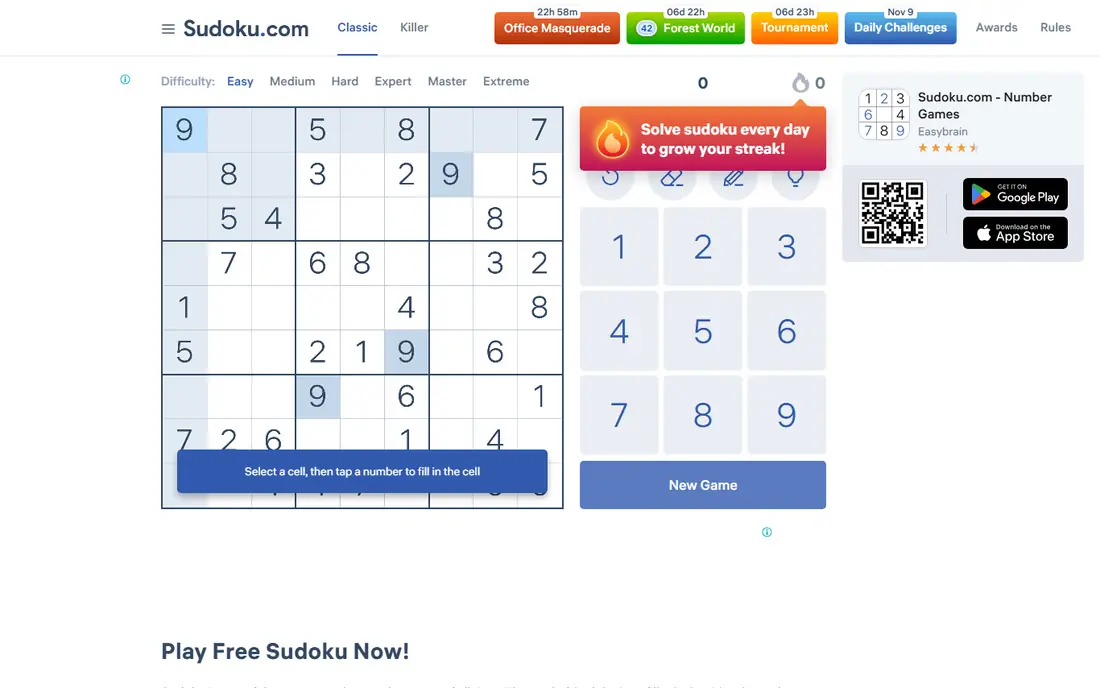
Sudoku.com, from Easybrain, is the most widely used sudoku app on Android and iOS, and that popularity is easy to understand. The board is clear, the controls are fast, and the difficulty curve runs from easy puzzles for new players to expert grids that need real technique. Daily challenges and events give a reason to return each day. The app also handles the basics well, including pencil marks, error tracking, undo and hints. Offline play works for core puzzles, which matters for commutes and flights. If you want one app that covers casual play and steady progress, this is the default choice. The main drawback is ads in the free version, which appear between puzzles rather than during a game. An in-app purchase removes ads and adds extra features, but the free version is still fully playable. If ads bother you, a paid app like Good Sudoku may feel calmer.
- Large player base
- Daily challenges
- Easy to expert levels
- Offline play
- Ads in the free version
- Some features need an in-app purchase
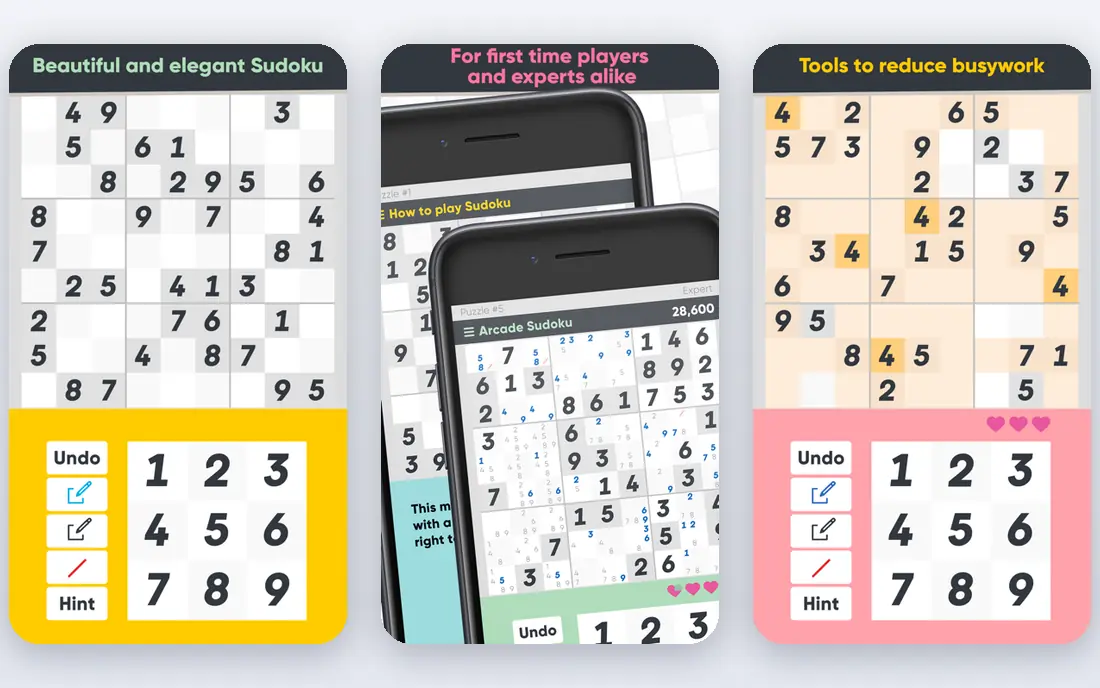
Good Sudoku, from Zach Gage, treats sudoku as a skill to learn, not just a puzzle to finish. The app highlights candidates as you play, flags mistakes without giving away the answer, and explains the technique behind a hint. That teaching approach helps you move from guessing to solving with logic. The design is calm and focused, with no ads and no subscription pressure once you own the app. Puzzles are generated rather than limited to a fixed set, so you can keep playing at your level without running out. For players who want to improve, that endless supply at the right difficulty is a real plus. The catch is price and platform. Good Sudoku is a paid app, so it is not the best first try if you only play occasionally. Check the current store listing for your device, since platform availability and pricing have varied. For serious players, the one-time cost is easy to justify.
- Hints that teach technique
- Clean design
- No ads or subscriptions in the paid app
- Paid app
- IOS focused, with Android availability varying by store listing

Brainium Sudoku suits players who want a relaxed, readable board. The interface is clean, the numbers are large, and the controls for pencil marks and hints are easy to find. That simplicity helps beginners, who can focus on the grid rather than learning a complex app. The app includes daily puzzles, difficulty levels and basic stats, so you can track streaks and solving time without extra clutter. Offline play covers core puzzles, and the overall feel is calm rather than gamified. If other apps feel busy, Brainium is a good reset. The limit is variety. Brainium focuses on classic sudoku rather than a wide range of variants, so advanced players who want Killer, Samurai or irregular grids will need a second app. Ads in the free version can also interrupt the flow, though an in-app purchase can remove them.
- Clean interface
- Gentle learning curve
- Daily puzzles and stats
- Fewer variants than specialist apps
- Ads in the free version
Web Sudoku is the best pick when you do not want another app on your phone. Open the site in a browser, pick a difficulty, and start solving at once. The grid is simple, the controls are clear, and there is no signup barrier for basic play. That simplicity is also the point for many players. You can solve a puzzle on a work break, on a shared computer, or on a device with little storage, without installing anything. The site has been around for years, and the classic format has stayed stable. The trade-off is features. Web Sudoku does not offer the same stats, daily events, hint teaching or variant range as a modern mobile app. If you play every day and want progress tracking, a mobile app will serve you better. If you play occasionally, Web Sudoku is fast and free.
- No download needed
- Free play
- Simple difficulty levels
- Fewer app features
- No mobile app polish or stats depth
Conceptis Sudoku suits players who have mastered classic sudoku and want new challenges. The range includes irregular grids, diagonal sudoku, Killer-style variants and other logic twists that change how you scan a board. That variety keeps the game fresh after classic puzzles start to feel routine. The puzzles are presented with the care you expect from a long-standing puzzle publisher, and the site and apps let you play on different devices. Difficulty levels help you step into a new variant slowly, rather than jumping straight to an expert grid. The downside is presentation and pricing. The interface feels older than Sudoku.com or Brainium, and some puzzle packs need a purchase. If you only want classic sudoku, this extra variety may not matter. If you want variants, Conceptis is one of the strongest libraries available.
- Many sudoku variants
- Hand-designed feel
- Web and mobile play
- Some puzzles need a purchase
- Interface is less modern than rivals
Sudoku Coach is built for players who want to understand a puzzle, not just finish it. You can enter a puzzle, ask for a hint, and see the logic step explained in plain terms. That solver view helps when you are stuck on a hard grid and want to learn the next technique, not just the next number. The site also offers training features and puzzle generation, so you can practise a specific technique at your level. Playing in a browser means no download, and the free tier covers basic solving and learning tools. For students of the game, that is a strong combination. The limit is game feel. Sudoku Coach is more of a learning tool than a polished daily game app, with fewer events, themes and social features than Sudoku.com. Use it alongside a main game app: play in your game app, then bring hard puzzles to Sudoku Coach to learn the missing technique.
- Step-by-step solver explanations
- Training tools
- Web play with no download
- Less polished as a daily game app
- Premium features need a subscription
Puzzazz takes a different route by offering hand-crafted puzzle books rather than only generated grids. Sudoku sits alongside other logic puzzles, and the books feel curated, with a clear difficulty progression. For players who value puzzle quality over endless quantity, that curation matters. The app is well made on iOS, with a clean board, pencil marks and a reading experience that suits longer sessions. You can buy a book, work through it at your pace, and move to the next book when you finish. That book model also removes the pressure of daily streaks. The main limit is platform. Puzzazz is iOS focused, so Android players need a different app. Some books are also paid, though free content lets you test the style first. If you are on iOS and you like crafted puzzles, Puzzazz is a distinctive pick.
- Hand-crafted puzzle books
- Many puzzle types
- IOS focused quality
- IOS only for the main app
- Some books are paid
How we picked these
We reviewed official app pages, store listings, publisher sites and public reviews for each app. We focused on board clarity, hint quality, difficulty range, offline play, variant range and pricing, rather than only download counts. Where pricing varied by store, region or in-app purchase, we used See website instead of a single figure. We checked that each app is still available and working in 2026 and truly offers sudoku, not just a puzzle bundle with a weak sudoku mode. Apps that were closed, broken or only available in one store with no clear publisher page did not make the list. Check the store listing for your device before you buy, since features and prices differ by platform.
How to pick the right difficulty and hints
Start one level below your comfort zone for the first week. Easy puzzles build speed and confidence, and they teach scanning habits that make harder grids less frustrating. Move up only when you finish easy puzzles without guessing, and use pencil marks on every puzzle, even easy ones, so the habit is ready for harder grids. Use hints as a teacher, not a crutch. When you are stuck, ask for a hint on one cell, then try to see why that number must go there before you move on. If an app only fills the cell with no explanation, switch to Good Sudoku or Sudoku Coach for learning, and keep your main game app for daily play. Finally, protect your streak from becoming a chore. A daily puzzle is a good habit, but a missed day should not end your enjoyment. Pick an app with offline play and a large puzzle supply, so you can play when you want, not only when the app reminds you.
Learn one technique at a time
Focus on naked singles, then hidden singles, then pairs, before you tackle advanced chains. One technique practised for a week beats ten techniques skimmed in a day. A learning app can show you which technique a puzzle needs, so you know what to practise next.
Frequently asked questions
What is the best sudoku app for beginners?
Brainium Sudoku and Sudoku.com are both strong for beginners, because the boards are clear and the difficulty starts gently. Brainium feels calmer, while Sudoku.com offers more daily events. Try both free versions for a few days and keep the one whose controls feel natural.
What is the best sudoku app without ads?
Good Sudoku is the best ad-free pick if you are willing to pay once for the app. Puzzazz and Brainium also offer ad removal through a purchase. Free apps usually show ads between puzzles, so a paid option is the simplest way to remove them completely.
Can I play sudoku offline?
Yes, most mobile apps on this list support offline play for core puzzles, including Sudoku.com, Brainium and Good Sudoku. Daily challenges and events may need a connection, so download or start puzzles before you go offline. Web Sudoku needs a browser connection for normal play.
Is Sudoku.com free?
Sudoku.com is free to download and play, with ads in the free version and optional in-app purchases for ad removal and extra features. The core puzzles and difficulty levels are available without paying. Check the store listing for your device for current purchase options.
Which sudoku app is best for learning?
Good Sudoku and Sudoku Coach are the best learning picks. Good Sudoku teaches technique inside normal play, while Sudoku Coach explains solver steps for a puzzle you enter. Use Good Sudoku for daily learning, and Sudoku Coach when a specific hard puzzle blocks you.
Do sudoku apps help with logic skills?
Sudoku apps train scanning, pattern recognition and logical deduction, since every puzzle has a single solution you must find by reasoning. They do not replace broader learning, but regular play can improve focus and patience with structured problems. The benefit comes from solving with logic, not from guessing.
Sources we checked (7)

Online Jobs is an independent blog about careers, online work, learning new skills and the tools that help people earn. More about us.
Keep reading
All posts
Best Solitaire App
Find the best solitaire app for your phone in 2026, from classic Klondike to TriPeaks twists, with free options, ads, and daily challenges for all ages.
Best Crossword Apps
Looking for the best crossword app? We compare 8 top crossword apps, from daily newspaper puzzles to free word games, with prices, free plans, and tips.

n8n Alternatives
n8n alternatives compared for 2026, with Zapier, Make, Activepieces, and more, covering visual builders, code steps, self-hosting, and pricing models.