Best Realtor App to Use in 2026: 8 Apps Compared

How we put this together: we compare official feature and pricing pages, app store listings, privacy policies and public user reviews. Prices change, so check the provider's site before you pay.
Key takeaways
- Zillow is our pick for broadest home search, with the largest listing pool and the most familiar search tools.
- Realtor.com is the best choice when listing freshness matters most, since its listings come closely from MLS feeds.
- Redfin suits buyers who want fast tour booking and a brokerage service behind the app.
- Homes.com is a strong second source, with agent-first contact and neighborhood video tours.
Quick comparison
| Name | Who it suits | Starting price | Free option | |
|---|---|---|---|---|
 Zillow | Broadest home search | Free | Yes | Visit |
 Realtor.com | Fresh MLS listings | Free | Yes | Visit |
 Redfin | Tour booking and brokerage | Free | Yes | Visit |
 Homes.com | Agent-first contact | Free | Yes | Visit |
 Trulia | Neighborhood research | Free | Yes | Visit |
 Compass | Polished agent collaboration | Free | Yes | Visit |
 Rocket Homes | Search plus mortgage path | Free | Yes | Visit |
 StreetEasy | New York City search | Free | Yes | Visit |
The best realtor apps to use
The word realtor app usually means a home search app, and buyers use these apps in two ways: to browse listings and to contact an agent. The best app for you depends on which of those jobs matters more, and on your local market, since listing freshness and agent coverage vary by city. We compared official feature pages, listing sources, tour tools, and agent contact options for the apps below, using published product pages and app store listings.
One warning applies to every app here. Listing status can lag, home value estimates are automated guesses rather than appraisals, and the agent who answers your inquiry may not be the listing agent. Always confirm status, price, and showing details with the listing agent or your own agent before making decisions, and treat estimates as a starting point for research, not a valuation.
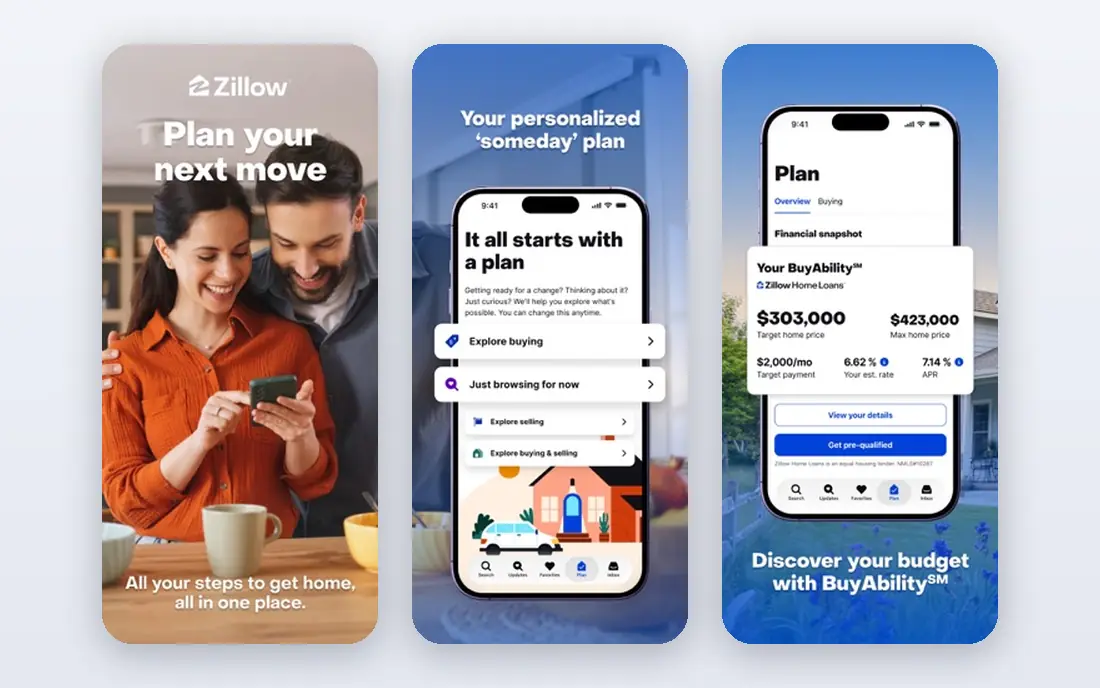
Zillow is the default home search app for most buyers because it covers the most ground. Its database includes MLS listings, rentals, and for-sale-by-owner homes, and its map search, saved searches, and alerts make it easy to watch a neighborhood over weeks. Price history, tax history, and the Zestimate home value estimate give a useful first picture of a home, even if none of those replace an agent's pricing advice.
The honest catches are freshness and lead routing. A home that went under contract in the morning can still show as active later in the day, and a contact request on a listing may reach a Premier Agent who paid for that area rather than the listing agent. Use Zillow as your broad discovery tool, then verify status and details through Realtor.com or your agent before booking a tour or making an offer.
- Largest listing pool including rentals and for-sale-by-owner homes
- Familiar map search and saved alerts
- Zestimate and price history on most homes
- Listing status can lag behind MLS updates
- Contact requests may go to a paid Premier Agent rather than the listing agent
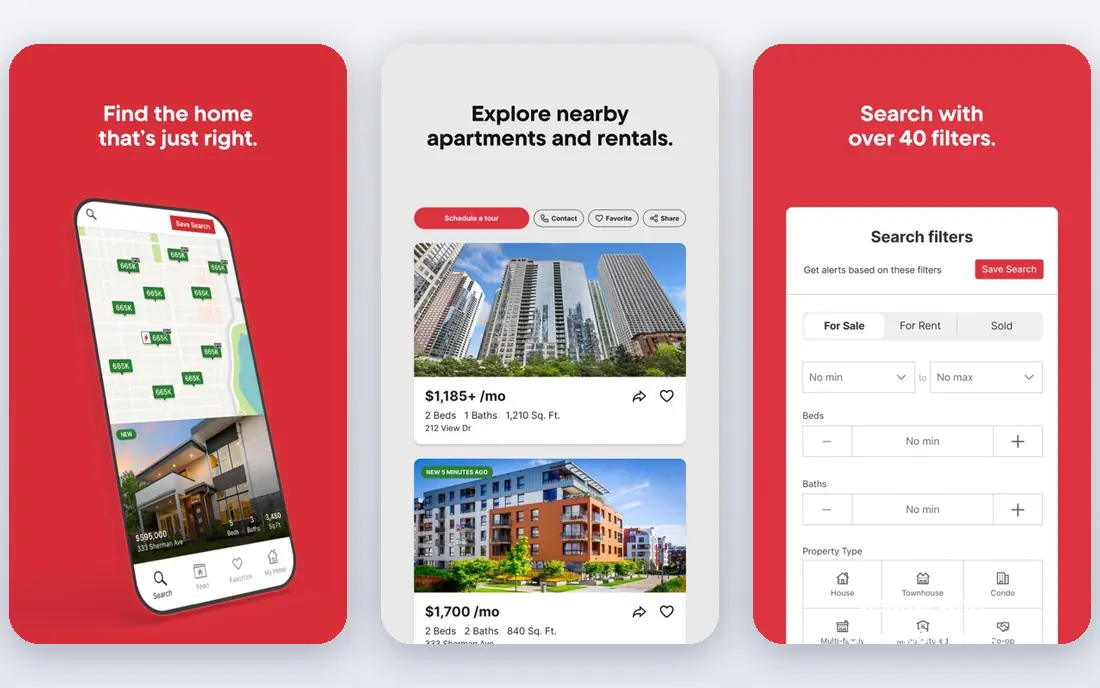
Realtor.com is the app to check when accuracy matters more than breadth. Operated as the official site of the National Association of Realtors under license, it draws listings closely from MLS feeds, which means status changes, price changes, and new listings tend to appear sooner here than on broader portals. Its neighborhood pages, school data, commute estimates, and affordability calculator help buyers compare areas, not just houses.
The trade-offs are smaller. Realtor.com does not surface for-sale-by-owner listings the way Zillow does, and some users find its interface less smooth than Zillow or Redfin. Neither gap matters much if your main goal is trustworthy status. Use Realtor.com as your verification app: browse widely elsewhere, then confirm the homes you care about here before contacting an agent.
- Listings sourced closely from MLS feeds
- Strong neighborhood, school, and commute data
- Affordability tools
- No for-sale-by-owner listings in the same way as Zillow
- Interface feels less polished to some users
Redfin is both a search app and a brokerage, and that combination is its appeal. Buyers can search MLS-sourced listings, book tours quickly in markets where Redfin operates, and work with a Redfin agent through the same app. Its sold-home data, days-on-market filters, and price-drop alerts help buyers judge whether a listing is priced fairly and how fast homes move in an area.
The limit is geography. Redfin's full agent service does not cover every market, so buyers outside its service areas get a good search app without the full brokerage benefit. Its agent model, with salaried agents in many markets, also differs from a traditional brokerage, which suits some buyers and not others. If you live in a Redfin market and want tours booked fast, Redfin is a strong first choice.
- Fast tour booking in Redfin markets
- Brokerage service behind the app
- Fresh MLS data and sold-home tools
- Full brokerage service is not available in every market
- Listing agent model differs from traditional brokerages
Homes.com has grown into a useful second source for buyers, and its agent-first approach is the reason to try it. When you ask about a listing, your inquiry goes to the listing agent rather than a paid lead buyer, which can mean a faster and more informed answer about showings, offers, and the home itself. Neighborhood video tours and area insights also help buyers compare places they have not visited in person.
Coverage is the catch. Homes.com is still building depth in some markets, and its filter set is simpler than Zillow or Redfin, so power searchers may miss advanced options. Use it alongside a larger portal: discover homes broadly, then check Homes.com for the listing agent's details and neighborhood video before you reach out.
- Contact requests go to the listing agent
- Neighborhood video tours and area insights
- Clean, simple search
- Smaller listing depth in some markets
- Fewer advanced filters than Zillow or Redfin
Trulia, part of the Zillow Group, is the app for buyers who choose a neighborhood first and a house second. Its neighborhood pages include resident reviews, commute data, school information, and lifestyle filters that help you compare areas on more than price. Map search with custom boundaries makes it easy to watch a specific set of streets rather than a whole city.
The trade-offs mirror Zillow, since the two share a listing feed family. Status can lag behind MLS updates, and contact requests may go through the Zillow lead system rather than directly to the listing agent. Use Trulia for neighborhood research and early browsing, then verify status on Realtor.com and confirm details with an agent before acting on a listing.
- Strong neighborhood pages with resident reviews
- Many lifestyle filters
- Same listing feed family as Zillow
- Listing status shares Zillow's lag in some cases
- Contact routing follows the Zillow lead system
Compass is a brokerage with a polished app, and it shines when you work with a Compass agent. Listings are presented cleanly, with strong photos and property details, and the app supports sharing, commenting, and tracking homes with your agent in one place. In markets where Compass has many agents and listings, that collaboration feels smoother than juggling email and a portal separately.
The limit is dependence on the brokerage. Without a Compass agent, the app is a good search tool but not a standout one, and coverage varies by city. If your agent is at Compass, use its app as your shared workspace. If not, Zillow, Realtor.com, or Redfin will serve your search better.
- Polished listings and presentations
- In-app collaboration with a Compass agent
- Strong in Compass-heavy markets
- Best experience needs a Compass agent
- Coverage varies by market
Rocket Homes combines home search with a path to mortgage pre-approval through Rocket Mortgage, which suits buyers who want search and financing in one place. You can browse listings, get matched with an agent, and start a pre-approval without leaving the platform, which shortens the gap between finding a home and knowing what you can afford.
The tie-in is also the caution. A combined search and lending path is convenient, but it is wise to compare mortgage offers from more than one lender before committing, since rates and fees differ. Listing depth also varies by market. Use Rocket Homes if you want one starting point for search and pre-approval, and still get a second mortgage quote elsewhere.
- Nationwide listings with mortgage pre-approval path
- Agent matching
- Integrated financing steps
- Financing tie-ins suit some buyers and not others
- Listing depth varies by market
StreetEasy is essential for New York City and of little use anywhere else, and that focus is its strength. Its building pages, floor plans, listing history, and city-specific filters, such as doorman, elevator, and laundry options, reflect how New Yorkers actually search. For buyers and renters in the five boroughs, no national portal matches its local depth.
Outside New York, StreetEasy has no role, so it belongs on this list only for that audience. If you are searching in New York, use StreetEasy as your primary app and a national portal as a backup. If you are searching anywhere else, skip it and put your time into Zillow, Realtor.com, or Redfin.
- Deepest New York City listing data
- Building pages with floor plans and history
- City-specific filters
- Useful only for New York City
- Limited value elsewhere
How we picked these
We compared official feature pages, listing sources, tour and contact tools, and market coverage for widely used home search apps in the United States, and we checked app store listings for current availability. We favored apps with a clear listing source, a working tour or contact path, and a current product, and we included a city specialist where its local depth clearly beats national portals. We left out lead-only sites with no real search app and apps with no clear United States listing product.
How to use realtor apps without wasting tours
Use two apps, not eight. Pick one broad search app, such as Zillow, and one freshness app, such as Realtor.com, and check both before booking a tour. Set saved searches and alerts for your price range and neighborhoods, and review new listings daily during an active search, since good homes move fast in many markets.
Then talk to an agent early. An app can show you homes, but it cannot tell you whether a price is fair, whether a home has issues, or how to structure an offer in your market. Ask your agent which portal they trust for status in your area, confirm every listing before a tour, and treat value estimates as rough guides. The app finds the home; the agent helps you buy it wisely.
A note on agents and lead routing
When you tap contact on a listing, your message may go to the listing agent, to a buyer's agent who paid for leads in that area, or to a brokerage team, depending on the app. That routing affects who calls you back and how well they know the home. If you already have an agent, tell the app or contact your agent directly rather than submitting a portal inquiry, so your search stays with the person representing you.
Frequently asked questions
What is the best app for finding a realtor?
Zillow, Realtor.com, and Redfin all help you find agents, but in different ways. Zillow connects you with Premier Agents in an area, Realtor.com emphasizes verified licensed agents tied to listings, and Redfin connects you with its own brokerage agents in its markets. Homes.com routes inquiries to the listing agent, which can be the fastest path to details on a specific home. Interview more than one agent before choosing, whatever app you start with.
Is Zillow or Realtor.com more accurate?
Realtor.com is generally more accurate for listing status, since its listings come closely from MLS feeds. Zillow covers more homes, including rentals and for-sale-by-owner listings, but status can lag. Use both: Zillow for broad discovery, Realtor.com for verification, and your agent for final confirmation before a tour or offer.
Can I buy a house using only an app?
You can search and tour through an app, but buying a home still involves an agent, a lender, inspections, and legal paperwork that no app completes alone. Apps help you find homes, compare prices, and contact agents, while the purchase itself runs through people and contracts. Treat the app as a search tool, not a substitute for professional advice.
Do realtor apps cost money to use?
Home search on the apps here is free for buyers. Costs appear elsewhere: agent commissions at closing, lender fees, and optional paid services for agents and sellers. Some apps also offer paid agent programs, but those charges fall on agents, not on buyers browsing listings. Always confirm who pays for any service before you agree to it.
How do I know if a listing is still available?
Check the listing on Realtor.com and ask the listing agent or your own agent to confirm status, since portal status can lag. Look for price changes, pending markers, and days on market, and be cautious with listings that show no recent activity. A quick message to an agent is the most reliable check before you plan a tour.
Which app is best for first-time buyers?
Redfin suits first-time buyers in its markets, thanks to fast tour booking and agent guidance in one app. Zillow suits buyers who want the broadest search and learning tools, while Realtor.com suits buyers who want the freshest status. First-time buyers benefit most from pairing any of these apps with an agent who explains financing, inspections, and offers in plain terms.
Sources we checked (8)

Online Jobs is an independent blog about careers, online work, learning new skills and the tools that help people earn. More about us.
Keep reading
All posts
Best Tenant Screening Services
Compare the best tenant screening services for landlords in 2026, with credit, criminal, and eviction checks, pricing per screening, and FCRA notes for all.

Best House Hunting Apps
Compare the best house hunting apps in 2026, from Zillow and Redfin to Realtor.com and Trulia, with alerts, tours and value estimates explained for buyers.

Best AI Tools for Real Estate Agents
Compare the best AI tools for real estate agents in 2026, from AI CRMs and lead nurture to listing copy, virtual staging, and photo tools and pricing details